


Hey there, are you struggling to build a web app that grows without crashing under pressure? REST APIs, or Representational State Transfer interfaces, are key to making web services talk smoothly to each other.
In this post, I’ll walk you through 10 simple tricks to design RESTful APIs that scale like a champ. Stick with me, it’s gonna be quick!
Key Takeaways
- Use resource-based URIs like /orders and /customers/1/orders for clear navigation.
- Stick to HTTP methods: GET for fetching, POST for creating with a 201 status, PUT for updates, and DELETE with a 204 status.
- Handle big data with pagination like limit=25 and offset=50, plus filtering like /orders?status=shipped.
- Keep APIs stateless for scalability, ensuring each request has all needed info.
- Secure APIs with HTTPS, OAuth 2.0, or JWT to block unauthorized access.
Use Resource-Based URIs
Crafting resource-based URIs is like setting up clear road signs for your REST API. Think of them as the paths users take to find stuff on your web app. Keep it simple by using nouns, not actions, so go for /orders instead of something clunky like /create-order.
This approach, my friends, makes your API easy to grasp and navigate.
Also, stick with plural nouns for collections, like /customers for a list of folks. Avoid making URIs too messy or long; opt for /customers/1/orders rather than piling on extra bits.
With this clear structure, using tools like URI design in a uniform interface, you’ll build a RESTful API that’s logical and smooth for everyone to use.
Stick to HTTP Methods Correctly
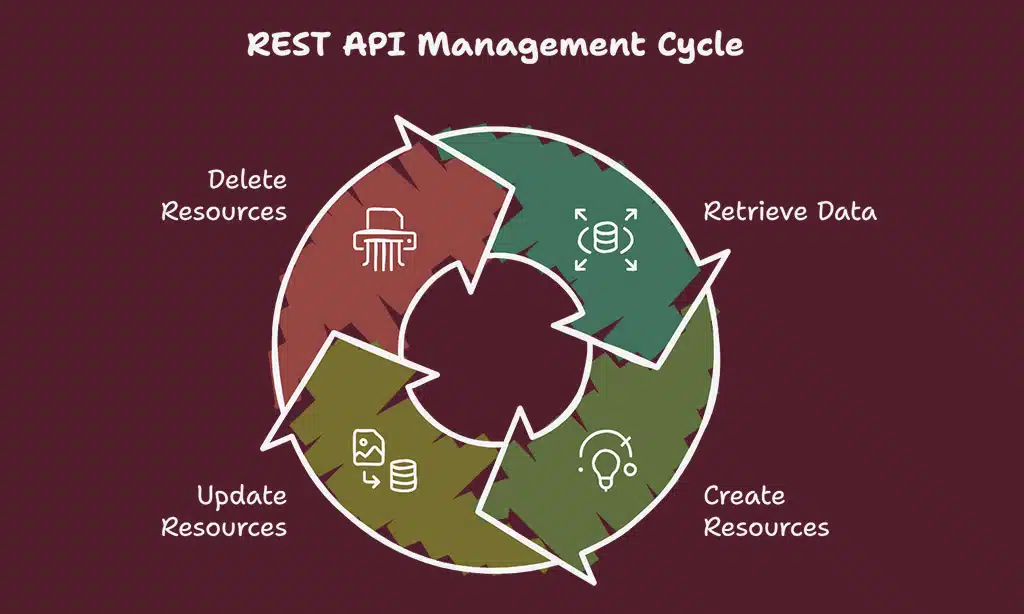
Hey, wanna make your REST API super smooth? Stick to the right HTTP actions, and watch your web app flow like a river!
GET for retrieving data
Let’s talk about using GET to fetch data in a REST API. This HTTP method is your go-to tool for pulling info from a server, kinda like asking a librarian for a specific book. With GET, you can retrieve resources without changing anything on the server side.
Think of it as a safe, read-only request.
Take this example: GET /articles grabs a list of articles from the system. It’s simple, direct, and plays by the rules of HTTP methods in RESTful web services. Whether you’re building a web app or a microservice architecture, GET keeps data retrieval clean and easy.
So, stick with it for all your fetching needs, and watch how smoothly your API handles requests!
POST for creating resources
Hey there, folks, wanna know how to build stuff online with a REST API? Let’s talk about using the POST method to create resources, like adding a shiny new article to a blog.
Imagine you’re introducing a fresh idea into the digital space. With a POST request, you can make that happen quickly. For example, sending POST /articles adds a new article to your site.
Then, the server responds with a 201 status code, meaning “Created,” and just like that, your content is live. This HTTP method is your key tool for creating new elements in web apps, keeping your API design clear and effective.
PUT for full updates
Let’s chat about using PUT in REST API design. It’s a key HTTP method for full updates to your resources. Say you’ve got an article on your web app. If you need to change everything about it, like the title and content, you use PUT.
For example, sending PUT /articles/:id updates that whole article in one go. It’s like swapping out an old book on the shelf with a brand new edition.
Think of PUT as your go-to for a complete makeover of data. This HTTP verb, paired with the right resource representation, keeps your API clear and efficient. With a status code like 200 for OK, you know the update worked.
So, when tweaking stuff on the server-side, lean on PUT to keep things smooth in your RESTful API.
DELETE for removing resources
Hey there, readers, let’s discuss using DELETE in a REST API. This HTTP method is your ideal choice for removing resources from a server. Consider it a digital eraser, eliminating data when it’s no longer needed.
For instance, DELETE /articles/:id removes an article with a specific ID. Simple, right?
Now, imagine this as tidying up clutter. After the delete action, the server often returns a 204 status code, meaning “No Content.” It’s like saying, “Done, nothing left to show here!” This keeps your web API neat and efficient, especially for scalable apps.
Stick with this HTTP verb, and maintain smooth data management.
Return Consistent and Meaningful HTTP Status Codes
Let’s talk about HTTP status codes, everyone. These small numbers inform your app about the outcome of a request, acting as a quick approval or a caution signal. Use consistent and straightforward codes to prevent misunderstandings.
For a successful GET request, return a 200 (OK) when the data is retrieved properly. If you add a new resource with a POST, provide a 201 (Created) to show it was successful.
Now, if an issue arises, don’t just ignore it. Use a 400 (Bad Request) for incorrect inputs, or a 404 (Not Found) when the item can’t be located. Facing a conflict? Respond with a 409 (Conflict).
And for a DELETE that removes everything, a 204 (No Content) works perfectly. Clear status codes in your REST API ensure everyone stays aligned, making troubleshooting much easier.
Implement Pagination and Filtering for Large Data Sets
Hey there, readers, let’s chat about handling big chunks of data in your REST API. When you’ve got tons of info, like thousands of orders or articles, pulling it all at once is a mess.
It slows down your app and frustrates users. So, break it into smaller bits with pagination. Use query strings like limit=25 and offset=50 to grab just a slice of data. Think of it as flipping through pages of a book, not trying to read the whole library in one go.
Now, filtering is your best buddy for narrowing things down. Want only shipped orders? Try a call like /orders?status=shipped. Need items over a certain price? Go with /orders?minCost=100.
And for sorting, something like /articles?sort=+author,-datepublished works like a charm. Set defaults, say limit=25 and offset=0, to keep things smooth. This way, your API scalability shines, and users get exactly what they need without the wait.
Use JSON for Request and Response Formats
Let’s chat about using JSON in your REST API for requests and responses. It’s like the universal language of the web, making data exchange super smooth between your app and clients.
JSON, short for JavaScript Object Notation, is light and easy to read, which is why it’s the go-to choice for most developers crafting a solid API design.
Stick with JSON, as it’s widely recommended for swapping data in a RESTful API. For tweaks and updates, use PATCH methods with formats like JSON merge patch or JSON patch, known by their specific tags, application/merge-patch+json and application/json-patch+json.
Take a cue from standards like RFC 5789 and RFC 6902, and set headers like Accept: application/vnd.contoso.v1+json to keep things clear. This setup boosts API usability and keeps your developer experience hassle-free.
Ensure Stateless Communication
Hey there, readers, let’s explore the concept of keeping things stateless in REST API design. Stateless communication, a fundamental aspect of Representational State Transfer, means the server doesn’t retain any information about previous requests.
Each call from the client must include all the necessary details for the server to complete the task. Think of it like ordering at a fast-food joint; you provide all your specifics each time, with no stored preferences or past orders kept in mind.
Isn’t it impressive how this enhances API scalability? Since no client context remains on the server between HTTP requests, your app can manage a large number of users without any issues.
It’s like playing a game with no saved progress; every action is independent, keeping things strong and simple to manage. Follow this principle, and see your web app thrive with a firm client-server architecture.
Design Logical and Hierarchical Endpoint Structures
Crafting clear endpoint structures for your REST API is like building a neat filing cabinet. You want everything in its right spot. So, design your URLs to show a logical flow, like nesting resources in a way that makes sense.
For instance, use a path such as /users/{id}/orders to show that orders belong to a specific user. This setup helps developers guess the structure easily.
Isn’t it cool how a simple hierarchy can boost API usability? Keep your endpoints tidy and grouped, almost like organizing a family tree. A clear uniform resource identifier guides users through your system without confusion.
Plus, it smooths out the developer experience in microservice architectures, making data access a breeze with just a glance.
Handle Errors Gracefully and Provide Clear Error Messages
Hey there, let’s chat about making errors less painful in your REST API design. Nobody likes hitting a wall with a vague “something went wrong” note. So, handle errors with care by sending clear HTTP status codes like 400 for a Bad Request or 404 for Not Found.
These numbers tell developers exactly what’s off, saving them a big headache.
Think of error messages as a friendly nudge, not a slap. Craft them to guide client developers with helpful tips. For instance, if a request flops with a 400 status, say why it’s invalid, maybe a missing field or wrong format.
This kind of error handling in a RESTful API boosts the developer experience, cuts down on guesswork, and keeps your API usability top-notch.
Version Your API Effectively
Hey there, got a minute to chat about keeping your API fresh? Upgrading your system with smart versioning is like giving it a new coat of paint—keeps things current and smooth!
URI versioning
Got a REST API to manage? Let’s talk about URI versioning, a really useful method to keep your API design up-to-date and adaptable. Imagine you’re updating your app, but older users still rely on the initial setup.
URI versioning addresses this by embedding the version directly in the web address, like /v1/customers/3. This ensures everyone accesses the right content effortlessly.
Think of it as marking different sections of a story. You can use /v1/employees for the initial version and /v2/employees for the polished update. It also supports semantic versioning, such as v1.2.3, separating it into major, minor, and patch updates, just like version 2.0.6 with its sixth correction.
This maintains strong API usability and allows developers to change versions smoothly without worrying about compatibility issues.
Header versioning
Hey there, readers, let’s chat about a smart way to keep your REST API fresh with header versioning. It’s like putting a label on a jar of jam, so you know exactly which batch you’re grabbing.
With header versioning, you tuck the version info right into the request header, using something like Custom-Header: api-version=1. This keeps things tidy and lets clients pick the exact API version they need, no mess, no fuss.
Now, imagine you’re sending a note with Accept: application/vnd.contoso.v1+json in the header. Cool, right? It’s a clear signal to the server about which API flavor you want. Plus, this trick helps with backward compatibility, so older apps don’t break when you roll out new updates.
Stick with this method for api versioning, and watch how it boosts api scalability and keeps your developer experience smooth as butter.
Implement Security Best Practices

Hey there, let’s chat about keeping your REST API safe from nasty threats, okay? Stick with me to dig into smart ways to shield your web app from sneaky attacks!
Use HTTPS
Let’s chat about keeping your REST API secure with HTTPS. It’s a must, folks, for protecting data as it travels between the client and server. Think of it as a secret tunnel, guarding your info from sneaky eyes.
With SSL/TLS in play, you get top-notch safety, making sure data stays private and untampered.
Now, using HTTPS isn’t just a fancy add-on, it’s vital for API security. It wraps your communication in a shield, locking down integrity and confidentiality. So, stick with HTTPS for every request, whether it’s a simple HTTP GET or a complex POST.
Your users will thank you for keeping their data safe!
Apply OAuth 2.0 or JSON Web Tokens (JWT)
Hey there, securing your REST API is a big deal, and using OAuth 2.0 or JSON Web Tokens, often called JWT, is a wise choice. These tools help keep out unwanted guests by verifying who’s trying to access your API.
Think of them as bouncers at a club, only allowing entry to those with the correct pass. They ensure your web app remains protected from unauthorized access, safeguarding your data like a vault.
Now, imagine this, with JWT, you can use header-based isolation through claims to restrict specific areas. OAuth 2.0, on the other hand, excels at granting limited access to third-party apps.
Both methods assist in validating user input, preventing harmful attacks like SQL injection or cross-site scripting. So, choose one, implement it, and keep those bad actors at bay with strong API security.
Optimize Performance With Caching
Speed matters a ton in web apps, folks. If your REST API runs slow, users bounce fast. Caching can save the day by storing data temporarily, so your app doesn’t fetch the same stuff over and over.
Think of it like keeping snacks in your pantry instead of running to the store every time you’re hungry. Using HTTP Cache-Control headers, you can tell browsers and clients how long to hold onto data.
It’s a simple trick that cuts load times.
Let’s get practical with an example. Try a tool like apicache middleware to set a 5-minute caching window for your API responses. That means for five minutes, repeat requests grab stored data instead of hitting your server hard.
Also, pair this with data compression tricks like Gzip or Brotli to shrink response sizes. For long tasks, use asynchronous processing to keep things snappy. These steps boost API performance and keep users happy while they interact with your app.
Provide Comprehensive API Documentation
Crafting solid API documentation is like giving your users a trusty map for a tricky journey. It’s vital for any REST API aiming for great developer experience. Think of it as a friendly guide, helping folks use your application programming interface without getting lost.
Good docs lay out every detail, from endpoints to HTTP methods like GET and POST requests. They show how to send a proper HTTP GET request or handle a DELETE request with ease. Follow the OpenAPI guidelines, and you’ll build a clear path for everyone.
Even better, enable interactive tools with OpenAPI, often called Swagger, to let users test endpoints on the spot. That hands-on vibe boosts API usability big time.
Dig into this, pals, and see documentation as your secret sauce for API success. Back in 2008, Leonard Richardson dropped the Web API Maturity Model, setting a bar for quality. Keep a changelog to track every update, so no one’s left guessing what’s new.
Mention how to handle HTTP status codes or structure a neat request method. Toss in examples for POST requests or even HTTP PUT updates. Make sure your words paint a vivid picture, guiding users through each step.
Focus on media types or metadata if needed, and always keep it conversational. Let’s make sure your RESTful API docs shine bright for all readers out there.
Takeaways
Hey there, folks, we’ve just zipped through some killer tips for crafting REST APIs that can grow with your web apps. Think of these practices as your trusty roadmap, guiding you to build systems that hum along smoothly.
Got a big project on your hands? Stick with these ideas, and watch your API handle loads like a champ. Let’s keep coding smart and scalable, alright!
FAQs
1. What’s the big deal with REST API design for scalable web apps?
Hey, let’s chat about why REST API design matters so much. It’s all about crafting a restful API that boosts API scalability and API performance, keeping your app running smooth as butter, even when traffic spikes on your website. Think of it as building a sturdy bridge with HTTP protocol, like HTTP/1.1, to handle tons of GET requests or DELETE requests without crumbling.
2. How do HTTP methods fit into crafting a solid API?
Listen up, HTTP methods, or those handy HTTP verbs, are your toolkit for a uniform interface in a REST API. They define actions like fetching data with GET requests or wiping it out with DELETE requests, making API usability a breeze for developers.
3. Why bother with API versioning in your design practices?
Well, pal, API versioning is like keeping an old recipe while tweaking it for new tastes. It lets you roll out updates without breaking existing setups, ensuring a slick developer experience. Plus, it ties into stateless communication, a core of representational state transfer, so your app doesn’t trip over itself.
4. How does API security play into building a trustworthy RESTful system?
Security isn’t just a fancy add-on; it’s the lock on your digital door. Using API keys, JWT (JSON Web Tokens), and role-based access control (RBAC) keeps the bad guys out while running security tests guards your API health. Don’t skimp here, or you’re inviting trouble to your EC2 setup or client-side ops.
5. What’s the trick with error handling and HTTP status codes in APIs?
Picture this: HTTP status codes are like traffic signs telling users what’s up. Good error handling in your REST API spells out issues clearly, whether it’s a 404 or 500, guiding folks through the mess with hyperlinks if needed. It’s a small step that massively lifts API documentation and usability.
6. Can data compression and asynchronous processing really amp up API performance?
You bet they can, my friend! Data compression shrinks payloads for faster trips over HTTPS:// connections, while asynchronous processing, alongside batch operations, keeps things humming without bottlenecks. Toss in load balancing and a reverse proxy, and your API’s ready to juggle heavy loads like a circus pro.






























