Setting up smart speakers can make your head spin, especially if you are new to voice assistants. Maybe you want help with daily tasks or just someone to chat with, but the options like amazon alexa and google home leave you scratching your head.
Did you know that over half of UK internet households used an amazon echo or alexa in 2021? These virtual assistants do more than answer questions—they set medication reminders, play music, and even connect to smart home devices.
This blog post will compare the best voice assistants for seniors: Amazon Alexa and Google Home. You’ll see their pros, cons, and what makes each one different for older adults looking for easy tools at home.
Stay tuned—choosing the right assistant could be easier than making a cup of tea!
Key Takeaways
- In 2021, over half of UK internet homes used Amazon Echo or Alexa. These voice assistants help with reminders, music, and smart home control.
- Amazon Alexa works with more than 100,000 smart devices, but Google Home supports about 50,000 products. Alexa has more skills and features for shopping and safety.
- Google Home understands clear speech better. It can translate real-time languages for calls or visits with family from other countries.
- Both systems let you set up routines by voice—like turning on lights or getting the weather—making life easier for seniors without small screens or switches.
- Seniors should pick the one that matches their needs: Alexa is best for lots of gadgets and shopping lists; Google Home is quick with questions and helps if you speak two languages.
Key Features for Seniors in Voice Assistants
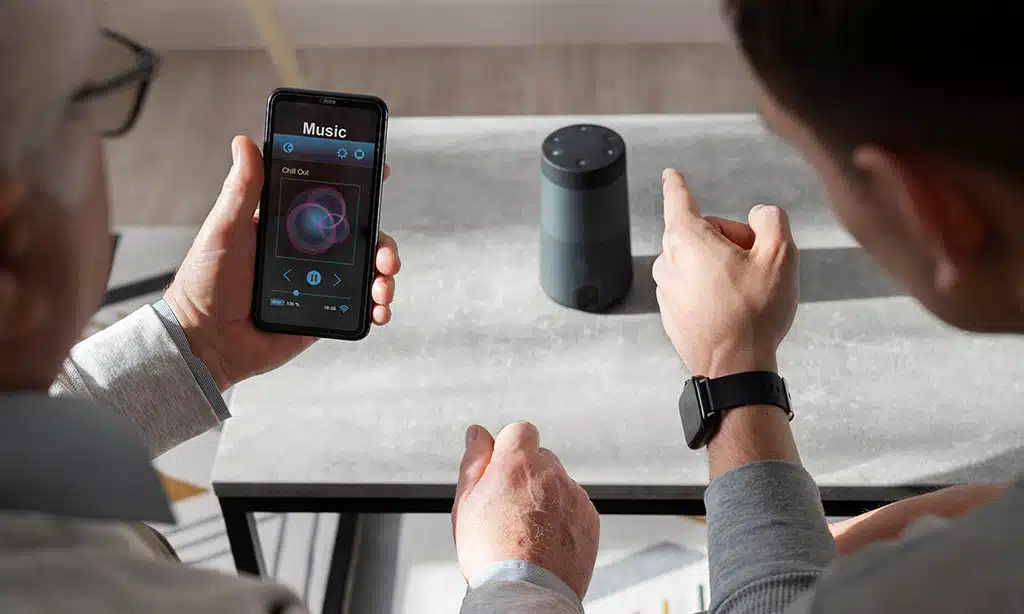
Older adults often want clear, simple voice commands from smart speakers like Echo Dot or Nest Audio. These gadgets help with daily tasks, making life a bit smoother and even more enjoyable.
Ease of setup and use
Plug in the Echo Dot or Nest Mini, and you’re already halfway done. Both Amazon Alexa and Google Assistant talk you through setup with easy voice steps. Just grab your phone, open the Alexa app or Google Home app, and follow prompts on-screen.
No computer science degree needed — even Miss Betty at bingo set up her Echo smart speakers in less than 10 minutes.
Most seniors start with one device like an Amazon Echo or Google Nest Hub to keep things simple. Stick to either Alexa or Google Home gadgets so all your smart home devices work together without fuss.
Each system guides you to connect other tools, such as lights or a Fire TV Cube, by clear voices and pictures right from your smartphone or tablet. You just pick what fits each room best—like a radio for the kitchen using TuneIn Radio on your Nest Audio or Echo Show in the den for video calls.
The whole process feels more like playing Simon Says than building rocket ships!
Accessibility and voice recognition
Amazon Alexa and Google Assistant help seniors use voice commands with ease. Both pick up speech from across the room, even if you speak softly or have a raspy voice. Amazon Echo speakers work well for many accents, making it easier to ask Alexa for medication reminders or to play favorite radio stations.
Google Home shines at understanding natural language and lets you give two commands in one sentence, like “Turn on the lights and tell me the weather.” Some users find that smart displays, such as Nest Hub Max or Echo Show, are helpful because they show large text and clear icons.
Seniors can benefit from these virtual assistants because they adapt over time. If Grandma calls the device by accident or mispronounces a word, both platforms learn her style quickly.
The Home app makes setting up voice profiles simple on Android devices. Apple’s Siri also offers basic accessibility but doesn’t match Google Assistant’s accuracy for complex sentences or Amazon’s wide range of Alexa Skills made for older adults.
For most people using smart home devices like light bulbs or thermostats, speaking is usually all that’s needed—no tiny screens required.
Smart home integration
Alexa works with over 100,000 smart home devices. Google Assistant supports around 50,000 connected products. These numbers make both great for technology for seniors who want simple control at home.
Use voice commands to turn lights on or off, adjust the thermostat, or lock doors—no need to fumble with tiny switches or buttons.
Plug in a smart plug like Samsung SmartThings or ask your Amazon Echo Dot to start the coffee maker. You can use an Apple HomePod Mini if you prefer Apple’s system, though support is smaller than Alexa’s and Google Home’s spread.
Try linking tablets or streaming services too; just speak up and let your voice assistant handle it. Even controlling cameras like Nest Doorbell is quick with a few words—helpful if safety matters most!
Safety and emergency features
Safety matters a lot. Google Home speakers can call emergency contacts with just your voice. Amazon Alexa offers Guard, which listens for alarms or glass breaking and sends alerts to your phone.
This helps if you live alone or sometimes worry about missing sounds in another room.
Smart home devices like Nest Cam, Echo Show, and smart door locks add extra peace of mind. Voice assistants connect to these gadgets, so if trouble hits—like smoke or someone at the door—you get fast warnings.
Medication reminders from Amazon Echo Dot also help avoid missed doses. With routines set up through the Google Home app or Alexa skills, seniors can automate daily safety checks without fussing over tiny screens or buttons.
Entertainment options
Music is just a voice command away with amazon alexa and google assistant. Ask for your favorite songs, or play playlists through smart speakers like echo dot or google home mini. Audiobooks and podcasts fill quiet afternoons, while news, weather, and local radio stations stream live.
Seniors can enjoy jokes, trivia games, or classic stories by simply asking their virtual assistants.
Echo studio from Amazon ($220) offers big sound for music lovers. The smaller echo dot ($55) gives clear audio in any room. Google nest hub max brings video calls and youtube videos on a screen—perfect for grandkids’ visits.
Both systems work well with streaming services such as spotify and google play music, making every day more fun at home.
Amazon Alexa: Pros and Cons
Alexa, from Amazon Echo family, makes talking to machines feel like chatting with an old friend. But every silver lining has its cloud, so there’s plenty to weigh before picking this voice command helper for your home automation needs.
Pros of Amazon Alexa
Amazon Alexa is a favorite for seniors who want handy tech. It keeps things simple but packs in smart features.
- Supports over 100,000 connected devices including lights, door locks, and cameras. This means you can speak to control almost any gadget at home.
- Echo Dot costs only $55, making it budget-friendly for most people wanting voice assistants.
- Offers large speakers like Echo Studio at $220 for clear voice commands and strong music output.
- Has a huge library of Alexa Skills. You can play the radio, manage shopping lists, set medication reminders, or check the weather with just your voice.
- Easy setup through the Amazon Alexa app on both Android devices and iPhones. No need to fiddle with wires for hours.
- Works well with Amazon’s smart displays such as the Echo Show. Seniors can see news headlines or watch movies without lifting a finger.
- Good emergency features like Alexa Guard let you listen for smoke alarms or breaking glass while away from home.
- Handles daily routines easily; say “Good morning” and get news, traffic updates, plus calendar alerts instantly.
- Can connect with Samsung SmartThings and many other smart home ecosystems for total home automation using voice commands alone.
- Offers integration with popular streaming services so seniors can enjoy music or audiobooks hands-free.
Cons of Amazon Alexa
Alexa smart speakers are handy, but they have some snags for seniors. Some features may confuse or frustrate older users.
- Alexa sends unsolicited advertising notifications. These can pop up on Echo Dot or Echo Show, often at odd times. They might mention sales, new skills, or suggest shopping lists with Amazon.
- Multi-step voice commands trip up Alexa if “Follow-Up Mode” is not enabled. Without this mode, she only responds to one request at a time, like “Turn on the lights” but ignores the next command unless you say “Alexa” again.
- Alexa’s voice recognition isn’t perfect. Seniors with softer voices or distinct accents may need to repeat themselves.
- Home automation setups can be tricky and often require linking through the app. People using Samsung SmartThings or other smart home devices may face extra steps.
- The Amazon Echo lineup sometimes pushes extra services that cost money, such as music streaming upgrades and Audible books.
- Privacy concerns crop up since Alexa always listens for her wake word. This worries many families about conversations staying private.
- Some device settings hide deep in the Alexa app menus. Older adults might find it hard to adjust reminders or set medication alerts without help.
- Emergency support lags behind Google Assistant and HomePod Mini options for direct calls to 911 unless you add a paid third-party skill.
- Updates change menu layouts without warning, which baffles some people who like routine with their technology for seniors setup.
- Alexa doesn’t support as many languages as Google Assistant does, making it tough for non-English speakers seeking language help in daily needs.
Smart displays like Amazon’s Echo Show give visuals but also add things to learn. Voice command devices need practice and patience, especially for first-time users trying home automation.
Google Home: Pros and Cons
Google Home plays well with Android devices and works smoothly with Google Photos. It brings quick responses, but some people find its voice commands tricky at times.
Pros of Google Home
Google Home works well for seniors. It listens carefully and gives smart answers fast.
- Google Home uses natural language processing, so it understands plain speech better than most voice assistants.
- The link to Google’s search engine helps it give quick and accurate answers about weather, news, recipes, or simple questions.
- Nest Mini costs between £22 and £60, making it a budget pick that is small and friendly for any countertop or bedside table.
- Speaking to the Assistant feels easy; you just say “Hey Google” and ask about your schedule or set reminders—great for anyone who forgets details now and then.
- Voice commands work even from across the room, which is handy if you use a walker or just want to stay comfortable in your chair.
- The Google Home app offers clear settings with large text; seniors don’t have to squint or guess what button they are pressing.
- Smart home devices like smart lights, locks, and Nest Hub Max cameras connect smoothly for home automation that brings peace of mind.
- For music lovers, radio stations play in a snap—just say what you want to hear on streaming services such as YouTube Music or Spotify.
- Real-time translation comes built-in through Google Assistant; this breaks language barriers during calls with family around the globe.
- The speaker can show photos on smart displays using Google Photos—grandkids’ smiles pop up every morning if you wish!
- If someone uses Android devices or owns a Chromecast TV stick, everything links together without fuss.
- Shopping lists update by voice command; this avoids forgotten milk runs or double-buying groceries at the store.
- Medication reminders can sound out each day so doses are never skipped—a safety feature many find comforting.
- The sound quality packs a punch for its size; the Nest Audio surprises with volume and clarity even though it looks petite.
- Samsung SmartThings support means extra gadgets like lightbulbs or thermostats fall into line under one smart home ecosystem umbrella.
Google Home keeps things simple but full of options—you just speak up, sit back, and let it lend a hand!
Cons of Google Home
Smart assistants like Google Home can help a lot, but they do have limits. Knowing these helps set good expectations, especially for seniors.
- Fewer third-party integrations mean it may not work with every smart home device. Alexa often supports more devices, giving wider choices.
- The wake word is stuck as “Hey Google.” Seniors who want to change it can’t—this can be frustrating for those used to renaming tech.
- Sometimes the Google Assistant does not hear voice commands right away or at all. Background noise makes this worse.
- Some smart home gadgets—like Samsung SmartThings or certain soundbars—may pair better with Amazon Echo than with Google Nest speakers.
- The Google Home app can feel confusing for first-timers, making setup harder than hoped.
- Apple users miss features like AirPlay 2 and easy pairing with Apple Watch that Apple HomePod or Mini offer.
- Less support for Alexa Skills means less variety in things seniors can try compared to Amazon’s Alexa.
- Updates roll out slowly across different Android devices, so new features aren’t always ready on day one.
- Shopping lists and reminders through the system sometimes lag behind what Alexa offers through Echo Dot or Echo Show devices.
- The lack of a true emergency service link-up puts it behind competitors focused on home security connected devices and senior safety needs.
Smart speakers help make life easier, but knowing these bumps in the road keeps surprises small and smiles big!
Comparing Alexa and Google Home for Seniors
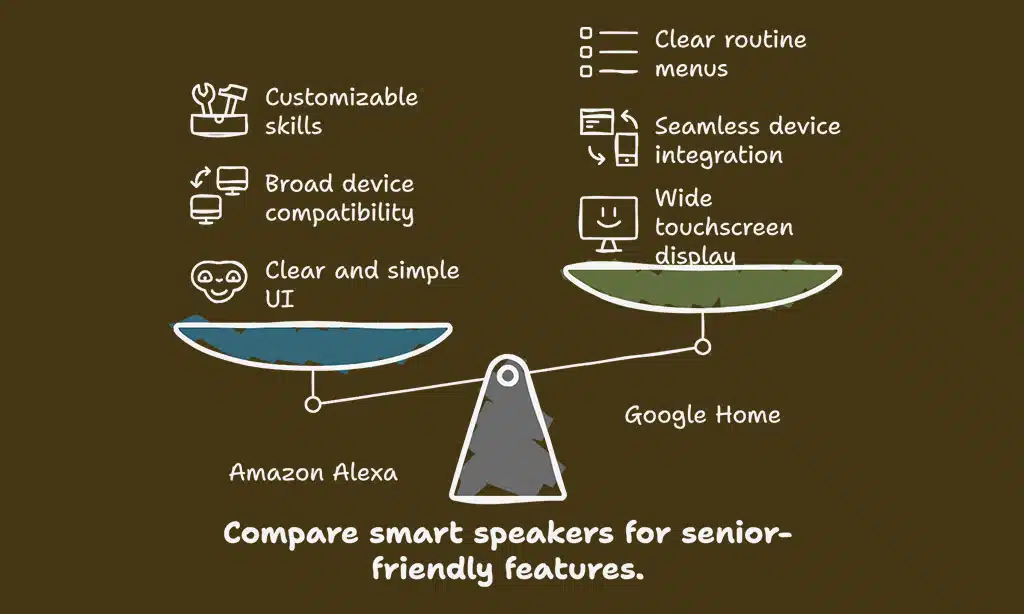
Let’s see how Amazon Echo and Google Nest smart speakers make life easier, or maybe a little trickier, for older adults. Choices matter—each voice assistant handles things like reminders and smart home gadgets their own way.
User interface and app experience
Amazon Alexa keeps its screen clear and simple on the Echo Show 5. There are big icons, a bright display, and easy swiping for settings or music. The Alexa app works on both iPhone and Android devices, with large text you can actually see—no squinting required.
Setting up an Amazon Echo Dot or other smart speakers uses step-by-step guides, so even someone who hates technology will feel at home.
Google Home shows off its basics well with Nest Hub 2nd Gen and Google Home App. You get a wide touchscreen—seven inches—but no camera to worry about privacy. The Google Home App lines up all your connected devices in plain view; just tap for lights or thermostat changes.
Voice commands make life easier without hunting through menus, which means less time fussing, more time listening to the radio or using smart home devices like Samsung SmartThings right from your phone or tablet.
Smart home compatibility
Alexa works with a big mix of smart home devices, from Amazon Echo to third-party brands like Samsung SmartThings and Philips Hue lights. You can use voice commands to turn off lights, lock doors, or change your thermostat settings.
Plug in an Amazon Echo Show or Echo Dot and connect things fast through the Alexa app.
Google Home also syncs up well with lots of gadgets. It connects easily to Nest Hub Max, Arlo cameras, Tado thermostats, and even Google Photos for photo displays on smart screens like Google Nest Hub.
Use the Google Home app to set up connected devices or stream music on Nest Audio. Both platforms handle shopping lists, reminders for medication, radio stations, and streaming services such as Spotify or YouTube Music—all through simple spoken requests.
Seniors get hands-free help without touching a single switch—pretty handy for daily tasks!
Customization and routines
Both Amazon Echo devices and Google Nest speakers let seniors set up daily routines with just a few voice commands. For example, you can say “Good morning” to your google assistant or Alexa voice assistant, and the device will read out the weather, turn on smart lights, or play your favorite radio station.
One simple request can control many connected devices like Samsung SmartThings plugs or adjust thermostats.
On Amazon Echo products, you get more options thanks to customizable skills—think medication reminders, shopping lists, and even jokes for a good laugh. With the Google Home app, routines use clear menus so it’s easy to create schedules for smart home automation.
Seniors who choose one platform keep things smooth as mixing systems often causes headaches with compatibility between apps like Apple HomePod mini and Android devices.
Language capabilities and translation
Google Assistant leads the pack with its language skills. It can understand more than 40 languages and even lets users switch between two in real time. This is a big win for seniors who speak Spanish at home but prefer English, or have friends who visit and chat in French.
Google’s smart speakers like Nest Hub Max use Google’s search engine to answer questions in simple words, making things even easier.
Amazon Alexa understands many accents, yet covers fewer languages than Google Home devices. Still, you get basic translation by asking Alexa to translate phrases aloud or through smart displays like Echo Show.
If someone wants natural speech and quick answers while managing connected devices such as Samsung SmartThings or Apple HomePod mini, Google Assistant stands out with smoother translation and clearer voice commands every time.
Integration with health and safety devices
Both Amazon Alexa and Google Home work well with health and safety devices. Voice commands can call for help, control smart bulbs, or lock doors using Samsung SmartThings. Seniors use a Nest Cam IQ to watch their front door or check on loved ones.
Medication reminders keep track of pills so nothing gets missed.
With Amazon Echo speakers like the Echo Dot, seniors can contact family if there’s an emergency. The Google Nest Hub Max connects to video calls in seconds—no buttons needed, just speak up.
These assistants also handle shopping lists and calendar alerts, making daily life safer and less stressful for everyone at home.
Unique Features for Seniors
Voice assistants bring clever tricks to the table, making daily life simpler for seniors. From reminders to helpful voice commands, these tools keep things running smoother than a well-oiled machine.
Senior safety features: Amazon Alexa
Amazon Alexa makes life safer for seniors with voice commands that call for help, check news, or control smart lights. Just say “Alexa, call for help,” and it contacts chosen friends or family through an Amazon Echo Dot or other Amazon Echos right away.
Alexa adjusts the volume if your tone sounds urgent, so no one needs to shout in a pinch. Medication reminders keep you on track with daily pills—no sticky notes needed.
Seniors can lock doors, turn off lights, run a robot vacuum, or even check cameras using Alexa and connected devices like Samsung SmartThings or Nest Cam IQ Indoor. If hearing is tough some days, ask Alexa to raise her voice by saying so out loud.
It feels less like talking to technology and more like chatting with someone who listens and responds fast.
Real-time language translation: Google Assistant
Google Assistant changes the game for people who speak more than one language. With simple voice commands, you can ask it to translate words or whole sentences. For example, say, “Hey Google, be my interpreter.” The device then helps with live translation between languages using smart speakers like Nest Audio or smart displays such as the Nest Hub Max.
You do not need to type anything or use another gadget. This comes in handy if a family member visits from another country or someone wants help talking to a caregiver in their own language.
Google pulls information from its powerful search engine and speaks out clear translations fast. Seniors find this tool helpful for travel, doctor’s visits, shopping trips—anywhere good communication matters most.
Shopping and reminders: Amazon Alexa
Alexa makes shopping easy as pie. Ask, “Alexa, add milk to my shopping list,” and she does it right away. You can check your list any time using the Amazon Echo Dot or smart speakers around your home.
Alexa keeps track of your Amazon orders with voice commands—you just say, “Where’s my package?” and she tells you if it’s on the way.
Busy days get easier too. Set medication reminders by saying, “Alexa, remind me to take my pills at 8 AM.” She’ll chime in when it’s time. Use Alexa Skills for more help—think calendar alerts or grocery lists sent straight to your phone through the Alexa app or other connected devices like an iPad or Apple Watch.
No need for sticky notes on the fridge anymore!
Multitasking capabilities: Google Assistant
Google Assistant quickly understands many voice commands at once. You can say, “Turn off the lights, play some jazz on Spotify, and show my Google Photos from last year,” with just one breath.
It gets things done in order without missing a beat. Many smart home devices like Nest Hub Max or Samsung SmartThings work well with it.
It uses Google’s search power to find answers fast and reliable every time you ask for help. Seniors can set reminders while checking the weather or ask for medication reminders as they add items to their shopping lists—no need to repeat themselves over and over again.
With a steady internet connection, routines run smooth as butter across smart speakers like Nest Audio or Google Home Max. Multitasking feels easy, even if you’re juggling more than just eggs in your kitchen!
Which Voice Assistant Should You Choose?
For many seniors, Amazon Alexa hooks into lots of smart home devices like Samsung SmartThings, making switching on lights or locking doors as easy as speaking. Alexa skills help with medication reminders and shopping lists.
On the other hand, Google Assistant stands out for handling natural voice commands well and pulling up clear info from Android devices or the Google Home app. It also shines at real-time language translation—handy if you chat with family who live far away.
Trying out both helpers can be fun, especially if friends or family are around to lend a hand. Small speakers such as Echo Dot or Nest Mini work great in modest rooms. For those who enjoy photos or want recipes at their fingertips, smart displays like Nest Hub Max offer bigger screens and voice controls that feel almost magical.
Pick what feels right for your daily needs since both cover most basics well without fussing over tough tech words.
Takeaways
Choosing between Amazon Alexa and Google Home is like picking your favorite ice cream flavor—both are sweet, but one might suit you more. Alexa connects with loads of smart gadgets, which makes home life easy.
Google Home answers questions fast and understands natural voice commands better. Both will play your radio stations and help remind you about pills or shopping lists. In the end, pick the one that fits right into your daily routine—and enjoy the extra helping hand!
FAQs
1. What makes Google Assistant and Amazon Alexa helpful for seniors?
Google Assistant and Amazon Alexa answer questions, set medication reminders, play radio stations, and control smart home devices. Seniors can use voice commands to manage shopping lists or ask about the weather.
2. Can you connect these voice assistants to other devices in your house?
Yes, both work with many connected devices like smart lights, thermostats, or even a Samsung SmartThings hub. You can say “turn off the lights” or “lock the door,” and it just happens.
3. Do Google Home speakers help with photos or music?
Absolutely! With a Nest Hub Max or Nest Audio speaker, seniors can view Google Photos albums by asking out loud. They also stream music from services like Spotify—no buttons needed.
4. Which is easier for new users—Amazon Echo Dot or Google Nest Mini?
Both are simple once plugged in; however, some find setting up an Echo Dot with Alexa skills more direct than using the Google Home app on Android devices.
5. Can Apple’s virtual assistant compete here too?
Apple Siri comes built into products like HomePod mini and Apple Watch but does not support as many smart home ecosystem options as Alexa Voice Services or Google Home displays do right now.
6. What extra features might help seniors stay independent at home?
Voice assistants handle tasks hands-free: making calls through Echo Auto while driving; playing news on a Woofern speaker; sending messages; even translating languages live if you enable Alexa Live Translation—all without touching anything except maybe that lock screen once in a while!