
You’re on a busy construction site, and a key tool vanishes just when you need it most. Frustration builds as your team hunts for it, wasting precious time that could push the project forward.
It’s like searching for a needle in a haystack, and trust me, it happens more than you’d think, turning small hiccups into big delays.
Did you know workers often spend over an hour each day looking for misplaced tools? Modern tracking tools change that game, using digital smarts to keep tabs on inventory and locations.
In this post, we’ll break down the 10 best options, from Hilti ON!Track to Bluebeam, showing how they boost efficiency in project tracking and construction management. Stick around to find your perfect fit.
Key Takeaways
- Workers spend over an hour each day looking for misplaced tools, as noted in the article.
- Hilti ON!Track manages over 5,000 assets and uses 2023 data from Hilti Corporation for workflow automation.
- ToolWatch helped Jenco, an Arizona electrical contractor, recover $250,000 in lost equipment.
- ShareMyToolbox reduced tool hoarding and loss for Blinderman Construction in Chicago.
- BuilderTrend offers plans from $499 to $1,099 per month with unlimited users and real-time tracking.
Hilti ON!Track Features and Benefits
Imagine chasing down lost tools like a detective in a mystery novel, but Hilti ON!Track turns that chaos into smooth sailing with its GPS tags and app alerts that pinpoint every drill and saw in real time.
Contractors love how this system boosts tool use, cuts theft risks, and keeps projects on track, making you wonder why you ever managed without it.
What features does Hilti ON!Track offer for tool tracking?
You know how frustrating it is to lose track of tools on a busy job site. Hilti ON!Track steps in to fix that mess with smart features that keep everything in check.
- Hilti ON!Track uses cloud-based software that links up with physical asset tags like barcodes, RFID, and Bluetooth sensors for solid asset management.
- This system gives you real-time tracking for all kinds of assets, from simple hand tools to big heavy machinery, so you always know where things are.
- Imagine, you scan a tool and boom, the automated check-in/check-out system logs its every move, cutting down on mix-ups and boosting tool management.
- Inventory control shines here with clear visibility into what you have, and it even handles open API integration to automate workflows like a pro.
- Maintenance management gets easy too, as the platform tracks upkeep needs and schedules, helping you avoid breakdowns that slow you down.
- For compliance tracking, it keeps tabs on rules and standards, making sure your team stays on the right side of regulations without the headache.
- Equipment tracking covers everything, and get this, it can manage huge inventories over 5,000 assets, perfect for big crews.
- Realtime monitoring means you spot issues fast, like if a tool goes missing, and it ramps up performance optimization by showing how tools get used.
- Hey, imagine the time you save not hunting for lost gear; this setup reduces search time and amps up accountability among your team.
- Backed by data from Hilti Corporation in 2023, it ties into workflow automation that streamlines operations, like syncing with other apps for seamless inventory updates.
How does Hilti ON!Track improve tool utilization and prevent theft?
Hilti ON!Track boosts tool utilization with real-time tracking that cuts down on idle tools and sharpens resource optimization. Imagine you’re on a busy job site, and tools sit unused no more; the system spots them fast and helps redistribute them right away.
It ramps up productivity enhancement by slashing the time folks waste hunting for gear, just like in that large contractor case study where search times dropped big time. Automated check-in and check-out builds accountability, so everyone knows who’s got what, reducing mix-ups and keeping things smooth.
For theft prevention, Hilti ON!Track steps up with geofencing and alerts that ping you if tools sneak off the site or get used after hours. It ties into open API integration for custom anti-theft workflows, making loss prevention a breeze.
Maintenance scheduling tracks upkeep to dodge unexpected downtime and pricey fixes, while inventory tracking improves recovery chances for misplaced or stolen equipment. Asset management gets a real lift here, turning potential headaches into quick wins, and hey, that means fewer tools vanishing into thin air.
Tool management feels like a well-oiled machine, enhancing security without the fuss.
Milwaukee ONE-KEY Features and Benefits
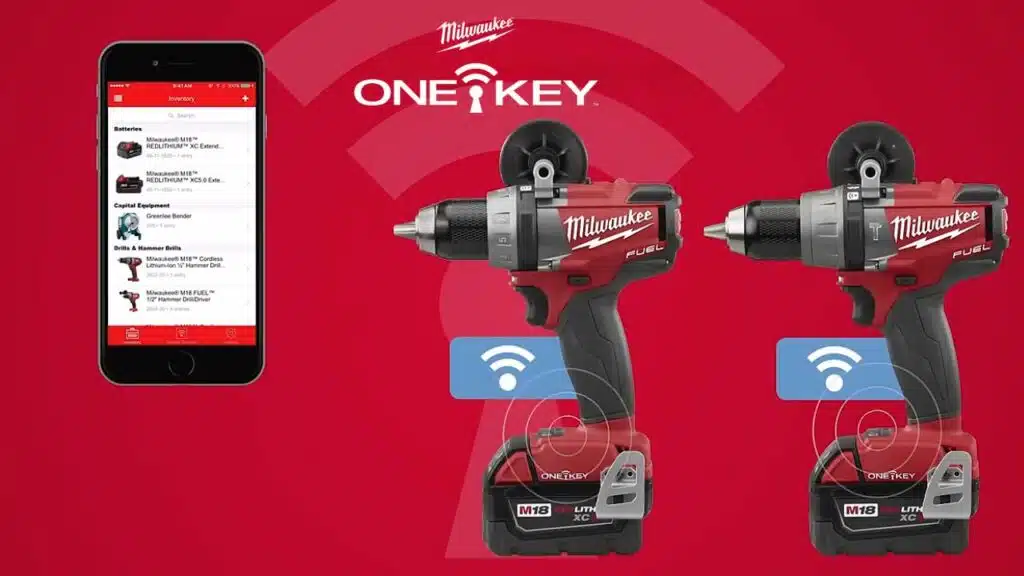
Imagine a power tool that texts you its location, like a loyal dog that never wanders far. Milwaukee ONE-KEY packs Bluetooth tracking, custom alerts for battery life, and app controls that let teams tweak settings on the fly, cutting down on lost gear and boosting job site smarts.
What tracking and customization features are included in Milwaukee ONE-KEY?
Milwaukee ONE-KEY packs a punch with its smart tech for construction pros. You get tools that track and tweak like never before, making job sites smoother.
- Bluetooth technology embeds right in power tools, letting you handle digital inventory and tracking with ease, like a built-in GPS for your gear.
- Tool management shines through features that let you preset torque or speed for specific tasks, so you customize options to fit the job, boosting performance monitoring on the fly.
- Inventory tracking uses a Bluetooth network that leverages users’ phones for location services, turning your crew’s devices into a web of watchful eyes.
- Location services include community tracking, which helps crews find tools by logging last-seen spots and users, say, spotting a rotary hammer at the Site Trailer at 8:05 AM via John’s phone.
- Customization options go beyond basics; you set up presets for tasks, cutting idle time and ramping up work quality, as if your tools learn your habits.
- Remote access allows you to lock tools from afar, a real thief-stopper that deters unauthorized use and adds solid security features to your kit.
- Security features tie into alerts about tool status, keeping you in the loop so nothing slips through the cracks on busy job sites.
- Utilization analytics deliver reports on how tools perform, helping you spot patterns and reduce downtime, much like having a coach for your equipment.
- Job site tracking combines all this into one app, where you monitor everything from utilization reports to last-seen logs, simplifying the chaos of construction life.
How does Milwaukee ONE-KEY simplify inventory management and enhance security?
You know that feeling when tools vanish on a job site, like socks in a dryer? Milwaukee ONE-KEY steps in as your free digital inventory system. It integrates with smart tools and Bluetooth tags for seamless tracking.
This setup delivers real-time location data, so you cut down on search time and skip those pointless trips back to the truck. Imagine assigning tools digitally to crew members; it boosts accountability and slashes tool loss right away.
Security gets a big upgrade too, with theft prevention at its core. The system uses community tracking and remote lock-out features to deter thieves. If a tool goes missing, you disable it instantly from afar, like flipping a switch.
This connected ecosystem provides real-time tool performance info, enhancing accessibility and asset management. Plus, it reduces work stoppages and those surprise emergency costs by speeding up tool recovery.
Talk about turning chaos into smooth sailing on the site!
DEWALT Tool Connect Features and Benefits
DEWALT Tool Connect attaches Bluetooth tags to power drills and saws, so you track them from your phone. This system links with apps for real-time alerts on job sites, cutting down on lost gear and boosting your crew’s flow.
What smart tag and software integrations does DEWALT Tool Connect provide?
DEWALT Tool Connect gives you smart tags and software that boost asset management on job sites. These tools help with tool monitoring, location tracking, and more, keeping everything in check like a watchful eye over your gear.
- Bluetooth tags and chips attach to any tool, even non-DEWALT brands, so you tag drills from other makers and track them all in one spot, cutting down on mix-ups.
- Site Manager, the integrated enterprise software platform, aggregates tool data for smooth software integration, pulling in info from tags to give you a full picture of your inventory.
- It tracks location, usage, and safety metrics for all tagged tools, offering usage analytics that show how often items get used, like spotting a hammer that sits idle too long.
- Multi-site tracking capability suits contractors with several projects, letting you monitor gear across different spots without running around like a chicken with its head cut off.
- Asset assignment and status tracking automate within the platform, handling who has what and its condition, which streamlines project management and keeps teams on the same page.
- Utilization insights and safety data provide for compliance metrics, helping you meet rules by showing data aggregation on how tools perform and stay safe.
- Bluetooth gateways extend tracking coverage across job sites, boosting safety monitoring by widening the range so no tool hides in a far corner.
- It automates inventory updates to reduce manual tracking errors, making inventory management a breeze and saving you from those pesky mistakes that waste time.
How does DEWALT Tool Connect streamline tool monitoring on job sites?
DEWALT Tool Connect pulls together data on tool spots and how folks use them, right away. Imagine you’re on a busy job site, and boom, you spot exactly where that drill hides through asset tracking.
This setup drives job site efficiency by letting teams shift tools based on real data analytics, cutting down project delays like a hot knife through butter. It hands out asset assignment so everyone knows who’s responsible, no more finger-pointing games.
Teams save cash with cost reduction tricks, like alerts that stop shortages and theft in their tracks. Multi-site features help big contractors juggle complex project logistics without breaking a sweat.
Bluetooth tags cut out those tedious manual checks, while maintenance automation handles safety inspections for top-notch reliability. Grab that accessible dashboard, and you make quick calls with realtime visibility, boosting usage monitoring and resource allocation on the fly.
ToolWatch Features and Benefits
ToolWatch packs real-time analytics that spot tool locations fast, cutting down on those frantic searches during busy shifts. Imagine boosting your crew’s efficiency by slashing downtime, like turning a chaotic job site into a well-oiled machine that keeps projects rolling without a hitch.
What analytics and tracking capabilities does ToolWatch offer?
ToolWatch packs a punch in asset management with its strong analytics and tracking tools. You get real-time insights that make handling construction gear a breeze, cutting down on headaches from lost or idle tools.
- ToolWatch uses a centralized asset database with real-time data integration, so you always have fresh info on your inventory tracking, like knowing exactly where that drill is right now.
- Barcode and RFID check-in/out features track tool movement and usage, imagine scanning a tool like checking out a library book, it logs everything to boost equipment monitoring and stop mix-ups.
- You can explore utilization analysis through reports that show tool utilization and cost efficiency, envision spotting a hammer sitting unused for weeks, then shifting it to save bucks.
- ToolWatch offers job costing and analytics for tool allocation, think of it as a smart coach assigning players, using data to match tools to jobs and improve resource allocation.
- Maintenance scheduling comes built-in with calibration tracking for proactive upkeep, you set reminders like a car service alert, keeping tools in top shape to avoid breakdowns.
- Data-driven insights help identify underused or lost assets, it’s like having a detective on your team, flagging that forgotten ladder before it becomes a costly ghost.
- Job cost data enforces accountability for tool usage, you track who used what and when, fostering a team vibe where everyone owns up, much like sharing chores at home.
- As a vendor-neutral platform, ToolWatch supports tools from any manufacturer, so you mix brands freely, enhancing performance metrics without brand loyalty drama.
- All this ties into broader tool tracking and cost analysis, giving you reports that reveal a clear view of efficiency, like a scorecard showing wins and areas to tweak.
How does ToolWatch increase efficiency and reduce tool downtime?
Jenco, an electrical contractor in Arizona, recovered about $250,000 in lost equipment thanks to ToolWatch. This system shifts tool management from chaotic messes to data-driven order, like turning a wild storm into a calm sea.
Workers use the mobile app for field workflow, which cuts warehouse trips and slashes delays. Real-time tracking spots tools fast, so you spend less time hunting and reduce tool downtime right away.
Proactive maintenance alerts pop up for calibration and replacement needs, keeping gear in top shape. The setup automates inventory management and boosts productivity across the board.
Data analytics fine-tune tool distribution, which helps avoid over-purchasing and saves cash. As projects shift, it supports quick location and redeployment of tools, ramping up efficiency without a hitch.
ShareMyToolbox lets workers track tools right from their phones, like passing notes in class, but way more useful for keeping tabs on gear across the site. This setup boosts team chats and holds everyone accountable, turning chaotic job sites into smooth operations that save time and headaches.
ShareMyToolbox changes how small and mid-sized contractors handle tool tracking. This mobile app lets field workers share resources like a community library, cutting out the need for a central boss.
- Field workers use the mobile application to build a tool library model, where everyone pitches in to list and track items for easy resource sharing.
- You search the tool catalog with simple features that make finding equipment a breeze, like spotting a hammer in a haystack during busy field operations.
- Contractors check out or assign tools right through the app, streamlining tool management without waiting in line or dealing with paperwork.
- A request and approval workflow automation governs who gets access, so you avoid mix-ups and keep asset oversight tight among the team.
- GPS pinpoints the last known location of each tool, helping you chase down that missing drill before it turns into a wild goose chase.
- The peer-to-peer network runs without a yard manager, letting your crew handle equipment tracking on their own terms for smoother inventory management.
- This setup boosts team adoption thanks to its user-friendly interface, making field operations feel less like herding cats and more like a well-oiled machine.
Teams at Blinderman Construction in Chicago cut down on tool hoarding and loss once they started using ShareMyToolbox. This app assigns tool responsibility right to individual workers, boosting accountability like a trusty watchdog.
Imagine: field crews handle their own needs, slashing admin work and letting everyone focus on the job. The mobile app makes tool requests and transfers a breeze between team members, sparking real-time chats about what’s available.
Delays drop fast as folks spend less time hunting for gear, thanks to smart tool management that amps up efficiency. Audit trails track every use and assignment, keeping oversight sharp and encouraging peer-to-peer teamwork.
Workers step up with responsible handling, optimizing workflow and resource allocation for smoother collaboration. It’s like giving your crew superpowers, turning chaos into a well-oiled machine without the hassle.
GigaTrak Tool Tracking System Features and Benefits
GigaTrak uses barcode labels to tag tools and gear, making scans quick and easy for teams on busy sites. This setup cuts down on lost items and speeds up reports, so you keep projects moving without the hassle of manual counts.
What barcode tracking features does GigaTrak provide for tools and equipment?
You know how chaotic job sites get with tools vanishing like ghosts in the night. GigaTrak steps in with barcode tracking that keeps everything in check, turning asset tracking into a breeze for busy contractors.
- GigaTrak uses barcodes and QR code technology to tag and follow tools and equipment, so you scan items quickly with your phone for real-time visibility, like a digital watchdog that never sleeps.
- Pick cloud-based solutions or on-premises deployment options with GigaTrak, fitting your setup perfectly, whether you run a small crew or a big operation that needs flexible inventory management.
- Workers handle the check-in/out system using a phone or basic scanner, no fancy gear required, which speeds up equipment monitoring and cuts down on those frustrating mix-ups during shifts.
- GigaTrak integrates maintenance alerts right into the mix, logging repairs and sending notices for service or replacement needs, helping you avoid breakdowns that stall your project management flow.
- Track inventory and location management effortlessly with GigaTrak, pinpointing where hammers or drills sit on the site, and imagine ditching old spreadsheets like that regional contractor did for instant updates.
- Generate usage reports that break down tools by project, spot overdue returns, and highlight high-usage items, giving you the data to boost efficiency and keep your team accountable with clear insights.
How does GigaTrak simplify inventory management and reporting?
GigaTrak cuts through the chaos of inventory management with barcode and QR code scanning that slashes paperwork and wipes out manual entry mistakes. Imagine a busy job site where you grab your phone, scan a tool, and boom, you see its exact spot right away.
This asset tracking gives instant clarity on locations, boosting resource allocation like a well-oiled machine. Real-time monitoring keeps tabs on inventory status, dodging shortages and curbing tool loss before it bites.
Field crews and warehouse teams love how GigaTrak amps up workflow efficiency without fancy hardware, just mobile devices in your pocket. Customizable reporting tools let you whip up reports that guide tool redistribution and smart maintenance planning.
Picture chatting with your buddy, “Hey, this drill needs a tune-up soon,” all thanks to maintenance management that trims downtime and stretches tool life. Digital records back up compliance audits, keeping everything above board and easy to prove.
ToolHound Features and Benefits
ToolHound uses RFID tags to automate check-ins and check-outs in your tool crib, making the whole process as smooth as a well-oiled machine. This setup boosts tracking accuracy and cuts down on lost items, so your team stays accountable without the usual headaches.
How does RFID technology automate tool crib processes in ToolHound?
RFID technology in ToolHound changes how you handle tools in a crib. It makes everything faster and smarter, like having a silent helper that never sleeps.
- ToolHound uses RFID for automated tool cribs, so workers grab tools from self-service kiosks without waiting for staff. This setup cuts down on lines, boosts asset tracking, and keeps things moving in busy spots like construction sites.
- SecureCrib Kiosk relies on RFID to dispense tools unattended, and it handles returns just as easily. Imagine a vending machine for hammers and drills; it logs every move, which amps up security and tool management.
- You get cloud and on-premise options with ToolHound, perfect for fields like mining or oil and gas. Pick what fits your team, and watch how automation streamlines inventory management across tough jobs.
- Asset records update themselves in ToolHound thanks to RFID. No more scribbling notes; the system tracks assignments in real time, slashing errors and saving you headaches.
- Permission settings let you control access for user groups. RFID enforces these rules automatically, so only the right folks get the right tools, enhancing access control and operational efficiency.
- ToolHound integrates with procurement and ERP systems. RFID feeds data straight in, making operations seamless and helping you avoid stockouts or overbuys.
- The scalable design fits any crib size. RFID automation grows with you, reducing manual work and boosting efficiency in small sheds or big warehouses.
- Automated processes in ToolHound cut errors from hand tracking. RFID handles check-ins and check-outs fast, freeing your crew for real work and improving total tool management.
What benefits does ToolHound offer for check-in/check-out speed and tracking accuracy?
ToolHound speeds up check-in and check-out with RFID technology. Workers scan tools fast, cutting wait times like a quick pit stop in a race. This automation boosts productivity by minimizing idle time, so teams grab what they need without delays.
Consider a mining operation that cut tool loss in their 275 square foot tool crib; they used a system like SecureCrib to amp up tool accountability and slash waste. ToolHound does that too, controlling shared resource access for better asset control.
It delivers precise tracking accuracy through rapid inventory updates. You get real-time data that prevents overstock and loss, easing inventory management. This setup integrates with job costing and analytics for spot-on cost allocation, and it optimizes supply chain flows.
Automated workflows lower administrative overhead, freeing you for real work. Teams see improved tool availability, which ramps up total efficiency on site.
Autodesk Build Features and Benefits

Autodesk Build packs powerful project management software that tracks tasks, schedules, and resources all in one spot. It ties tool tracking with progress reporting, so teams stay on top of budgets and workflows, making job sites run smoother than a well-oiled machine.
What project management and tracking tools are included in Autodesk Build?
Autodesk Build delivers strong value for construction pros tired of juggling spreadsheets and endless emails. This unified platform pulls everything together, making project management simple with tools that integrate seamlessly.
- Cost management tools let you track expenses in real time, spotting overruns before they hit hard, like catching a leaky faucet early. Teams love how it ties into budgeting, keeping projects on track without the headache of manual calculations.
- Document control features store all your files in one spot, replacing chaotic email chains with easy access. Imagine sharing blueprints with a click, and everyone stays in the loop, boosting collaboration across the board.
- Scheduling tools help map out timelines, assigning tasks and deadlines that sync with your crew’s workflow. You can adjust on the fly, ensuring no one drops the ball during busy phases.
- Real-time collaboration options connect project teams instantly, fostering communication that feels like chatting over coffee. Envision your group hashing out changes live, cutting down on misunderstandings and delays.
- Detailed reporting tools deliver analytics for progress monitoring, turning data into clear insights that guide decisions. It’s like having a crystal ball for your project’s health, with charts that highlight wins and hiccups.
- Integration with Autodesk tools such as AutoCAD and Revit makes design flow right into delivery, digitally managing both phases. Your drawings update automatically, saving hours that you’d waste on clunky transfers.
- Scalability suits large organizations, offering customized pricing and flexible functionality that grows with you. Think of it as a toolbox that expands, handling bigger jobs without breaking a sweat.
- A 30-day free trial gives you hands-on time to test the waters, evaluating how it fits your setup. Try it without commitment, and see if it streamlines your daily grind like it does for so many others.
How does Autodesk Build unify tool and project tracking on one platform?
You know that feeling when everything in a construction project feels scattered, like tools and plans live in different worlds? Autodesk Build fixes that mess. It combines project management, document control, and tool tracking in a single interface.
This setup centralizes data for improved decision-making and accountability. Real-time updates make sure all stakeholders have current information. The platform integrates tool location and assignment with project schedules.
Imagine: no more chasing down lost gear or outdated docs, it’s all right there.
Teams love how it eliminates information silos by linking design, procurement, and field operations. It streamlines communication between project managers and field crews, like passing notes without the hassle.
Cloud-based access supports multi-project coordination, keeping things smooth across jobs. Plus, it enhances transparency for all project resources, so everyone stays in the loop. Imagine your crew chatting seamlessly, tools accounted for, and timelines on point – that’s the magic.
BuilderTrend Features and Benefits
BuilderTrend packs cloud-based features like real-time scheduling and GPS tracking that keep your construction team on point, dodging those costly delays like a pro quarterback avoiding a sack.
It boosts project timelines and tool allocation by letting you assign resources with a few taps, making sure everyone knows where the hammer is and when the next task kicks off, so why not check it out for your next job?
What cloud-based tracking and scheduling features does BuilderTrend have?
You need tools that keep your construction projects on track without the hassle. BuilderTrend steps in as a cloud-based hero for small to medium companies, packing features like project management and real-time tracking to make your life easier.
- This platform offers scheduling tools that let you handle multiple projects at once, assigning tasks and deadlines with a few clicks to keep everyone in sync, much like a quarterback calling plays in a tight game.
- Resource allocation shines here, allowing you to deploy tools and teams efficiently across job sites, cutting down on wasted time and helping you avoid those frustrating bottlenecks that slow progress.
- CRM features integrate customer relationship management right into the mix, tracking client interactions and feedback in real time so your team builds stronger ties, almost like having a trusty sidekick whispering tips in your ear.
- Financial tools come built-in, including budgeting options that sync with QuickBooks for smooth accounting, saving you hours of manual work and keeping your numbers spot-on without the headache.
- Cloud-based solutions mean access from anywhere, anytime, supporting unlimited users on plans from $499 to $1,099 per month, which feels like a steal when you factor in the seamless team collaboration it fosters.
- Real-time tracking monitors project progress and resource deployment on the fly, giving office and field teams the coordination they crave, like a well-oiled machine humming along without a hitch.
- User training gets a boost with live sessions and an intuitive interface for quick onboarding, so even new crew members jump in fast, turning potential chaos into smooth sailing for your construction software needs.
How does BuilderTrend improve project timelines and tool allocation?
BuilderTrend boosts project management with real-time scheduling. This keeps projects on track and within budget, like a reliable clock that never skips a beat. Cloud computing lets teams make instant updates to plans and resource allocation.
Imagine your crew spotting a delay, and bam, they shift tools right away without missing a step. It cuts down on manual data entry and those pesky administrative bottlenecks that slow everyone down.
The tool ramps up visibility into tool and material needs for each project phase. Teams can spot what’s missing before it becomes a headache. Efficiency shines through as it allows quick resource reallocation based on changing site conditions, say, when weather throws a curveball.
BuilderTrend integrates with financial tools for spot-on cost tracking. Communication flows better between management and crews, slashing delays like a sharp knife through butter. Tool management gets a lift too, ensuring necessary tools stay available and optimizing timelines for the win.
Bluebeam Features and Benefits
Bluebeam handles documents and tracks tools in one spot, so teams spot issues fast and keep projects moving. It boosts collaboration with markups and sharing options, letting crews chat like old friends over plans.
How does Bluebeam manage documents alongside tool tracking?
Bluebeam started as PDF takeoff software. Now it acts as full construction management software.
- Bluebeam offers markup tools that let you edit project drawings and specs right on the spot, like adding notes to a blueprint during a busy site meeting.
- This tool handles document management by centralizing project files and records, so your team grabs what they need without digging through piles of paper.
- Batch processing speeds up tasks; imagine handling dozens of files at once, cutting down on that tedious back-and-forth.
- Dynamic measurement features make sizing up plans a breeze, giving accurate reads that tie right into your tool tracking efforts.
- Real-time collaboration tools allow sharing updates and revisions instantly, keeping everyone on the same page, even if they’re miles apart.
- You get digital storage for tool usage logs, which means quick retrieval when you need to check who used what hammer last Tuesday.
- Bluebeam supports document control while handling other project tracking needs, blending it all into one smooth system.
- Project collaboration shines here, with features that foster teamwork like chatting over revisions in a virtual huddle.
- File centralization keeps everything in one spot, reducing the chaos of scattered docs and mismatched tool logs.
- As construction software, Bluebeam prices out at $260 to $440 per user per year, depending on the feature levels you pick for your crew.
- Tool tracking integrates seamlessly with these document features, so you monitor equipment alongside specs without missing a beat.
What collaboration and documentation improvements does Bluebeam provide?
Project teams love how this software lets them add marks and check work together. They spot issues fast, like catching a fly ball before it drops. Document tools boost control over versions and keep everyone on the hook for their part.
Stakeholders share quick notes and fixes, turning chaos into smooth sailing.
Say goodbye to stacks of paper that slow you down; this setup ramps up speed instead. Teams chat fast about shifts in tool needs or spots, like whispering secrets in a huddle. It backs up records for rules and checks, plus handles group updates to files in a snap.
Reports on tool use and big steps flow easy, making life a breeze for builders.
Takeaways
You now know the top tracking tools that boost construction site efficiency. Pick one like Hilti ON!Track or Milwaukee ONE-KEY to cut down on lost tools and wasted time. These systems handle project tracking, tool management, and resource allocation with ease, helping teams stay on schedule and under budget.
Imagine wrapping up jobs faster, with fewer headaches from misplaced gear. Give them a try, and watch your workflow transform.
FAQs
1. Hey, what makes these tracking tools the best for construction projects?
Well, picture this, you’re juggling hammers and blueprints like a circus act, and these top picks step in to track progress, budgets, and timelines without dropping the ball. They shine by blending user-friendly interfaces with real-time updates, keeping your team on the same page. Plus, they cut down on those pesky delays that can turn a quick build into a never-ending saga.
2. How do tracking tools help manage construction projects?
They streamline everything from scheduling to resource allocation, making sure nothing slips through the cracks. Imagine chatting with your crew as if the tool’s whispering smart tips in your ear.
3. Are these tools affordable for small construction teams?
Absolutely, many of the best ones offer budget-friendly plans that fit like a glove, even for tiny outfits scraping by on tight margins. You’ll get core features without breaking the bank, and hey, who doesn’t love saving a buck while staying organized?
4. Can beginners use these tracking tools easily?
You bet, most are designed with simple setups that feel as straightforward as following a recipe. No need for tech wizardry; just dive in and start tracking.