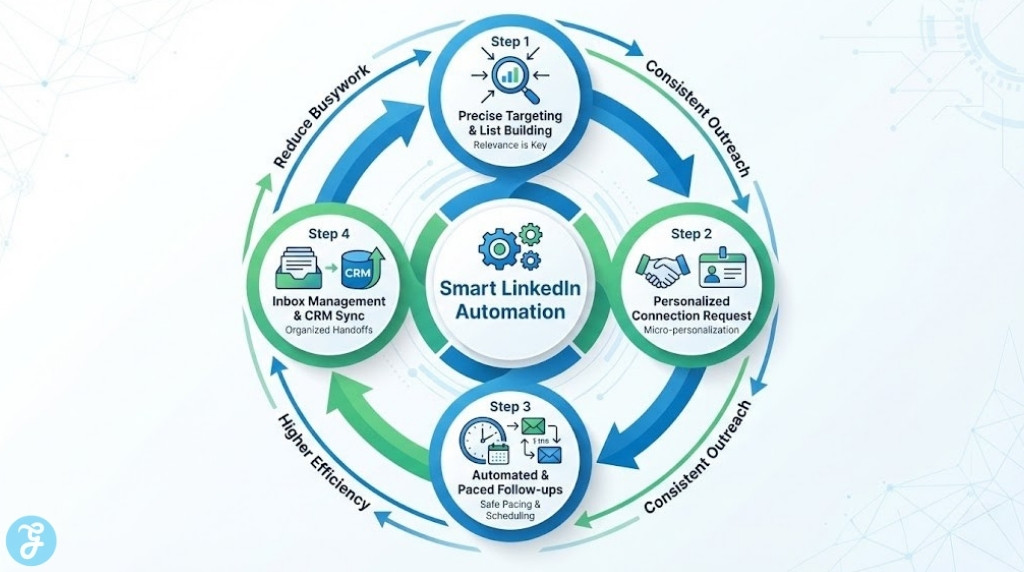
LinkedIn lead gen gets messy when you’re doing everything manually: searching, connecting, following up, and trying not to lose track of who said what. The right automation tool should reduce busywork while keeping outreach personalized and organized.
One important note before we jump in: LinkedIn generally discourages automated activity, so the safest approach is always to stay conservative with volume, prioritize relevance, and use tools that emphasize pacing, permissions, and reporting.
How Did We Pick Our 10 Best LinkedIn Automation Tools for Lead Gen?
Not every “automation” tool fits lead gen. Some are better at sequencing, some are better at inbox workflows, and others are really data tools with outreach add-ons.
-
Workflow fit: Sequencing, targeting, inbox, and handoffs to CRM
-
Personalization: Variables, conditional steps, and templates that still sound human
-
Pacing controls: Time windows, delays, and guardrails designed to reduce risk
-
Reporting: Replies, acceptance rate, and outcomes that help you iterate weekly
-
Team readiness: Roles, workspaces, and multi-account support when needed
Comparison Table
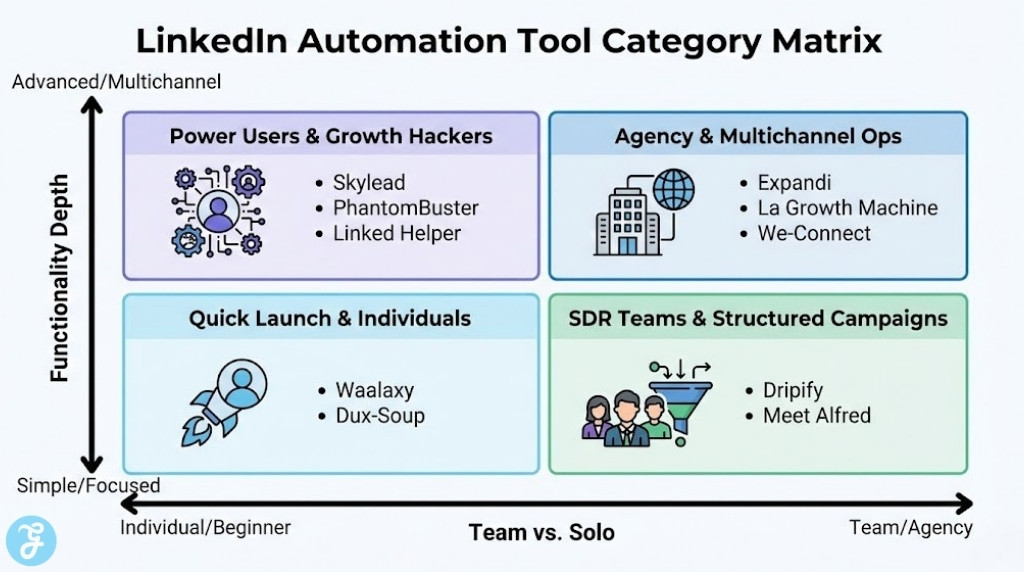
Here’s a quick snapshot so you can shortlist faster based on how you actually run outbound.
| Tool | Best For | Best Strength | Best Use Case | Main Watch-Out |
|---|---|---|---|---|
| Expandi | Agencies + teams | Smart sequences, inbox, roles | Scaling LinkedIn + email-style flows | More setup than lightweight tools |
| Dripify | SDR teams | Cloud-based outreach + analytics | Visual drip campaigns and reporting | Must stay disciplined on targeting |
| Waalaxy | Beginners | Prebuilt sequences | Quick campaign launch and reply handling | Template limits vs fully custom flows |
| PhantomBuster | Growth ops | Automations + extraction | List building, enrichment, repeatable tasks | More “building blocks” than guided outreach |
| La Growth Machine | Multichannel outbound | LinkedIn + email + more | Multistep sequences across channels | Can be overkill for simple LinkedIn-only |
| Skylead | Advanced sequences | Logic-based sequences | If/else style outreach plus personalization | Higher learning curve than basic tools |
| Meet Alfred | Small teams | Multi-channel automation | LinkedIn + email + X style campaigns | Needs clean ICP to perform well |
| Dux-Soup | Individuals | Simple LinkedIn automation | Drip campaigns and basic outreach | Browser/extension style tradeoffs |
| Linked Helper | Power users | Deep automation actions | Detailed campaigns and workflow control | Desktop app approach may not suit everyone |
| We-Connect | B2B teams | LinkedIn + email workflows | A/B tests, tracking, CRM-style flows | Still requires safe pacing and moderation |
10 Best LinkedIn Automation Tools for Lead Gen
Here are 10 Best LinkedIn Automation Tools for Lead Gen you can use to streamline prospecting, follow-ups, and meeting booking without losing the human touch.
1) Expandi
Expandi is a cloud-based platform built for teams and agencies that need structured sequences, shared inbox workflows, roles, and CRM-style organization. It’s especially strong when you want multi-account management and a more “ops-ready” setup for consistent outreach.
-
Best For: Agencies and B2B teams managing multiple outbound campaigns
-
Pros: Smart campaign builder; global inbox; roles and permissions
-
Cons: More setup and structure than lightweight tools
2) Dripify
Dripify is positioned around drip-style LinkedIn outreach with a focus on reporting and safe, cloud-based operation. If you run outbound like a pipeline and want visibility into performance metrics, this is a strong “SDR-friendly” option.
-
Best For: SDR teams that want analytics and repeatable campaigns
-
Pros: Visual drip campaigns; works across LinkedIn account types
-
Cons: Results depend heavily on list quality and message relevance
3) Waalaxy
Waalaxy is beginner-friendly and campaign-driven, with a lot of prebuilt sequences that help you launch fast without overthinking the workflow. It’s a good fit if you want a simpler learning curve and built-in reply management features.
-
Best For: Newer teams starting LinkedIn outreach automation
-
Pros: Prebuilt campaign templates; lead/reply organization features
-
Cons: Less flexibility if you want fully custom sequences
4) PhantomBuster
PhantomBuster is best when you want automation “building blocks” for LinkedIn tasks, including actions like connecting and workflow scheduling. It’s popular with growth teams that want repeatable automations and integrations into broader workflows.
-
Best For: Growth ops teams doing outreach plus data workflows
-
Pros: Cloud scheduling; message personalization placeholders
-
Cons: Less guided for pure outreach sequencing than dedicated platforms
5) La Growth Machine
La Growth Machine is multichannel, so it’s useful when LinkedIn is only one part of your outbound and you want coordinated touches across channels. It’s a strong choice for B2B teams that run structured outreach programs rather than one-off campaigns.
-
Best For: Multichannel outbound (LinkedIn + email and more)
-
Pros: Multichannel sequencing; campaign templates and playbook-style workflows
-
Cons: Can feel heavy if you only want basic LinkedIn follow-ups
6) Skylead
Skylead is positioned as a sales engagement platform with sequences and personalization, and it’s often highlighted for “smart sequence” style logic. It’s a good fit when your outreach needs branching steps rather than a simple linear campaign.
-
Best For: Teams that want conditional sequences and a more advanced setup
-
Pros: Smart sequences; personalization-friendly positioning
-
Cons: More complexity than “plug and play” tools
7) Meet Alfred
Meet Alfred is designed to help teams automate outreach and follow-ups while keeping campaign management organized. It’s a solid mid-market option if you want LinkedIn automation plus broader campaign workflows.
-
Best For: Small teams that want multi-channel campaigns without enterprise complexity
-
Pros: Outreach automation + campaign management; multi-channel positioning
-
Cons: Needs strong ICP targeting to avoid wasted outreach
8) Dux-Soup
Dux-Soup is widely known for simple LinkedIn automation via an extension-based workflow and drip-campaign style outreach. It works best for individuals who want a straightforward way to systematize profile visits and follow-ups.
-
Best For: Solo operators who want basic LinkedIn automation quickly
-
Pros: Drip campaign workflows; works with LinkedIn and Sales Navigator
-
Cons: Extension-style automation has different risk/UX tradeoffs than cloud tools
9) Linked Helper
Linked Helper is a power-user tool with lots of automation actions and flexible workflow building, positioned as security-focused and feature-rich. It’s often used when you want very specific sequences and control over steps.
-
Best For: Advanced users who want deep automation and custom workflows
-
Pros: Broad set of automation actions; outreach workflow depth
-
Cons: Desktop app approach may not fit every team’s workflow
10) We-Connect
We-Connect emphasizes multichannel outreach, A/B testing, and tracking, which can be useful when you want to treat outreach like a measurable funnel. It’s a good fit for teams that want LinkedIn automation with email workflows and integrations.
-
Best For: B2B teams that want measurable outreach workflows
-
Pros: Email workflows + A/B testing; integrations and tracking
-
Cons: Still requires conservative pacing and strong moderation
How to Choose the Right LinkedIn Automation Tool
A “good” tool depends on whether you’re optimizing for speed, personalization, team ops, or multichannel coordination.
Quick Checklist:
-
Stack fit: Do you need CRM sync, webhooks, Zapier-style workflows, or a unified inbox?
-
Workflow type: Simple connect + follow-up, or branching sequences with logic?
-
Team needs: Multiple seats, approvals, shared templates, and reporting?
-
Multichannel: LinkedIn only, or LinkedIn plus email and other touches?
-
Safety posture: Does the tool support conservative pacing and schedule controls?
Small Decision Table
| If you need… | Shortlist these styles |
|---|---|
| Team workflows + governance | Expandi, Dripify |
| Fast launches with templates | Waalaxy |
| Multichannel sequencing | La Growth Machine, We-Connect |
| Advanced logic/branching | Skylead |
| Automation blocks + extraction | PhantomBuster |
High-Converting LinkedIn Outreach Playbook
Here are two easy-to-follow steps:
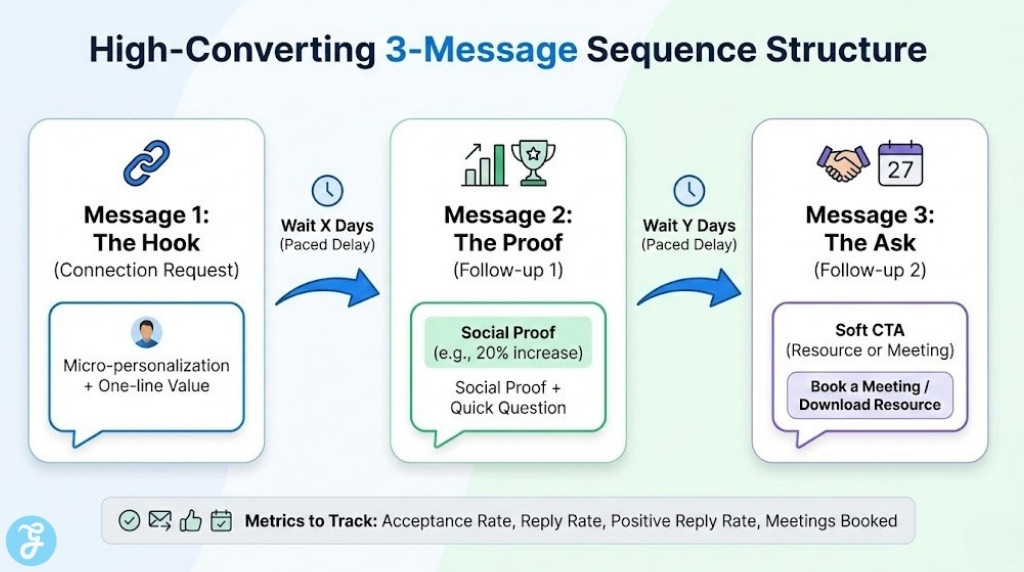
A Simple 3-Message Sequence:
-
Message 1: Micro-personalization + relevance + one-line value
-
Message 2: Proof + quick question that is easy to answer
-
Message 3: Soft CTA (offer a resource or ask for the right contact)
Metrics Worth Tracking:
-
Acceptance rate: Signals targeting quality
-
Reply rate: Signals message clarity and relevance
-
Positive reply rate: Signals offer-market fit
-
Meetings booked: The only metric that pays the bills
To Sum Up
The best LinkedIn automation tool for lead gen is the one that matches your workflow and helps you improve your outreach week by week. If you want team-ready structure and inbox control, start with a platform approach. If you want multichannel sequencing, pick something built for coordinated touches. And if you want simple automation without a heavy system, keep it lightweight and focus on targeting and message quality.
Whatever you choose, treat automation as a multiplier, not a replacement for relevance. The safest, most profitable outbound is the one that feels like it was written for a real person, because it was.