When email is the primary method for distributing content to your customers and communicating with your prospects, there arises the need to protect the integrity of your messages via the implementation of DMARC for inbound emails.
Inbound emails aren’t like outbound emails that go to everyone. Instead, inbound emails are directed at specific people who are most likely interested in what you’re selling or offering. As well as to those who are directly attached to a business, for example, its employees.
Therefore, if you don’t have good email hygiene, inbound email can lead to many failed accounts.
This article emphasizes the importance of setting up DMARC for inbound emails and the complete implementation plan of DMARC inbound processing to lessen the chances of having your business taken down by cyber attackers.
Already have a DMARC record in place? Check it now using our free DMARC checker tool.
DMARC for Inbound Emails
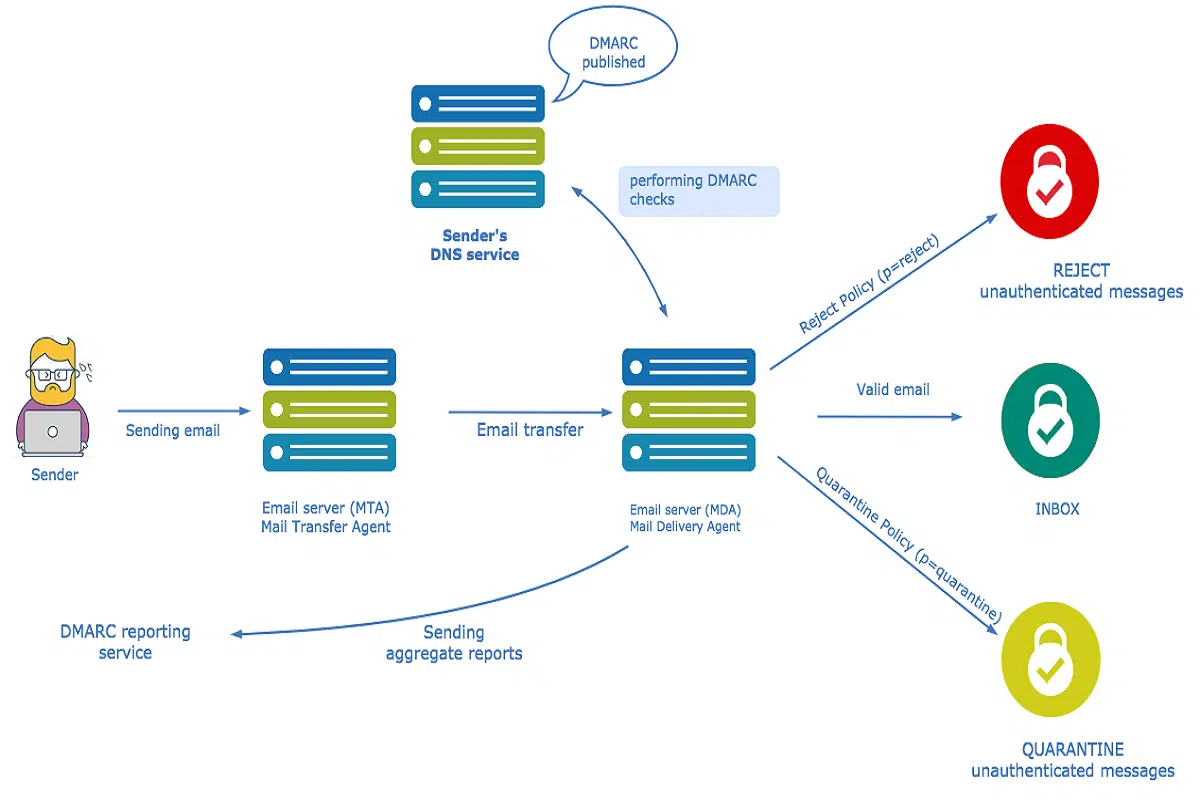
Setting up DMARC for inbound emails means that the email service provider (ESP) will be able to identify incoming messages and filter them, so that only those messages containing a From address that matches the IP address of your current domain or subdomain are delivered to the inbox.
Inbound messages are sent to a domain’s authoritative servers, which are legitimate servers with permission to send mail on behalf of the domain.
Therefore, when configuring DMARC for inbound emails, one can add a policy called “reject” to their domain’s DNS records. This policy instructs mail servers not to deliver messages that don’t conform to the policy they’ve set up via this record. As a result of this, if a message doesn’t have a valid DKIM signature or doesn’t come from an authorized email address, the message will be rejected automatically by the mail server and therefore not delivered.
Deploying DMARC for Inbound Email Processing: The Implementation Plan
Inbound processing is a critical part of the email marketing process. It helps a business determine whether an email is spam and then take action against it, such as suppressing or reclassifying it.
Deploying DMARC for inbound processing can shield a business against receiving fraudulent emails that may be sent from sources other than their direct mailings.
With the above said, here’s the strategy to implement DMARC for inbound emails.
Step #1 – Check DMARC Results
Checking DMARC results can help you understand what to expect when implementing DMARC inbound email processing. By checking the results, you’ll be able to determine how many emails have been marked as ‘spam’ by DKIM records, and how many emails are failing the DKIM or SPF checks.
This will give you useful information about how your email client is performing DMARC checks, and help you adjust your implementation plan accordingly.
Step #2 – Generate XML-based Aggregate Reports & Individual Forensic Reports
Next, you have to generate both the XML-based Aggregate and Individual Failure/Forensic reports. This will give you enough data to be confident that there are no false positives and false negatives.
The XML-based aggregate DMARC reporting provides a breakdown of the DMARC errors by type: authentication failure, policy violation, header field value, and unknown.
The Individual Forensic report includes a list of DMARC errors that occurred when someone used the target domain name for phishing attempts or when someone tried to reuse the domain name in an attempt to fool the target domain’s servers into believing they were legitimate users who should be allowed access.
Both these reports include information about how many times each type of DMARC error occurred within each period (Day 1/Week 1/Month 1/Year).
*Note: These reports are intended for internal use only and need not be shared with domain owners at this stage, as you are still collecting your data.
Step #3 – Analyze the Generated Reports
Now review the data to analyze your own domain’s email sending practices. Identify the services and partners that are using your domain to send emails to your users.
For example, you can search for the domain of the sender and see if they are an authorized sender for the domain (with a DKIM signature). You can also use the SPF or Domain Keys Identified Mail (DKIM) records for verification purposes.
Next, identify legitimate sources of email that are breaking DKIM signing. This could be from third-party SPF/DKIM providers, or other domains sending emails on behalf of yours.
Step #4 – Create Exceptions where Necessary
Now using the information from the reports generated above, it’s time to identify and make exceptions for legitimate email sources that are using your domain. This can be done by creating a unique policy in your mail flow management system that allows those emails to bypass DMARC processing.
Exception Rule #1: If there’s an email source using your domain for sending emails to external users (i.e outside of your organization), then that would not fall in your policy of DMARC for inbound emails. If this happens, we recommend you take action by getting this source into compliance with DMARC.
Exception Rule #2: If there’s an email source using your domain but communicating only with users confined within your business network, then you whitelist them in your policy of DMARC for inbound processing.
Step #5 – Configure Inbound Processing to Act on the Exceptions
You’ve just completed the process of creating exceptions in DMARC for your email sources. Now it’s time to configure inbound processing to act on DMARC results. You may also want to create additional filters to ensure that messages are being sent only from valid domains and not spam domains.
Your email provider may be able to provide you with information about how to configure inbound processing so that it acts on DMARC results. If not, you will need to contact them directly for assistance.
Exception Approaches When Configuring DMARC for Inbound Emails
|
Exception Approach |
Methodology |
Pros |
Cons |
|
Blanket |
The DMARC configured email server not only denies inbound email but also blocks it from retrying. |
Blocks unwanted and unauthorized emails to protect your brand against phishing attacks, malware, and fraud. |
Carries the highest risk of blocking the legitimate sources of emails important to the organization. |
|
Phased |
It is deployed in stages either to eliminate the risk of blocking important emails to your organization such as newsletters or important documents, or to accelerate the protection of a specific domain. |
You can avoid the risk of blocking important email traffic while taking advantage of the full protection offered by the approach. |
Time taking process |
|
People-Centric |
Enforces DMARC on email destined for employees that pose the most risk to the organization. This approach addresses fraudulent emails that could be sent to executives, employees, and customers of the organization. |
Offers the highest level of protection |
It requires more upfront effort to identify high-risk employees and it limits the scope of enforcement to only those employees with access to the company’s email infrastructure. |
Use PowerDMARC’s Inbound DMARC Visibility Service
Inbound emails are a big deal for businesses. They can mean the difference between success and failure, customer acquisition, and churn. But inbound processing sans an email security mechanism can leave your organization vulnerable to cyber-attacks and spear phishing attempts.
That’s why Power DMARC offers a free DMARC analyzer for inbound emails. Our DMARC service eliminates the risk of executive impersonation and spear phishing by using a DMARC policy that sends your inbound emails through DMARC-compliant mail servers. We also have unique exception approaches for inbound processing so that your emails aren’t showing up in any spam filters.
By deploying our DMARC service for inbound emails, you can increase engagement with your email marketing campaigns, decrease unsubscribes and bounces, and improve the overall performance of your domain’s inboxes.
Sign up for our free DMARC trial today to see how we deploy DMARC strategies for inbound emails for your business.