


An emergency rarely finds everyone at home with a charged phone and a reliable connection. A school may close while one parent is unreachable. A relative may need medication details that only one caregiver knows. A family may have to leave home before anyone has time to search through old emails.
I would build a family digital emergency kit around one practical test: Could another trusted adult find and use the essential information if I could not guide them?
The kit does not have to be a special app. It can be a small set of organized files, phone settings, and printed information. What matters is that the right person can reach the right details without exposing the family’s private records to everyone.
What Goes Into a Family Digital Emergency Kit?
Start with what someone would need in the first hour. Then add the records that would help your family manage care, travel, and recovery over the following days.
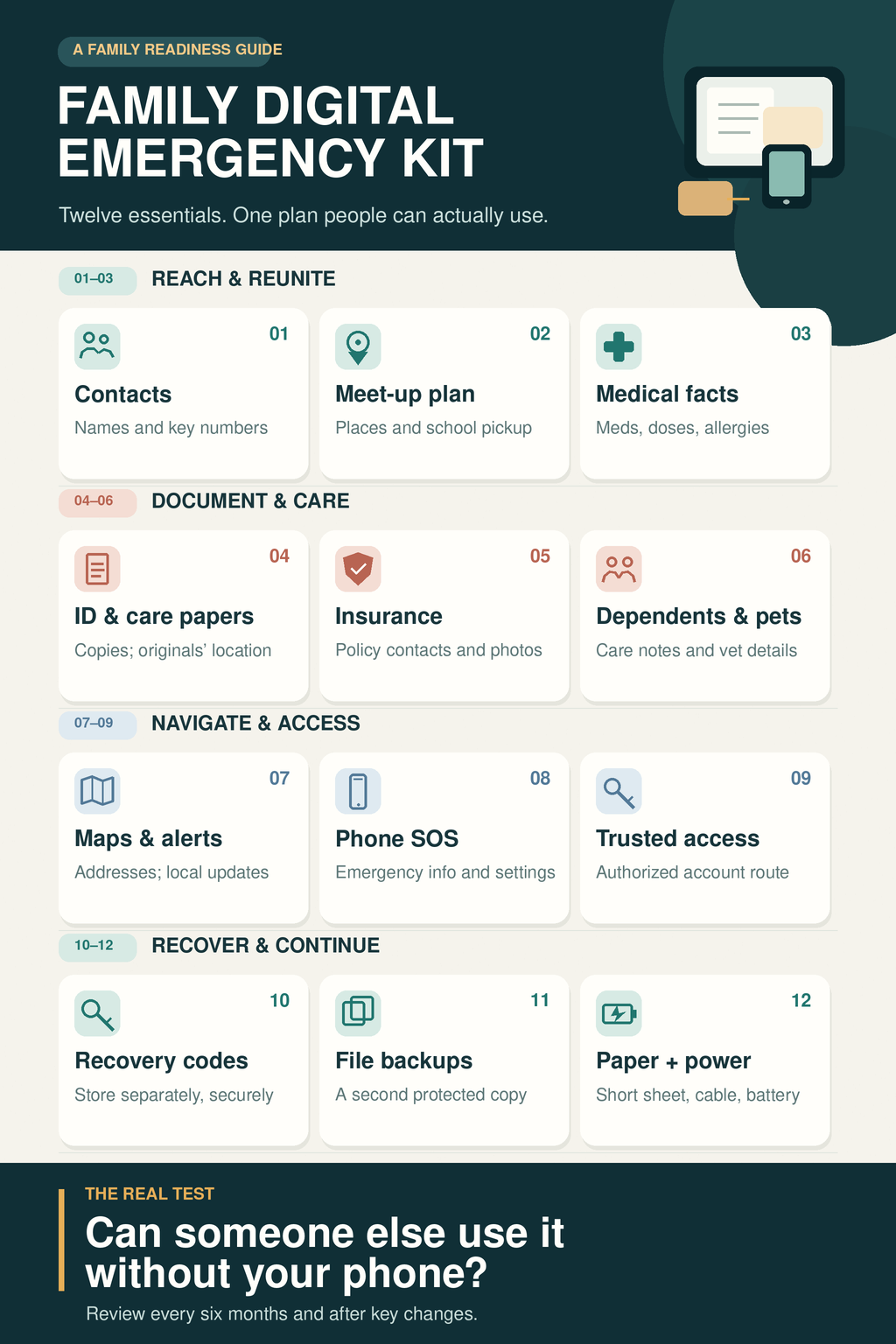
1. An emergency contact card
Create a one-page list of names and numbers: household members, a trusted person nearby, an out-of-area contact, your child’s school or childcare provider, doctors, and your local emergency service. Include country codes for contacts abroad.
Write names and relationships clearly. “Maya — Farah’s aunt and backup pickup contact” is more useful to another caregiver than “Aunt Maya” alone.
Keep the card on more than one adult’s device. Print a short version for a wallet or go bag, too. A contact saved only in a missing phone cannot help the person holding the paper kit.
2. A plan for meeting up and collecting children
Choose one meeting place near home and another outside your immediate area. Decide whom each family member should contact if they cannot reach the others. Older children can learn a trusted adult’s name and number; younger children may need a contact card in their bag.
Ask your child’s school or childcare provider how it handles emergency notifications, evacuation, and pickup. Record its number and the steps you would need to follow.
Check that its official list of approved pickup adults is current. Writing someone’s name in your family file does not change the school’s release procedure.
3. A current medical summary for each person
Keep the information a new caregiver or clinician would need quickly: important conditions, allergies, current medicines, doses, and clinician and pharmacy contacts. If someone relies on medical or communication equipment, add brief instructions and the relevant support number.
Aim for a readable summary, not an archive of every appointment. Store detailed records in the protected part of the kit. For a child with complex healthcare needs, use a care plan prepared with their healthcare team and keep the version that caregivers actually follow.
Update the summary whenever treatment changes. An old medication list is easy to overlook when it looks neatly filed.
4. Copies and locations of important documents
Keep protected copies of the identity and family records your household may need, such as IDs, passports, and birth or adoption certificates. If you already have relevant guardianship, care authorization, or advance care documents, include the current versions or a note explaining where to find them.
Also record where the originals are stored. In some situations, knowing which document exists and who holds it is more helpful than another scan.
Treat digital copies as useful records, not guaranteed replacements for originals. Requirements vary by document, institution, and location.
5. Insurance details and a household inventory
List your insurers, policy numbers, and claims contacts. Add the property and ownership records you would need to identify a home, vehicle, or other important asset.
Photographs can make a household inventory more useful. Capture significant possessions and update the record after a major purchase or move. Save the inventory with the insurance information rather than leaving it in an unlabelled camera roll.
You may also want contact details for banks or other financial institutions. Keep this section focused on whom to call and what records exist. It does not need to become a widely shared list of account passwords.
Learn more about digital tools for family and caregivers.
6. Care instructions for dependents and pets
If another adult had to step in tomorrow, what would they need to know? Write down essential routines, caregiver contacts, mobility or communication needs, and where necessary supplies are kept.
For a pet, include a recent photo, veterinary contact, vaccination information, medications, and microchip details if applicable. Name someone who could help with care if your household could not return home.
I would keep these notes brief enough to use under pressure. A caregiver needs clear next steps; sensitive background information can stay in the protected records.
7. Key addresses, alerts, and offline maps
Save the addresses of your meeting places, school, healthcare facilities, and agreed destinations. Find out where your local authorities publish emergency instructions, and make sure more than one adult knows how to check them.
Download a map of the relevant area before you need it. Check that it covers the full journey, not only your immediate neighborhood. Offline map features vary by location and may not provide live traffic information or alternate routes.
Keep important addresses on the printed contact card as well. A map saved on a phone still depends on that phone having power. During an evacuation, follow current local instructions rather than assuming a previously chosen route remains safe.
8. Emergency settings on each adult’s phone
Check the features your phones already provide. On an iPhone, Medical ID can display selected health information and emergency contacts while the device is locked if that option is enabled. Some Android devices offer similar emergency information and SOS settings. Availability and steps vary by device and region.
Decide what you are comfortable showing to someone who picks up the phone. A lock-screen medical note can help in an emergency, but it may also be visible to a stranger.
After setting it up, look at the locked screen to confirm what another person would see. Learn how the SOS feature works without placing a test call to emergency services.
Make a short list of the accounts that matter in an emergency: perhaps the email receiving important notices, the storage account holding family records, or a shared household service. State who should be able to access each one and through which approved method.
A password manager can help keep credentials organized. Some services let you designate a trusted person who may request emergency access, sometimes after a waiting period. Check the rules and availability of the service you use.
I would keep passwords out of the ordinary emergency contact document. A file shared with several relatives should not also be the key to every private account. For financial or other restricted services, follow the provider’s authorization process; possessing a login is not the same as having authority to act.
10. Recovery options for your own accounts
An access plan for another adult and a recovery plan for a lost phone serve different purposes. Check the recovery email, phone number, and second sign-in methods for the accounts holding your kit.
If a service provides backup codes, store them securely somewhere you can reach without your usual phone. Treat the codes as sensitive. Do not leave them in an open family folder or send them in a group chat.
Check them again after changing security settings or generating a new set. A neatly printed code is of little use if it has already been used or replaced.
11. Separate, protected copies of the files
Your everyday phone should not hold the only copies of the kit. Keep important files in protected storage and consider a second copy that does not depend on the same account or device. If you use a portable drive, protect it in case it is lost.
Include records that would be hard to recreate: care plans, an inventory, important family photographs, and the documents you identified above. Check occasionally that a sample file opens and that the designated adult knows how to locate what they are meant to use.
A backup is valuable only when someone can retrieve it. Do not let the only password or recovery key disappear with the device it is supposed to replace.
12. A paper and power fallback
Print the information someone may need immediately: contacts, meeting places, key addresses, and essential care details. Keep it in a protected, easy-to-find place. Leave full document scans, passwords, and detailed financial records out of this quick-reference sheet.
Keep a suitable cable, charger, and charged power bank with your physical emergency supplies. Check them during your regular review. If someone depends on powered medical equipment, make a separate backup plan for that equipment with their care team.
The digital kit is one part of preparedness. It cannot replace medicines, water, food, or other supplies your household may need.
Make a “Start Here” Sheet Someone Else Can Follow
The easiest way to make this kit usable is to give it a clear first page. A trusted adult should be able to read it and know whom to call, where to go, and where the protected information lives.
A simple version could look like this:
START HERE
Call first: [Name and number]
Out-of-area contact: [Name and number]
Meet nearby: [Location and address]
Alternate meeting place: [Location and address]
Child pickup: [School number and where to check its approved pickup procedure]
Medical summaries: [Where the current copies are kept]
Protected records: [Where they are kept and who has authorized access]
Last reviewed: [Date]
Keep the sheet short and avoid putting passwords or full ID numbers on it. Its purpose is to get someone to the next useful step.
Then test it. On a calm day, put your phone aside and ask the other designated adult to find the contact card, a medical summary, and the insurer’s number. Try locating the information without mobile data. You do not need to reveal passwords or use recovery codes for this exercise. Fix anything that takes too much searching or depends entirely on one device.
Review the kit at least every six months. Update it sooner after a move, school change, new medication, different caregiver, or changed phone number.
Frequently Asked Questions about Family Digital Emergency Kit
Do I need a special app to make a family digital emergency kit?
No. A clearly named folder, appropriate secure storage, phone emergency settings, and a printed first page can do the job. Choose a system that the adults who need it can understand and maintain.
Should I include photographs of family members and pets?
Current photographs may help if people or pets become separated. Keep them with the protected kit or the appropriate emergency supplies, and decide carefully which photos need to be shared with an out-of-area contact.
What if an older relative lives alone?
Build the plan with them where possible. Make sure their chosen caregiver knows where to find contacts, current care information, and any instructions for essential equipment. A readable paper summary may be especially useful if they do not rely on a smartphone.
Will a legacy contact setting help my family today?
Do not use it as your immediate access plan. Features that release account data after death or a period of inactivity serve a different purpose. Your contact sheet, care summaries, and authorized access arrangements need to work during an emergency happening now.
Make It Useful Before It Is Urgent
A family digital emergency kit can begin with three pages: contacts, a reunification plan, and medical summaries. Add protected documents and account recovery details once those first pages are accurate.
When you finish, check it from another person’s point of view. They should know where to start, what they are allowed to access, and what to do when the phone or internet is unavailable. That is what makes the kit useful to your family.






















