Finding the best math apps for elementary students starts with knowing where a child needs help. I look for a clear match between the activity and the learning goal. A kindergartner learning to count objects needs different practice from a fourth grader comparing fractions.
For this guide, I reviewed publishers’ current features, learning levels, device requirements, and access options. My firsthand testing is with the Android version of 123 Magic Number Fun, and I’ve kept those observations specific to the activities I checked.
Disclosure: Our team at Editorialge develops 123 Magic Number Fun: Math Kid, which appears in this list.
Here, elementary school means kindergarten through Grade 5. Some apps cover a wider range, while others focus on early foundations. The selections address different learning needs.
Best Math Apps for Elementary Students at a Glance
| App | Learning range | Best fit | Cost and access |
| Khan Academy Kids | Ages 2–8 | Free foundational math and broader early learning | Free core app; no ads or subscription |
| SplashLearn | Preschool–Grade 5 | Game-based practice across elementary topics | Some school-linked home access free; premium paid |
| Prodigy Math | Grades 1–8 | Practice within a fantasy adventure | Core curriculum math questions free; memberships available |
| IXL | Pre-K–Grade 12 | Working on a specific skill gap | 10 questions daily free; full membership paid |
| DreamBox Math | Kindergarten–Grade 8 | Following an adaptive lesson path | Paid home subscription; school access may be available |
| DoodleMath | Kindergarten–Grade 5 in the US version | A regular personalized practice routine | Limited free access; premium subscription |
| Kahoot! Numbers by DragonBox | Ages 4–8 | Understanding quantities and early arithmetic | Paid access; check the current offer |
| Todo Math | Mainly Pre-K–Grade 2; some Grade 3 basics | Early math with language and accessibility options | Limited free access; subscription for fuller content |
| Number Pieces | Elementary place-value skills | Visualizing regrouping and calculations | Free |
| 123 Magic Number Fun: Math Kid | Early number foundations; publisher lists ages 2–8 | Counting, numeral recognition, and tracing | Free download; ads and in-app purchases |
Access details are explained below. Prices quoted are US prices checked in October 2026; regional offers and store prices can differ.
1. Khan Academy Kids: Free Early Math Learning
Khan Academy Kids is my first recommendation for families looking for a free starting point with a younger learner. Its core app has no ads or subscriptions and is designed for children ages two to eight.
Math sits alongside reading, stories, and creative activities. Children can follow a personalized learning path or choose activities from the library. The app is available on iOS and Android. For a focused math session, select the relevant activities from the library.
Its strongest fit on this list is foundational learning. A child beginning counting and early arithmetic is a more suitable audience than an older student who needs extensive work on fractions or multi-step problems.
2. SplashLearn: Broad Elementary Math Practice
SplashLearn covers preschool through Grade 5, including counting, arithmetic, fractions, decimals, geometry, measurement, and word problems. It is available through mobile apps and a browser.
I recommend considering it when a child needs game-based practice across several elementary topics. Its range gives families room to move between skills as schoolwork changes. Start with the current difficulty, such as comparing fractions, so the activity library serves a clear purpose.
School-linked access can also make it a practical choice. Parents connected to a participating classroom can access teacher-assigned work and progress information for free. Unlimited games and the personalized learning path are premium features.
Check what the school account includes before buying a separate home plan.
3. Prodigy Math: Practice Through Adventure Games
Prodigy Math places questions inside a fantasy adventure with quests and characters. Its curriculum covers Grades 1–8, including the elementary years.
Core curriculum math questions are free. Paid memberships add features such as Math Facts, Arcadia, additional progress tools, and game benefits, so access to the free questions does not include every feature.
This is a choice I’d consider for a child who enjoys adventure games and responds to having a reason to keep playing. The important question is whether the child gives the math enough attention along the way.
During an initial session, watch the balance between answering questions and exploring the game. That will tell you more about its fit for the learner than enthusiasm for the characters alone.
4. IXL: Focused Help With Specific Skills
IXL is my pick when a family can identify a particular difficulty: place value, multiplication, equivalent fractions, or another specific skill.
Its coverage runs from pre-K through Grade 12. The current app includes adaptive practice, explanations, video tutorials, learning games, and diagnostic recommendations. Children can practice 10 questions daily for free; fuller access requires membership. It is available through mobile apps and the website.
The useful feature here is focus. If a child struggles with subtraction involving regrouping, the session can center on that skill.
I’d use the explanations and videos alongside the practice, especially when a child needs help getting started. Repeated questions are more useful when the learner has a way to revisit the underlying idea.
5. DreamBox Math: An Adaptive Lesson Path
DreamBox Math suits families looking for an ongoing lesson pathway. Its K–8 program personalizes lessons as a child works, and the Family Dashboard provides information about progress.
The appeal is having the program adjust the next steps instead of requiring an adult to select every activity. Parents can use the dashboard to see what the child is working on and identify topics to discuss with a teacher.
Check the device before subscribing. DreamBox works through a browser on computers and Chromebooks, and through its iPad app. It currently does not support smartphones or Android tablets.
Individual home plans list $12.95 for one month or $99.95 for 12 months. School access may already be available.
6. DoodleMath: Regular Personalized Practice
DoodleMath’s US version covers kindergarten through Grade 5. It provides personalized practice based on a child’s learning level, with support within interactive questions. Families can access it on phones, tablets, and computers.
What draws me to this option is the emphasis on a regular practice routine. It is worth considering when a family wants a manageable session that revisits skills over time. Use the trial to check the starting difficulty and the help available when the child gets stuck.
The name and curriculum vary by region; outside the US, you may see DoodleMaths. US single-child premium plans list $10.99 monthly or $94.99 annually, with limited free access and a seven-day premium trial.
7. Kahoot! Numbers by DragonBox: Understanding Quantities
Kahoot! Numbers by DragonBox focuses on number sense for ages four to eight. Its characters, called Nooms, represent numbers and can be stacked, combined, separated, and compared.
Activities explore numbers up to 20 and early addition and subtraction. The app is available on iOS and Android, with paid access.
The visual approach makes this an interesting choice for a child who recognizes numerals but needs more practice connecting them with quantities. Combining and separating the characters gives the learner a way to explore how numbers fit together.
Choose the title carefully. Numbers focuses on these early concepts; other DragonBox apps cover different topics. Its narrow focus is useful when number sense is the skill you want to address.
8. Todo Math: Flexible Early Math Practice
Todo Math mainly serves preschool through Grade 2, with its current Level H introducing Grade 3 basics. Activities cover counting, place value, arithmetic, shapes, time, measurement, and introductory fractions.
Parents can select a level or use the placement test. The app offers eight languages, a left-handed mode, a help button, and a dyslexic font option. It is available on iOS and Android, with limited free access and a subscription for fuller content.
For a child who needs a different language or interface setup, these options deserve attention during a trial. I recommend trying the relevant settings with the child before deciding whether the app is comfortable to use.
9. Number Pieces: Seeing How Place Value Works
Number Pieces, from The Math Learning Center, provides virtual ones, tens, and hundreds. Children can join pieces or break them apart to explore regrouping and build arrays for multiplication and division.
It is free, with a web version and an iOS version suited to iPads.
This is my choice for working through a place-value problem together. For example, an adult could ask a child to represent 32 minus 17, exchange one ten for ten ones, and show the subtraction.
Number Pieces is an open-ended tool. A parent or teacher supplies the problem and guides the conversation. That makes it especially useful when the goal is to make the steps in a calculation visible.
10. 123 Magic Number Fun: Counting and Numeral Practice
123 Magic Number Fun: Math Kid is developed by our team at Editorialge. My firsthand experience is with its Android version, where I checked tracing, Pop Balloons, Tile Match, Count Objects, Math Puzzle, Math Car Race, and other activities.
What stood out to me was the distinction between the tasks. Count Objects is relevant when a child needs practice connecting a numeral with a quantity. Tracing focuses on forming the numeral. Choosing between them depends on what the child needs to practice.
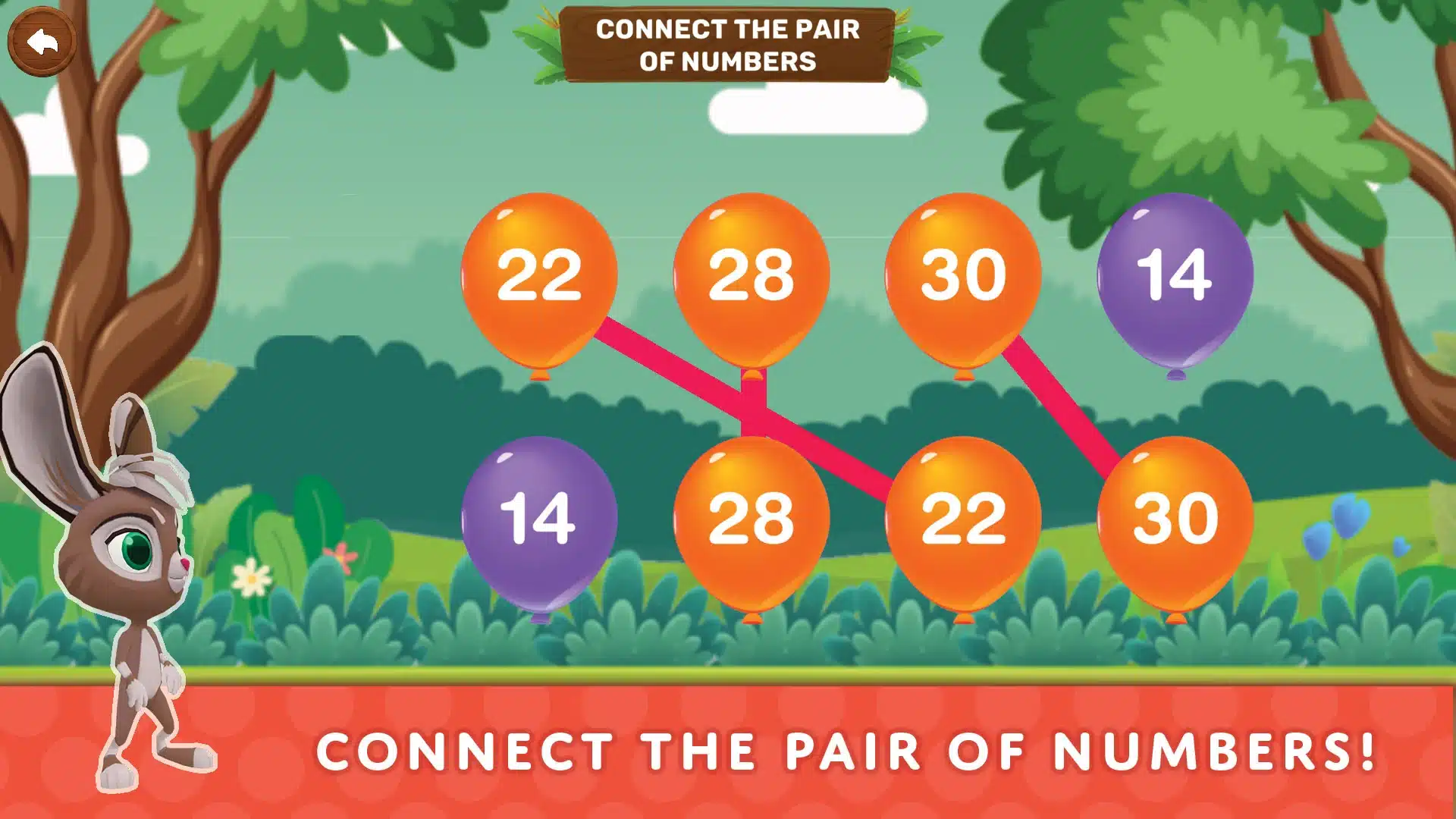
I deliberately tried incorrect answers and incomplete traces. In the tasks I checked, those attempts did not count as completion. These checks show how those activities responded; lasting learning gains would need a separate assessment.
The publisher lists ages two to eight. I see its clearest fit in early number foundations. Android access includes ads and in-app purchases. The Apple version is listed as 123 Magic Number Fun, with a $9.99 Full Version option and a separate $1.99 Remove Ads purchase.
Give the App One Clear Job
For free early learning, I’d begin with Khan Academy Kids. For a specific skill gap, I would examine IXL. For a conversation about place value, Number Pieces is a useful starting point. Families wanting an ongoing adaptive lesson path can consider DreamBox.
Choose the option that matches the child’s current need, then watch how the sessions go. Keep using it while the practice remains useful, and change the activity or level as the child’s needs develop.
Frequently Asked Questions on the Best Math Apps for Elementary Students
1. What is a good free math app for elementary students?
Khan Academy Kids is my first choice for younger learners needing foundational practice. Number Pieces is free for guided place-value activities. Prodigy offers free core curriculum math questions, while IXL limits free practice to 10 questions daily.
2. Which apps are useful for counting and number recognition?
Khan Academy Kids, Todo Math, Kahoot! Numbers by DragonBox and 123 Magic are worth considering. Choose the activity carefully: recognizing a numeral, counting a group of objects, and writing the numeral involve different kinds of practice.
3. Which apps suit multiplication, fractions, and upper-elementary work?
Compare SplashLearn, IXL, DreamBox, DoodleMath, and the relevant Prodigy grade content. For one clearly identified skill gap, I’d start by examining IXL. For broader practice, compare the topic coverage and available lesson pathways.
4. How can I tell whether a child understands or is guessing?
Ask the child to show an answer with objects or a drawing, explain a step, or try a similar problem with different numbers. For example, counting objects away from the screen gives you another way to check what a completed counting activity means.
5. Will these apps follow my child’s school curriculum?
Check the regional version and compare its topics with current schoolwork. Grade labels and teaching sequences vary. A teacher can help identify the skill to practice and confirm whether the school already provides access to a suitable app.