


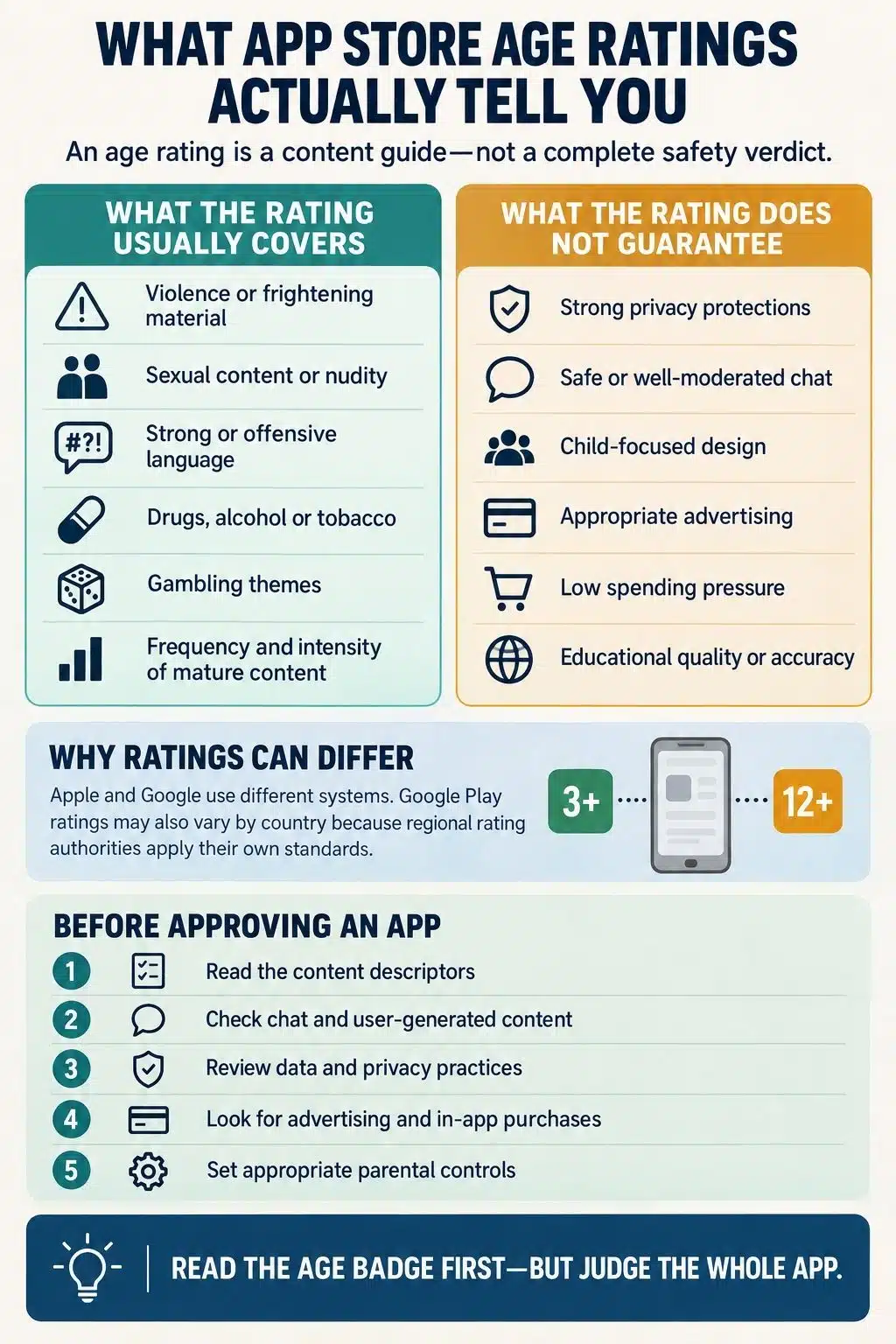
App store age ratings tell us the minimum maturity level of an app’s declared content. They can warn about violence, sexual material, profanity, gambling and other potentially sensitive elements. They also help parental controls filter apps. What they do not provide is a complete safety verdict.
A 4+, 9+ or Teen rating does not automatically mean an app was designed for that age. It does not certify the app’s privacy, educational quality, moderation, medical accuracy or spending practices. It may not reflect everything a child can encounter through chat, advertising, live content or other users.
I find age ratings useful, but I treat them as a starting point rather than permission to download without looking further.
What Does an App Store Age Rating Mean?
An age rating classifies the maturity of content disclosed by an app’s developer. Depending on the store and region, the rating may consider:
- Violence and weapons
- Profanity or crude humor
- Sexual content and nudity
- Frightening or disturbing themes
- Alcohol, tobacco or drug references
- Gambling and simulated gambling
- Loot boxes and randomized rewards
- Certain online or interactive capabilities
The rating usually represents the youngest age for which that content is considered generally suitable. It does not mean every child above that age will be comfortable with the app.
Children of the same age can respond very differently to horror, competition, social pressure or contact with strangers. The badge cannot account for those individual differences.
How Apple App Store Age Ratings Are Assigned
Apple requires developers to complete an age-rating questionnaire. The questions cover sensitive content and app capabilities such as:
- Advertising
- Messaging and chat
- User-generated content
- Social media
- Unrestricted web access
- Parental controls
- Age-assurance tools
- Health and medical information
- Gambling, contests and loot boxes
Developers report whether relevant material is absent, infrequent or frequent. Apple then calculates a global age rating and any additional rating required for particular regions.
Apple separately reviews submitted apps and updates through its App Review process. However, the age rating begins with information supplied by the developer. Developers may choose a higher rating when their terms or intended experience require one, but they cannot simply lower Apple’s calculated rating.
Apple’s Current Rating Levels
On Apple devices running operating-system version 26 or later, the main global ratings are:
| Rating | Examples of what may be present |
| 4+ | No objectionable declared content, although advertising, messaging, user-generated content and infrequent contests may still be present |
| 9+ | Infrequent profanity, fear, suggestive themes, cartoon violence, weapons, wellness topics or loot boxes |
| 13+ | Social media, frequent fantasy violence, infrequent realistic violence, limited sexual content, substance references or simulated gambling |
| 16+ | Unrestricted web access, frequent medical information or frequent mature and suggestive themes |
| 18+ | Gambling, frequent simulated gambling, frequent realistic violence, frequent sexual content or frequent substance use and references |
Older Apple operating systems may still display the previous 4+, 9+, 12+ and 17+ ratings. This can make the same app appear differently rated on two devices.
Why Apple’s 4+ Rating Requires a Closer Look
Apple defines 4+ as containing no objectionable material under its content rules. That does not mean the app is a preschool product or suitable for unsupervised use by a four-year-old.
The app’s detailed listing may still identify capabilities such as advertising, user-generated content, messaging or chat. The existence of those capabilities alone does not necessarily raise the app above 4+.
This does not mean Apple has approved everything users might post or say. It means the rating number and the capability labels answer different questions. Parents need to read both.
How Google Play Content Ratings Work
Google Play uses the International Age Rating Coalition, commonly known as IARC. Developers complete a content questionnaire, and an automated system generates ratings based on the standards used in different regions.
The initial IARC rating is issued without a regional rating authority manually examining every app before publication. Participating authorities can monitor apps, investigate concerns and correct ratings afterward. Google may also take action against developers who provide inaccurate information.
All active apps on Google Play are required to have a content rating. Developers must complete the questionnaire again when changes to the app affect their previous answers.
This process differs from the traditional classification of many boxed video games. Physical games carrying an ESRB rating may be assessed by trained raters, while digital-only apps using IARC generally receive their initial classifications from the questionnaire.
Why the Same App Can Have Different Ratings
Google Play translates the same questionnaire answers into the rating system recognized in each market.
Users in the United States and Canada may see ESRB labels such as Everyone, Everyone 10+, Teen or Mature 17+. Many European users see PEGI 3, 7, 12, 16 or 18. Germany uses USK ratings, while Australia, Brazil and South Korea have their own systems.
Apple uses its own global ratings with additional regional requirements.
These classifications are not exact equivalents. Regional authorities can apply different standards to violence, gambling, loot boxes, drugs and user-generated content. Therefore, different ratings on iPhone and Android do not automatically mean one of them is wrong.
Their legal status can differ as well. Some ratings are advisory, while certain classifications in some countries create legal access restrictions.
What Age Ratings Tell You, and What They Do Not
| Question | Does the age rating answer it? |
| Does the app contain mature themes? | Usually, although the descriptors reveal more than the number |
| Was the app designed for children of that age? | No |
| Is the game easy enough for that age? | No |
| Is its educational or medical information reliable? | No |
| Does the app protect children’s data? | No |
| Can strangers contact the child? | Not from the number alone |
| Does it contain ads or purchases? | Not consistently; separate disclosures may be needed |
| Is user-generated content effectively moderated? | No |
| Will the store automatically prevent access? | Only when appropriate controls and account settings are active |
| Is the rating also the app’s signup age? | Not necessarily |
The number is most useful when it is read with the explanation showing why the app received that rating.
A Low Rating Does Not Mean “Made for Kids”
An app can receive an all-ages rating simply because it contains no mature material. That says nothing about whether its purpose, language or interface suits a young child.
A banking tool, shopping app or calculator may have harmless content while still being irrelevant or unsuitable for independent use by children.
Google Play separates an app’s content rating from its declared target audience. Apple similarly distinguishes ordinary low-rated apps from those accepted into its Made for Kids category.
Apple’s Kids category uses child-specific age bands, including ages 5 and under, 6–8 and 9–11, and applies additional requirements. Google’s Teacher Approved badge is another separate signal for child-oriented content.
When I want to know whether an app was genuinely designed for children, I look for these additional indicators. I do not rely on 3+, 4+ or Everyone alone.
The Biggest Blind Spots in App Age Ratings
Age ratings can flag mature content, but they leave some of the biggest practical risks out of view. I still look closely at chat, user-generated content, data collection, advertising, and spending features before deciding whether an app is a good fit.
Chat and User-Generated Content
Fixed content is easier to classify than a live social environment. In a messaging app, multiplayer game, streaming platform or AI service, the experience may change according to:
- The people a child encounters
- Posts and messages from other users
- Search terms or prompts
- Live broadcasts
- Algorithmic recommendations
- Moderation practices
- Privacy and communication settings
Labels such as “Users Interact” or “Messaging and Chat” warn that communication exists. They do not explain who can initiate contact, whether users can exchange images or how effectively abuse reports are handled.
For interactive apps, I check whether profiles are public, whether strangers can send messages, whether location sharing is available and whether reporting and blocking tools are easy to find.
Privacy and Permissions
An age rating is not a privacy certification.
Apple’s App Privacy section and Google Play’s Data Safety section provide separate information about data collection and sharing. These disclosures can cover location, contact information, photos, device identifiers, browsing activity and financial information.
They are still substantially based on developer declarations. It is sensible to compare them with the permissions the app requests during actual use.
A drawing app can have completely harmless visual content while asking for access to photos, the microphone or location. The age rating does not explain whether those permissions are necessary.
A 13+ label is also not proof that an app complies with the US Children’s Online Privacy Protection Act. Content classification, privacy law and account eligibility are separate matters.
Advertising and Purchases
Commercial pressure is not fully expressed by the headline rating.
Google Play treats advertising separately from the core content rating, although ads should not be significantly more mature than the app containing them. “Contains ads” and purchase notices provide additional information.
Under the ESRB system, notices for in-game purchases and randomized items do not determine the age category. Apple’s newer system does allow certain activities, including loot boxes and gambling, to affect ratings. Regional rules may be stricter.
Instead of relying on the number, I check for:
- Subscriptions and automatic renewals
- Virtual currencies
- Randomized rewards
- Advertising that resembles gameplay
- Paywalls introduced after installation
- Urgent or repeated purchase prompts
- Links to external stores
An age rating does not tell us how frequently a child will be encouraged to spend money.
Quality, Accuracy and Difficulty
Ratings do not evaluate whether an app teaches well, provides accurate health guidance or suits a child’s reading ability.
An educational app can have a low content rating while offering shallow activities, distracting rewards or aggressive monetization. A wellness app may receive a rating based on the presence of health information without that information being medically validated.
PEGI specifically assesses content suitability rather than difficulty. A PEGI 3 game can still be too complex for a three-year-old to understand.
Content Rating and Signup Age Are Different
An app’s store rating may be lower than the minimum age stated in its terms. The apparent conflict usually exists because the numbers serve different purposes.
The store rating describes content maturity. The signup age may reflect privacy law, account design, service policies or the risks associated with particular features.
If an app is rated 4+ but its terms require users to be 13, I would treat 13 as the operational minimum. Allowing a child to enter a false birthday can remove age-based protections and give the app an inaccurate understanding of the user.
The relevant age of digital consent also varies between countries. Thirteen should not be described as a universal international rule.
How Parental Controls Use the Ratings
Age ratings become more useful when connected to active parental controls.
Apple’s Screen Time can restrict apps above a selected rating. Ask to Buy can require approval before a child downloads an app or completes an in-app purchase. Parents may also approve individual exceptions.
Google Play and Family Link can restrict downloads by maturity level, require purchase approval and block specific apps.
These controls still need careful setup. On Google Play, restricted apps can remain visible through search or direct links. Apps installed before restrictions were enabled may also remain accessible until a parent blocks them.
No filter catches every problem. The rating helps apply a family’s decision; it does not replace that decision.
Read the Badge, Then Read Beyond It
App store age ratings deserve attention. They offer a quick warning about mature content and give parental controls a practical way to filter apps. They simply do not answer every question a parent needs to ask.
I get the clearest picture by combining the rating with its content descriptors, communication features, privacy disclosures, commercial design, account requirements and the needs of the individual child. The badge tells me where to begin. Careful judgment tells me whether the app belongs on the device.
Frequently Asked Questions on App Store Age Ratings
1. Does 4+ mean an app is safe for a four-year-old?
No. It means the app’s declared content falls within Apple’s 4+ maturity rules. Advertising, messaging or user-generated content may still be present, so parents should review the detailed capability labels.
2. Why does the same app have different ratings on iPhone and Android?
Apple and Google use different classification processes. Google Play also converts IARC answers into regional systems such as ESRB, PEGI and USK. Different standards can produce different ratings without either listing necessarily being incorrect.
3. Are app store age ratings manually reviewed?
Not usually as a standalone manual classification. Developers complete questionnaires, and the ratings are calculated from their answers. Apple reviews app submissions separately, while IARC authorities monitor ratings and can correct them after publication.
4. Do age ratings include chat, ads and in-app purchases?
The detailed listing may disclose these features, but the headline number does not explain their full impact. Parents should check interactive-feature labels, advertising notices, purchase disclosures and communication settings separately.
5. Can parental controls block higher-rated apps?
Yes. Apple Screen Time and Google Family Link can restrict apps based on age ratings. However, settings, exceptions and previously installed apps still require attention.






















