

Feeling pulled in five directions by client work, due dates, messages, and invoices? The project management tools for freelancers can give freelancers and remote workers one clear home for their projects, so they spend less time hunting for details and more time doing paid work.
If you want an all-in-one option, Moxie combines client management, proposals, contracts, time tracking, invoicing, and scheduling. As of September 2026, Moxie lists its Starter plan at $10 per month when billed yearly, which can be a practical starting point if your biggest headache is moving from a signed proposal to a paid invoice.
I’ll walk you through the tools that suit different freelance workflows, from simple task boards to client portals and budget tracking.
Project Management Tools for Freelancers: Key Features to Consider
The project management tools for freelancers do more than hold a to-do list. They help you see what is due, what needs client input, and what you still need to bill.
Start with task management, deadlines, and a calendar or timeline view. A visual schedule helps you spot two client deadlines landing on the same day before your week gets crowded.
- Task views: Use a list for daily work, a board for status, and a calendar or Gantt chart for dates and overlaps.
- Time tracking: Choose native timers if you bill by the hour, since turning tracked time into an invoice reduces manual entry.
- Client access: Give clients comment-only or view-only access to project items instead of sharing your full workspace.
- Templates: Build a repeatable project plan for onboarding, drafts, reviews, revisions, and final delivery.
- Permissions: Check which guest roles are free before inviting clients or contractors.
Guest access can protect your budget. ClickUp’s paid plans include permission-controlled guests, but the number of included guest seats depends on the plan and member count. Use guests for clients who need to review a milestone, leave feedback, or approve a deliverable, rather than adding them as full workspace members.
Also look past project features. If you need proposals, contracts, deposits, or invoices, a standard project tool may leave you using separate software. That is fine if you prefer a focused setup, but an all-in-one freelance platform can cut down on duplicate data entry.
Use one test project before committing
Create one real client project during each free trial. Add tasks, a due date, a recurring admin task, a sample invoice, and one client guest. If you cannot find your next action in a few seconds, the tool is probably asking for more setup than your current workload can support.
Quick Comparison of Freelance Project Management Software
The current published annual-billing prices below give you a quick way to compare entry points. Prices and included limits can change, so check the plan screen before you pay.
| Tool | Starting price | Best fit | Standout feature |
|---|---|---|---|
| ClickUp | $7 per user/month | Custom workflows | Native time tracking and Gantt charts |
| Notion | Free plan available | Notes and flexible project hubs | Connected databases and templates |
| Asana | $10.99 per user/month | Multi-client project planning | Timeline, goals, and reporting |
| Trello | $5 per user/month | Simple visual task tracking | Kanban boards and card automation |
| Hive | $5 per user/month | Small teams using several views | Chat, calendar, and AI-assisted work planning |
| Teamwork | $9.99 per user/month | Client-service teams | Billable time and client users |
| Basecamp | $99 per month | Client communication | Fixed-price plan with unlimited users |
| Plutio | $19 per month | Freelance business operations | Proposals, invoices, contracts, and portals |
| nTask | About $3 per user/month | Low-cost planning | Meetings, timesheets, and risk tracking |
| Freedcamp | Free plan available | Budget-conscious freelancers | Tasks, discussions, calendar, and files |
For a solo freelancer, the lowest price is not always the lowest cost. A $19 all-in-one plan can be cheaper than stacking separate subscriptions for proposals, time tracking, invoicing, and project planning.
ClickUp: Customizable Workflows for Freelancers
ClickUp works well when each client project follows a slightly different process. You can switch among list, board, calendar, and Gantt views without moving your tasks into separate projects.
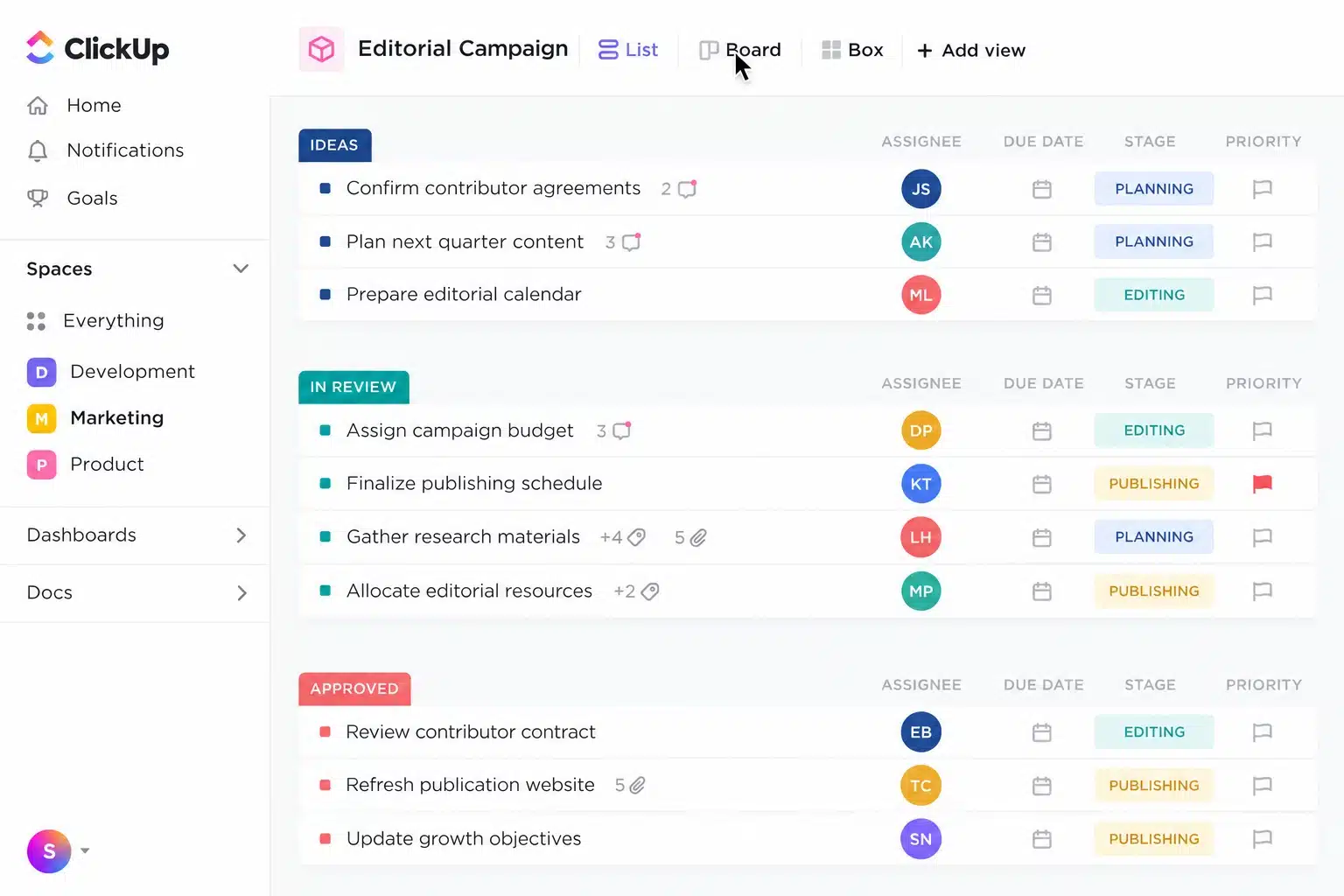
The Unlimited plan includes native time tracking, unlimited Gantt charts, unlimited storage, integrations, and permission-controlled guests for $7 per user per month when billed yearly. That makes ClickUp a strong choice for freelancers who need detailed task management and billable-hour records in one workspace.
- Build a separate space or folder for each client.
- Create statuses that match your work, such as “Waiting for Client,” “In Revision,” and “Ready to Invoice.”
- Use custom fields for project budget, retainer month, or estimated hours.
- Invite clients only to the tasks or folders they need to see.
ClickUp Brain can help summarize task details and draft updates, but do not treat AI output as a client-ready status report without checking dates, names, and commitments.
The tradeoff is setup time. Start with one template and a short status list. Too many custom fields and views can make a simple freelance workflow feel harder than it needs to be.
Notion: Keep Notes, Briefs, and Projects Together
Notion is a great fit if your client work begins with research, meeting notes, content briefs, or creative ideas. You can keep those pages beside your task database instead of scattering them across folders and apps.
Its Projects and Tasks setup can show the same work as a table, board, timeline, calendar, list, or gallery. Use one tasks database, then create filtered views for each client so you avoid maintaining several copies of the same task list.
Build a simple client dashboard
Create a project page for each client with a short brief, links to shared files, key contacts, due dates, and a filtered list of open tasks. Give the client comment access only to the page or tasks where you want feedback.
Notion is less suited to freelancers who need native invoicing or one-click time tracking. Pair it with dedicated billing or time software if accurate hourly records drive your income. Use Notion for project context and reusable systems. Use it carefully if you need strict timekeeping or financial records.
Asana: Efficient Management of Multiple Projects
Asana is a solid choice if you manage several client projects with repeatable steps and clear handoffs. Its list, board, and calendar views are available on the free Personal plan, while Timeline, Gantt views, forms, and reporting start on paid plans.
As of September 2026, Asana lists Starter at $10.99 per user per month with annual billing. Paid plans also include unlimited free guests, which helps when clients need to approve work without taking up a paid seat.
- Use a form for incoming client requests, edits, or support tasks.
- Set dependencies so a final design task cannot start before copy approval.
- Use milestones for proposal approval, first draft, revisions, and launch.
- Review the project timeline each Monday to catch workload conflicts early.
Asana’s goals and portfolio features are helpful for larger client-service teams, but a solo freelancer may not need them. Keep your workspace focused on deliverables, due dates, and client approvals.
Trello: Simplified Kanban Boards for Easy Tracking
Trello keeps project management visual. Each board uses lists and cards, so you can drag work from “To Do” to “In Progress,” “Waiting on Client,” and “Done.”
The free plan supports up to 10 open boards and 10 collaborators per Workspace, plus 250 automation runs per month. That is enough for a solo freelancer who needs a clear workflow without a long onboarding process.
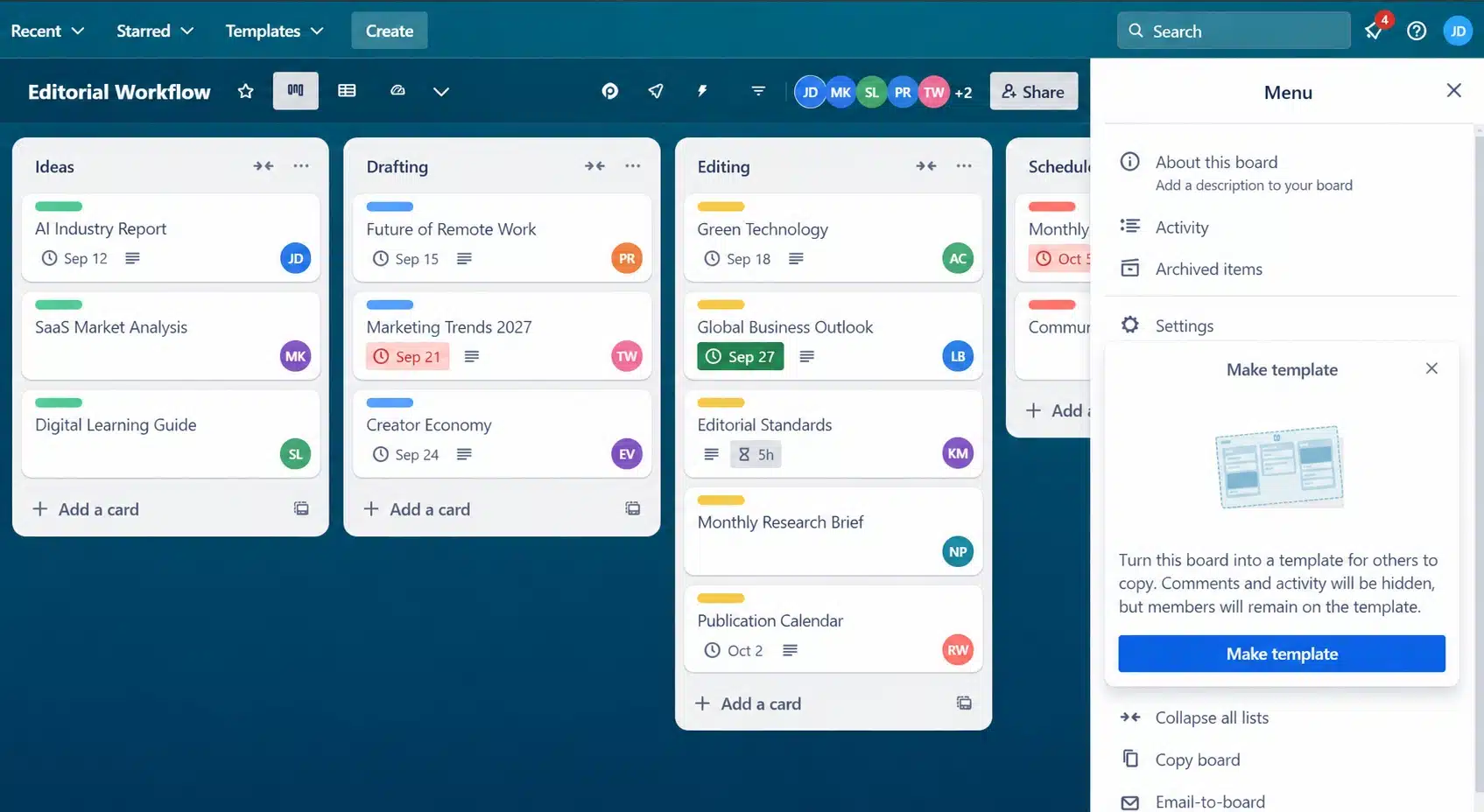
Paid Standard starts at $5 per user per month with annual billing and adds unlimited boards, custom fields, advanced checklists, card mirroring, and 1,000 automation runs each month.
Make boards work for client projects
Use one card for each deliverable, not every tiny action. Put subtasks into a checklist, attach the brief, assign a due date, and use comments to keep feedback attached to the work.
Set a rule that moves a card to “Ready to Invoice” when you mark the final checklist item complete. It is a small workflow rule that can stop finished work from sitting unpaid.
Hive: Collaboration, Views, and Time Tracking
Hive gives freelancers several ways to view the same project, including list, Kanban, calendar, Gantt, table, and timeline views. It also includes native chat, which can help small teams keep quick questions out of long email threads.
Hive’s free plan supports up to 10 workspace members, unlimited tasks, collaborative notes, email, and chat. The paid Starter plan begins at $5 per user per month, while time tracking is available on the Teams plan or as part of a paid setup.
- Choose Hive if you work with contractors and want a shared workspace for tasks and messages.
- Use the calendar to see deadlines beside meetings and scheduled reviews.
- Use proofing and approvals if clients regularly mark up files before final delivery.
- Check add-on costs before subscribing if timesheets, resourcing, or advanced reporting matter to you.
Hive can suit a growing freelance team, but it may be more software than you need for one-person projects with simple deliverables.
Teamwork: Manage Freelance Teams and Client Work
Teamwork is built around client work, which makes it useful for freelancers who use subcontractors or run a small service business. You can organize projects by client, assign tasks, log billable time, and track budgets in the same system.
Teamwork lists its Basics plan at $9.99 per user per month with annual billing. It includes up to five projects, five users, time logging, client organization, Gantt, table, list, and board views.
A standout feature is unlimited free client users. Give clients a place to view progress and comment, while keeping your internal rates, task notes, and planning private with role-based permissions.
Use Teamwork if project profitability matters as much as task completion. Set estimated hours on major tasks, log actual time, and review the difference before you price the next similar project.
Basecamp: Keep Client Communications in One Place
Basecamp is best for freelancers who want a calm, simple place for client communication. Projects can include to-dos, messages, chat, files, schedules, and automatic check-ins without making every client learn a complex system.
Basecamp’s Pro plan is $99 per month with annual billing and covers up to 25 active projects, 100 GB of storage, time tracking, templates, and unlimited users. Its fixed price can make sense for a small agency that regularly adds clients and contractors.
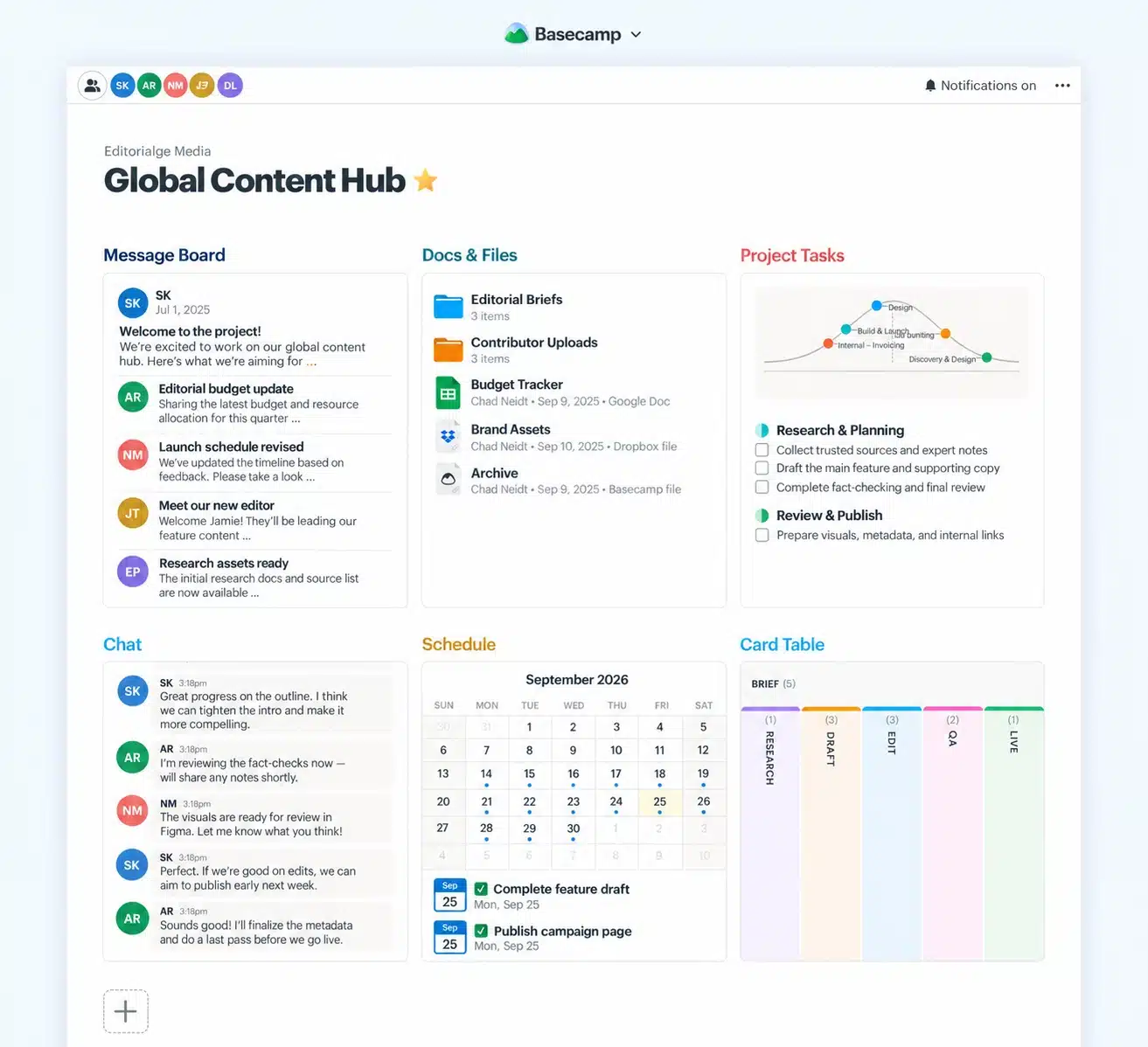
Basecamp does not focus on detailed Gantt planning, task dependencies, or deep project reporting. If you handle a complex launch with many moving parts, ClickUp, Asana, or Teamwork may give you more control.
Choose Basecamp for clear client conversations and routine project check-ins, not for highly detailed scheduling.
Plutio: All-in-One Freelance Management Solution
Plutio is built for freelancers who want project management and client operations in one place. It includes projects, tasks, invoices, proposals, contracts, forms, scheduling, time tracking, automations, and a branded client portal.
Plutio’s Core plan costs $19 per month and includes all core features for solo work, with up to nine active clients. Its client portal lets clients view project progress, files, messages, invoice history, and payment options without asking you for another status update.
| Need | How Plutio helps |
|---|---|
| Win the project | Create a proposal and collect an electronic signature. |
| Set expectations | Turn deliverables, due dates, and tasks into a client-visible project. |
| Track billable work | Log time against projects and use it when preparing invoices. |
| Get paid | Send branded invoices and let clients pay from their portal. |
Plutio is a strong pick if you are tired of copying client names, scope details, and hours between separate tools. If you only need a basic task board, its wider feature set may feel unnecessary.
nTask: Feature-Rich Yet Affordable Project Tool
nTask is a low-cost option for freelancers who want structured planning without a high monthly bill. It brings tasks, timesheets, meetings, issue tracking, Kanban boards, and Gantt charts into one app.
Its Premium plan has been listed at about $3 per user per month, while Business plans add features such as risk management and custom fields. That pricing can work well if you need more structure than Trello but do not need invoices or a client portal.
- Use meeting agendas and follow-up actions for client calls.
- Track time in timesheets when you bill hourly.
- Add risks to projects with firm launch dates or outside dependencies.
- Use Gantt charts to show clients how approvals affect final delivery.
nTask does not replace proposal, contract, or invoicing software. Plan for a second tool if you want to manage the full sales-to-payment process.
Freedcamp: A Strong Free Project Management Tool for Freelancers
Freedcamp gives budget-conscious freelancers a useful set of project features without forcing an immediate subscription. The free plan includes tasks, discussions, a calendar, files, milestones, time tools, and unlimited users, projects, and storage within its plan limits.
Paid Pro begins at $1.49 per user per month with annual billing and adds features such as Gantt chart views, custom fields, recurring tasks, and integrations. Clients and occasional collaborators can use guest or read-only roles, which helps you share updates without paying for every viewer.
Use Freedcamp if you want a practical place for tasks, client comments, files, and recurring work. Test the exact view or add-on you need during the 14-day trial, because some advanced planning options sit behind paid plans.
Common Mistakes to Avoid in Project Management
A good tool cannot fix an unclear project. The biggest wins often come from a few habits that make client work easier to track and approve.
- Starting without a written scope: List deliverables, revision limits, due dates, and what the client must provide before work begins.
- Using vague task names: Replace “Work on website” with a clear action such as “Send homepage draft for approval.”
- Hiding client feedback in email: Put comments and decisions on the related task so you can find them later.
- Ignoring scope changes: Add a task for the request, state the impact on price or timing, and get approval before starting.
- Failing to track time: Log time for a week, even on fixed-price work, so you can see whether your estimate was realistic.
- Skipping a weekly review: Check upcoming deadlines, blocked tasks, unpaid invoices, and client approvals once a week.
A 2016 Project Management Institute analysis found that high-performing organizations met original project goals far more often than low-performing organizations, 89% compared with 34%. You do not need a corporate process for a freelance project, but a written scope, regular review, and clear change approvals give you the same useful discipline.
Final Words
The 10 best project management tools for freelancers cover very different ways of working. Trello and Freedcamp work well for simple, low-cost task management, while ClickUp and Asana give you deeper workflow management, reporting, and planning views.
If you want proposals, invoices, contracts, and client visibility in the same place, Plutio or Moxie may save you from juggling extra software.
Pick one tool, set up one active project, and use it for a full week. The right system should make your next task, next deadline, and next invoice easier to see.























