
I want an FAQ page to do one simple job: help me make a decision without sending me back through the website to piece together an answer. If I ask about pricing, I want to understand the cost. If I ask whether something will work for me, I want the conditions as well as the promise.
That is where I would start with answer engine optimization, or AEO. The term describes efforts to make information easier to discover and use in answer-oriented search experiences, including AI-generated responses.
A useful FAQ page for AEO gives readers clear information that can also make sense when referenced elsewhere. But publishing questions and answers does not guarantee rankings, featured snippets, or AI citations.
The ten questions below offer a practical foundation. Adapt them to your customers and your business. Their purpose is to resolve uncertainty, and the quality of the answers matters more than reaching a particular number.
What Makes an FAQ Page Useful for AEO?
Google’s current guidance treats optimization for its generative search features as part of SEO. It does not require special FAQ schema or a particular writing formula.
There is also an important distinction between FAQ content and FAQ rich results. Google stopped displaying FAQ rich results on May 7, 2026. That change concerns a search-result feature; businesses can still publish useful FAQ content.
My priority would be to make every answer understandable, accurate, and specific enough to act on. A reader should know which product the answer concerns, which conditions apply, and where uncertainty remains.
For example, “Yes, absolutely” gives very little information on its own. An answer that names the supported device, service area, or subscription plan gives the reader something concrete.
That clarity supports the purpose of people-first content: helping someone accomplish what brought them to the page.
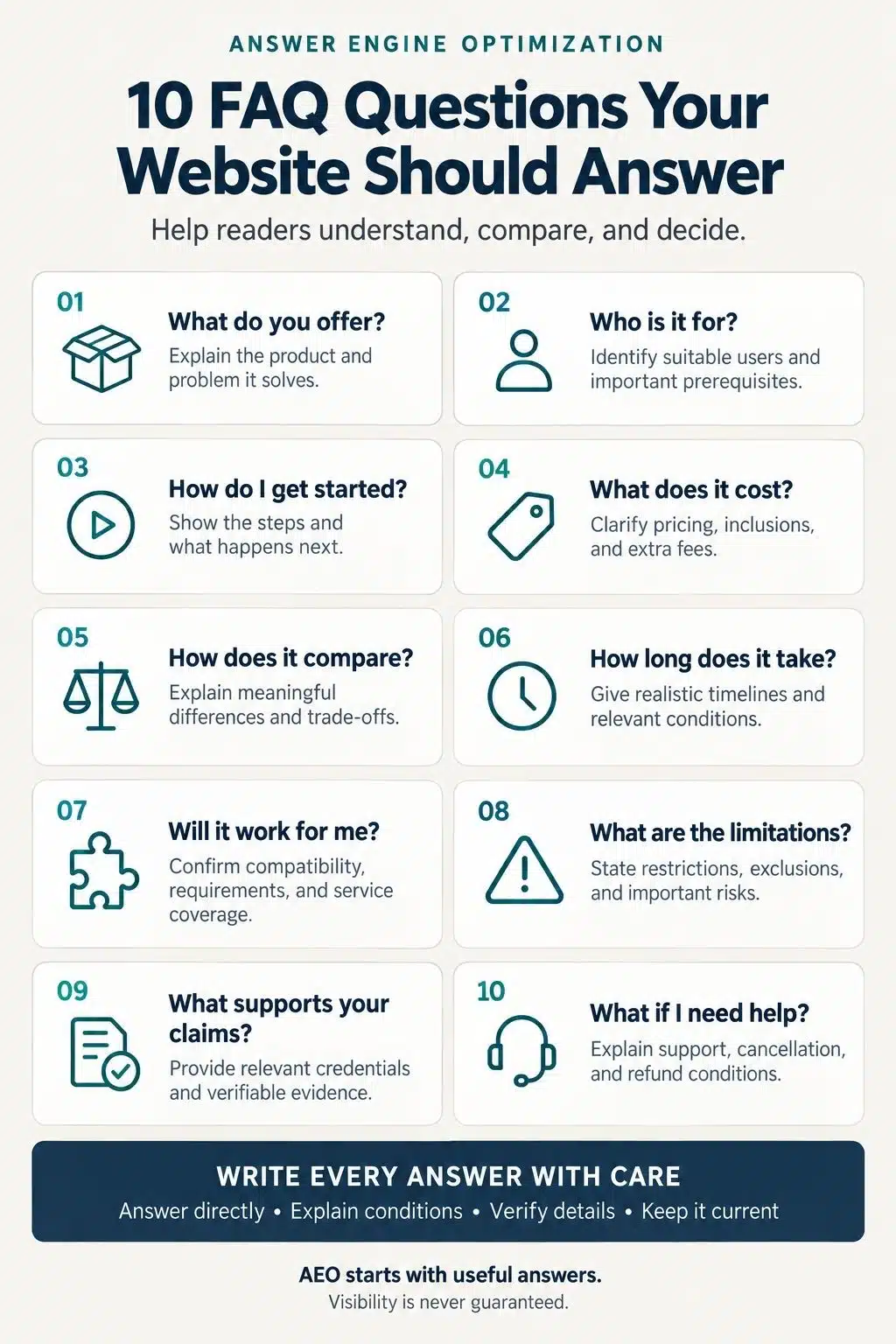
1. What Is Your Product or Service, and What Problem Does It Solve?
Before discussing features, explain what you actually offer. I would begin with the product or service category and the task it helps someone complete. A visitor unfamiliar with your business should understand the answer without decoding internal terminology.
Consider a hypothetical scheduling tool. “A platform that transforms productivity” says little. “Scheduling software that lets clients choose an available appointment and receive a booking confirmation” explains the job.
Your answer should establish:
- What the product or service is.
- Which problem it addresses.
- What the customer can do with it.
- Any important boundary to that description.
Keep the scope honest. A tool that organizes appointments should not automatically be described as a complete business-management system.
This answer also belongs on the main product or service page. The FAQ can reinforce it, but visitors should not have to search for a basic explanation of the offer.
2. Who Is It Suitable For?
Once someone understands the offer, the next question is whether it fits their circumstances.
“This is for everyone” rarely gives a reader enough information to judge suitability. Describe the customers you can actually serve, using characteristics that matter to the decision.
Depending on the business, those might include experience level, team size, location, budget, or access to particular equipment.
I would also explain who may need a different option. A course that assumes working knowledge of spreadsheets should say so. A service available within a defined area should make that boundary clear.
The aim is to help a reader recognize a good fit before committing time or money. Be equally careful with exclusions: do not turn a typical customer profile into an eligibility rule unless it really is one.
3. How Does It Work, and How Do I Get Started?
An interested visitor should be able to picture the next few steps.
Explain what they need to provide, what they need to do, and what your business handles. If onboarding requires an appointment, approval, identity check, or technical setup, mention it where relevant.
Numbered steps work well when the order matters. For a hypothetical consulting service, the process might involve submitting a brief, agreeing on scope, and scheduling a first meeting. Only publish those steps if they reflect the actual service.
I would pay particular attention to what happens after the first action. “Submit the form” leaves a question unanswered: then what?
Explain whether the customer receives an email, waits for a review, or books a call. A short account of the process can remove uncertainty without reproducing an entire getting-started guide.
4. How Much Does It Cost, and What Is Included?
Pricing answers need enough context to be useful.
State the currency, billing frequency, and what the customer receives. Explain mandatory fees, usage limits, minimum commitments, and optional extras when they apply.
A monthly equivalent billed annually is different from a month-to-month payment. Make that distinction visible beside the amount.
For custom services, an exact price may not be possible before assessing the work. Explain what determines the quote: scope, duration, materials, number of users, or another genuine cost factor.
I would rather read a clear explanation of those variables than an attractive starting price that excludes most of the work.
Check the FAQ against your pricing page and checkout. If those places disagree, the customer is left deciding which version to trust.
5. How Does It Compare With the Alternatives?
A comparison answer should help someone choose. Start with the criteria that matter for the task. Those could include setup effort, support, compatibility, ownership, ongoing costs, or the amount of manual work required.
The alternative may be a competing product, an in-house process, or continuing with a spreadsheet. You do not need to name a competitor if a comparison between approaches answers the question more clearly.
I would avoid declaring one option “the best” without defining the conditions behind that judgment. Something can suit a beginner while being too limited for a specialist.
When naming competitors, verify their current specifications and compare equivalent offerings. A lower price is not a meaningful advantage if the comparison quietly ignores different usage allowances or contract terms.
6. How Long Does Setup, Delivery, or the Process Take?
Time estimates should tell the reader what the clock measures.
Does the stated period begin when someone places an order, submits complete information, or approves a proposal? Does it end at dispatch, delivery, activation, or completion? These distinctions deserve a clear answer.
Use a supported estimate or an actual service commitment. Where timing varies, explain the causes: customer approvals, workload, location, customization, or third-party dependencies.
I would also separate setup time from time to achieve a result. Opening an account quickly does not mean a customer will see an immediate business outcome.
If reliable timing data is unavailable, explain how and when the customer will receive an estimate. Inventing a reassuring range creates a promise the business may be unable to keep.
7. Will It Work With My Existing Tools, Devices, or Location?
Compatibility can determine whether an otherwise attractive offer is usable. For software, identify supported operating systems, versions, file formats, or integrations. Explain whether an integration is native, requires another service, or involves a manual transfer.
For a local business, this question may concern service coverage or site requirements. For a physical product, dimensions, power requirements, or installation conditions may matter more.
Avoid “works with everything.” Name the support you can verify and the exceptions customers need to know.
I would put the most consequential restriction near the beginning of the answer. If a capability requires a particular plan, readers should discover that before they spend time following setup instructions.
8. What Limitations, Risks, or Exclusions Should I Know About?
This is an opportunity to answer the question a customer may not know to ask.
Explain material limits, unsupported uses, exclusions, or circumstances that require additional help. The relevant details will vary, but the principle is consistent: qualifications belong beside the claims they affect.
For example, a service description should make clear when customer-supplied information is necessary before work can proceed. A software answer should identify important limits on a feature rather than leaving them buried in a separate document.
I would avoid treating this section as a place for a long, generic disclaimer. Give the reader practical boundaries.
An honest limitation helps someone assess suitability. It also keeps a short answer from sounding more absolute than the underlying facts allow.
9. What Evidence Supports Your Quality or Reliability Claims?
Words such as “trusted,” “secure,” and “high quality” need substance. Depending on the claim, useful evidence could include documented testing, relevant qualifications, a clearly scoped certification, or a case study with enough detail to understand the result.
Explain what the evidence covers. A credential held by one team member does not necessarily apply to every service. A result achieved by one customer does not establish what every customer should expect.
My standard here is straightforward: could someone check the statement?
Do not invent a customer story or imply firsthand testing that never happened. If evidence is limited, narrow the claim to what you can support. Specific, modest information gives readers a firmer basis for judgment than a broad assurance.
10. What Happens If I Need Help, Cancel, or Request a Refund?
The relationship does not end at purchase. Explain how customers can reach support and when that support is available. Distinguish a target response time from a guaranteed commitment.
Cancellation and refund answers should identify the actual steps, applicable conditions, and relevant timing. For digital services, customers may also need to understand what happens to their files and account access.
I would split these into separate questions if the combined answer becomes difficult to scan. They belong together as a planning category, but readers may arrive with very different problems.
Make the practical answer easy to find, then direct users to fuller policy details where needed. Ensure every statement matches the business’s current terms and actual processes.
How I Would Build the FAQ Around Real Customer Needs
The ten categories are a starting point. The final questions should come from evidence about your own audience.
Review support requests, sales conversations, site searches, and customer feedback. Group different phrasings that ask for the same information. Then prioritize the questions that recur or block an important decision.
For each answer, identify who can verify it. Pricing may need a billing review. Compatibility may require a product specialist. Refund terms should match the approved policy.
I would then use a simple writing pattern:
- Answer the question directly.
- Explain the conditions that change the answer.
- Add necessary evidence or detail.
- Give the reader a useful next step.
There is no reason to force every answer into the same length. A straightforward question may need two sentences; a conditional policy may need a short list.
Keep answers available as readable page text, and check that search crawlers can access the content. If you use expandable sections, test both their accessibility and how the content is delivered.
Finally, maintain consistency. An FAQ should not become a second, independently edited set of prices, policies, and product specifications.
Give Readers an Answer They Can Use
The FAQ page I would aim for is one that respects a reader’s time and judgment. It explains the offer, addresses the difficult questions, and makes the next step understandable.
Start with the question your customers keep asking. Write the answer your team can stand behind. Check the details, put it where people need it, and assign someone to keep it accurate.
That creates a useful page regardless of which search feature brings someone to it. And it gives your AEO work a sound foundation: information worth finding because it helps someone move forward.
Frequently Asked Questions About FAQ Page for AEO
1. What Is the Difference Between AEO and SEO?
SEO broadly concerns helping content appear in search. AEO emphasizes answer-oriented visibility, including AI-generated responses. The work overlaps substantially. Google treats optimization for its generative search features as part of SEO, so strong content and technical fundamentals remain relevant.
2. Does FAQ Schema Guarantee AI Citations?
No. Google does not require special FAQ schema for its generative search features. Structured data should accurately describe the content, but adding it does not guarantee that an AI system will reference your page.
3. How Long Should an FAQ Answer Be?
Long enough to answer accurately without unnecessary detail. Begin with the answer, then explain important conditions. There is no universal word count that guarantees visibility, and cutting essential context to reach a target can make the answer misleading.
4. Should Every Page on My Website Have an FAQ Section?
No. Add one when it resolves useful questions that the page has not already answered clearly. If the information belongs in the main content, improve that content first. Repeating generic FAQs across unrelated pages adds little value.
5. Can I Use AI to Write My FAQ Answers?
Yes, as a drafting aid. Give it verified information, then have someone knowledgeable review the output. Check prices, policies, limitations, and product details carefully. Never publish invented customer experiences or assume that a polished answer is accurate.