
I still remember the first time I ran my own website through a popular SEO audit tool. A massive, glaring red notification popped up on the dashboard: “WARNING: High Toxicity Score.” According to the software, I had hundreds of “toxic links” pointing to my site, and my immediate reaction was pure panic. I was convinced my rankings were going to tank overnight.
If you are reading this, you have probably just seen a similar warning. It is incredibly stressful. But after years of managing SEO campaigns, analyzing traffic drops, and keeping up with Google’s relentless algorithm updates, I can tell you right now: take a deep breath.
Here is the honest, unvarnished truth about toxic links, how search engines view them today, and whether you actually need to disavow them.
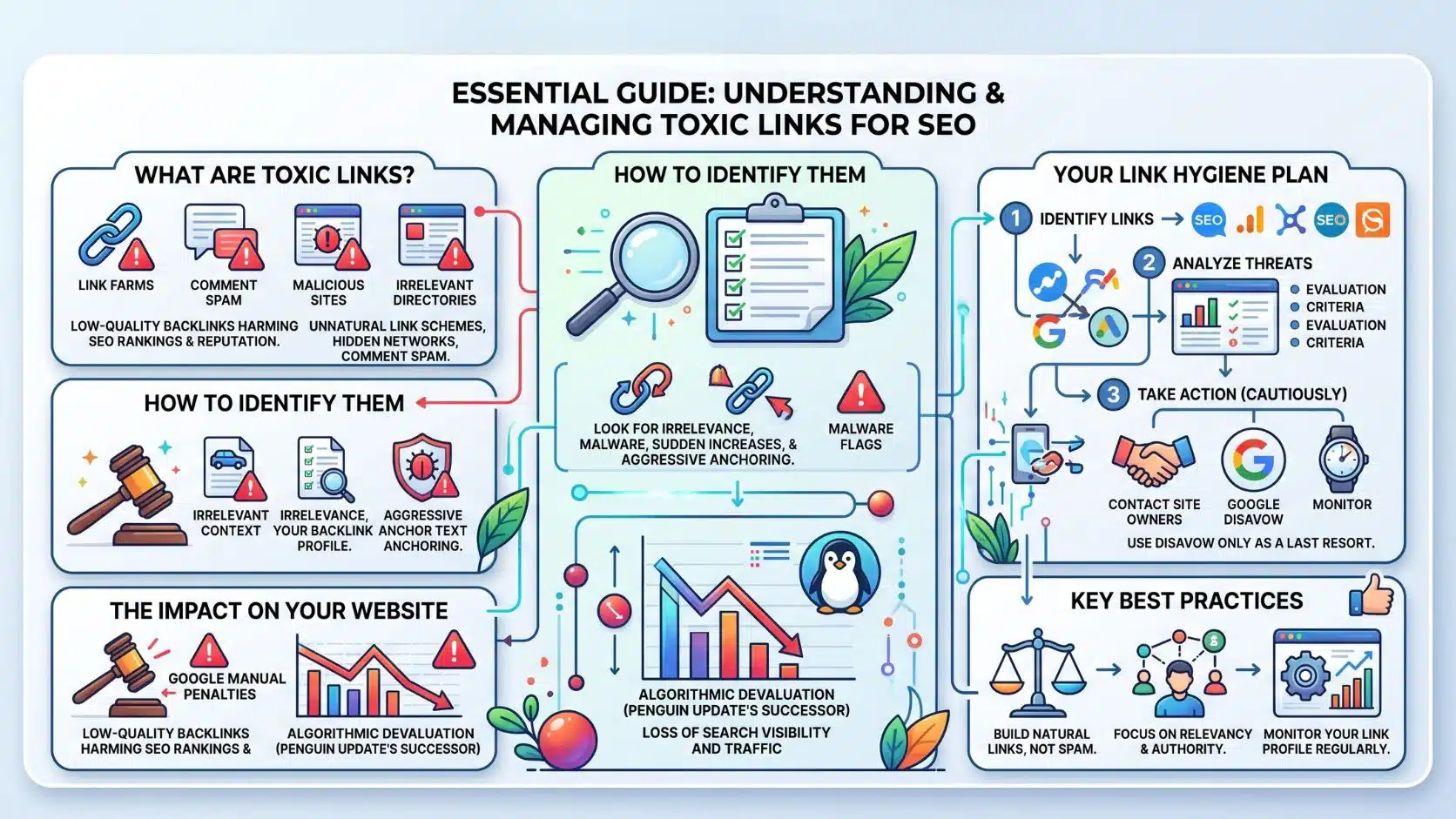
What Is a “Toxic” Link, Really?
The very first thing you need to understand is that “toxic link” is a marketing term invented by third-party SEO software companies. It is not an official Google metric.
When your favorite SEO tool flags a backlink as toxic, it is just making an educated guess. It usually flags links from low-traffic sites, foreign web directories, pages with strange domain names, or sites with high outbound link ratios.
In the old days of SEO, we’re talking over a decade ago, these spammy links could absolutely penalize your site. People used to buy thousands of junk links to artificially inflate their rankings, and Google’s infamous Penguin update cracked down on that hard. But the internet has evolved, and so have search engines.
How Google Handles Bad Links Today
Fast forward to today, and the landscape is completely different. Google is remarkably smart. Their AI systems, specifically SpamBrain, are designed to evaluate the context and value of links at an incredibly sophisticated level.
When Google sees a bizarre, spammy link pointing to your site from a random scraper directory in a language you don’t even speak, they do not penalize you. They simply ignore it. They know you didn’t ask for that link, and they know it is just the natural “junk” that accumulates on the web as your site grows in popularity.
In fact, Google representatives have explicitly stated over and over again that spending hours digging through third-party “toxic link” reports is essentially a waste of time.
Should You Use the Disavow Tool?
For 99% of website owners, my answer is a hard no. The Disavow Tool in Google Search Console is essentially a way of saying, “Google, please ignore these specific links when evaluating my site.” But if Google’s algorithms are already ignoring them automatically, using the tool is entirely redundant.
Worse than being redundant, it can actually be dangerous. I have seen well-meaning site owners get overzealous, export a list of “toxic” links from an SEO tool, and blindly upload it to the Disavow Tool. Weeks later, their organic traffic plummets. Why? Because the third-party tool was wrong. Some of those “ugly” links were actually passing valuable authority, and by disavowing them, the site owner essentially shot their own rankings in the foot.
The Only Times I Ever Disavow Links
I keep my use of the Disavow Tool restricted to exactly two specific scenarios:
- A Manual Action Penalty: If I log into Google Search Console and see an actual “Manual Action” notification for unnatural links, it means a human reviewer at Google has actively penalized the site. At that point, you have no choice. You must attempt to remove the links manually, and then use the Disavow Tool to clean up the rest before filing a reconsideration request.
- Cleaning Up Intentional Manipulation: If I take over a website from a shady SEO agency that I know actively purchased private blog network (PBN) links or ran massive, intentional spam campaigns, I will proactively disavow those specific manipulative links before they trigger a manual review.
If neither of those applies to you, leave the Disavow Tool alone.
Wrapping It Up
At the end of the day, modern SEO is about building genuine trust with both your audience and search engines. Obsessing over toxic links takes your focus, time, and energy away from what actually moves the needle: creating incredibly helpful content, improving your user experience, and earning authentic recommendations.
Unless you have a glaring manual penalty staring you in the face inside Search Console, my advice is simple. Close the link audit tab, ignore the scary red numbers, and get back to creating content that people actually want to read. That is the only real, sustainable way to win in search today.
Frequently Asked Questions on Toxic Links
1. Will a competitor pointing toxic links at my site ruin my rankings?
Almost never. This is known as “Negative SEO,” and it used to be a real threat. Today, Google’s algorithms are exceptionally good at recognizing when a sudden, massive influx of spam links is a malicious attack rather than something you built yourself. They just neutralize the links.
2. Why do SEO tools still highlight toxic links if they don’t matter?
SEO tools use their own proprietary metrics, and backlink health is a feature users expect to see. It is helpful data for spotting historical patterns (like identifying a previous agency’s bad work), but it should never be treated as an absolute rulebook for how Google views your site.
3. Do I need to disavow links to recover from a core update?
No. Google’s core updates are about content quality, user experience, and overall site authority—not about punishing you for random scraper links that you cannot control. Focus on improving your content instead of auditing your links.
4. How long does a disavow file take to work?
If you do submit a file, the impact is not instant. It can take a few weeks or even months for Google to recrawl those specific URLs and process the disavow request across their index.
5. Can I undo a disavow file if I made a mistake?
Yes, you can delete the file directly in Google Search Console. However, it takes time for Google to re-evaluate and restore the value of those links, and there is no guarantee they will carry the exact same weight they did before the mistake.