The person who carries a group project rarely volunteers for the job—they inherit it through vague assignments, missed deadlines, and late work. Knowing how to plan group projects stops this cycle before it starts. A successful group project relies on four core elements: named task owners, visible workflows, staggered internal deadlines, and an agreed-upon escalation protocol.
True fairness isn’t about giving everyone an equal number of tasks, as research, design, and editing require vastly different efforts. Instead, effective planning establishes a transparent, balanced distribution of meaningful work so accountability is built into the process from day one.
How to Plan Group Projects in 10 Practical Steps
Learning how to plan group projects starts with turning a shared deadline into clear, manageable commitments. The following steps show how to define the work, assign fair ownership, set useful checkpoints, track progress, review contributions, and address missed responsibilities before one dependable person is left fixing everything at the end.
1. Define what the team must deliver
Start with the assignment brief, rubric, client request, or project charter. The team should be able to describe the finished result in one sentence: what it is, when it is due, and how it will be judged.
List the fixed requirements: format, length, mandatory sections, assessment criteria, submission method, and citation or technical rules. Assign one member to clarify anything uncertain. Otherwise, a team can produce polished work that does not answer the brief.
2. Break the deliverable into work that can be owned
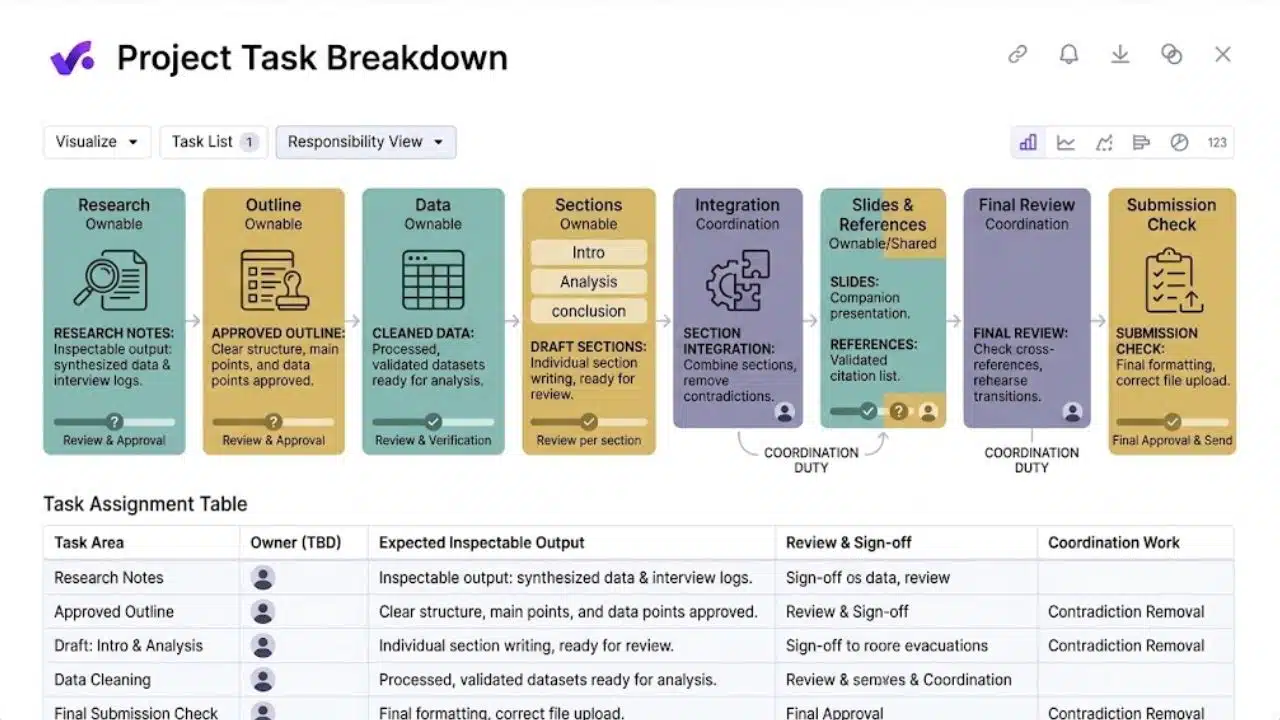
“Write the report” is too broad to assign responsibly. Divide it into outputs another person can inspect: research notes, an approved outline, cleaned data, draft sections, slides, references, and a submission check.
Include the work between those outputs. Someone must combine sections, remove contradictions, check references, rehearse transitions, and upload the correct file. These duties often fall to the most conscientious member because nobody assigned them. If nobody can explain what completion looks like, the task needs a clearer definition.
3. Discuss skills, schedules, and constraints
Before assigning roles, ask what each member can do confidently, what they need to learn, and which scheduling or access problems could affect their work.
A strong presenter may be unavailable on rehearsal day. A colleague may understand the data but lack access to the required system. These are planning facts, not excuses.
Do not hand every difficult task to the strongest person. Pairing is fairer: one member prepares the draft while another reviews it against agreed criteria.
4. Give every task one clear owner
Several people can contribute, but one person should own completion. Assigning work to “everyone” makes it easy to assume somebody else is handling it.
For a small project, record five details for each task:
- The task and its expected output
- One owner
- A reviewer, where review is needed
- An internal deadline
- A link or location showing the completed work
For example: “Research summary — Amina — reviewed by Leo — Tuesday, 6 p.m. — notes in the shared document.” That is enough detail to act on.
Larger projects may use a RACI chart to distinguish who is responsible, accountable, consulted, and informed. Small projects rarely need more than the five fields above.
5. Balance effort and risk, not task counts
Ten simple slides may require less work than cleaning a difficult dataset for one chart. Compare effort, difficulty, revision time, coordination duties, and uncertainty rather than counting assignments.
Flag tasks that rely on an interview participant, unfamiliar software, outside approval, or missing information. Early estimates will be imperfect, so rebalance the work after the first milestone.
6. Work backward from the deadline
The submission date is not a useful working deadline because it leaves no time to recover. If a presentation is due Friday, sections might be due Monday, the assembled deck Tuesday, review Wednesday, and revisions Thursday. That leaves time to correct weak evidence or replace missing work.
Put the earliest checkpoint where failure would be expensive. Review a survey before sending it. Confirm access to a crucial dataset before drafting around it.
7. Agree on working rules early
A short team agreement should cover the behaviours that affect delivery:
- Where files, decisions, and task status will be stored
- Which channel is used for urgent messages
- What response time is reasonable on working days
- How meetings and decisions will be documented
- When members must report a likely delay
- What happens after a missed commitment
Keep the rules realistic. A defined response window works better than a promise to answer every message immediately. Choose one source of truth; scattered chats, emails, and duplicate files invite mistakes.
8. Make progress visible without creating surveillance
Use a few clear statuses: Not Started, In Progress, Ready for Review, Blocked, and Done. Time spent does not make a task complete; the promised output must be available.
Short check-ins need only three questions: What was completed? What comes next? What is blocked? Schedule them around important handoffs. Long meetings are not evidence of progress. If the work is visible, ten focused minutes may be enough.
9. Review early and combine the work before the final day
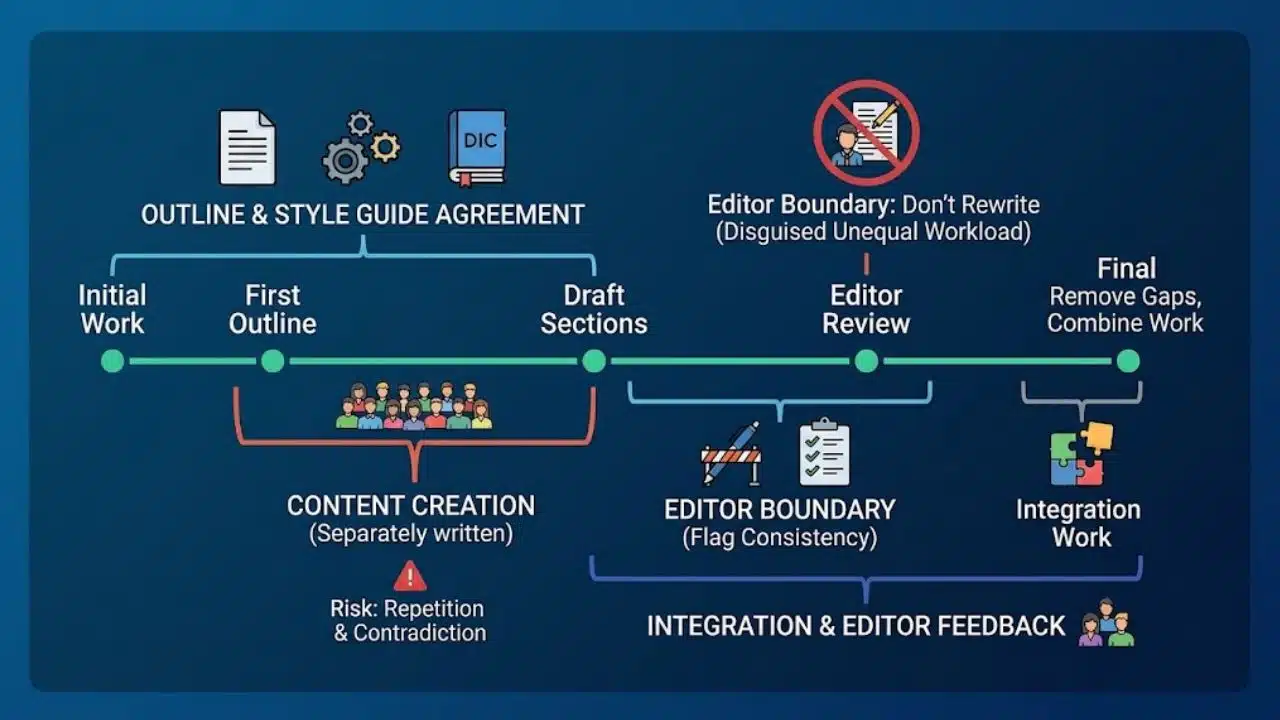
Separately written sections can repeat ideas or contradict one another. Agree on the outline, audience, terminology, and citation style. Review an early sample before the same problem spreads.
Name an editor, but set a boundary around the role. The editor should flag gaps and maintain consistency, not quietly rewrite every weak section. Assigning an editor without that boundary is one of the quickest ways to disguise an unequal workload.
10. Address missed work and use an escalation path
When a deadline slips, ask what is finished, what is blocked, and what recovery date is realistic. Replace “Please finish soon” with “Upload the revised section by 4 p.m. Wednesday so review can begin that evening.”
If the delay threatens the project, update the plan. Reassign only essential work and record the change. Quietly absorbing a missing task may protect one deadline, but it hides the workload problem.
For academic work, follow the course policy if repeated non-participation continues. In a workplace, report the delivery risk through the agreed route. Record assigned work, deadlines, reminders, current status, and project impact.
Adjust the Plan to the Setting
The basics of how to plan group projects stay consistent, but accountability should fit the setting.
- Students can keep task assignments, meeting notes, and plan changes so the group can intervene before a grading dispute develops.
- Educators can use interim deliverables and consider individual learning alongside the group product. Peer feedback belongs before the final submission, while behaviour can change.
- Workplace teams must clarify decision authority. Record dependencies such as data access or budget approval and assign someone to resolve them.
Warning Signs That One Person Is Starting to Carry the Team
Intervene when several of these patterns appear:
- Important tasks belong to “everyone.”
- Updates describe effort but show no output.
- The same person takes notes, chases deadlines, edits, and submits.
- Drafts arrive too late for meaningful review.
- Members reveal blockers only after missing deadlines.
- The editor repeatedly replaces incomplete work instead of returning it.
One missed task does not prove bad faith. Look for repeated patterns and whether the team can agree on a workable recovery.
Final Thoughts
Knowing how to plan group projects starts with making commitments visible. Define the result, name task owners, create internal deadlines, and decide how the team will respond when work slips.
That structure will not prevent every disagreement. It will make unequal effort visible early enough to correct it—before the final submission turns a planning failure into a personal conflict.
FAQs
Does a small group need project management software?
Usually not. A shared document, a task list, and one communication channel are enough for most short assignments. Use dedicated software when the project has many dependencies or approval stages—not because a project board looks more professional.
Should members be allowed to choose their own tasks?
Preferences should influence assignments, but they should not decide them entirely. Confident members may claim the visible or interesting work while editing, references, coordination, and quality checks go unclaimed. Let people express preferences, then review the complete workload as a team.
What if everyone receives the same group grade?
Keep task records and raise participation problems while there is still time to correct them. Check the instructor’s policy before assuming peer evaluations will change a grade. Documentation is most useful when it shows assignments, missed deadlines, follow-up attempts, and changes to the plan—not complaints written after submission.