
App overload rarely begins with one obviously bad decision. A team adds a project tracker for a demanding client. Someone approves a meeting tool because it solves an immediate problem. An AI assistant moves from free trial to paid subscription, but the software it was supposed to replace never leaves.
Eventually, project updates live in one place, approvals happen in chat, files sit in two storage systems, and nobody knows which subscription is about to renew.
To reduce app overload, you do not need to force every department into one platform. You need to remove avoidable duplication, clarify where work belongs, and keep only the complexity that serves a real purpose.
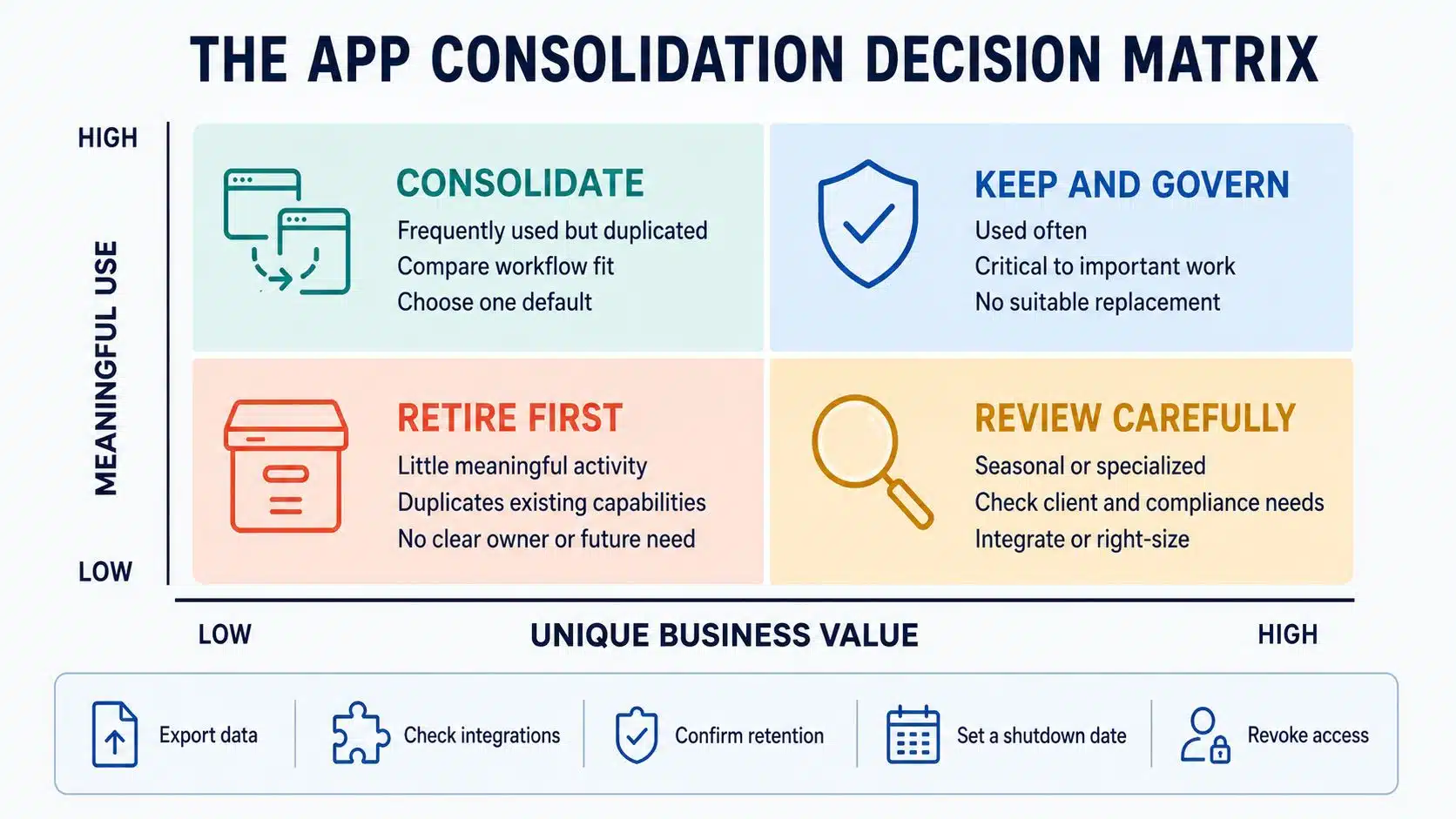
1. Find Every App the Business Is Actually Using
Ask employees to list their work apps and you will get part of the picture. People forget abandoned trials, browser extensions, department purchases, meeting bots, plug-ins, and subscriptions charged to company cards.
Build the inventory from several sources: expense records, vendor invoices, administrator dashboards, procurement documents, identity logs, integrations, and team feedback. Include free tools and AI services because they may still hold business information even when they do not appear on a software bill.
For each application, record:
- Its purpose and owner
- The administrator and active users
- Plan, cost, and billing method
- Renewal and cancellation-notice dates
- Information stored inside it
- Connections to other systems
- Available export options
A spreadsheet can handle this for a smaller company. The important part is keeping it current, not buying another application merely to document the ones you already have.
2. Trace the Work Before You Start Removing Tools
Imagine a marketing campaign that begins as a document, moves into a project tracker, gets discussed in chat, waits for approval in email, and ends with final assets in cloud storage. Looking at each application separately will not reveal where people are losing time.
Follow several recurring workflows from beginning to end. Publishing an article, onboarding an employee, resolving a customer complaint, and moving a sales lead into delivery are all useful examples.
Look for the awkward moments:
- Information copied manually between systems
- Approval requests that disappear in chat
- Files downloaded and uploaded repeatedly
- Project status recorded in more than one place
- Employees waiting because they cannot find the current version
App overload often causes the most trouble between tools, not inside them.
3. Separate Real Duplication From Apparent Overlap
Group applications by the jobs they perform: messaging, meetings, task management, documents, storage, customer records, analytics, forms, whiteboarding, automation, and AI assistance. Then investigate the overlapping categories.
Two meeting platforms may look redundant until you learn that several clients require one of them. Two project trackers may support entirely different technical and nontechnical workflows. Conversely, three writing tools may genuinely be performing the same task for the same people.
Compare the capabilities employees actually use, not every feature listed on vendor websites. Shared features are a reason to investigate, but they are not enough to justify cancellation.
4. Decide Where the Reliable Version Lives
People should not have to search multiple applications to discover which policy, project update, or customer record is current.
Assign one recognized home to each important type of information. Customer details may belong in the CRM, project progress in the work-management system, approved policies in the documentation platform, and final assets in the designated file repository.
Chat is useful for reaching decisions, but it is a poor permanent archive. Once a decision is made, record it where the lasting work lives.
This matters more than reaching an impressive app-reduction target. A large stack can remain manageable when every application has a clear role. A small one can still be confusing when several tools compete to become the source of truth.
5. Measure Useful Activity, Not Just Logins
A login does not prove that someone received value from an application. Single sign-on, integrations, bots, and automated processes can all create activity. A person may also open a tool repeatedly because it is difficult to use, not because it is helpful.
Where possible, examine actions connected to real work:
- Documents created or edited
- Tasks completed
- Records updated
- Reports generated
- Files shared
- Paid features used
- Automations executed
- External collaborators supported
Use a measurement period that covers the application’s normal work cycle. Recruitment, accounting, compliance, and event software may remain quiet for months before becoming essential.
Usage data also needs context from the people involved. A rarely opened application might support a critical quarterly process. A heavily used one might be kept alive by habit even though another platform now covers the same need.
6. Right-Size Licenses Before Planning a Migration
Some of the easiest savings require no replacement at all. Remove seats assigned to former employees. Downgrade people who only need viewing access. Cancel unused add-ons and check whether the business is paying for advanced features that nobody touches.
This creates less disruption than migrating an entire team and produces cleaner data for the next vendor negotiation.
It should not lead to shared accounts or improvised credential rotation. Those shortcuts create security problems and may breach licensing terms.
7. Give Common Tasks a Default Tool
Employees sometimes adopt new software because nobody has explained which existing tool they are expected to use.
Create a short guide that answers routine questions:
- Where should internal messages go?
- Where are project tasks recorded?
- Which system handles approvals?
- Where should final documents be stored?
- Where do meeting notes belong?
- Which platform contains customer information?
Defaults reduce hesitation, especially for new employees. They also make training and support easier.
Leave room for justified exceptions. A legal, design, engineering, accessibility, or client-facing requirement may call for a specialist platform. Document who owns that exception, what problem it solves, and when it should be reviewed. Standardization should create clarity, not punish teams for having different work.
8. Be Careful With the “One Suite Solves Everything” Answer
Moving several functions into one suite can simplify authentication, billing, administration, search, and basic collaboration. It may be the right decision when most employees need similar capabilities and the suite handles their core work well.
But a single vendor does not automatically produce a simpler stack. Weak specialist features can force employees into awkward workarounds. Configuration may become a job of its own. Prices can change, and deeply embedded data may be expensive to move later.
Before committing, test the proposed platform with real assignments rather than a polished demonstration. Find out whether employees can complete their usual work without recreating old processes through spreadsheets and manual steps.
The review should also cover:
- Accessibility and security requirements
- External client or partner access
- Data exports and usable file formats
- Important integrations and API access
- Migration, training, and administration costs
- The difficulty of leaving the vendor later
I would rather keep one specialist product that supports valuable work than remove it simply to claim the company has consolidated its stack.
9. Deal With Notification Noise Separately
Some applications have to remain, but they do not all need permission to interrupt everyone.
If one update produces an in-app alert, email, and chat message, choose the notification that reaches the person expected to act. Turn off the duplicates. Remove employees from irrelevant channels and replace routine alerts with scheduled summaries where possible.
Teams should also agree on what counts as urgent and where urgent requests belong. Without that agreement, people monitor every channel because they are afraid of missing something important.
Even before the app count changes, this can make the working day feel noticeably less fragmented.
10. Integrate Specialist Tools When Replacing Them Makes Little Sense
A useful specialist application may still create a poor handoff. A focused integration can solve that problem without forcing the team into an inferior replacement.
A form might create a CRM record automatically. A serious support issue might open a project ticket. A completed approval might update the official system and send a brief notification to the relevant channel.
Keep these connections narrow and purposeful. Automating a confused process will not clarify ownership; it will simply move the confusion faster.
Every integration needs someone responsible for its permissions, errors, and future maintenance. Otherwise, it becomes another invisible part of the stack that nobody notices until it fails.
11. Retire Old Applications as Carefully as You Adopt New Ones
Cancelling a subscription is the last step, not the retirement plan.
Before closing an application, identify the records that must be migrated, archived, retained, or securely deleted. Check whether forms, public links, bots, plug-ins, service accounts, and automations still depend on it.
For a major platform:
- Test the migration with real work.
- Confirm that permissions and ownership transfer correctly.
- Tell employees where their information is moving.
- Provide brief instructions for the tasks that changed.
- Make the old platform read-only on a stated date.
- Verify exports or backups before cancellation.
- Revoke old accounts, tokens, and integration credentials.
A temporary overlap period may be sensible. An indefinite one is not. If both systems remain active without a firm retirement date, people will continue dividing work between them.
12. Put Ownership Into Every New Purchase
A cleaned-up stack will expand again if new applications can enter without an owner, review date, or exit plan.
The approval process does not need to become a bureaucratic obstacle. A brief request can ask:
- What specific problem does the tool solve?
- Can an approved application already handle it?
- Who owns the subscription and budget?
- What information will it store?
- How will access be granted and removed?
- What result would justify renewal?
- When does the trial end?
- How can the information be exported?
- What is the cancellation-notice deadline?
Keep the process quick enough that employees will use it. If approval takes weeks, teams may buy around it and create more untracked software.
Review important products before their contractual notice dates, not after the renewal invoice appears. Update the wider inventory whenever a tool is purchased, replaced, or retired.
What a Successful App Cleanup Should Change
Success is not the number of icons removed from a company dashboard.
A healthier stack should make daily work easier to understand. Employees know where to begin a task, where decisions are recorded, and which version is final. New hires learn the system faster. Former staff lose access promptly. Teams spend less time copying information, and finance encounters fewer unexpected renewals.
Some duplication may remain. That is reasonable when it supports specialist work, external clients, accessibility, security, or regional requirements. What matters is that every exception has a clear purpose and owner.
If employees are still searching several systems for the same answer, the stack may be smaller without being any better.
A Clearer Stack Matters More Than a Smaller One
The most reliable way to reduce app overload is to start with the work rather than an arbitrary cancellation target. Decide where information belongs, remove genuine duplication, control unnecessary notifications, and keep specialist tools when they justify their place.
A good software stack does not need to be unusually small. It needs to be clear enough that people can get their work done without wondering which application they are supposed to open next.
Frequently Asked Questions on Reduce App Overload
1. How many business apps are too many?
There is no correct number for every organization. You have too many when applications duplicate work, create conflicting records, generate unnecessary costs, or leave employees unsure where to complete a task. Workflow friction is a better warning sign than app count.
2. How often should a company review its software stack?
A stable small business may conduct a full review once or twice a year. Fast-growing teams may need quarterly checks. Expensive or critical subscriptions should also be reviewed before their renewal and cancellation-notice deadlines.
3. Should an application be cancelled if nobody has logged in recently?
Not immediately. Check for seasonal work, service accounts, automations, external collaborators, compliance requirements, and infrequent but important tasks. If the app has no meaningful use, responsible owner, or upcoming need, prepare to retire it.
4. Is an all-in-one suite better than specialist software?
It can be when the suite handles the organization’s main workflows and reduces administration without creating frustrating workarounds. Specialist software remains worthwhile when its capabilities materially affect quality, revenue, accessibility, security, or compliance.
5. How can a company consolidate apps without frustrating employees?
Involve the people who perform the affected work, test replacements on real tasks, communicate the timeline, and explain where information will move. Resistance should be investigated rather than dismissed because it may reveal a requirement that decision-makers missed.