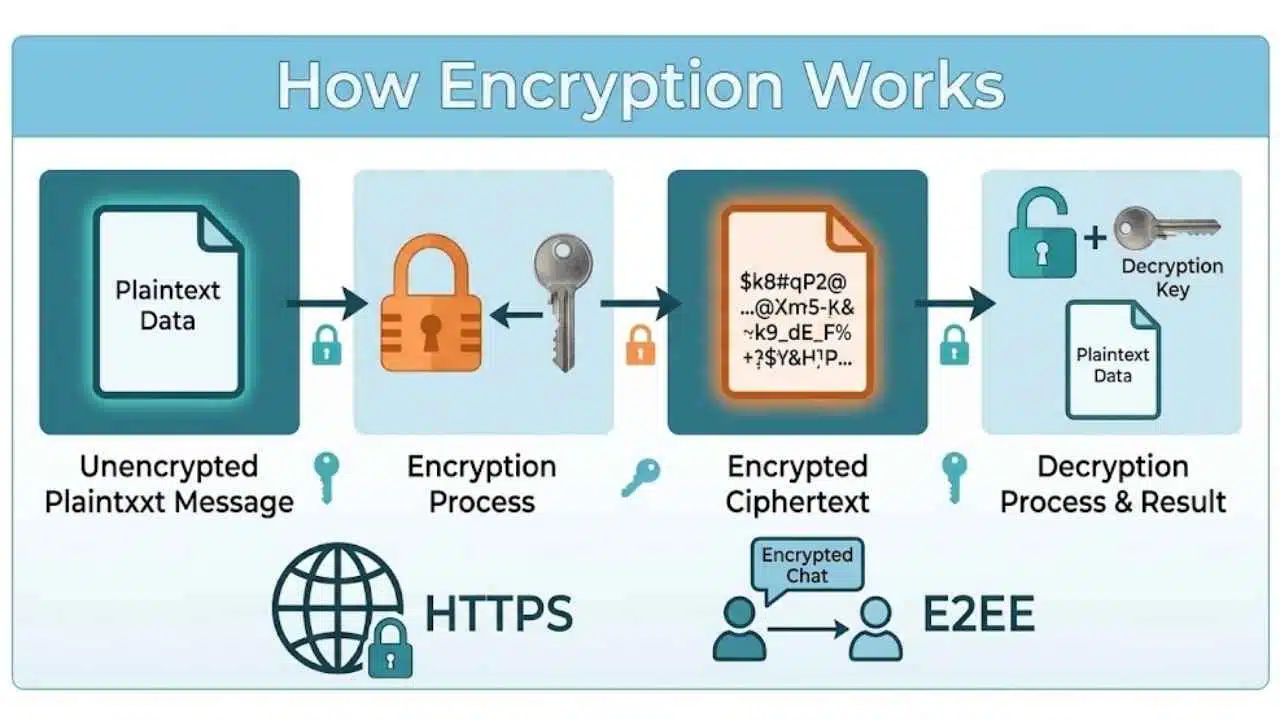
How encryption works comes down to one core mathematical process: converting readable data (plaintext) into scrambled, unreadable code (ciphertext) using cryptographic algorithms and secret keys. Only authorized parties holding the matching key can decrypt and restore the original information.
While modern cybersecurity pairs encryption with hashing, digital certificates, and public-key infrastructure to verify identities and prevent tampering, the primary role of encryption is confidentiality. Whether protecting data in transit across HTTPS web connections or safeguarding data at rest on an encrypted hard drive, cryptographic keys ensure that unauthorized observers, hackers, and network eavesdroppers see nothing more than random gibberish.
How Encryption Works at the Basic Level
Readable information is called plaintext. After encryption, it becomes ciphertext.
A simplified model looks like this:
Plaintext + algorithm + key → ciphertext
Recovering the information reverses the process using the appropriate key. The algorithm itself does not need to be secret. Modern cryptographic systems are normally designed on the assumption that attackers know which algorithm is being used. Security depends much more heavily on the key and on using the cryptographic system correctly.
That is also why a product saying it uses “strong encryption” does not tell you enough. The algorithm matters, but so do key generation, storage, access controls, implementation, protocol design, and the security of the device where the data eventually gets decrypted. Strong cryptography cannot compensate for giving the key to the wrong person.
With symmetric encryption, the communicating parties use the same secret key for encryption and decryption. Imagine two people holding copies of the same physical key. One locks a box; the other can open it.
The obvious problem is getting that shared secret to both parties safely. That becomes particularly difficult when two computers are communicating for the first time across the internet. Once a secure shared key exists, symmetric encryption is well suited to protecting large amounts of data.
AES, the Advanced Encryption Standard, is a widely used standardized example. NIST defines three variants:
- AES-128
- AES-192
- AES-256
All three process data in 128-bit blocks. The numbers refer to their key lengths. But “we use AES” is still an incomplete security claim. How the algorithm is used matters too.
Modern protocols commonly use authenticated encryption, which protects confidentiality while also enabling the recipient to detect unauthorized modification. TLS 1.3, for example, uses authenticated encryption for protected application traffic.
For most users, the important point is that symmetric encryption is the efficient workhorse once the necessary secret keys have been established.
Asymmetric Cryptography Helps Solve the Key Problem
Public-key, or asymmetric, cryptography uses two related keys rather than one shared secret. One is public and can be distributed. The other is private and must remain protected.
What the pair does depends on the cryptographic system. Public-key techniques can support:
- encryption;
- establishing shared secrets;
- digital signatures.
A simplified encryption example works like this: Bob publishes a public key. Alice can use it to protect information intended for Bob. The related private key remains with Bob. This addresses part of the key-distribution problem, but it creates a common misconception.
Modern secure connections generally do not use public-key cryptography to encrypt every byte sent between two systems. Public-key mechanisms or key-agreement techniques are commonly used to authenticate parties or establish shared secrets. Symmetric encryption then handles the larger stream of data.
The same basic pattern appears in newer post-quantum key-establishment systems: establish a shared secret safely, then use efficient symmetric cryptography for the ongoing communication.
HTTPS Combines Several Cryptographic Jobs
When a browser opens an HTTPS website, the protected connection normally uses Transport Layer Security, or TLS. TLS does not rely on one encryption operation. Several cryptographic steps work together.
In a typical public-web TLS 1.3 connection:
- The browser contacts the server.
- The two sides negotiate cryptographic parameters.
- Shared keying material is established.
- The server is normally authenticated using a certificate and corresponding cryptographic proof.
- Traffic keys are derived.
- Authenticated symmetric encryption protects the application data.
This hybrid design is practical. Public-key mechanisms help solve authentication and key-establishment problems. Symmetric encryption handles the ongoing traffic efficiently.
HTTPS Does Not Mean a Website Is Trustworthy
This distinction matters in everyday browsing. HTTPS tells you something important about the connection. It does not guarantee that the organization operating the website is honest.
A phishing website can use HTTPS. That is not a failure of TLS. The protocol is designed to protect communications and authenticate endpoints under its trust model. It does not determine whether the site operator intends to steal your password or sell you a fake product. A cryptographically secure connection to a malicious website is still a connection to a malicious website.
Encryption at Rest Protects Stored Information
Encryption is not limited to network traffic.
Files and devices can also be protected while data is stored. Common approaches include:
- full-disk encryption;
- volume or virtual-disk encryption;
- file and folder encryption.
Full-disk encryption is particularly useful if a laptop, phone, or storage device is lost or stolen. Someone trying to read the storage directly should not be able to recover the protected information without the required authentication and keys.
But encryption at rest has an important boundary. Once an authorized user unlocks a device, applications need access to readable data. Malware running with sufficient privileges may be able to access that information after the operating system has decrypted it for normal use. Encryption can protect a stolen drive without making an already-compromised computer safe.
End-to-End Encryption Changes Who Can Read the Content
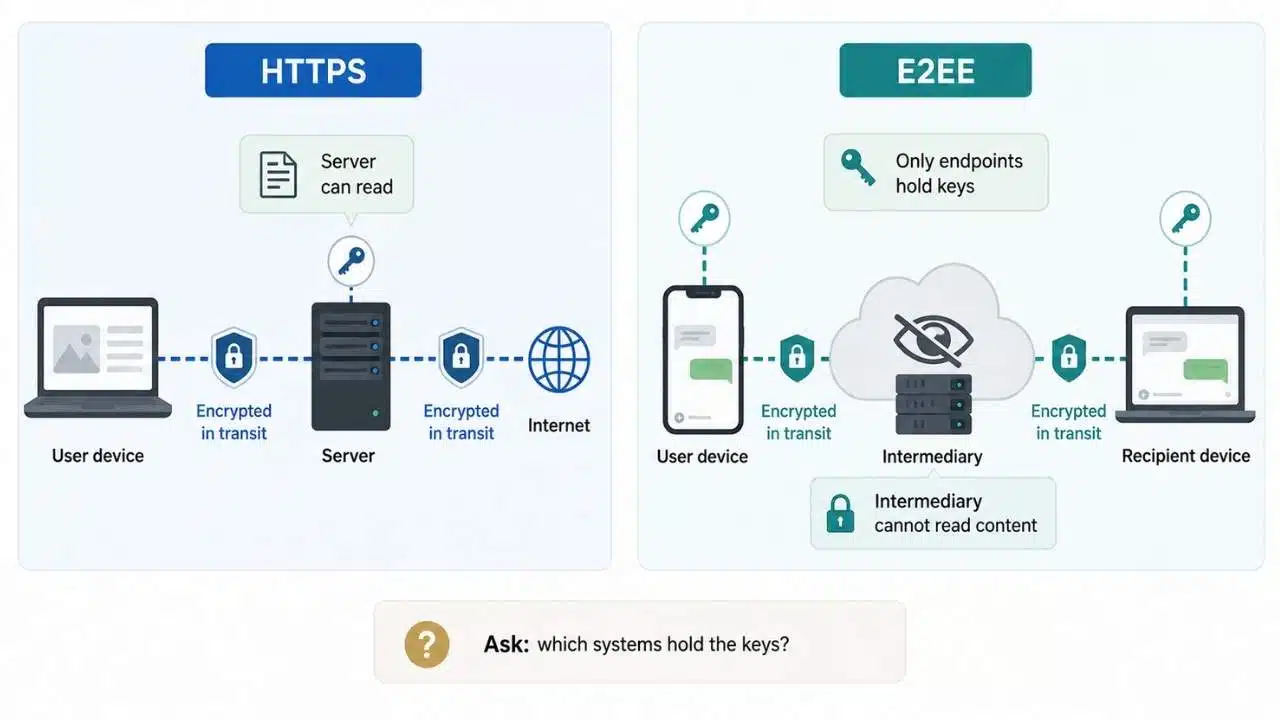
HTTPS and end-to-end encryption, or E2EE, protect different parts of a communication system. With ordinary HTTPS, data is protected while traveling between the client and the server. The server usually needs access to the plaintext so it can process the request.
An end-to-end encrypted system is designed so that the protected content remains readable only at the communication endpoints rather than by intermediary servers carrying it.
That can be useful in messaging, calling, and conferencing systems. It does not mean the service necessarily knows nothing about the communication.
Depending on the implementation, the provider may still process information needed to operate the service, such as account details, routing information, device data, timing, or participant relationships. Backups and linked devices can also affect the security model.
So when a service claims end-to-end encryption, a better question than “Is it encrypted?” is:
Which systems actually hold the keys needed to recover the content?
Encryption and Hashing Solve Different Problems
Encryption is designed to be reversible when the appropriate key is available. Cryptographic hashing is not. A hash function takes input and produces a fixed-size output called a digest. Hashes are used in integrity checking, digital signatures, password systems, and many other security mechanisms.
Passwords provide a useful example. A service that verifies passwords centrally should not need to store every password in reversibly encrypted form.
Current NIST guidance calls for passwords to be salted and processed with a suitable password-hashing scheme. The system stores the resulting verifier rather than needing the original plaintext password for routine authentication.
When the user signs in, the submitted password goes through the appropriate hashing process and the result is compared with the stored value.
This is why saying a service “encrypts passwords” can be technically misleading. For ordinary password verification, purpose-built password hashing is the more relevant protection.
Digital Signatures Prove Something Different Again
Encryption is mainly concerned with confidentiality. Digital signatures address authenticity and integrity. In a public-key signature system, a private signing key creates the signature. The corresponding public key allows someone else to verify it.
The signature does not make the signed information secret. Consider a signed software package. Anyone may be able to download and read the file. The digital signature helps a verifier determine whether it was signed with the expected key and whether the signed content has changed.
Signatures appear in software distribution, certificates, authentication protocols, signed documents, and many other systems. Some systems need encryption. Others need signatures. Many need both.
Key Management Is Where Good Cryptography Often Gets Difficult
Choosing an encryption algorithm is only part of deploying a secure system. Someone has to manage the keys. That can include generating them, storing them, controlling who can use them, rotating them, backing them up where appropriate, revoking them, replacing them after exposure, and eventually destroying old key material. Encrypted backups show why this gets complicated.
Lose the only usable decryption key and the organization may lose access to its own data. Store an easily accessible copy beside every encrypted backup and an attacker who compromises both may have everything needed to read the information.
For a business, “Are we using AES?” is often a much easier question than:
- Who controls the keys?
- Where are they stored?
- Which systems can use them?
- How is access recorded?
- How does recovery work?
- What happens if a key is exposed?
- When is old key material retired?
These operational decisions can matter as much as the algorithm itself.
Encryption Cannot Protect Data From Every Threat
Encryption solves specific security problems. It is not a general replacement for cybersecurity.
Encryption alone cannot stop:
- phishing;
- stolen authenticated sessions;
- malware already running with sufficient privileges;
- excessive access permissions;
- insecure application code;
- people intentionally sharing confidential information;
- attackers using legitimately stolen credentials.
If an attacker successfully signs in as an authorized user, the application may correctly decrypt data for that session. The cryptography has not necessarily failed. That is why encryption needs to sit alongside authentication, authorization, endpoint security, monitoring, software updates, secure development, backups, and good key management.
What Quantum Computing Actually Changes
Quantum computing does not mean every encrypted file will suddenly become readable. The more immediate concern is with widely used public-key cryptographic techniques whose underlying mathematical problems could be attacked by a sufficiently capable quantum computer.
NIST finalized its first three principal post-quantum cryptography standards on August 13, 2024:
- FIPS 203 — ML-KEM, for key establishment;
- FIPS 204 — ML-DSA, for digital signatures;
- FIPS 205 — SLH-DSA, also for digital signatures.
The standardization effort continues. As of August 2026, NIST is also working on additional algorithms, including FN-DSA and HQC. Those should not yet be described as finalized FIPS standards.
For everyday users, there is little reason to start manually selecting cryptographic algorithms. The practical transition belongs mainly with browser and operating-system developers, cloud providers, protocol designers, software vendors, infrastructure teams, and organizations protecting data that must remain secure for many years.
Final Thoughts
How encryption works becomes much easier once each tool has a clearly defined job. Symmetric encryption efficiently protects data with shared secret keys. Public-key cryptography helps solve problems such as key establishment, encryption, and digital signatures. TLS combines several mechanisms to protect web traffic. End-to-end encryption changes which systems are able to decrypt communication content. Hashing and digital signatures serve different purposes again.
Then there is the less glamorous part: key management. Strong cryptography only delivers its intended protection when the keys, endpoints, software, and surrounding processes are handled properly. So when a website, messaging app, storage product, or business service says something is “encrypted,” do not stop at the label.