The market for digital personas and conversational agents has exploded. Whether you are scaling an enterprise support program, building an internal IT helpdesk, or launching an automated lead generation campaign, you no longer need an oversized human workforce. You just need the right software.
However, not all AI chatbot tools are built for the same purpose. Some excel at hyperrealistic generative text. Others are specifically tuned for complex internal workflow automation or e-commerce integrations. We mapped out the best ways to deploy this technology right now to help you bypass the trial phase and find the exact implementation you need.
The Impact of Conversational AI in 2026
Before diving into the specific applications, it is helpful to understand what the current technology actually delivers. Expect these standard capabilities across top-tier platforms:
-
Massive adoption: Chatbot adoption across businesses grew roughly 4.7x between 2020 and 2025.
-
Customer preference: Currently, 62% of consumers prefer interacting with a chatbot rather than waiting for a human agent. Furthermore, 82% of consumers will engage with a bot to completely avoid wait times.
-
Cost efficiency: Automating routine tasks and support inquiries drives massive productivity gains and lowers overhead. AI driven automation has led to an average 30% decrease in customer service operational costs.
How to Choose the Right Chatbot Application
When selecting a deployment strategy, specific criteria separate the enterprise-grade implementations from casual widgets.
Integration and Real-Time Action
Quality is critical because functional chatbots build audience trust, whereas basic static FAQ bots frustrate users. You must evaluate whether the bot can execute real actions, such as calling external APIs mid-conversation to check product availability or pulling live account data.
Departmental Focus and Scalability
Consider the software cost compared to traditional manual labor and how easily you can scale your operations. Professional teams may require enterprise plans that offer custom branding, strict security compliance, and internal communication controls.
Top 10 Chatbot Use Cases in Business
Here is the definitive breakdown of the most effective ways companies are deploying chatbots across different departments.
1. 24/7 Customer Support
Customer service is one of the most common enterprise chatbot use cases. Chatbots provide instant answers to frequently asked questions and troubleshooting steps without human intervention. This ensures round-the-clock availability and significantly reduces the workload on support teams. In 2026, a fully loaded tier 1 support ticket costs between $5 and $15 to handle manually. AI can reduce the cost per ticket by 40% to 60% by resolving these routine inquiries.
2. Lead Generation and Qualification
Marketing teams use chatbots to detect potential customers based on website behavior and proactively guide them toward a purchase. When visitors interact with the bot, it captures their contact information and asks qualifying questions to determine their exact needs. Deploying bots for lead capture can increase website leads by 25% to 40%.
3. Order Tracking and Processing
For e-commerce companies, virtual assistants help users check their order status, delivery updates, and invoice information instantly. By handling these routine inquiries, chatbots reduce support tickets and improve the post-purchase customer experience. Retail adoption of chatbots is as high as 68%, directly impacting order status requests and cart recovery.
4. Appointment Booking and Scheduling
Businesses utilize chatbots to seamlessly schedule demos, consultations, or healthcare appointments. The system collects required details, checks calendar availability, and sends automated reminders directly to the user. In the healthcare sector, appointment scheduling via bots can boost appointment bookings by up to 30%.
5. Human Resources and Onboarding
A huge undertaking for human resources is recruiting and hiring, and chatbots can take care of basic tasks like sorting candidate pools and asking preliminary questions. For new hires, HR chatbots deliver onboarding checklists, link to policy documents, and answer benefits questions. This instantly resolves 60% to 80% of HR inquiries.
6. IT Helpdesk Automation
Internal IT support is another highly effective application. Chatbots help employees troubleshoot basic issues, reset passwords, and submit support tickets automatically. This allows IT staff to focus on complex technical problems, as bots can successfully resolve 50% to 70% of IT tickets without human intervention.
7. Personalized E-commerce Recommendations
AI chatbots analyze purchase history and browsing behavior to surface personalized product recommendations in real time. They can suggest complementary items during checkout or explain product differences to help shoppers make confident buying decisions.
8. Shopping Cart Abandonment Recovery
When prospects leave items in their cart without purchasing, chatbots can be configured to remind them upon their next visit. This proactive engagement strategy effectively reduces cart abandonment rates and captures lost revenue.
9. Internal Knowledge Management
Chatbots serve as centralized search tools for sales, legal, and product teams. By retrieving answers from approved company documentation, they provide employees with immediate access to critical information without disrupting colleagues.
10. Multilingual Global Support
Modern chatbots come with out-of-the-box multilingual support, enabling businesses to communicate with an international audience. This allows companies to provide localized assistance and expand their market reach without hiring native speakers for every region.
How to Measure Chatbot ROI
Understanding the return on investment requires tracking both hard financial metrics and soft experiential benefits.
Calculating Hard ROI Metrics
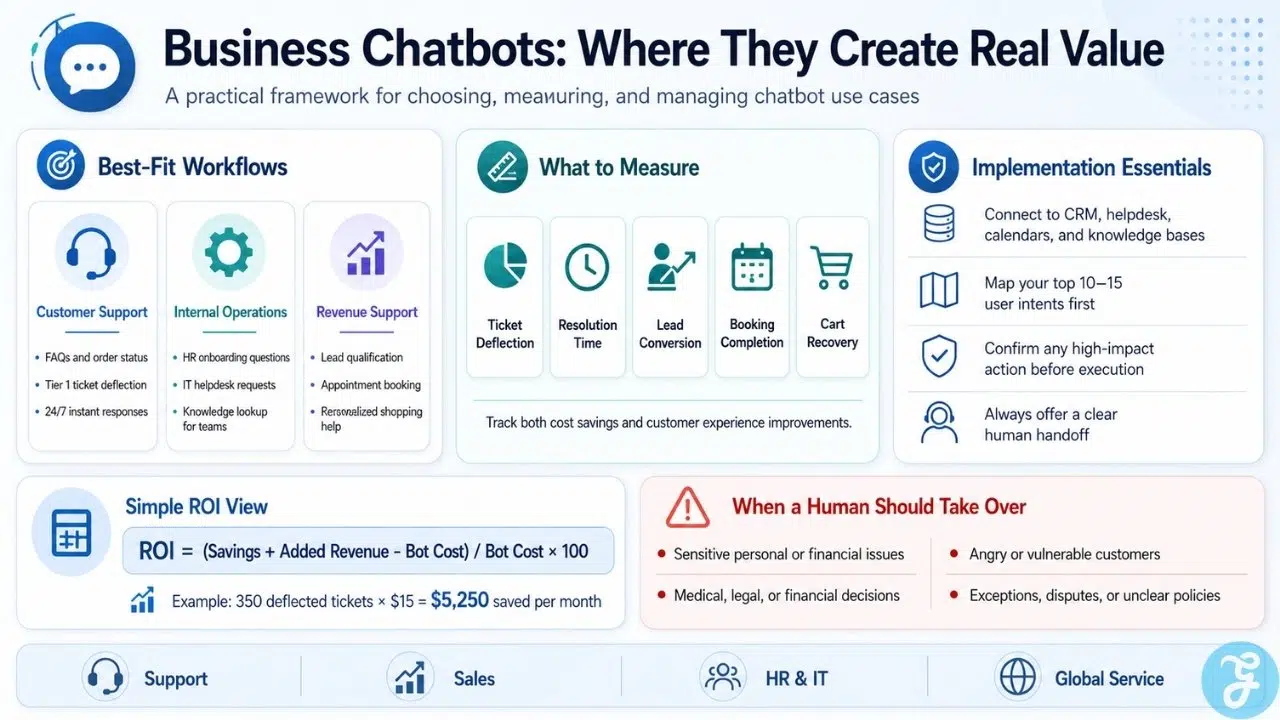
The most direct way to measure your success is through ticket deflection rates. The formula for chatbot ROI involves subtracting the total monthly costs of the bot from the savings and additional revenue, divided by the total costs, and multiplied by 100. For example, if your chatbot successfully deflects 350 tickets per month that normally cost $15 each, your business saves $5,250 monthly.
Evaluating Soft ROI and Experience Gains
Not all returns are purely financial. Soft ROI includes improved employee morale when workers are freed from repetitive queries and an enhanced customer experience when wait times drop to zero. Happy employees who are not bogged down by menial tasks tend to stay with companies longer and report greater job satisfaction.
Best Practices for Implementing Business Chatbots
To ensure your investment does not frustrate your customers, you must follow strict implementation rules.
Design the Conversation Flow First
Never build a chatbot without mapping the actual conversation flows first. Start with your top 10 to 15 highest-volume interactions. Map out the ideal happy path as well as every way the conversation could go wrong.
Always Provide a Human Escape Hatch
At every point in the interaction, users must have a clear option to reach a human agent, start the conversation over, or exit. Trapping a frustrated user in an endless automated loop will instantly destroy brand trust.
Confirm Actions Before Executing
If your bot is integrated into an active database, it must always confirm intent before executing a consequential action. Whether the bot is canceling an order, processing a refund, or booking an appointment, requiring a final confirmation prevents errors and protects the user experience.
When a Chatbot Is the Wrong Choice
Despite their efficiency, chatbots are not a universal solution. A chatbot should not independently handle situations involving the following:
Sensitive personal or financial information without proper controls: Data must be properly secured, heavily encrypted, and strictly compliant with regional privacy laws before a bot can process it.
High-risk medical, legal or financial decisions: Complex advice requires human expertise and professional accountability.
Angry or vulnerable customers requiring empathy: Automated systems can quickly escalate frustration when a user desperately needs genuine human connection and understanding.
Unclear policies or unreliable internal data: AI models learn from the data they are fed. If your internal knowledge base is outdated, the bot will confidently generate inaccurate responses.
Negotiations and unusual exceptions: Bots lack the nuance to effectively manage complex edge cases that require flexible reasoning or breaking standard protocols to retain a loyal customer.
Irreversible actions without confirmation: Processing a large refund or canceling a critical service always requires final human validation or strict user confirmation workflows.
The Verdict
Integrating chatbots across your organization drives massive productivity gains and elevates the customer experience. From handling basic IT requests to closing sales, the right conversational AI strategy directly impacts the bottom line. Evaluate your highest volume inquiries, choose a specialized platform, map your conversational paths, and start automating your most repetitive workflows today.
Frequently Asked Questions (FAQs) About Chatbot Use Cases in Business
1. Where Could a Chatbot Genuinely Reduce Work?
Chatbots excel at handling huge volumes of repetitive inquiries. They provide instant answers, gather initial information, and execute predefined automated tasks. The most impactful reductions in workload happen when bots handle basic tier one support tickets, manage password resets, answer common onboarding questions, and track e-commerce orders.
2. What Would It Need to Access or Integrate With?
A standalone bot provides very little value. To execute real actions, your conversational AI must integrate deeply into your tech stack. This typically includes connecting to customer relationship management platforms, internal knowledge bases, booking calendars, and secure external application programming interfaces.
3. When Should It Transfer the Task to a Human?
Automation is meant to assist human workers, not replace them entirely. A chatbot should immediately transfer a conversation to a human agent when it detects negative sentiment, when the customer explicitly requests a representative, or when a request falls completely outside its programmed knowledge base.
4. Are conversational AI bots difficult to integrate with existing business software?
Connecting a chatbot to your current tech stack is essential for it to execute real actions, but it can be tricky if data formats or security requirements do not perfectly align. Most enterprise-grade platforms offer pre-built integrations for major CRM and helpdesk tools, though custom setups may require developer assistance to function smoothly.
5. What happens if a chatbot cannot answer a customer’s question?
You must always provide an option for users to escalate the conversation and speak directly to a human agent when complexities arise. If a request falls outside the bot’s programmed knowledge or the customer becomes frustrated, a seamless human fallback protocol protects your brand’s reputation.