Choosing how to document your child’s academic journey shouldn’t feel like taking on a second full-time job. Many parents spend hours wrestling with over-engineered spreadsheets or disorganized binders, only to realize they still lack clear documentation when state evaluations or college applications arrive.
Shifting toward modern digital tools can save hours of administrative overhead, but picking the wrong software introduces its own frustrations. A system built entirely around rigid scheduling can collapse the first time your child struggles with a math concept, while an unstructured journal app might leave you missing the exact compliance data your state mandates. Finding the right balance among available homeschool tracking apps requires analyzing how you organize lessons, track attendance, and build transcripts.
Top Top 8 Homeschool Tracking Apps for Modern Record Keeping
Finding the right software means matching the tool to your daily teaching rhythm. Some parents prefer to plan weeks in advance using highly structured lesson planning apps, while others prefer to log activities retrospectively using specialized homeschool record apps. The following options represent the top choices among homeschool tracking apps designed to keep your home classroom organized and legally compliant.
1. Homeschool Moment
Purpose-built for families who prefer documentation over forward planning, Homeschool Moment relies on a retrospective workflow. Instead of setting up rigid calendar blocks in advance, you simply take a photo of an activity, worksheet, or museum exhibit as it happens. The software automatically writes a descriptive caption based on the image, categorizes it by academic subject, and files it away into a searchable timeline.
The main benefit is the sheer speed of the process, which allows you to compile an organic portfolio without sitting at a computer every evening. It works exceptionally well for unschoolers or families using relaxed, play-based methodologies. However, if you require forward-looking calendar alerts, daily student assignment checklists, or integrated curriculum marketplaces, this tool will feel incomplete, as it offers zero forward planning features.
2. Homeschool Planet
If your teaching methodology is highly structured and curriculum-driven, Homeschool Planet stands out as one of the most fully featured homeschool planner apps on the market. It functions as a complete administrative station where you can manage your household calendar, track attendance, and map out lesson plans. Its major strength is an integrated lesson plan marketplace that allows you to buy pre-made schedules from major publishers and sync them instantly to your calendar.
The operational friction with a heavy platform like this is the initial learning curve. Setting up multiple courses, inputting specific grading scales, and aligning family events takes a significant investment of time upfront. It also includes an automatic rescheduling feature that pushes uncompleted tasks to the next day, which can inadvertently create a mountain of backlogged assignments if your child falls behind, leading to student discouragement.
3. Homeschool Hall
Homeschool Hall strips away complex multi-tier menus to focus on clean, straightforward journaling and high-school preparation. Built by a homeschooling family, it provides an activity journal with custom categories, automated attendance logs, and a built-in transcript generator.
The simplicity of the design makes it easy to maintain consistently throughout the year. The trade-off is the lack of deep analytical reporting or lesson scheduling features. It functions beautifully as a reliable digital repository to prove compliance and calculate GPA metrics, but it won’t help you map out the day-by-day progression of a complex textbook series.

4. Modify Edu
For families with teenagers approaching the high school years, Modify Edu focuses heavily on mobile-first transcript management and credit-hour calculation. It avoids complicated daily lesson grids to emphasize macro-level tracking, letting you log hours by subject, build detailed course descriptions, and compile official transcripts for college applications.
This focus makes it highly popular among relaxed learners and unschoolers who need to translate real-world experiences into traditional high school credits. The primary limitation is that it lacks deep elementary-level tracking tools, such as gamified reward systems or visual chore charts. It is an administrative tool designed for compliance and official documentation rather than a daily interactive guide for younger children.
5. Homeschool Reports
Homeschool Reports is a long-established web-based platform tailored specifically for managing large families with multiple students across different grade levels. It excels at generating uniform progress reports, report cards, and multi-student attendance summaries that are easily formatted for state audits.
Because it is optimized for high-volume data entry, the user interface feels traditional and desktop-centric. It lacks a modern, mobile-first app design, meaning you will do your best work on a laptop rather than on your phone while on a field trip. It is highly dependable for generating clean paperwork, but it lacks the visual charm or interactive student logins found in newer platforms.
6. Syllabird
Syllabird is a sleek digital planner designed for families who organize their school year around an explicit syllabus. You build a course out, assign specific resources or reading page ranges, and set your custom grading weights. As assignments are completed, the software automatically calculates real-time grade metrics and tracks overall course completion percentages.
The interface is highly intuitive and visually polished, making it less overwhelming than older enterprise planners. The limitation is that it assumes a linear progression through materials. If your homeschooling style relies heavily on spontaneous unit studies, current events, or child-led tangents, trying to force those fluid experiences into Syllabird’s structured course blocks can feel frustrating and counterintuitive.
7. Applecore
Applecore is an iOS-centric tool built to make attendance tracking and simple portfolio generation as rapid as possible. It allows you to log active school days, track raw instructional hours, enter grades by subject, and export basic progress summaries directly from your Apple devices.
The main appeal is its lightweight, no-frills architecture that runs smoothly on an iPad or iPhone. The clear drawback is platform availability; because it is built natively for the iOS ecosystem, it is not an option for Android-using households or families who want to manage their records across a variety of devices. The portfolio feature is also basic, functioning more like a digital folder rather than an expansive, annotated gallery.
8. Homeschool Ledger
Available for Android users, Homeschool Ledger stands out among Android-focused homeschool tracking apps for tracking attendance, logging hours by individual subject, and building high-school transcripts. It gives parents the ability to organize long-term curriculum goals and output structured compliance summaries for end-of-year state audits.
The software functions well as a local storage tool on your device, keeping your documentation private. The operational hurdle is that the multi-student management tools and advanced transcript exports require a premium paid upgrade. The free tier gives you a functional test drive for a single student, but families with multiple children will need to budget for the premium tier to utilize its full capabilities.
The Boring Check That Matters
Before linking your family’s records to a specific software subscription, it helps to compare how different administrative tracking methods fit into your lifestyle.
| Application Style | Core Strength | Primary Tracking Method | Operational Commitment Required |
| Retrospective Portfolios | Captures organic learning instantly with photos | Logging activities after they occur | Minimal data entry but requires daily phone photos. |
| Comprehensive Calendars | High-level lesson scheduling and marketplaces | Mapping assignments out in advance | Heavy initial setup time and manual calendar adjustments. |
| Administrative Managers | Creating professional high school transcripts | Inputting completed hours and course grades | Periodic logging rather than daily interaction. |
| Syllabus Calculators | Automated real-time grade and completion tracking | Processing linear course checklists | Demands a structured curriculum with explicit assignments. |
Before You Choose
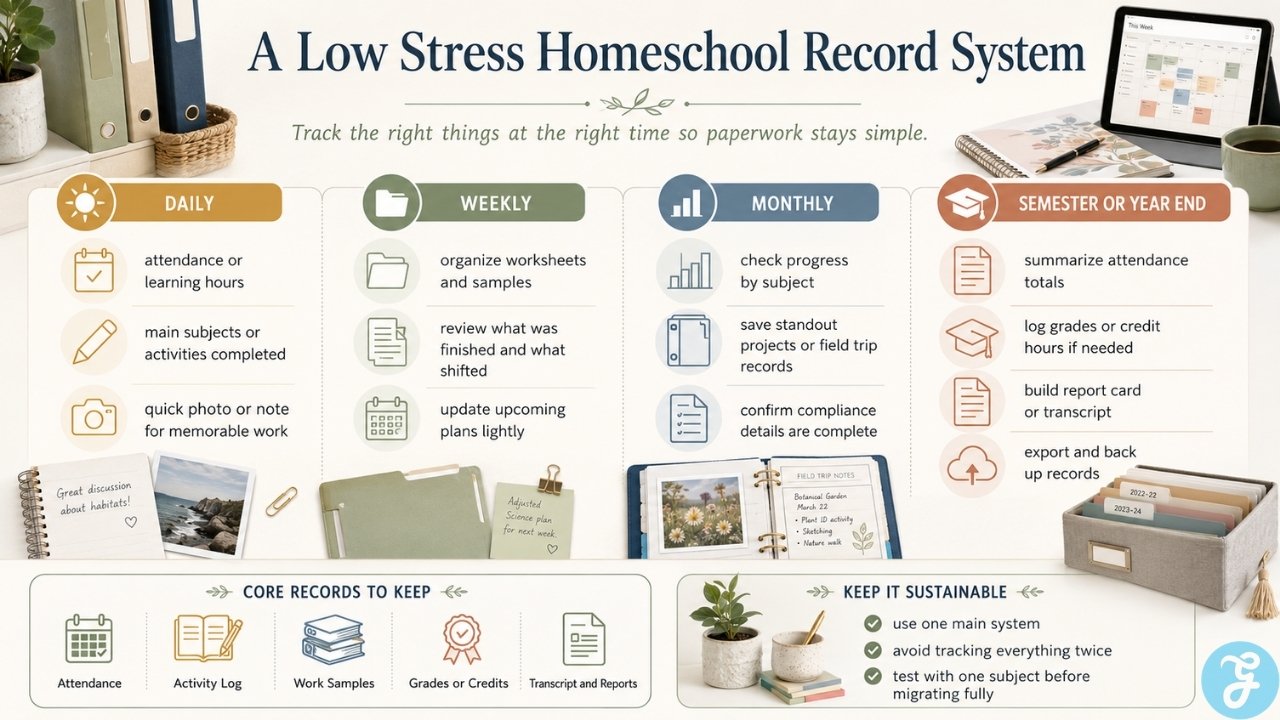
Finding the sweet spot among various homeschool tracking apps comes down to recognizing your own personal habits as an educator. If you struggle to maintain a paper planner, buying a highly complex digital platform that requires you to map out 180 days of lessons in advance will likely lead to a abandoned subscription by week three.
Start by identifying the exact legal mandates your state or region requires. If your local laws only demand a simple tally of days attended, a lightweight app focused entirely on attendance tracking is all you need. If you face rigorous portfolio reviews or need to prepare a teenager for university admissions, prioritize software that specializes in automated transcript generation or photo-rich timelines. Test the free trials with a single subject first to see if the interface feels natural before migrating your entire academic calendar into a new digital space.
Frequently Asked Questions (FAQs) About Homeschool Tracking Apps
Reviewing standard technical hurdles and operational parameters can help clarify which software matches your household tracking expectations.
Do homeschool tracking apps submit my records to the state automatically?
No, these applications are private storage utilities designed for personal organization and audit preparation. Parents must manually export the generated PDFs or reports and submit them to their local school boards or umbrella schools in accordance with regional deadlines.
Can my children log into these apps to check off their own assignments?
Several comprehensive planning applications feature dedicated student portals with separate logins. This structure allows children to view their daily checklists and mark items as complete on their own devices without gaining access to the parent’s grading backend or subscription settings.
How do these apps handle unschooling or non-traditional learning?
Photo-driven retrospective applications excel at documenting non-traditional education because they track learning after it happens. Instead of trying to force real-world experiences into a pre-planned grid, you simply capture the activity and categorize it under the appropriate academic category later.
What happens to my family’s data if I decide to cancel my subscription?
Most reputable platforms allow you to export your complete data set as a CSV file or comprehensive PDF portfolio before closing your account. It is highly recommended to perform a full manual export at the end of every school term to maintain a permanent local backup on your personal computer.
Is it safe to store my child’s photos and academic records on these cloud platforms?
Data privacy practices vary significantly between developers, making it essential to review individual security policies before uploading documents. Look for platforms that use secure cloud hosting, offer easy deletion tools, and explicitly state that they never monetize or sell student information to third-party data brokers.