A page does not appear in search just because someone published it. That sounds obvious, but it is one of the most common mistakes beginners make with SEO. They write an article, hit publish, share the link once, and then wonder why Google does not show it. The missing piece is usually not magic. It is crawlability and indexability.
To understand how search engines crawl, imagine search engines as massive discovery systems. They do not sit around waiting for every new page to politely introduce itself. They follow links, read sitemaps, revisit old pages, check changes, process content, and then decide whether a page deserves a place in the search index.
That process matters even more in 2026. Search visibility is no longer limited to ten blue links. Your content can appear in classic results, featured snippets, image results, video results, Discover surfaces, AI Overviews, AI-powered search experiences, and other answer formats. But none of that happens properly if the page cannot be found, crawled, understood, and indexed.
This is where many SEO strategies quietly fail. The content may be good, but the page is buried. The sitemap may exist, but it includes weak URLs. The article may be live, but a noindex tag blocks it. The page may be indexed, but Google chooses another canonical version. In editorial SEO work, these are the boring problems that often explain the most painful traffic gaps.
So let’s break this down properly. Not in a textbook way, but in the way a site owner, editor, blogger, or content team actually needs to understand it.
Why Crawling and Indexing Still Matter in Modern SEO
Crawling and indexing are not old technical SEO topics that only developers should care about. They are the foundation of search visibility.
Before Google, Bing, or any other search engine can rank a page, the page has to be discovered. After discovery, the crawler needs to access the page. After crawling, the search engine has to process the content. Only then can the page become eligible to appear in search results.
That does not mean every discovered page gets indexed. It does not mean every indexed page ranks. Search engines are selective because the web is full of duplicate pages, weak pages, broken pages, spam pages, outdated pages, and pages that do not offer much value. This is why search engine indexing is not just a technical checkpoint. It is also a quality checkpoint.
A weak page can be crawled and ignored. A duplicate page can be crawled and folded under another canonical URL. A thin tag page can appear in Search Console as discovered but never become important enough to crawl quickly. A page blocked by robots.txt may still be known to Google, but Google may not be able to read its content.
The lesson is simple: publishing is not the finish line. It is the starting point.
How Search Engines Crawl Before Indexing Begins
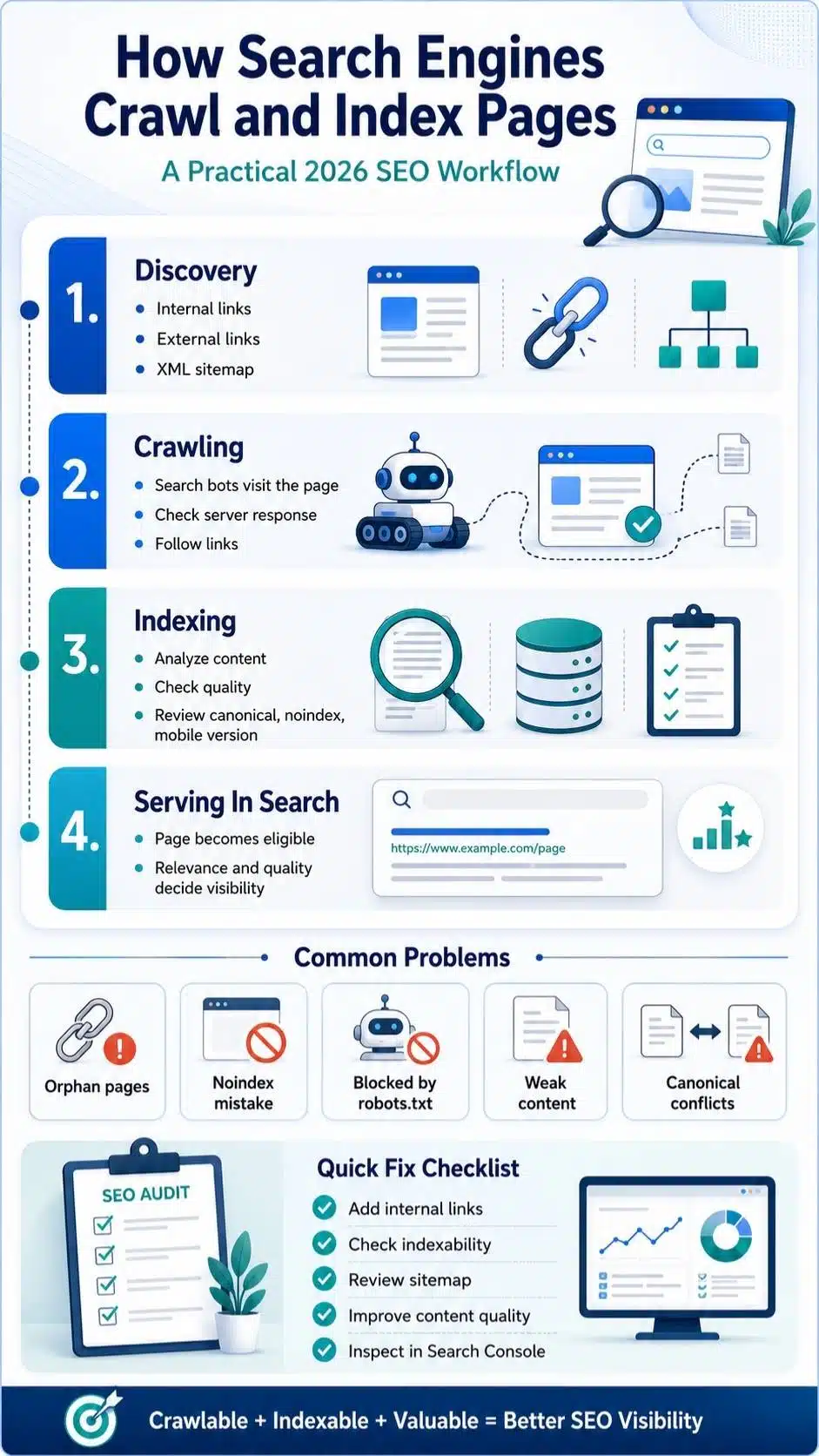
The crawl process explained simply starts with discovery. Search engines need to find a URL before they can do anything useful with it.
They usually discover URLs through:
- Internal links from your own website
- External links from other websites
- XML sitemaps
- RSS or Atom feeds
- Previously known URLs
- Redirects
- CMS-generated archives, categories, tags, and pagination
- URLs submitted through tools like Google Search Console or Bing Webmaster Tools
Internal links are often the most underrated part of this process. If a page is important but nothing links to it, search engines may still find it eventually through a sitemap, but the page sends a weak signal. It is sitting alone with no real context.
Think of a new article on “title tag optimization.” If it is linked from your main SEO pillar page, from a related on-page SEO article, and from a technical SEO checklist, crawlers can understand that the page belongs to a topic group. If the same article is only floating in the sitemap with no internal links, it looks less connected and less important.
That is why orphan pages are dangerous. They exist, but they are not part of the site’s natural path.
What Crawlers Actually Do When They Visit a Page
When a crawler reaches a page, it requests the URL from your server. The server responds with an HTTP status code and page resources. If the page is accessible, the crawler can fetch the HTML, discover links, process text, and sometimes render the page to understand what users would see. This sounds technical, but the practical meaning is simple.
If the server returns a 200 status, the page is available. If it returns a 404, the page is missing. If it returns a 301, the URL has moved. If it returns a 500-level error, the server has a problem. If the page requires a login, the crawler may not access it. If critical content loads only through blocked JavaScript, the crawler may not understand it properly.
A page that looks fine to you in your browser is not always fine for a crawler. That is why Search Console’s URL Inspection tool matters. It shows how Google sees a specific page, not just how you see it.
Crawl Budget Without the Drama
People often overcomplicate the crawl budget. For small websites, crawl budget is usually not the first thing to worry about. A 50-page blog with clean internal links and no technical mess is not usually suffering because Google “ran out of crawl budget.” But crawl efficiency becomes important when a site grows.
News sites, ecommerce platforms, large blogs, faceted navigation systems, tag-heavy WordPress sites, and database-driven websites can create thousands of low-value URLs. Search engines may spend time crawling filter pages, duplicate URLs, search result pages, thin tag archives, parameter URLs, or old paginated content instead of the pages you actually want indexed.
Here is a common editorial example.
A site publishes 500 strong articles, but it also has thousands of auto-generated tag pages. Many tags have one or two posts. Some are near duplicates. Some use slightly different wording for the same idea. Search engines may crawl these pages, but they add little value. Over time, the site becomes noisy.
That noise does not always destroy rankings, but it makes the site harder to understand. The goal is not to block everything aggressively. The goal is to make your important pages easier to find and your unimportant URLs less distracting.
Robots.txt: Useful, But Often Misunderstood
Robots.txt is one of the most misunderstood SEO files. A robots.txt file tells crawlers which URLs or sections they should not request. It is mainly a crawling control tool, not a perfect indexing control tool. That difference matters.
If you block a page in robots.txt, Google may not crawl the page content. But if other pages link to that blocked URL, Google may still know the URL exists. In some cases, the URL can still appear in search results without a proper snippet because Google has not crawled the content.
That is where many site owners get confused. They think robots.txt means “remove this from Google.” It does not always work that way.
Use robots.txt when you want to manage crawler access to low-value or unnecessary areas, such as internal search pages, some parameter URLs, or resource paths that do not need crawling. Do not use it as your main method for hiding private content. Private content should be protected properly through login, password protection, or server-side access control.
And do not block important CSS, JavaScript, or image resources if Google needs them to understand the page. A page may technically be crawlable, but if its important layout or content is hidden behind blocked resources, interpretation can suffer.
Noindex: The Cleaner Way to Keep Pages Out of Search
If robots.txt is about crawl access, noindex is about index inclusion. A noindex directive tells search engines not to include the page in search results. It can be placed as a meta robots tag in the page head or sent through an HTTP header.
This is useful for pages that users may need, but search engines do not. Examples include thank-you pages, internal search results, thin utility pages, some filtered pages, private-ish pages that still load publicly, and duplicate landing pages not meant for organic search.
There is one important catch: for Google to see a noindex tag on an HTML page, it generally needs to crawl the page. If you block the page in robots.txt and also add noindex, Google may not be able to crawl the page to see the noindex directive.
That is a classic SEO conflict.
So the cleaner logic is:
- Use noindex when the page can be crawled but should not appear in search.
- Use robots.txt when you want to manage crawling and keep crawlers away from certain URL paths.
- Do not rely on robots.txt to protect sensitive information.
- Avoid mixing rules without understanding which ones search engines can actually see.
Technical SEO is often less about adding more rules and more about not letting rules fight each other.
Indexing Basics: What Happens After Crawling
Now let’s move into indexing basics. After crawling a page, a search engine analyzes what it found. It looks at the text, headings, links, images, videos, structured data, canonical tags, language signals, mobile version, page quality, duplication, and many other signals.
Then it decides what to store in the index. The index is not just a folder of URLs. It is a massive processed database of information about pages. A page in the index may be eligible to appear for relevant searches. A page outside the index generally cannot perform in normal search results.
But indexing is not guaranteed. Search engines may choose not to index a page for several reasons:
- The page is blocked by noindex.
- The content is too thin.
- The page is a duplicate or very similar to another page.
- The canonical points somewhere else.
- The page redirects.
- The page returns an error.
- The page requires a login or cannot be accessed.
- The page is of low value compared with other known pages.
- The site has too many weak URL variations.
- The page is newly discovered and has not been processed yet.
A page can be good and still take time to be indexed. A page can also be technically available but not valuable enough to enter the index quickly. This is why “published” and “indexed” are not the same thing.
Crawled But Not Indexed: What It Really Means
One of the most frustrating Search Console messages is “Crawled – currently not indexed.” It means Google has visited the page but has not added it to the index. That message does not automatically mean the page is broken. It also does not mean the page will never be indexed.
But it is a signal worth reviewing. When I see this status on an important page, I do not start by hitting “request indexing” repeatedly. That rarely solves the real problem. I look at the page itself.
Is it too similar to another page? Is it thin? Does it answer a real search intent? Does it have incoming internal links? Is it included in the sitemap? Does the canonical point correctly? Does it have unique value, or is it another generic article saying what 50 other pages already say?
For a blog or media site, this status often appears when content is technically fine but editorially weak. The page exists, but it does not make a strong case for why search engines should store and serve it.
That is uncomfortable, but useful. Indexing is not only a technical gate. It is also a quality filter.
Discovered But Not Indexed: A Different Problem
“Discovered – currently not indexed” is different. This usually means Google knows the URL exists but has not crawled it yet. The URL may have been found through a sitemap, an internal link, or another discovery path, but Google has not fetched it.
For new sites and new pages, this can be normal for a while. Search engines do not crawl every URL instantly. But if important pages stay in this status for too long, check discovery signals.
Start with these questions:
- Is the page linked from relevant internal pages?
- Is it included in the XML sitemap?
- Is the sitemap clean and submitted?
- Are there too many low-value URLs competing for crawl attention?
- Is the server slow or unstable?
- Is the page buried too deep in the site structure?
- Is the URL pattern clean and canonical?
A practical mistake I see often is sitemap dumping. Site owners include every possible URL in the sitemap, including weak category pages, archives, tags, thin author pages, and parameter URLs. A sitemap should help search engines find the URLs you prefer to show in search. It should not become a trash drawer.
Sitemaps Help Discovery, But They Do Not Force Indexing
An XML sitemap is useful because it gives search engines a list of important URLs. It can help with discovery, especially for new pages, large sites, media sites, e-commerce pages, and pages that are not easily found through internal links.
But a sitemap is not a command. Submitting a sitemap does not force Google to crawl every URL. It does not force indexing. It simply provides a strong hint about which URLs you care about. That means your sitemap should be clean.
A good sitemap should include:
- Canonical URLs
- Indexable pages
- Important articles, pages, categories, or product URLs
- Recently updated content
- URLs that return 200 status
- Pages you actually want search engines to evaluate
A weak sitemap includes:
- Noindex URLs
- Redirected URLs
- 404 pages
- Duplicate parameter URLs
- Thin tags and archives
- Non-canonical versions
- Staging URLs
- Old URLs that no longer matter
For WordPress sites, SEO plugins often generate sitemaps automatically. That is helpful, but automatic does not always mean strategic. Review what is included. If your sitemap says “these are important,” but half the URLs are weak, you are sending mixed signals.
Canonical Tags: Helping Search Engines Choose the Right Version
Canonical tags help search engines understand which version of a duplicate or similar page should be treated as the preferred version.
This matters because duplicate content is common. The same content can appear through different URLs because of tracking parameters, category paths, pagination, printer-friendly versions, HTTP/HTTPS issues, www/non-www versions, or CMS behavior.
For example:
- /how-search-engines-crawl/
- /seo/how-search-engines-crawl/
- /how-search-engines-crawl/?utm_source=facebook
- /how-search-engines-crawl/?replytocom=12
If these show the same content, search engines need to decide which version matters. A canonical tag gives your preference.
But canonical tags are signals, not absolute orders. If your canonical tag points to an unrelated page, or if your internal links and sitemap contradict it, Google may choose a different canonical.
Keep the signals consistent:
- Link internally to the canonical URL.
- Include only canonical URLs in the sitemap.
- Avoid self-created duplicate URL patterns.
- Redirect old versions where appropriate.
- Use canonical tags for similar or duplicate pages, not as a lazy fix for messy architecture.
Canonical confusion is one of those issues that can quietly weaken indexing. The page may not be “missing.” Google may simply be indexing a different version than the one you wanted.

Mobile-First Indexing Changed the Way Pages Are Evaluated
Google uses the mobile version of a page for indexing and ranking. That means your mobile page is not a secondary version anymore. For SEO, it is the main version.
This creates real problems when desktop and mobile content differ. If your desktop page has full content, helpful links, author details, product specs, FAQ sections, and structured data, but your mobile version hides or removes half of it, search engines may evaluate the weaker version.
A mobile-first review should check:
- Is the main content present on mobile?
- Are headings and internal links visible?
- Are images and videos accessible?
- Is structured data consistent?
- Does the page load properly?
- Are ads or pop-ups blocking the content?
- Can users read and tap comfortably?
Mobile SEO is not just about passing a mobile-friendly test. It is about making sure the version Google relies on is actually complete.
JavaScript, Rendering, and Hidden Content Problems
Modern websites often use JavaScript frameworks, lazy loading, interactive modules, filters, tabs, accordions, and dynamic content. These can be fine when implemented properly.
The problem starts when important content is not available in the initial HTML and depends on scripts that search engines struggle to process, delay, or cannot access.
Google can process JavaScript, but JavaScript SEO is more complex than simple HTML SEO. That is enough reason to be careful.
For important pages, check whether the main content appears in rendered HTML. Test lazy-loaded images. Make sure links are real, crawlable links, not only clickable JavaScript actions. Avoid loading important text only after user interaction if search engines may not see it.
A simple editorial rule helps here: do not hide your most important SEO content behind fragile technical behavior. If a page depends heavily on scripts, involve a developer before assuming the content is crawlable.
Internal Linking Gives Crawlers Context
Internal links do more than pass authority. They tell search engines how your site is organized. A pillar page about modern SEO fundamentals should link naturally to cluster articles such as:
- How search engines crawl and index pages
- Keyword research fundamentals explained
- Title tag optimization best practices
- Meta description writing guide
- Header tags hierarchy explained
- URL structure best practices
- On-page SEO elements explained
Each cluster should also link back to the pillar where useful. This creates a topic structure that helps readers and search engines.
Do not overdo it. Internal linking is not about stuffing the same anchor text everywhere. A link should feel like the natural next step in the sentence.
For example, in a section about SEO basics, the anchor “modern SEO fundamentals” can point back to the pillar page. In a section about title tags, the anchor should point to the title tag guide when that cluster exists.
Good internal linking answers the reader’s next question. Bad internal linking looks like someone pasted keywords into a paragraph after writing it.
How AI Search Changes the Value of Crawlability
AI search has made crawlability more important, not less. Google’s AI search features still depend on content that can be found, processed, and evaluated through Search systems. Bing also connects crawling and indexing with search experiences beyond traditional blue links. In plain language, AI does not rescue content that search systems cannot access or understand.
For 2026 SEO, this means crawlability is part of AI visibility. If your content is blocked, buried, duplicated, thin, or technically confusing, it has fewer chances to be selected in normal search and AI-assisted search experiences. Strong pages are easier for search systems to retrieve, summarize, cite, and connect with related queries.
But do not make the mistake of writing only for AI. That usually creates generic content. The better approach is to write for humans, structure for search systems, and maintain technical access. Clear headings, direct answers, original examples, useful visuals, accurate metadata, and clean internal links all help. AI search may be new. The access problem is not.
A Practical Crawl and Indexing Checklist for Editors
This is the checklist I would use before publishing an important SEO article.
Before publishing:
- Is the URL clean and readable?
- Is the page set to index, not noindex?
- Is the canonical URL correct?
- Is the page linked from at least one relevant existing page?
- Is it included in the right sitemap?
- Does the page return a 200 status?
- Is the main content visible on mobile?
- Are internal links crawlable?
- Are images compressed and useful?
- Does the article answer a clear search intent?
- Does it add value beyond generic summaries?
After publishing:
- Inspect the URL in Google Search Console.
- Submit the URL only if it is important and newly published or significantly updated.
- Check whether Google can crawl the live page.
- Watch the Page Indexing report.
- Review impressions and queries after the page starts appearing.
- Add more internal links if the page is important but buried.
- Improve the content if it is crawled but not indexed.
- Check the canonical selection if the wrong URL appears.
The mistake is treating indexing as a one-click action. Request indexing is useful, but it is not a substitute for a strong page.
Common Crawl and Indexing Mistakes to Avoid
Some crawl and indexing problems are obvious. Others hide inside normal publishing workflows.
Publishing Orphan Pages
A page with no internal links is easy to forget. Search engines may find it through a sitemap, but it lacks context. Important pages should be part of a visible internal structure.
Adding Noindex by Accident
This happens more often than people admit. Staging settings, SEO plugin templates, CMS defaults, and page-level settings can accidentally block indexing. Always check before publishing important content.
Blocking Important Pages in Robots.txt
A single robots.txt rule can block an entire folder. That can be helpful or disastrous, depending on the folder. Review carefully after redesigns, migrations, and CMS changes.
Including Weak URLs in Sitemaps
Do not include every URL just because your CMS generated it. Sitemaps should highlight preferred, indexable, useful URLs.
Ignoring Canonical Conflicts
If the sitemap says one URL, internal links point to another, and the canonical tag points to a third, search engines may choose for you. They may not choose the version you want.
Assuming Indexed Means Ranking
Indexing only means the page is eligible to appear. It does not mean the page will rank, get impressions, or earn clicks. Quality, relevance, authority, freshness, and intent still matter.
Expecting Instant Results
New pages can take time to be found, crawled, indexed, and tested in results. Indexing is not always immediate, especially for newer or lower-authority sites.
How to Diagnose Indexing Problems Without Panicking
When a page is not indexed, do not guess. Diagnose. Start with the URL Inspection tool. Check whether the URL is known to Google, whether crawling is allowed, whether indexing is allowed, what canonical Google selected, and whether the live page can be accessed. Then compare that with your own page settings.
If the page says noindex, remove noindex if you want it indexed. If robots.txt blocks it, decide whether the block is intentional. If Google chose a different canonical, check whether your content is too similar or if your signals are inconsistent. If the page is crawled but not indexed, improve value, uniqueness, internal links, and intent match.
Here is the honest part: not every non-indexed page needs fixing. Some pages should not be indexed. Duplicate filters, thin tags, admin pages, thank-you pages, internal search pages, and utility URLs often do not belong in search. A healthy site does not need every URL indexed. It needs the right URLs indexed. That mindset saves time.
Frequently Asked Questions About How Search Engines Crawl
1. What Does Crawling Mean in SEO?
Crawling is the process by which search engines use automated bots to find and fetch pages from the web. These bots follow links, read sitemaps, revisit known URLs, and discover new pages. Crawling is the first major step before search engine indexing can happen.
2. What Is the Difference Between Crawling and Indexing?
Crawling means a search engine visits or fetches a page. Indexing means the search engine processes the page and stores information about it in its index. A page can be crawled but still not indexed.
3. Why Is My Page Crawled But Not Indexed?
A page may be crawled but not indexed if it is thin, duplicate, low value, blocked by signals, affected by canonical issues, or not useful enough compared with other pages. It may also be indexed later. For important pages, check content quality, internal links, sitemap inclusion, canonical tags, and Search Console details.
4. Does Submitting a Sitemap Guarantee Indexing?
No. A sitemap helps search engines discover important URLs, but it does not force crawling or indexing. Use it as a clean signal, not a guarantee.
5. Should I Use Robots.txt or Noindex?
Use robots.txt to manage crawling. Use noindex to keep a crawlable page out of search results. Do not rely on robots.txt to hide sensitive content or to fully remove a page from search.
6. How Long Does Indexing Take?
Indexing time varies. Some pages are indexed quickly. Others can take days or weeks, especially on newer sites or when the page has weak internal links, low value, or technical issues. Search engines do not guarantee instant indexing.
7. Is Crawlability Important for AI Search?
Yes. AI search features still depend on accessible, understandable, and indexable content. If search systems cannot crawl or process your page properly, the page has fewer opportunities to appear in AI-powered search experiences.
Build Pages Search Engines Can Actually Use
Understanding how search engines crawl is not just a technical lesson. It changes how you publish. A strong article needs more than good writing. It needs a clean URL, crawlable links, correct index settings, useful internal placement, a clear canonical signal, mobile-ready content, and enough value to deserve indexing. That is the real foundation behind modern SEO.
In 2026, search is more selective. AI summaries, answer engines, featured results, and classic rankings all depend on the same basic truth: search systems must be able to find, process, trust, and use your content.
So do not treat crawling and indexing as developer-only issues. Editors, writers, SEO teams, and site owners should understand the basics. It helps you avoid wasted content, diagnose traffic problems, and build a cleaner site architecture.
The goal is not to get every URL indexed. The goal is to make your best pages easy to discover and worth storing. That is where strong SEO starts.