The conversation surrounding Zoom vs Teams vs Around vs Butter has shifted from basic video quality to the deep integration of agentic AI and spatial presence. As we navigate the complexities of a post-hybrid world, the platform you choose acts as the digital foundation of your company’s culture and operational velocity. The landscape of 2026 is defined by “The Great Fragmentation.” We are no longer looking for a single tool that does everything poorly; we are looking for specialized ecosystems that do one thing exceptionally well.
Whether you are managing a global enterprise, a boutique design agency, or a high-stakes training workshop, the technical nuances between these four titans will dictate your team’s daily friction levels.

Beyond the Screen: Why the “Vibe” of Your Digital Room Matters
Let’s be honest: in 2026, we aren’t just “hopping on a call” anymore. We are stepping into digital environments that either fuel our creativity or drain our batteries before the first agenda item is even reached. We’ve all felt that specific type of exhaustion that comes from staring at a grid of tiny boxes for six hours straight, or the frustration of a tool that feels like it’s fighting against your workflow instead of supporting it.
The reason the debate of Zoom vs Teams vs Around vs Butter is so heated right now is that these aren’t just software choices; they are cultural statements. Your platform is essentially your office’s architecture. Some of these tools are built to be massive, high-security corporate skyscrapers where everything is polished and standardized. Others are designed to be cozy, sun-drenched studios where the walls are covered in Post-it notes and inspiration.
Zoom vs Teams vs Around vs Butter: Which Fits Your Team?
As we look at these four giants, we have to ask ourselves: What does our work actually feel like? Are we trying to manage a 500-person global operation where security is the only thing that matters? Or are we a small, scrappy team of developers who just want to stay connected while we build the next big thing?
In 2026, the “best” tool is no longer the one with the most features; it’s the one that matches your team’s unique DNA. If you’ve ever felt like your meetings were a chore, it’s likely because you’re using a skyscraper when you really need a workshop.
To find out which one fits your rhythm, we need to look at how each of these platforms has reimagined the way we show up for work, starting with the industry’s most recognizable name.
1. Zoom Workplace: The Global Connectivity Engine
Zoom has successfully navigated its transition from a simple meeting app into a comprehensive AI-first “Workplace.” In 2026, its identity is built on being the most accessible bridge between different organizations. While other platforms try to lock you into their ecosystem, Zoom remains the “Switzerland” of collaboration, functional, neutral, and incredibly easy to join.
The platform’s 2026 architecture is powered by the AI Companion 2.0, which has moved beyond simple transcription into active participation. It now functions as a federated intelligence layer, meaning it can pull data from your connected Google Workspace, Microsoft 365, or Salesforce accounts to provide real-time context during a live conversation.
Core 2026 Features
Intelligent Catch-Up: A private sidebar that uses agentic AI to summarize what was said before you joined, specifically highlighting if your name or projects were mentioned.
Universal Audio Isolation: Using advanced neural networks, Zoom now filters out 99% of non-human noise, including pets, keyboards, and even distant sirens, without clipping the speaker’s voice.
Dynamic Video Wrappers: Users can now layer live data dashboards directly onto their video feed, allowing for “Presentation-less” meetings where the data is always visible.
The Strategic Advantages
Seamless External Reach: It remains the only platform where a guest can join a complex, high-security call in under three seconds via a browser without downloading a client or creating an account.
Multi-LLM Flexibility: Unlike Teams, Zoom allows enterprise admins to choose which AI model powers their summaries, providing a layer of data sovereignty that is highly valued in 2026.
Hardware Agnostic: Its performance on low-end hardware and mobile devices is still significantly better than its competitors, making it the primary choice for frontline workers and traveling executives.
The Technical Trade-offs
File Management Fragmentation: Because Zoom doesn’t “own” your files (like OneDrive or Google Drive), the document collaboration experience can feel disjointed compared to Teams.
Security Configuration Complexity: While Zoom is secure, reaching “Enterprise Grade” security requires manual configuration that can be daunting for non-technical administrators.
2. Microsoft Teams: The Integrated Enterprise Powerhouse
For any organization already paying for the Microsoft 365 stack, Teams isn’t just an option; it is the environment. In 2026, Teams has evolved into a “Command Center” where video calls are merely a subset of the broader data flow. The integration of Copilot has turned every meeting into a structured data-harvesting event that feeds directly into the company’s institutional memory.
The 2026 version of Teams relies heavily on “Loop Components,” which are live, atomic units of productivity that exist across all Microsoft apps. A table created in a Teams chat can be edited in a meeting, and those changes reflect instantly in a Word doc and an Outlook email.
Core 2026 Features
Copilot Call Delegation: In 2026, you can send your “AI Twin” to a meeting. The agent listens, participates in the chat based on your previous stances, and gives you a “Decision Log” afterward.
Mesh Spatial Integration: Teams now allows for “Hybrid Rooms” where 3D avatars and 2D video feeds sit at the same virtual table, solving the “equity of presence” problem for remote workers.
Automated Governance: Every meeting is automatically tagged, categorized, and filed into the company’s knowledge base, making “Searching for that one thing someone said three months ago” a thing of the past.
The Strategic Advantages
Unmatched Security and Compliance: For regulated industries like finance, law, or healthcare, Teams’ integration with Microsoft Purview ensures that data never leaves the “Tenant,” meeting the strictest 2026 global standards.
Cost Efficiency: For companies already on M365, the “all-in-one” pricing model makes it significantly cheaper than layering Zoom and other tools on top of their existing subscription.
Deep Workflow Continuity: The transition from a chat to a call to a co-authoring session happens within a single window, reducing the “Context Switching Tax” that hampers productivity.
The Technical Trade-offs
High Resource Consumption: The Teams client remains one of the most resource-intensive applications in the 2026 workspace, often causing lag on older laptops.
“The Walled Garden”: Inviting someone from outside the organization (a “Guest”) still involves a friction-heavy process of tenant switching that can disrupt the flow of external collaboration.
3. Around (by Miro): The Designer’s Sanctuary
Around has carved out a unique niche in the Zoom vs Teams vs Around vs Butter debate by focusing entirely on “High-Focus Teams.” After its acquisition by Miro, it transitioned from a standalone app to the “Voice and Presence Layer” of the world’s most popular visual collaboration tool. It is designed for people who hate meetings but love working together.
The 2026 interface of Around is “invisible.” It uses floating circular pods that move out of the way of your code, your design canvas, or your spreadsheet. It treats the meeting not as a destination, but as a transparent overlay on top of the actual work.
Core 2026 Features
Auto-Framing AI: Around’s AI surgically crops your video feed to just your face, following you as you move, which allows for much smaller video “bubbles” that don’t block your screen.
Deep Miro Sync: When you are in an Around call, the Miro board you are working on is the “Stage.” Every participant’s cursor and view can be synced with a single click, making “Where are you looking?” a dead question.
Room Echo & Spatial Audio: If two people in the same physical room join the same Around call, the AI automatically detects the proximity and merges their audio to prevent the dreaded feedback loop.
The Strategic Advantages
Meeting Fatigue Reduction: By removing the “Grid View” and the “Self-View” by default, Around reduces the cognitive load that causes digital burnout.
Developer-First UX: It’s “Screen Sharing 2.0,” which allows for multiple people to share their screens simultaneously in small windows, which is a game-changer for pair programming or cross-functional design reviews.
Ambient Collaboration: It supports “Drop-in Rooms” where a team can stay connected for hours in silence, only speaking when they need a quick check-in, mimicking the feel of a physical studio.
The Technical Trade-offs
Niche Functionality: It lacks almost all “Enterprise” features like phone dial-in, webinar hosting, or complex breakout room management.
Miro Dependency: While it works as a standalone, its true power is only unlocked if your team is already using Miro as their primary visual workspace.
4. Butter: The Engagement Architect
Butter is the only platform that views a meeting as a “Performance.” While the others try to fade into the background, Butter provides the “Stage” for facilitators to lead high-energy, interactive sessions. In 2026, it became the gold standard for workshops, creative agencies, and internal training departments.
The philosophy of Butter is built on the “Facilitator’s Dashboard,” which gives the host granular control over the energy and flow of the room. It assumes that a meeting without interaction is just an email that should have been sent.
Core 2026 Features
Integrated Interaction Stack: Native polls, flashcards, quizzes, and soundboards are built into the core engine. These aren’t “apps” you have to load; they are part of the meeting’s DNA.
Facilitator God-Mode: The host can see a “Heat Map” of participant engagement in real-time, showing who hasn’t spoken or interacted lately, allowing for gentle nudges.
The “Hype” Waiting Room: Before the meeting starts, participants enter a branded space with custom music and a “Mood Check-in,” setting the tone before the first word is spoken.
The Strategic Advantages
Radical Engagement: Butter consistently produces 40-50% higher participation rates in creative sessions compared to the sterile environments of Teams or Zoom.
Facilitation Automation: You can pre-program your entire agenda. When it’s time for a 10-minute brainstorm, Butter automatically starts the timer, plays the background music, and opens the Miro board for everyone.
Brand Authority: For consultants and agencies, being able to fully brand the virtual room with their colors and logos provides a level of professionalism that “standard” platforms lack.
The Technical Trade-offs
Cultural Fit: The “fun” and “colorful” nature of Butter can backfire in highly formal settings. It requires a specific type of company culture to be effective.
Learning Curve: Because there are so many tools for the facilitator to use, there is a steeper learning curve to running a “perfect” Butter session compared to just clicking “Join” on Zoom.
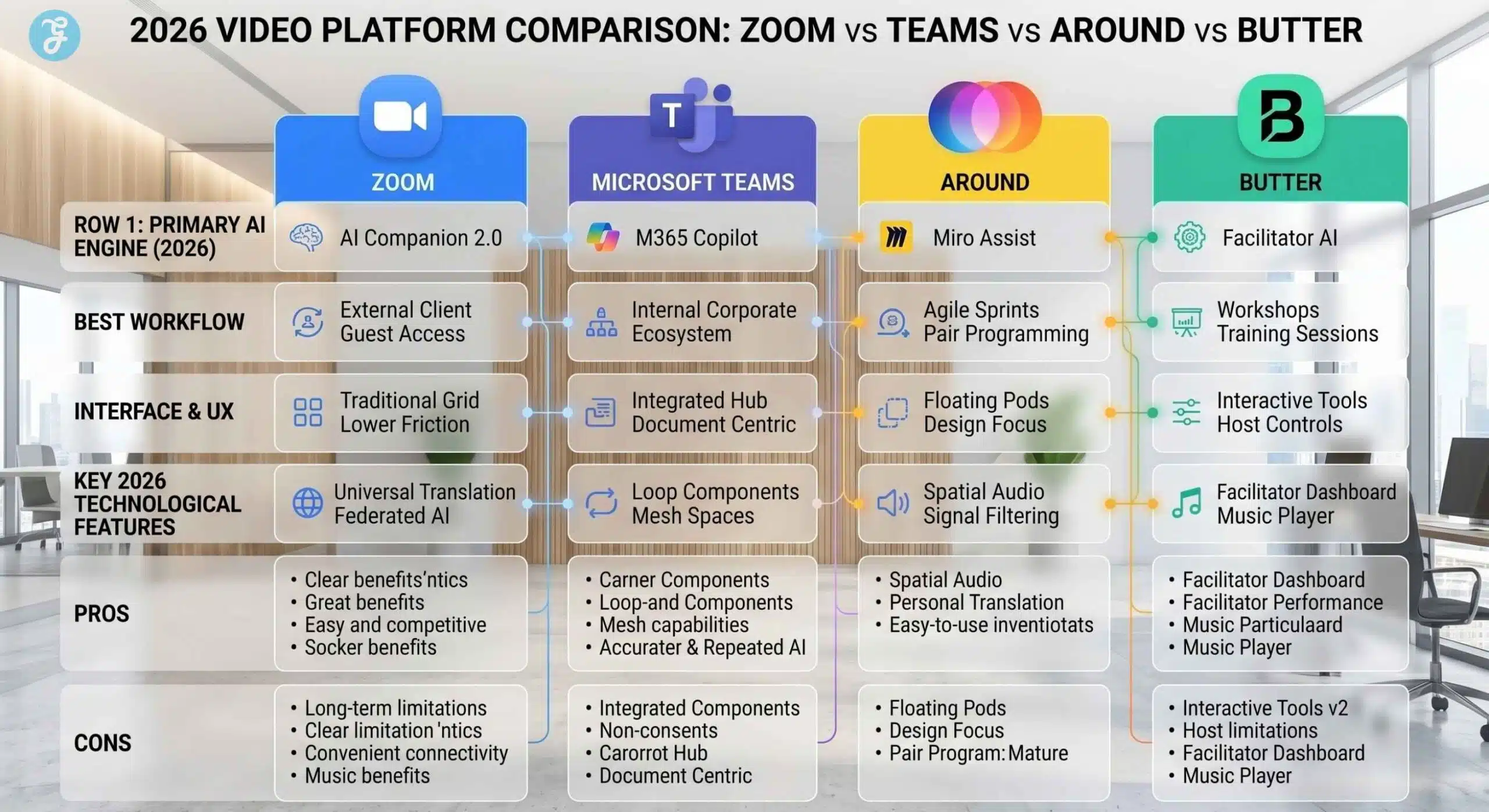
The 2026 Technical Comparison Matrix
To make an informed decision on Zoom vs Teams vs Around vs Butter, you must look at how these tools interact with your existing stack and your team’s hardware.
| Feature / Platform | Zoom Workplace | Microsoft Teams | Around (Miro) | Butter |
| Primary AI Philosophy | Federated / Multi-LLM | Proprietary / M365 Copilot | Contextual / Visual | Interaction / Facilitation |
| Ecosystem Lock-in | Low (Universal) | High (M365) | Moderate (Miro) | Low (Standalone) |
| Best Workflow | Client / External Sales | Internal / Enterprise Op | Design / Dev Sprints | Workshops / Training |
| Video Style | Traditional Grid | Integrated / Immersive | Circular / Floating | Playful / Facilitated |
| Latency Opt. | Global Edge Nodes | Azure Core Fiber | Peer-to-Peer (P2P) | Facilitator-Centric |
| Mobile UX | Superior | Moderate | Limited | Good |

The Strategic Turn: Moving from Feature Utility to Workflow Experience
When we analyze the competitive landscape of Zoom vs Teams vs Around vs Butter, we aren’t just looking at software; we are looking at the evolution of human connection. As an analyst, I have observed a significant shift in 2026: we are no longer “meeting” in the traditional sense. We are “syncing.”
The danger of our current era is the “Summarization Trap.” With AI being so good at telling us what happened in a meeting, there is a temptation to stop attending them altogether. However, the platforms that are winning, specifically Around and Butter, are the ones that remind us that the experience of collaboration is where the innovation happens.
Zoom and Teams have become the efficient, invisible pipes of the corporate world. They are the utilities, like electricity or water. You need them, and they must work perfectly. But for teams that want to build something new, the “utility” isn’t enough. We are seeing a move toward “Digital Intimacy.”
This is where Around succeeds by staying out of the way, allowing for hours of shared presence without the pressure of a “call.” It’s also where Butter succeeds by making every minute feel intentional and high-energy. The real choice for a content lead or a business owner in 2026 is balancing the efficiency of the machine (Teams/Zoom) with the creativity of the human (Around/Butter).
Platform Selection by Work Type: A Quick-Reference Guide
For transactional and external work: Zoom is your safest and most professional bet. It ensures that no client ever has a problem joining your call, and your AI summaries will keep your CRM updated with zero effort.
For hierarchical and data-heavy work: Microsoft Teams is your inevitable home. The sheer power of having your meetings, your files, and your AI agents in a single, secure “Tenant” is a competitive advantage that outweighs the clunky UI.
For iterative and visual work: Around is your sanctuary. It is the only tool that respects your screen real estate and your need for “Deep Work” while still maintaining a sense of team presence.
For transformative and educational work: Butter is your stage. It is designed to fight digital apathy and ensure that every participant leaves the call feeling more energized than when they joined.
The following table summarizes the 2026 “Best-Fit” logic to help you assign the right platform to the right department.
| Work Type | Recommended Platform | Primary Decision Factor |
| Executive Town Halls | Zoom Workplace | Reliability & Global Accessibility |
| Software Engineering / QA | Around (by Miro) | Minimalist UI & Low Resource Usage |
| Legal & Compliance | Microsoft Teams | Extreme Security & Data Archiving |
| Sales Discovery & Demos | Zoom Workplace | Low-Friction Client Entry |
| Design Thinking Workshops | Butter | Native Engagement & Facilitation Tools |
| Long-Term Project Ops | Microsoft Teams | Persistent Chat & Document History |
| Creative Brainstorming | Around or Butter | Visual Integration & High Interaction |
Wrapping Up: Mapping Your Strategy
Selecting your primary tool within the Zoom vs Teams vs Around vs Butter framework should be a reflection of your team’s most frequent type of “Work Unit.” By understanding the distinct architectural goals of Zoom, Teams, Around, and Butter, you can confidently architect a digital environment that supports your team’s specific workflow demands.
In 2026, the most successful organizations are those that treat their video platforms as a reflection of their values.
Frequently Asked Questions (FAQs) About Zoom vs Teams vs Around vs Butter
1. How does Zoom AI Companion compare to Microsoft Teams Copilot in 2026?
The primary difference lies in accessibility, cost, and ecosystem reach. Zoom has taken an inclusive approach, whereas Microsoft has positioned its AI as a premium, deeply integrated enterprise upgrade.
Cost impact: Zoom includes its AI Companion in all standard paid plans at no additional charge. In contrast, Microsoft Teams requires an additional, separate license for M365 Copilot (historically around $30/user/month), making it a significantly higher investment for large teams.
Data access: Microsoft Copilot is unmatched for internal work because it can pull data from your SharePoint, Word documents, and Outlook emails to inform its meeting summaries. Zoom’s AI relies more heavily on the context of the live meeting itself, making it less intrusive but slightly less comprehensive for long-term project management.
2. Which platform is the most bandwidth-efficient for remote workers?
Video consistency and bandwidth consumption are critical factors for remote teams operating in areas with unstable internet infrastructure.
Efficiency rating: Microsoft Teams is highly optimized for lower bandwidths, requiring as little as 1.2 Mbps to maintain a stable group call.
Quality consistency: Zoom uses a constant bitrate approach. While it demands higher bandwidth (often up to 3.8 Mbps for 1080p group calls), its adaptive technology is widely considered superior at maintaining audio and video quality when network conditions fluctuate, preventing the dreaded “robotic voice” effect.
3. Do external guests need to create an account to join Butter or Around?
Frictionless entry is a major selling point for modern collaboration tools, especially when dealing with clients or external contractors who do not share your tech stack.
Guest access: Both Butter and Around (by Miro) excel at removing barriers. External participants can join a session directly via a shared link in their web browser without needing to download a desktop client or create an account. This makes both platforms excellent choices for public workshops, client discovery calls, and rapid brainstorming sessions.
4. Can Butter be used for formal executive or legal meetings?
While Butter is technically capable of hosting any type of meeting, its user interface and core philosophy are built around high energy and interactivity.
Atmosphere considerations: Butter utilizes a very colorful, playful aesthetic featuring native soundboards, music players, and prominent emoji reactions. While this is incredible for design sprints and training, it can feel overly casual, or even distracting, during formal board meetings, financial disclosures, or strict legal depositions. For highly conservative environments, Zoom or Teams remains the standard.
5. Why is Around specifically recommended for designers and developers?
Around has optimized its entire interface for “Deep Work,” fundamentally changing how screen real estate is utilized during a collaborative session.
Visual layout: Instead of hijacking the entire monitor with a grid of faces, Around uses small, circular video pods that float unobtrusively over the user’s primary application (like an IDE or a design canvas).
Integration focus: As a Miro-owned product, it offers unparalleled synchronization with visual boards. Teams can engage in pair-programming or live-wireframing while maintaining ambient visual and audio contact without sacrificing their workspace.