


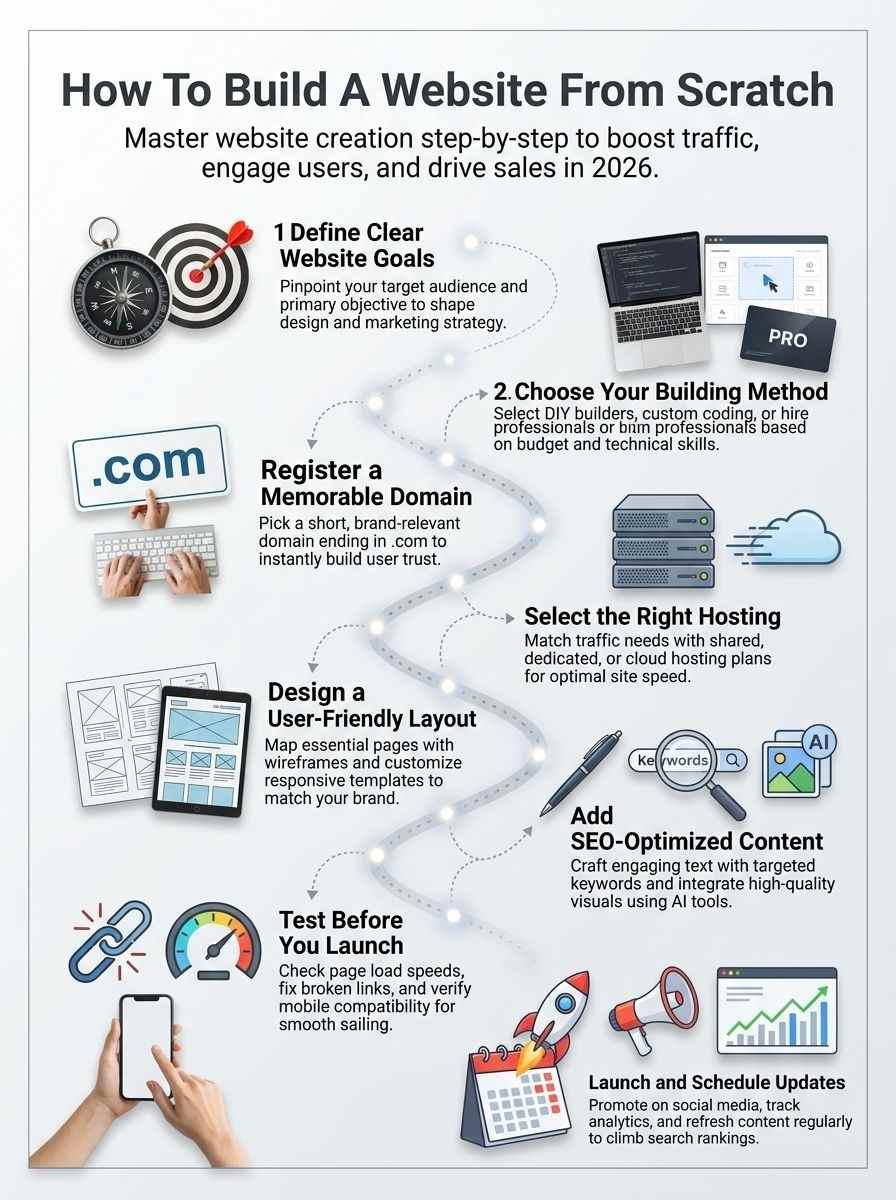
Building an online presence can feel overwhelming, especially when trying to build a website from scratch in 2026. Choosing the right domain name, setting clear goals like lead generation or e-commerce, and avoiding costly mistakes are common challenges for small business owners.
Selecting the right tools adds another layer of complexity. From web hosting providers like Hostinger to content management systems such as WordPress or Wix, the options can be confusing without clear direction.
Defining goals—whether to showcase services, attract customers, or sell digital products—is the essential first step in the process. With the right approach, building a website becomes far more manageable.
This guide simplifies how to build a website from scratch, covering everything from hosting and site structure to SEO, user experience (UX), and performance tracking. It also highlights modern tools, including AI-powered design solutions, to create a responsive and high-performing website.
Website’s Purpose and Goals
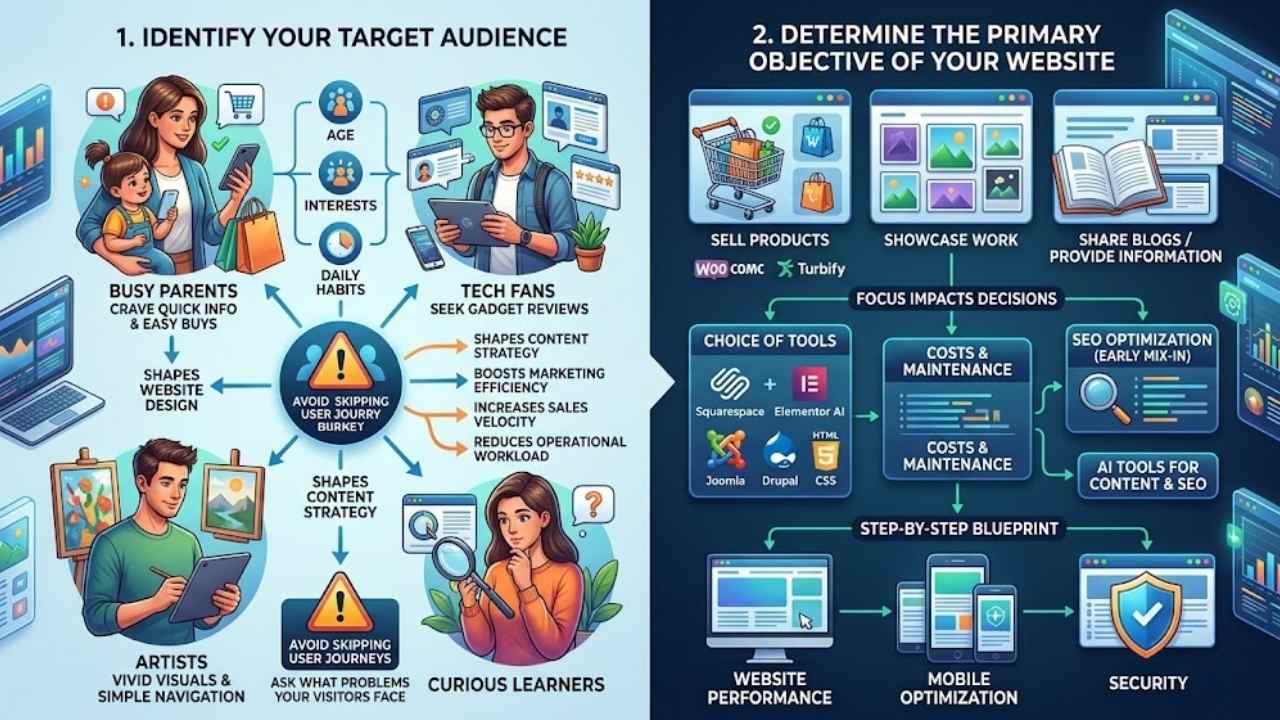
Start by figuring out who your visitors are, like busy parents shopping online or tech fans seeking gadget reviews. Pin down what you want the site to do, such as sell products or share blog posts, and watch how that focus shapes every choice ahead.
Identify your target audience
You need to pinpoint who will visit your site, folks. Think about their age, interests, and daily habits. This step shapes your website design and content strategy. For a business website, imagine selling products to busy parents.
They crave quick info and easy buys. Get this right, and you boost marketing efficiency plus sales velocity. Choices here cut down on operational workload too. Imagine a site for artists showcasing work; fans want vivid visuals and simple navigation.
Defining these people sets a strong base for web development in 2026.
Know your audience like you know your best friend; it’ll make your website feel like home. – Itamar Haim
Folks often skip thorough examinations of user journeys, but don’t fall into that trap. Ask what problems your visitors face. A site providing info might target curious learners. Use tools like Squarespace or Elementor AI to test ideas fast.
These platforms simplify with drag-and-drop interfaces. Mix in SEO optimization early for better website traffic. Consider examples: WooCommerce suits sellers, while Joomla fits complex needs.
Match your primary goal to the right crowd, and watch engagement soar.
Determine the primary objective of your website
Start defining the primary objective of your website right from the jump. Think about what you want it to do, like showcasing work, selling products, or providing information. This step kicks off website building in 2026, and it shapes everything else.
Picture your site as a trusty sidekick, helping with marketing efficiency, sales velocity, and operational workload. Get clear on these goals, and you’ll dodge common mistakes down the road.
Pick goals that match your needs, folks. Decisions here affect tools, costs, SEO, and even ongoing maintenance. Website builders like Webnode or Turbify make it simple, while platforms such as Drupal offer more coding options with HTML, CSS, and JavaScript.
A step-by-step blueprint covers planning for website performance, mobile optimization, and security. AI tools now help with content, boosting SEO optimization for better results.
Choose the Right Website Building Method
You stand at a crossroads, friend, where your site’s future hangs on this choice, like picking the perfect tool for a job that fits just right. Explore options from drag-and-drop page builders on SaaS platforms to coding your own landing page or teaming up with skilled developers for that custom CRM touch, and watch your vision come alive.
DIY website builders
DIY website builders make the process simple and fun for beginners in 2026.
| Aspect | Details |
|---|---|
| Why Choose Them | Website builders simplify creation with templates and user-friendly interfaces. They fit folks who want quick results without deep tech skills. Think of it as building a Lego set, easy and rewarding. |
| Key Platforms | Compare options like Wix, Squarespace, and Weebly. Each offers drag-and-drop tools. Wix integrates AI for content help, speeding up your work. |
| Costs Involved | Break down expenses: basic plans start at $10 monthly. Premium features add up to $50. Factor in domain fees around $15 yearly. Smart choices cut costs while boosting efficiency. |
| SEO and Tools | These platforms include built-in SEO tools. Optimize text for search engines right from the start. AI assists with engaging, keyword-rich content creation. |
| Common Mistakes | Avoid ignoring mobile design, it kills user experience. Skip platform comparisons, and you might pick a poor fit. Define goals first to match needs like selling products or sharing info. |
| Step-by-Step Tips | Start with your site’s purpose. Pick a platform that aligns with goals. Use templates to customize branding. Add visuals and test everything before launch. |
Custom coding from scratch
Custom coding from scratch gives you total freedom to craft a site that fits your vision like a glove.
| Aspect | Details for You |
|---|---|
| Why Choose It | You pick custom coding when DIY builders feel too basic. This method lets you build from the ground up. Define your site’s purpose first, as decisions here shape marketing efficiency, sales velocity, and operational workload. Platform comparisons matter a lot in 2026; custom coding stands out for those needing more than templates. |
| Key Steps | Start by defining clear goals, like showcasing work or selling products. Website building in 2026 kicks off with choosing this platform if you crave control. Map out planning, tools, costs, SEO, and common mistakes in your blueprint. Register a domain name early; it’s a critical step. |
| Tools and Tech | Use HTML for structure, CSS for styles, and JavaScript for interactivity. Editors like Visual Studio Code help you code. Git tracks changes. In 2026, artificial intelligence tools integrate to aid content creation, even in custom setups. Web hosts simplify hosting, but you handle the code. |
| Costs Breakdown | Expect to pay for domains, around $10 to $20 yearly. Hosting starts at $5 monthly for shared plans. Tools like code editors are often free. Factor in time; custom work boosts SEO optimization, a key component for an effective site. Avoid common mistakes by budgeting for updates. |
| Pros and Cons | You get full customization, perfect for unique needs. Builders simplify with user-friendly interfaces, but coding offers deeper tweaks. SEO shines here if you optimize text and visuals. On the flip side, it takes skill; hiring pros is an option if coding feels tough. Hey, imagine coding your site like building a custom car, exciting but hands-on. |
| Tips for Success | Focus on responsive design for all devices. Add engaging, SEO-optimized content with high-quality visuals. Test functionality before launch. In 2026, AI assists, so use it for ideas. This path impacts your site’s performance; choose it if templates don’t cut it. |
Hiring a professional developer
Sometimes, you need expert help to make your website stand out, especially if DIY tools feel like trying to build a house with toy blocks.
| Aspect | Details |
|---|---|
| Why Hire a Pro | You want full control. Decisions here shape marketing speed, sales flow, and daily tasks. Think of it as getting a tailor-made suit instead of off-the-rack clothes. |
| Key Benefits | Pros handle custom coding from scratch. They weave in AI tools for content help. Your site gets top SEO setup right away. |
| Platform Choices | Compare options like Upwork for freelancers or agencies on LinkedIn. Each fits different needs, from showcasing work to selling goods online. |
| Cost Breakdown | Expect $5,000 to $50,000 in 2026, based on complexity. Factor in ongoing fees for updates. It’s an investment that cuts long-term workload. |
| Steps to Hire | Define goals first, like providing info or boosting sales. Post jobs on sites such as Fiverr. Check portfolios for matches to your brand. |
| Common Pitfalls | Skip vague briefs; they lead to rework. Budget for extras like hosting on AWS or Google Cloud. Pros simplify this, but clear needs speed things up. |
| Tips for Success | Ask about their use of tools like GitHub for code. Ensure they cover responsive designs. Chat openly, as if grabbing coffee, to build trust. |
Register Your Domain Name
Pick a domain name that sticks in people’s minds, like a catchy tune you can’t forget, and keep it short, relevant to your brand. Grab it from popular spots like GoDaddy or Namecheap, where you search, pay, and own it in minutes.
Tips for choosing a memorable domain
Pick a domain name that sticks in people’s minds, like a catchy tune you can’t forget. Make it short and simple so folks type it without mistakes. Tie it to your brand or what you do, say, if you build a website for LocalWorks, grab something like localworksdesign.com.
Check for trademarks to avoid legal headaches down the road. Experts like Divit Bhat often say aim for .com endings because they build trust fast. Factor in web design vibes too, as a good domain boosts your site’s look and feel right from the start.
Search for availability on sites like GoDaddy or Namecheap before you commit. Think about keywords that help with SEO, such as slipping “web design” into the name for better search hits.
Costs run from $10 to $20 a year, so budget that into your website launch plans. Keep website security in mind; pick registrars with strong protection against hacks. This step sets up smooth website maintenance later, and in 2026, AI tools can even suggest options based on your goals.
Where to register your domain
You need a domain name to make your website live online. This step sets the foundation for everything else, like a street address for your digital home.
- GoDaddy stands out as a popular spot to register your domain, offering easy tools and often bundling it with web hosting for better performance optimization right from the start.
- Namecheap provides affordable options with strong privacy features, and their costs break down nicely, starting around $10 per year, which helps keep your budget in check during the early website creation process.
- Google Domains integrates well with other Google services, simplifying things if you plan to use their ecosystem, and it emphasizes SEO optimization through clean, reliable domain management.
- Hover focuses on straightforward registration without upsells, making it ideal for beginners who want to avoid common mistakes like hidden fees that can impact your operational workload.
- Domain.com offers a wide selection of extensions, with platform comparisons showing it’s competitive on price, often under $15 annually, and it ties into website builders that have user-friendly interfaces.
- Bluehost combines domain registration with hosting plans, which streamlines the process, and artificial intelligence tools in their setup can assist with initial content creation for your site.
- SiteGround excels in performance optimization for domains linked to their cloud hosting, providing a critical early step that directly affects your site’s speed and marketing efficiency.
- Porkbun gives quirky, fun vibes with low costs and transparent pricing, like grabbing a .com for about $5 to $10, turning what could feel like a chore into something light-hearted.
- Register your domain through these spots after defining your goals, since choices here influence sales velocity, and always check for deals to manage expenses in 2026’s website building landscape.
Select the Appropriate Web Hosting Plan
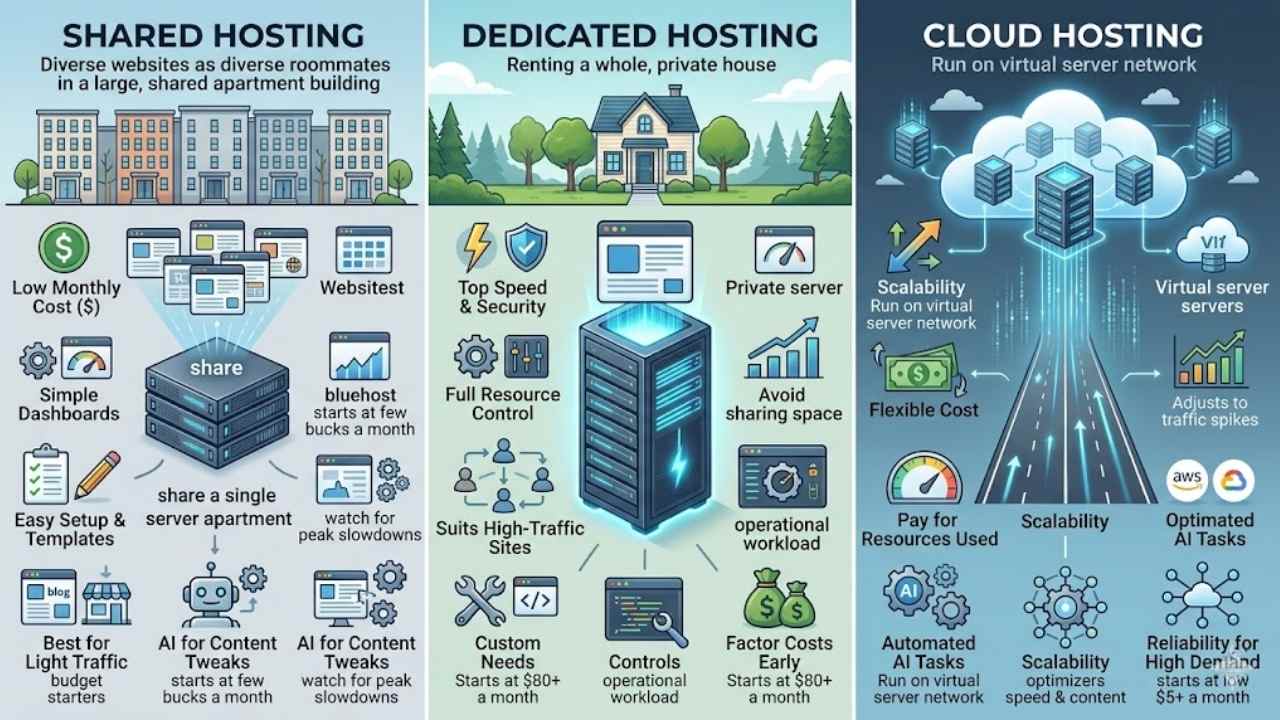
Picking the right host feels like finding a trusty sidekick for your site’s adventure, one that keeps things running smooth without breaking the bank. Consider shared options for budget starters, dedicated servers for heavy traffic loads, or cloud setups for easy scaling, and you’ll set your online presence up for success.
Shared hosting puts your site on a server with other websites, like roommates splitting rent in a big apartment. You all share resources such as space and power, which keeps costs low for starters. Many web hosts, think Bluehost or HostGator, offer this option with easy setups, user-friendly dashboards, and templates that simplify building. It fits well if your traffic stays light, say for a personal blog or small shop. Prices often start at just a few bucks a month, making it a smart pick for budget-conscious folks in 2026.
Imagine, you pick shared hosting and boom, AI tools jump in to help with content tweaks on platforms like these. Hosts have made things straightforward, no need for deep tech skills. Compare it to dedicated plans, and you see the savings, but watch for slowdowns during peak times. Still, for most beginners aiming to showcase work or sell products, it handles the basics without breaking the bank. Updates come regular, keeping your site smooth and secure.
Dedicated hosting
Dedicated hosting gives your website its own private server. You get full control over resources, like CPU and memory. This option suits high-traffic sites that need top speed and security. Costs run higher, often starting at $80 a month in 2026, but you avoid sharing space with other users. Think of it as renting a whole house instead of an apartment in a busy building. Platform comparisons show dedicated plans excel for custom needs, far beyond basic shared setups.
Web hosts simplify dedicated hosting with easy dashboards, even integrating AI tools for quick setups. You handle more operational workload, yet it boosts marketing efficiency and sales velocity. For instance, e-commerce sites selling products see faster loads, keeping customers happy. Factor in these costs early, as they impact your budget right from launch.
Cloud hosting
Cloud hosting lets you run your site on a network of virtual servers. Providers like Amazon Web Services or Google Cloud handle the heavy lifting. You get scalability that adjusts to traffic spikes, much like adding extra lanes to a busy highway during rush hour. Costs stay flexible; you often pay only for the resources you use, starting as low as $5 a month in 2026.
This option shines for growing sites, blending ease with power through user-friendly dashboards. Many integrate AI tools to automate tasks, such as optimizing speed or suggesting content tweaks. Compare it to shared or dedicated plans: cloud beats them in reliability for high-demand setups, without the big upfront fees.
Plan Your Website Structure
Start by sketching a simple sitemap to outline your home page, about page, and contact section, then draw basic wireframes to make sure visitors can zip through your site like a well-oiled machine—hey, think of it as building a roadmap for a smooth road trip, no wrong turns allowed.
Keep going to learn how design brings it all to life!
You need to map out your website’s essential pages and navigation early on, as this step supports the entire structure and directly impacts user experience, marketing efficiency, and even sales velocity. Think of it like drawing a treasure map for your visitors, guiding them smoothly to their goals while including SEO optimization from the start, especially in 2026 when AI tools in website builders can assist with smart planning.
- Start by listing core pages based on your site’s purpose, such as a home page for welcomes, an about page to share your story, a contact page for easy reach-outs, and product or service pages if you’re selling items, all while defining clear goals like showcasing work or providing info to match what readers seek in 2026’s fast-paced digital world.
- Sketch a simple sitemap on paper or using free tools like Google Drawings to visualize page connections, which helps spot gaps early and ensures the layout feels intuitive, much like organizing a family road trip where everyone knows the stops without confusion.
- Focus on user-friendly navigation menus that sit at the top or side, keeping them short with 5-7 main items to avoid overwhelming folks, and this ties into SEO by making search engines crawl your site better for higher visibility.
- Include dropdown menus for subpages if your site grows complex, but test them for mobile-friendliness since more than half of web traffic comes from phones in 2026, turning potential frustration into smooth sailing for your audience.
- Add breadcrumb trails on deeper pages, those little paths showing where users are, like “Home > Products > Item Details,” which boosts navigation ease and supports the operational workload reductions mentioned in complete step-by-step blueprints for building sites from scratch.
- Use wireframing software such as Figma or even basic sketches to lay out page elements, helping you see how navigation flows before coding or using builders, and hey, it’s a fun way to play architect without the hard hat.
- Consider accessibility features in your map, like keyboard navigation and alt text for links, because inclusive design isn’t just nice, it expands your target audience and aligns with modern web standards that AI-integrated platforms simplify.
- Review platform comparisons for tools that auto-generate navigation suggestions, as website builders and hosts in 2026 offer templates with user-friendly interfaces that cut down on common mistakes during this planning phase.
- Factor in cost breakdowns early, since adding complex navigation might bump up hosting needs from shared to cloud options, but it pays off in better user retention and faster sales.
- Tie everything back to your initial goals, ensuring the map supports objectives like info sharing or e-commerce, and use this as a blueprint to avoid rework, saving time when artificial intelligence tools speed up content creation tied to your structure.
Create a user-friendly layout
Think about your site’s layout like a cozy living room where folks feel right at home. Start by sketching a simple map of pages, you know, like home, about, and contact. Make navigation a breeze with clear menus at the top, so users zip around without getting lost.
Website builders simplify this through templates and user-friendly interfaces, cutting down on headaches. Decisions here boost marketing efficiency, speed up sales, and ease your workload, all in this 2026 blueprint that covers planning and tools.
Picture a frustrated visitor clicking away because the layout confuses them, ouch, that hurts traffic. Keep things clean with plenty of white space, and group related items together, like buddies at a party.
Use grids for structure, or tools like Canva to mock up designs fast. Add drop-downs for subpages, and always test on phones, since mobile rules these days. This step ties into SEO too, helping search engines love your site more.
Design Your Website
Picture your site as a cozy living room that welcomes everyone, so pick a mobile-friendly setup and tweak those ready-made layouts to echo your brand’s vibe, using tools like Figma or basic CSS for that perfect touch—stick around to see how content brings it all to life!
Choose a responsive design
Pick a responsive design that fits screens of all sizes, like phones and laptops. This approach keeps your site easy to use, no matter the device. Think of it as a flexible outfit that looks great at a picnic or a fancy dinner, adapting without a hitch.
Website builders in 2026 make this simple with built-in templates. They integrate artificial intelligence tools to help with content creation, boosting your site’s appeal. SEO optimization plays a big role here too, helping search engines find your pages fast.
Costs matter when you launch in 2026, so compare platforms like Wix or Squarespace for their responsive features. These tools simplify the process through user-friendly interfaces.
Platform comparisons show how decisions impact marketing efficiency and sales velocity. Define your goals first, such as selling products or sharing info, to guide your design choices.
Avoid common mistakes by testing on multiple devices early on.
Customize templates to match your branding
Customizing templates lets you shape your site’s look to fit your brand’s vibe. This step turns a basic setup into something that speaks directly to your audience, boosting engagement and trust.
- Website builders like Wix or Squarespace offer templates that simplify customization through user-friendly interfaces, so pick one that aligns with your branding colors and fonts right away.
- Integrate artificial intelligence tools in these builders to help generate content that matches your brand voice, making the process quicker and more creative.
- Compare platforms for cost breakdowns, as decisions here impact your marketing efficiency, sales velocity, and operational workload in 2026.
- Focus on SEO optimization during customization, weaving in keywords to make your branded site more visible on search engines.
- Match the template to your clear goals, like showcasing work or selling products, to create a cohesive feel that draws visitors in.
Create and Add Content
Grab your keyboard and start crafting copy that hooks visitors right away, weaving in keywords for better search rankings while sprinkling in photos, videos, and infographics from tools like Canva or Unsplash to make pages pop—hey, who knew content could turn a bland site into a buzzing hub? Keep scrolling for tips on testing your masterpiece.
Write engaging and SEO-optimized text
You craft engaging text by focusing on your readers’ needs. Think of it like chatting with a friend over coffee, sharing stories that hook them right away. Use simple words to explain ideas, and sprinkle in a dash of humor to keep things light.
Artificial intelligence tools now help with this in website builders, generating drafts that spark your creativity. They integrate seamlessly, making content creation a breeze for anyone building from scratch in 2026.
SEO optimization boosts your site’s visibility on search engines. Target keywords that match what people search for, like tips on website goals or domain choices. This step ties into the full blueprint, covering tools, costs, and mistakes to avoid.
Website builders simplify it with user-friendly interfaces, letting you weave in high-quality visuals too. Keep sentences punchy to draw readers in, turning your site into a magnet for traffic.
Include high-quality visuals and multimedia
Pick images that grab attention right away. Use stock photos from sites like Unsplash or Shutterstock, but make them fit your brand. Videos can explain ideas better than words alone, so embed short clips from YouTube or Vimeo to keep visitors hooked.
Infographics work great for data, turning numbers into easy-to-digest visuals that boost engagement. Artificial intelligence tools, now built into website builders like Wix or Squarespace, help generate these elements fast.
They even suggest SEO tweaks for alt text on images, which improves search rankings in 2026.
Audio files add a personal touch, like podcasts for storytelling. Balance file sizes to avoid slow loads, since decisions here impact your site’s performance and sales velocity. Opt for high-res but compressed files to maintain quality without dragging down speed.
Mix in animations sparingly, as they can make pages feel dynamic without overwhelming users. Platform comparisons show builders with user-friendly interfaces simplify adding multimedia, cutting your operational workload.
Costs matter too, so factor in premium assets while planning your budget for an effective launch.
Test Your Website Before Launch
Before you hit that launch button, grab your coffee and run checks on how fast pages load with tools like Google PageSpeed Insights, test buttons and forms for smooth operation across devices using BrowserStack for mobile views and different browsers like Chrome or Firefox, because catching glitches now saves headaches later—curious about the big reveal in the next step? Keep scrolling!
Check for functionality and performance
You finished building your website in 2026. Time to test its functionality and performance, since decisions here impact marketing efficiency, sales velocity, and operational workload.
- Run checks on all links and buttons to confirm they work as planned; for example, click through forms and see if submissions go through without errors, because a complete step-by-step blueprint for website building in 2026 covers common mistakes like broken navigation that hurts user experience.
- Measure page load times with tools like Google PageSpeed Insights, aiming for under three seconds, as website builders and web hosts have simplified processes through user-friendly interfaces that integrate artificial intelligence tools for quick performance tweaks.
- Test SEO elements such as meta tags and keywords, optimizing them to boost search rankings, since SEO optimization is a key component of building an effective website from scratch in 2026.
- Evaluate costs during testing by reviewing hosting fees and tool expenses, noting that platform comparisons are essential when deciding how to build a website from scratch in 2026, with options like shared hosting starting at $5 monthly to avoid unexpected bills.
- Simulate high traffic to assess server response, using cloud hosting for scalability, because website builders now integrate artificial intelligence tools to assist with content creation that ties into performance during peak times.
- Inspect code for bugs via browser developer tools, fixing issues that could slow down the site, as the decisions made during website development directly impact marketing efficiency, sales velocity, and operational workload in this ever-changing digital landscape.
Ensure mobile and cross-browser compatibility
Mobile users expect seamless experiences, and browsers vary widely in how they render sites. You need to test compatibility to keep visitors happy and boost your site’s performance.
- Test on real devices first, like smartphones and tablets, because over half of web traffic comes from mobiles in 2026, and this step ties into SEO optimization as search engines favor responsive designs.
- Use tools such as BrowserStack or LambdaTest to simulate different browsers, including Chrome, Firefox, and Safari, since platform comparisons show these help spot issues fast without owning every gadget.
- Check responsive design elements, for instance, how layouts adjust on small screens, as website builders now integrate artificial intelligence tools that suggest fixes for better mobile views.
- Run cross-browser tests early, say on Edge and older Internet Explorer versions if needed, because decisions during development impact operational workload, and fixing bugs late costs more time and money.
- Verify load times across devices, using Google’s PageSpeed Insights, given that slow sites hurt sales velocity, and cloud hosting options often include built-in performance boosts for this.
- Inspect interactive features, like forms or buttons, on various setups, as a complete step-by-step blueprint for 2026 stresses avoiding common mistakes here to maintain user-friendly layouts.
- Gather feedback from target audiences, perhaps through quick surveys, since defining clear goals like selling products means ensuring everyone can navigate without frustration, no matter their browser.
Launch and Maintain Your Website
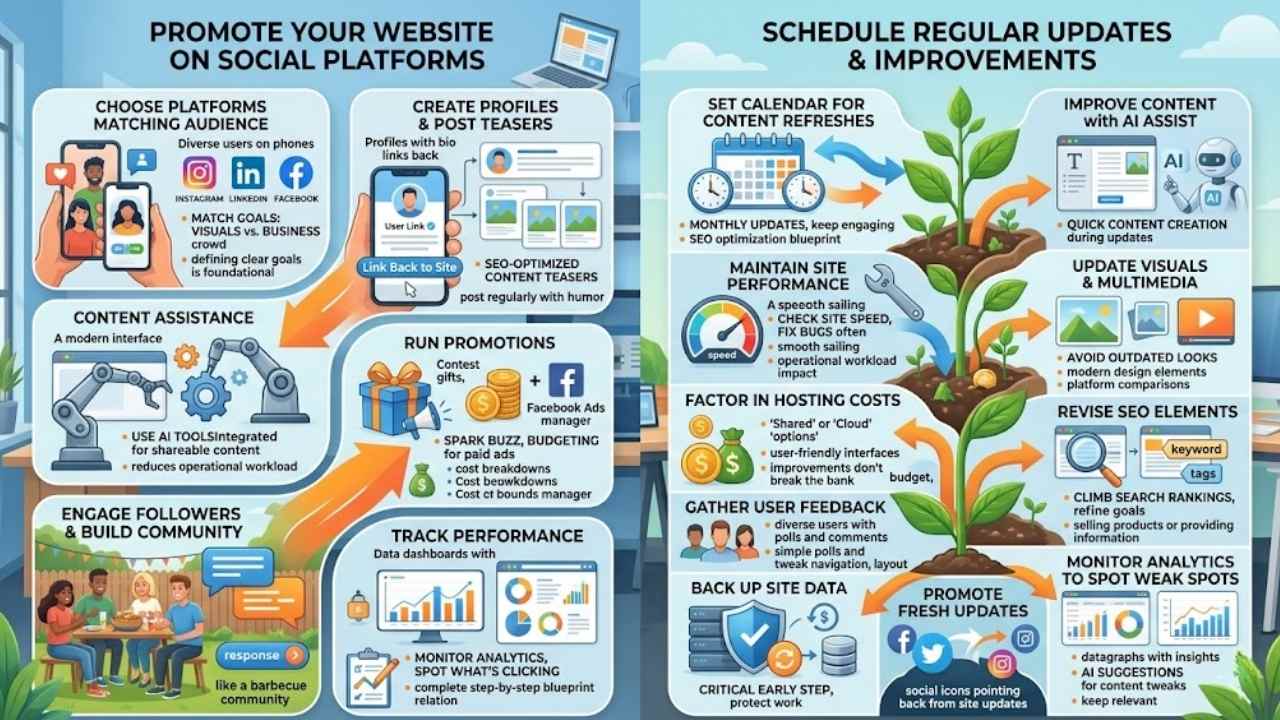
You’ve nailed the build, so flip the switch to go live, spread the buzz on spots like Instagram and TikTok where your crowd hangs out, track visits with Google Analytics to spot what’s clicking, and tweak content weekly to keep things zippy and fresh—curious about nailing that perfect promo push? Stick around for the wrap-up.
You’ve launched your website, now spread the word. Social platforms can boost your site’s visibility, tying into how decisions in website development impact marketing efficiency and sales velocity.
- Pick platforms that match your target audience, like Instagram for visuals or LinkedIn for business crowds, because defining clear goals and needs, such as showcasing work or selling products, is the foundational first step in website creation that extends to promotion.
- Create profiles that link back to your site, and post teasers of your SEO-optimized content to draw clicks, as SEO optimization is a key component of building an effective website from scratch in 2026.
- Share updates regularly, maybe with a dash of humor like, “Hey folks, check out this new post – it’s like coffee for your brain,” since website builders and web hosts have simplified the process through templates and user-friendly interfaces, making promotion feel less like a chore.
- Use artificial intelligence tools integrated into website builders to whip up shareable content, hey, they assist with content creation, which cuts down on operational workload and amps up engagement.
- Run promotions or contests to spark buzz, tying into cost breakdowns that are an important consideration when launching a website in 2026, like budgeting for paid ads on Facebook to speed up sales velocity.
- Engage with followers by responding to comments, building a community that feels like a backyard barbecue, and note that platform comparisons are essential when deciding how to build a website from scratch in 2026, so compare social sites too for the best fit.
- Track performance with built-in analytics, because the decisions made during website development directly impact marketing efficiency, and a complete step-by-step blueprint for website building in 2026 should cover planning, tools, costs, SEO, and common mistakes to avoid in promotion.
Schedule regular updates and improvements
Your website lives on after launch, like a garden that needs constant care to thrive. Keep it fresh and functional in 2026, folks, by planning smart updates that boost performance and user joy.
- Set a calendar for content refreshes, say every month, to keep things engaging and help with SEO optimization, a key part of building an effective site from scratch as per the complete step-by-step blueprint for 2026.
- Use artificial intelligence tools now integrated into website builders to assist with content creation during updates, making the task quicker and less of a headache for you.
- Check site speed and fix bugs often, since decisions in development directly impact marketing efficiency, sales velocity, and operational workload, and you want smooth sailing.
- Update visuals and multimedia with high-quality stuff, tying back to how platform comparisons matter when deciding your build method, to avoid common mistakes like outdated looks.
- Factor in cost breakdowns for ongoing hosting plans, like shared or cloud options that simplify the process through user-friendly interfaces, so improvements don’t break the bank.
- Revise SEO elements regularly, building on the foundational step of defining clear goals such as selling products or providing information, to climb search rankings over time.
- Gather user feedback through simple polls or comments, then tweak navigation and layout, noting how website builders have made this easier with templates in 2026.
- Back up your site data before any changes, a smart move that ties into registering a domain name as a critical early step, protecting all your hard work from mishaps.
- Promote fresh updates on social platforms right away, linking to how the complete blueprint covers tools and planning to cut down on operational workload.
- Monitor analytics to spot weak spots, then improve them, since AI tools can even suggest content tweaks, keeping your site relevant in this fast-paced digital landscape.
Final Thoughts
You’ve learned to define your site’s goals, pick tools like website builders or custom code, grab a domain, choose hosting such as shared or cloud options, map out pages, design with responsive layouts, add SEO-rich content, test everything, and launch with promotion.
These steps make building a site simple and quick, like piecing together a puzzle without the frustration. What stops you from starting your own project today? Master this process, and watch your online presence boost sales and cut workloads, turning ideas into real wins.
Check out resources like Wix tutorials or HostGator guides for extra help on platforms and costs. Jump in now, folks, because a great website opens doors you never knew existed.
Frequently Asked Questions (FAQs) About Building a Website From Scratch
1. What’s the first step to build a website from scratch in 2026?
Pick a domain name that fits your brand, like a catchy phrase folks remember. Then grab hosting from a reliable provider, think of it as renting space online. Don’t forget, make it mobile-friendly right from the start to keep visitors happy.
2. Do I need to learn coding to create my site?
You bet, basics like HTML and CSS get you going strong. JavaScript adds that interactive punch, turning a plain page into something lively.
3. How can I make my website stand out in 2026?
Dive into SEO tricks to climb search rankings, like sprinkling keywords naturally. Use a CMS such as WordPress for easy updates, it’s like having a helpful sidekick.
4. Is security a big deal when building from scratch?
Absolutely, lock it down with HTTPS to protect user data; imagine it as a sturdy fence around your digital home. Test for vulnerabilities often, and hey, a little caution goes a long way in this wild web world.























