You juggle a busy life, right? Work, family, and those quick moments to check the markets. Yet, picking the right forex trading app feels like hunting for a needle in a haystack. Clunky interfaces slow you down, hidden fees eat your profits, and poor security keeps you up at night.
Many mobile traders face this mess, missing out on trades during market volatility. Did you know? ForexBrokers.com tests trading platforms with thousands of data points, across more than 130 categories, and keeps errors under 0.1% each year. They even try apps on devices like iPhone and Samsung Galaxy phones.
This post breaks down the top forex trading apps for you. We cover user-friendly interfaces, advanced trading tools like technical indicators and economic calendars, plus demo accounts for practice.
You’ll get pros, cons, and tips on low fees, tight spreads and risk management.
Stick around to find your perfect match.
What Makes a Great Forex Trading App?
Ever wondered why some apps turn mobile trading into a breeze, while others leave you scratching your head? Imagine you’re on the go, checking EUR/USD trends via push notifications, and the app’s slick user interface lets you execute market orders in seconds, sparking that urge to explore top picks like MetaTrader 5 for its advanced charts.
Security and regulation
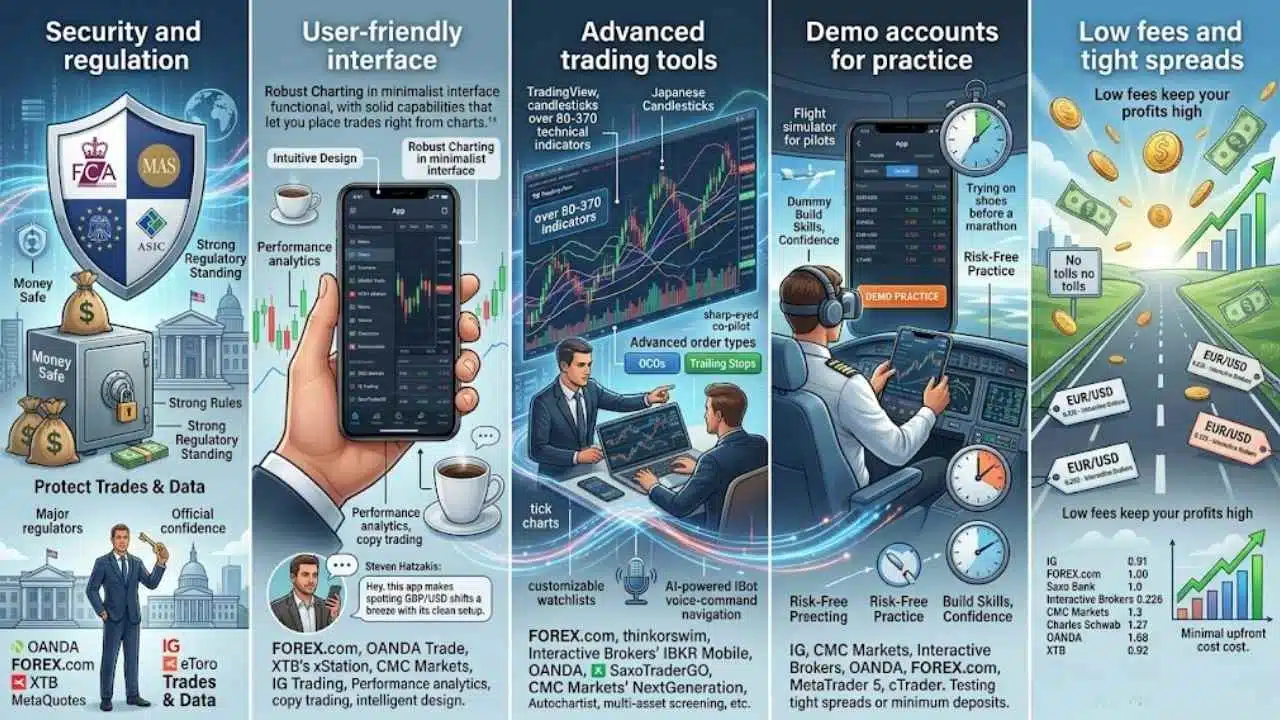
You want your money safe when you trade forex on a mobile app. Pick apps from brokers with strong rules in place. IG stands out here. This broker gets approval from eight top regulators.
Think of the Financial Conduct Authority in the UK, the Monetary Authority of Singapore, and the Commodity Futures Trading Commission in the US. IG holds licenses in many big financial spots and boasts the top trust score among forex brokers.
Folks at ForexBrokers.com check all facts with a research team. They base ratings on deep studies and shared know-how. OANDA shines as a trusted global name with solid regulatory standing.
FOREX.com acts as a reliable brand that gives great trading for forex and CFDs around the world. The IG Trading app wins for safety and trust. It comes from a well-funded, public company.
Apps like these protect your trades and data. They follow strict finance rules. This setup lets you focus on market orders, technical analysis, and forex pairs like EUR/USD or USD/JPY without worry.
Brokers such as eToro and XTB also push strong security. They use regulation to build user trust. Imagine trading on your iPad with push notifications, knowing rules back you up. OANDA Corporation and others offer tight spreads under watchful eyes.
Regulators like ASIC keep things fair. This means low risks for mobile trading strategies. You get peace of mind with account management and trade execution. Forex brokers with high standards, including those from MetaQuotes Software Corp., make apps secure.
They avoid scams in the fintech world. Choose wisely for your finance goals.
User-friendly interface
A good forex trading app needs a user-friendly interface to keep things smooth for mobile traders. Think of it like a well-organized toolbox, where you grab what you need without digging around.
Apps like FOREX.com shine with their intuitive design and robust charting features in a minimalist interface, making trades feel effortless. OANDA Trade stands out as user-friendly and functional, with solid capabilities that let you place trades right from charts.
XTB’s xStation app mirrors the desktop version, packing an intuitive design and a rich set of tools for seamless switches between devices. CMC Markets offers a clean design loaded with research tools and powerful charts, perfect for quick checks on pairs like USD/CAD or AUD/USD.
Take IG Trading, for example; it boasts an intuitive layout for easy navigation, plus quick setup for charts and alerts that ping you on market moves. SaxoTraderGO brings intelligent design and tons of info, keeping features consistent from web to mobile for top user experience.
Apps often integrate TradingView for advanced visuals, or tools like Japanese candlesticks to spot trends in financial instruments. Many include performance analytics to track your progress, and some even offer copy trading to mimic pros.
Picture chatting with a buddy about forex over coffee, “Hey, this app makes spotting GBP/USD shifts a breeze with its clean setup.”. The best apps feel like an extension of your hand, simple yet packed with power, says forex expert Steven Hatzakis.
Advanced trading tools
You want tools that make trading feel like a breeze, not a battle. Great forex apps pack in advanced order types, like OCOs and trailing stops from FOREX.com, to help you manage risks without constant babysitting.
They offer charting powered by TradingView, with over 80 technical indicators, so you spot trends fast. Think of it as having a sharp-eyed co-pilot, guiding your moves.
Apps like thinkorswim from Charles Schwab step it up with tick charts and over 370 technical indicators. You overlay multiple studies and sync drawings across devices, turning complex data into clear plays.
Interactive Brokers’ IBKR Mobile adds customizable watchlists, live streaming, and an AI-powered IBot for voice-command navigation, making trades as easy as chatting with a friend.
OANDA brings high-quality research with Dow Jones news and Autochartist signals, plus flexible lot sizing for smart risk management. SaxoTraderGO includes algo orders, risk tools, and multi-asset screening, while CMC Markets’ Next Generation offers chart patterns, client sentiment tools, and pre-defined screeners like Biggest Risers and Hot Products.
Demo accounts for practice
Demo accounts let you test the waters in forex trading without losing a dime. Brokers push these free tools so new traders can get comfy with apps like MetaTrader 5 or cTrader. Imagine, you explore real-time charts and practice trades, all risk-free, just like a flight simulator for pilots.
IG, CMC Markets, and Interactive Brokers all provide these setups to check out platforms. They help you spot tight spreads or advanced tools before you commit any cash.
New folks in trading love free demo accounts as a top pick for starting out. These gems mimic live conditions, so you grasp features from apps by OANDA or FOREX.com without financial hits.
Think of it as trying on shoes before a marathon; it saves blisters later. Brokers highlight them to build skills, evaluate CFDs trading, or even explore crypto options on NASDAQ feeds.
You practice strategies, test minimum deposit needs, and build confidence through direct involvement.
Low fees and tight spreads
Low fees keep your profits high in forex trading. Tight spreads mean you pay less on each trade, like buying low and selling high without extra costs eating your gains. Think of it as dodging hidden tolls on a smooth highway.
Brokers like IG offer an average EUR/USD spread of 0.91 with a minimum deposit of just $1. FOREX.com gives you 1.00 on that pair, starting at $100. Saxo Bank matches 1.0, and you can jump in with $0 down.
Interactive Brokers shines with a super-low 0.226 spread, no minimum needed.
CMC Markets hits 1.3 on EUR/USD, again with zero minimum deposit. Charles Schwab sits at 1.27, easy entry at $0. OANDA provides 1.68, perfect for beginners since it requires nothing upfront.
XTB delivers 0.92, and you start trading cfds right away with no deposit barrier. Apps like MetaTrader 5 integrate these features seamlessly. You get advanced tools from places like FOREX.com or OANDA, plus demo accounts to test tight spreads without risk.
Imagine practicing on fusion markets or fp markets setups, building skills through a trading academy vibe. Brokers such as blackbull markets, pepperstone, and plus500 us keep costs down too.
Even ic markets, avatrade, and global prime focus on low fees, while tickmill, xm group, and eightcap tighten those spreads for mobile traders. Capital.com and metatrader4 options add value, backed by stonex group inc.
and gain capital group llc insights. Dailyfx resources from city index or saxo bank help you spot deals, and strikex or tastyfx apps make it fun.
Best Overall: MetaTrader 5 (MT5)
Traders love MetaTrader 5 for its solid mix of speed and power on mobile devices, handling everything from forex pairs to CFDs with ease. Join the MQL5 community to grab custom indicators and bots that fit your style, turning your phone into a trading powerhouse.
Features & Description (MetaTrader 5)
MetaTrader 5, or MT5, stands out as a top choice for mobile traders. Brokers like CMC Markets and FP Markets support it fully. You get mobile apps for Android and iOS devices, so you can trade on the go.
MT5 shines with VPS hosting and algorithmic trading features. Imagine setting up trades that run themselves, like a loyal robot sidekick. It offers a wide range of tradeable markets, including CFDs (contracts for difference).
Plus, MT5 supports API trading via services like Algo Labs, but skip that in Australia. Eightcap boosts MetaTrader platforms with third-party plugins. U.K. clients even access TradingView for better charting and analysis.
CMC Markets adds TradingView mobile apps as extra options. MT5 connects you to the mql5.community for tips and tools. Folks often compare it to MetaTrader 4, but MT5 packs more power for modern needs.
Imagine: You open the app and explore advanced charts, all while sipping coffee at a cafe. MT5 keeps things smooth with its algorithmic trading setup. VPS hosting means your strategies hum along without hiccups.
Eightcap throws in plugins that amp up the experience. For U.K. users, TradingView integration feels like a secret weapon for sharp analysis. CMC Markets blends MT5 with TradingView apps, giving you choices.
The platform handles CFDs and other markets with ease. Join the mql5.community to swap ideas with fellow traders. MetaTrader5 edges out older versions like MetaTrader 4 in versatility.
It fits right in your pocket, ready for action anytime.
Pros & Cons (MetaTrader 5)
You know, weighing the good and bad sides of any app helps you trade smarter.
| Pros | Cons |
|---|---|
|
|
Best for Social Trading: eToro
Imagine joining a crowd of traders who share tips like old friends at a coffee shop. eToro lets you copy top performers with its CopyTrader tool, turning novice moves into smart plays.
Features & Description (eToro)
eToro stands out with its user-friendly copy-trading platform, perfect for mobile traders like you who want to follow pros without starting from scratch. You can replicate trades of experienced investors in real-time, and gain exclusive benefits for sharing your own strategies, which feels like joining a smart trading club.
The app gives access to over 7,000 symbols, including a big lineup of cryptocurrencies, so you trade stocks, forex pairs, and digital coins all in one spot. Imagine you spot a hot trade on EUR/USD with an average spread of just 1 pip, and copy it instantly to ride the wave.
eToro rates a solid 5 out of 5, and you start with a minimum deposit from $50 to $10,000, making it easy to jump in no matter your budget. Traders love the broad range of tradeable assets, which keeps things exciting and full of options.
Copy trading on eToro lets you mirror other investors’ moves automatically, saving you time while you learn the ropes. You get real-time updates, so your portfolio adjusts as theirs does, like having a trading buddy always on call.
The app shines with its simple design, but keep in mind, the charts miss drawing tools, a small hiccup for folks who sketch out plans. Still, you trade forex with tight spreads, and explore cryptos without hassle.
New users copy top performers right away, building confidence fast.
Pros & Cons (eToro)
You want the scoop on eToro’s ups and downs, right?
| Pros | Cons |
|---|---|
|
|
Best for Advanced Tools: FOREX. com
5. Best for Advanced Tools: FOREX.com:.
You know that feeling when your trading app feels like a trusty sidekick, packed with charts and indicators that spot trends fast? FOREX.com delivers just that, with real-time data feeds and custom alerts to keep you ahead in the forex game, making every swipe count.
Features & Description (FOREX.com)
– Features & Description (FOREX.com)
FOREX.com stands out with its fluid user interface that makes trading feel like a smooth ride. You get extensive market research to stay ahead of trends. Advanced charting, powered by TradingView, includes over 80 technical indicators and various drawing tools for sharp analysis.
The platform earns a perfect rating of 5/5, and it starts with a low minimum deposit of just $100. Traders love the average spread on EUR/USD at 1.00, which keeps costs down. Integrated research tools come from Trading Central, offering insights that cut through the noise like a hot knife through butter.
The FOREX.com Trading Academy suits all levels, from newbies to pros, and delivers pro-grade trading tools that pack a punch. You can set real-time price alerts to catch opportunities on the fly.
Advanced order types, such as OCOs and trailing stops, let you manage risks with precision. Educational content flows through the Trading Academy, building your skills step by step.
Imagine chatting with a wise mentor; that’s the vibe here, helping you trade smarter without the hassle.
Pros & Cons (FOREX.com)
You want the straight scoop on FOREX.com’s pros and cons, right? Check this table for a quick rundown.
| Pros | Cons |
|---|---|
|
|
Best for Modern Design: XTB (xStation)
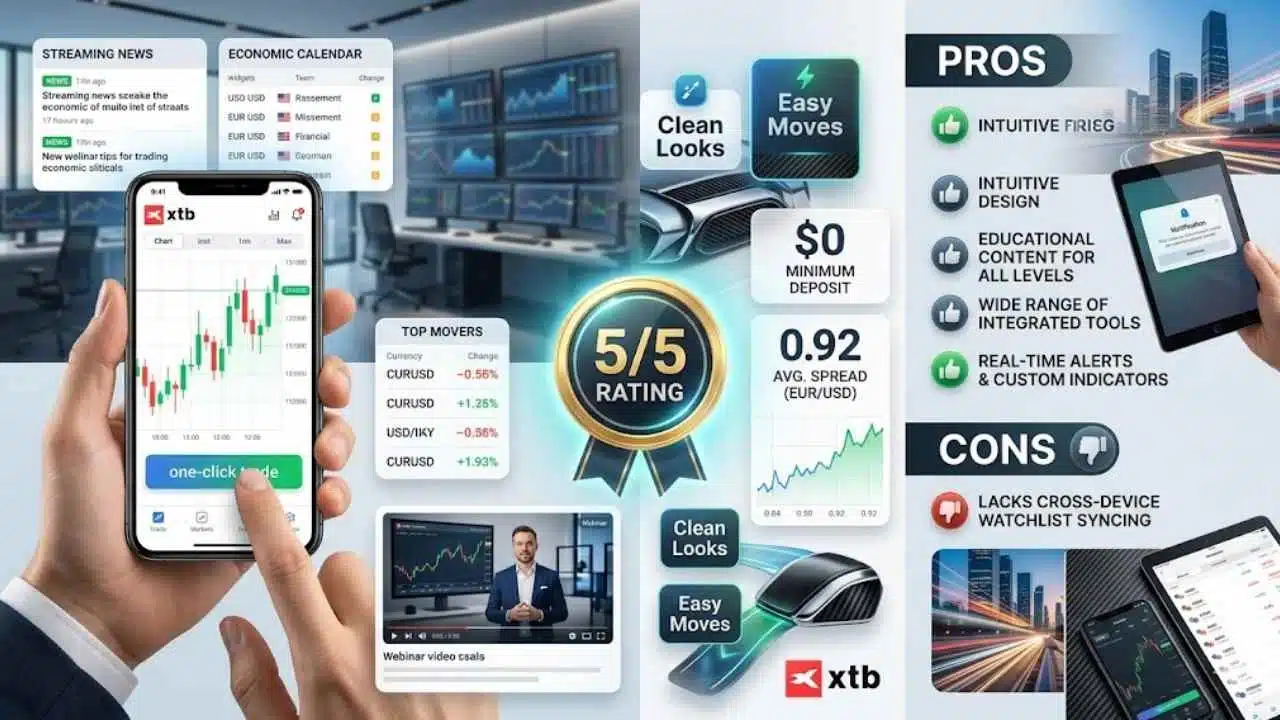
Picture your trading screen as a sleek sports car, smooth and fast, with XTB’s xStation app leading the pack in clean looks and easy moves. Traders love how it packs in candlestick charts and one-click trades, making tough market calls feel like a walk in the park, so dive deeper to see if it fits your style.
Features & Description (XTB)
XTB’s xStation 5 app shines with its intuitive design that matches the desktop version. Traders get a rich set of tools right at their fingertips, like streaming news to stay ahead of market shifts.
You spot hot opportunities fast with the “Top Movers” tab, and an economic calendar keeps you on top of key events. Plus, the app packs educational content, such as webinar-style videos, to sharpen your skills without leaving the platform.
This app earns a perfect 5/5 rating, and you start trading with a $0 minimum deposit. Spreads average a tight 0.92 for EUR/USD pairs, which saves you money on every deal. Imagine dipping into forex like a pro, no hefty upfront costs holding you back.
Tools feel seamless, turning complex trades into something as easy as pie.
Pros & Cons (XTB)
XTB shines with its intuitive design that feels like a breath of fresh air for mobile traders. You get educational content right at your fingertips, perfect if you’re new to forex charts and market trends. Plus, it packs a wide range of integrated tools, like real-time alerts and custom indicators, to keep your trades sharp. Imagine chatting with a friend who explains currency pairs without the headache, that’s the vibe here.
On the flip side, it lacks cross-device watchlist syncing, so your lists don’t carry over from phone to tablet seamlessly. This can feel like a minor hitch in an otherwise smooth ride, especially during busy trading sessions.
Best for Tight Spreads: OANDA
OANDA shines with its razor-thin spreads that keep your costs low, making it a top pick for mobile traders chasing quick profits in the forex market. Dive deeper into its slick mobile app, packed with real-time charts and fast execution, to see why it fits your on-the-go style like a glove.
Features & Description (OANDA)
Traders love apps that mix ease with power, and OANDA delivers just that. The OANDA Trade app strikes a fine balance between simple use and deep features, letting you drag and drop orders right on charts for quick changes.
You get flexible lot sizes, so you trade exact units and manage risks like a pro. High-quality research tools shine here too, with Dow Jones news feeds and Autochartist signals to spot trends fast.
Imagine: no minimum deposit holds you back, as OANDA starts at $0. Spreads stay tight, averaging 1.68 pips on EUR/USD pairs, which keeps costs low for mobile traders. This global brand builds trust through strong rules and solid research, earning a 4.5 out of 5 rating in total.
Folks often say it’s like having a reliable buddy in your pocket, ready for any market twist.
Pros & Cons (OANDA)
OANDA shines with strong market research that keeps you ahead in forex moves. People trust this global brand for good reason, it delivers a user-friendly app packed with solid tools. Flexible lot sizing helps you manage risks with pinpoint accuracy, like a sharp tool in your trading kit.
Drawbacks hit with fewer YouTube video updates than rivals, leaving you wanting more fresh content. Those new Smart videos focus mostly on platform tutorials, not deep insights. Higher spreads stack up poorly against top brokers, and the OANDA Trade platform lags behind the speed of elite options.
Final Thoughts
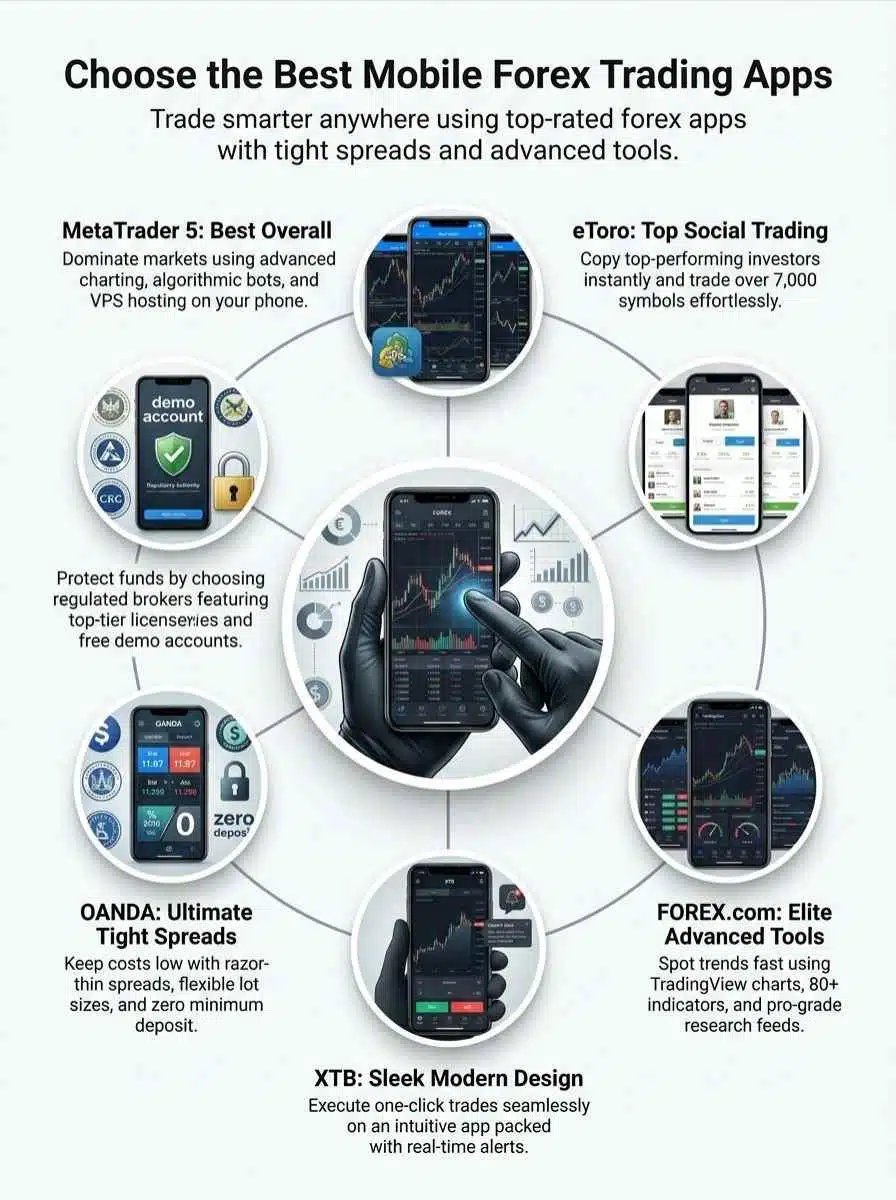
You’ve seen top apps like MetaTrader 5 for all-around use, eToro for copying pros, FOREX.com with its sharp tools, XTB’s sleek setup, and OANDA’s slim spreads that keep costs low. These picks fit right into your busy life, letting you trade on the go without hassle or steep learning curves.
Pick the right one, and you’ll dodge common pitfalls, boost your wins, and turn market ups and downs into real gains. Check out ForexBrokers.com for fresh reviews, or try demo accounts to test the waters. Jump in today, because smart trading starts with that first bold step, and hey, who knows, it might just change your game.