Have you ever wondered why your website pages struggle to show up higher in US search results? Maybe your links stretch on forever or look like a confusing bowl of alphabet soup. Long and messy URLs can actually scare users away and confuse even the smartest search engines. We know that websites with an SEO-friendly URL structure often get more clicks.
People find them easier to read and trust right away. I will walk you through the basics and show you exactly what works. Just one smart tip about your URL Structure could change how people find your site today.
What Is a URL and Why Does It Matter for SEO?
A URL is the exact web address you type in your browser to visit a page. Think of it as giving physical directions to a friend. Search engines and people both notice if those directions make sense. Making them clear can lead more visitors right to your digital doorstep.
Definition of a URL
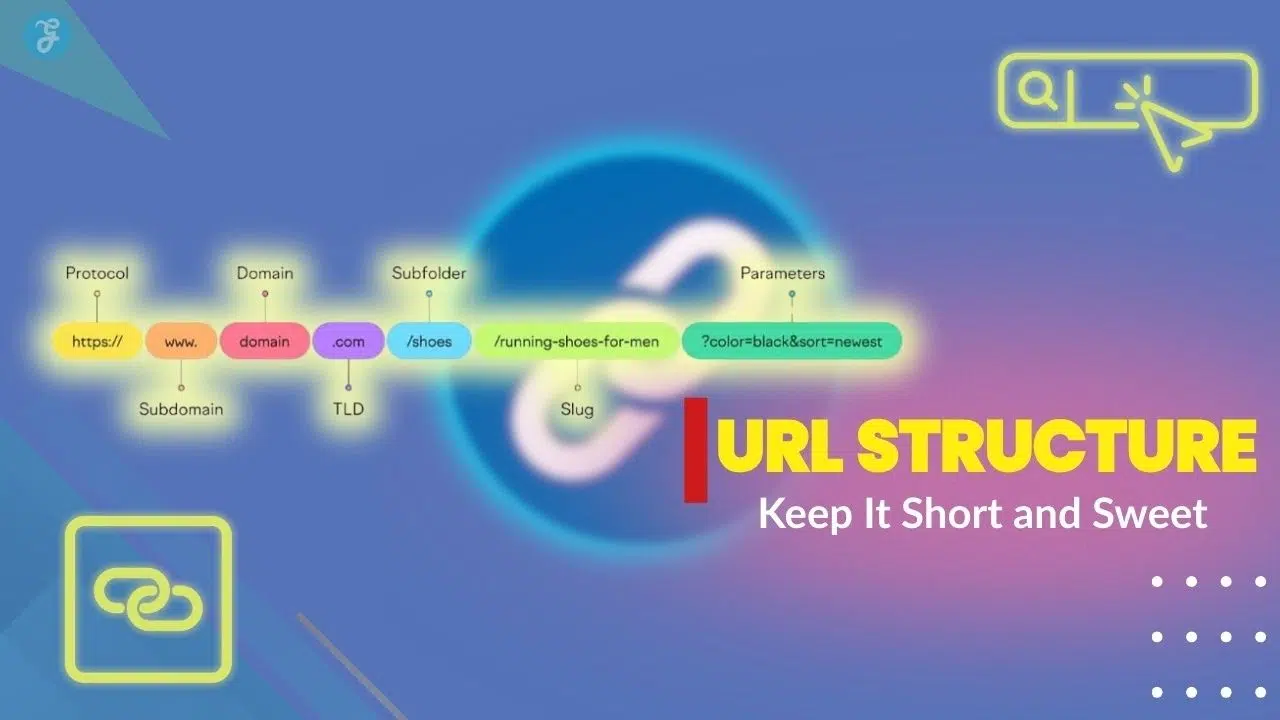
Think of a URL as the street address for any page on a website. It helps users and search engines find the right spot, just like how a physical address leads you to a home or shop.
For example, typing “https://www.example.com/shoes” tells both people and Google there are shoes waiting on that page. Each part of a URL serves its own job. You have the protocol like HTTPS, the domain name, the path, and sometimes extra information called parameters.
A good URL is like clear signage on a busy road. It is easy to follow and tough to forget.
Short and clean URLs are easy for everyone to read. That matters a lot for your site architecture and web traffic growth. Next, we will cover why this tiny string of text packs such power for your SEO optimization.
The importance of URLs for search engines and users
Search engines read URLs to figure out your page topics. Short and clean URLs make it easier for Google and Bing to understand your content. A URL like www.example.com/best-dog-leashes is simple and uses relevant keywords.
This can help your search engine rankings, as reported by Moz and Backlinko. In fact, 2026 data shows that keeping your URL between 50 and 60 characters is the sweet spot for performance. Messy URLs with lots of numbers or symbols confuse search bots and lower your total SEO optimization.
Users trust websites with clear and readable links. Long or jumbled addresses scare people away and reduce clicks. Imagine seeing www.example.com/product/12347-vXqK?ref=78 instead of /blue-jeans-sale. Which one looks better to you?
People click more often when they see organized site architecture and descriptive URLs that tell them what to expect. Clear links boost the user experience, making each visit much smoother.
Characteristics of an SEO-Friendly URL
Good URLs set the stage for higher search rankings and happier visitors. They act like street signs, guiding people and search engines right where you want them to go.
Clear and concise structure
A clear and concise URL structure helps both people and search engines. Think of a messy road sign. Nobody wants to stop and guess what it means.
Keep your URLs short, simple, and direct. You want to make them easy to recall, share, and trust. Here is a quick comparison to show the difference:
- Good: www.example.com/shoes/red-sneakers
- Bad: www.example.com/index.php?id=2468&category=saleitems
- Good: www.example.com/content-marketing-tips
- Bad: www.example.com/2026/01/content-tips (Dates make content look outdated quickly)
Search engine rankings favor cleaner URLs. Google’s John Mueller stated in 2020 that words in a URL help with relevance, but stuffing them will not provide a ranking boost. Use easy-to-read slugs separated by hyphens for the best results with SEO optimization.
Use of lowercase letters
Search engines read URLs with lowercase letters much more easily. This boosts your search engine rankings and helps users avoid frustrating errors. For example, “example.com/Best-Books” is different from “example.com/best-books”.
Did you know that most websites run on Linux servers? These servers treat uppercase and lowercase letters as completely different addresses. If someone types a capital letter by mistake, they might hit a broken 404 error page.
This split can divide your web traffic and hurt your site architecture. Use lowercase letters in every URL slug for the best readability and clean URLs. Small changes like this bring big wins for your SEO optimization and user experience.
Proper use of hyphens to separate words
Lowercase letters give a clean look, but hyphens act as vital signposts in your URL structure. Hyphens break up words and help both users and search engines read your links with ease.
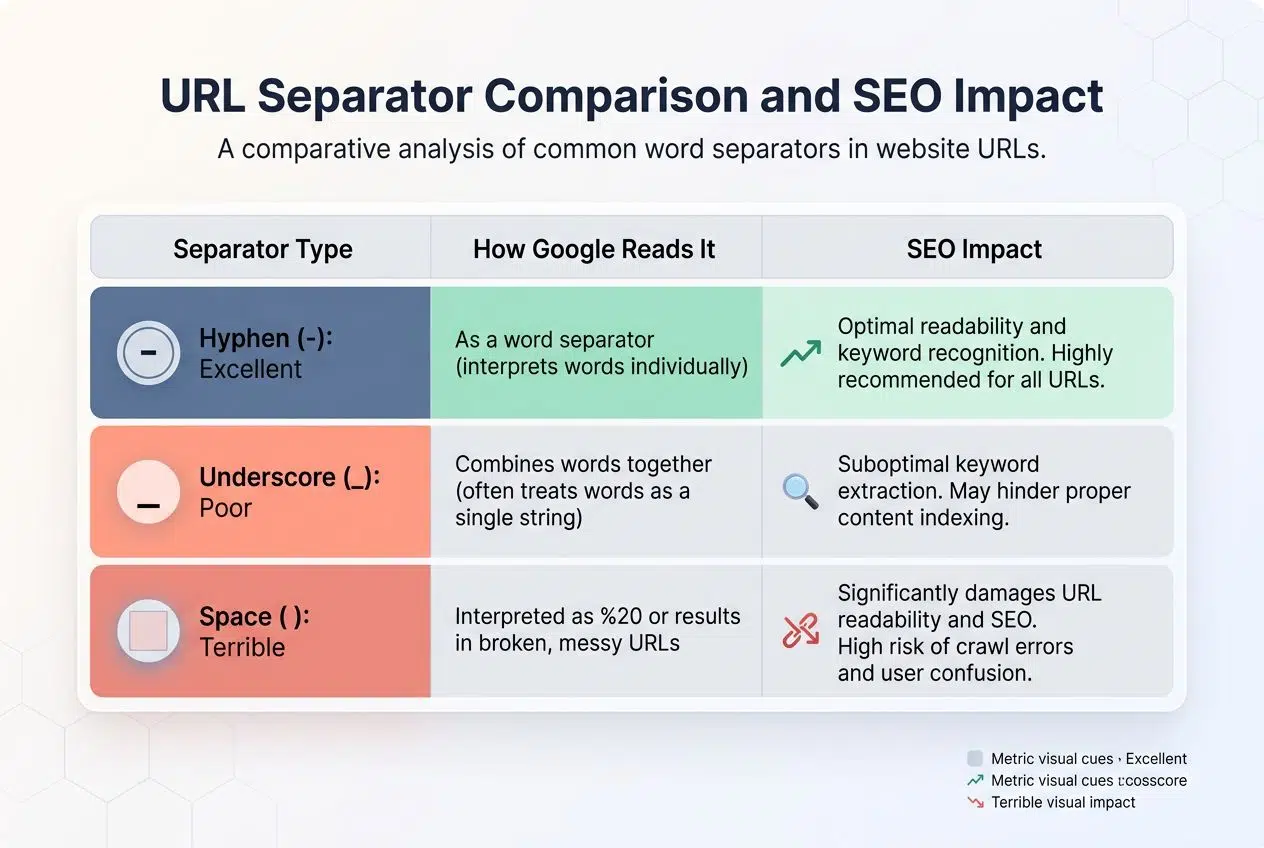
Compare /bestseotips to /best-seo-tips. The second one feels much easier to understand at a glance. Google officially recommends using hyphens instead of underscores or spaces for clear separation.
| Separator Type | How Google Reads It | SEO Impact |
|---|---|---|
| Hyphen (-) | As a space between words | Excellent. It helps Google index individual keywords perfectly. |
| Underscore (_) | As a word joiner | Poor. Google reads “red_shoes” as the single word “redshoes”. |
| Space ( ) | As special character %20 | Terrible. It looks spammy and can break links in emails. |
Stick to one hyphen between each word so things stay neat. Clean URLs keep both humans and algorithms happy, creating a win-win for your site architecture.
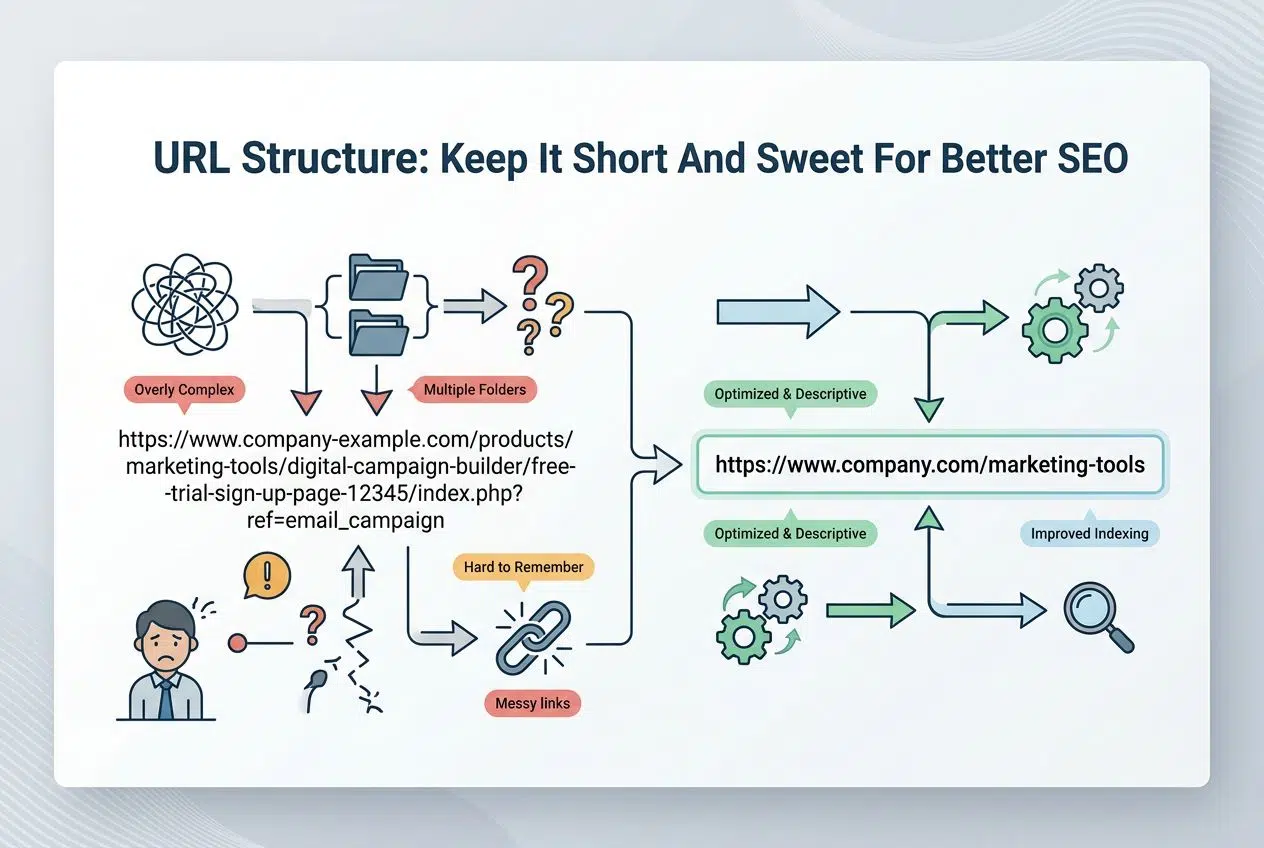
URL Structure: Keep It Short And Sweet For Better SEO
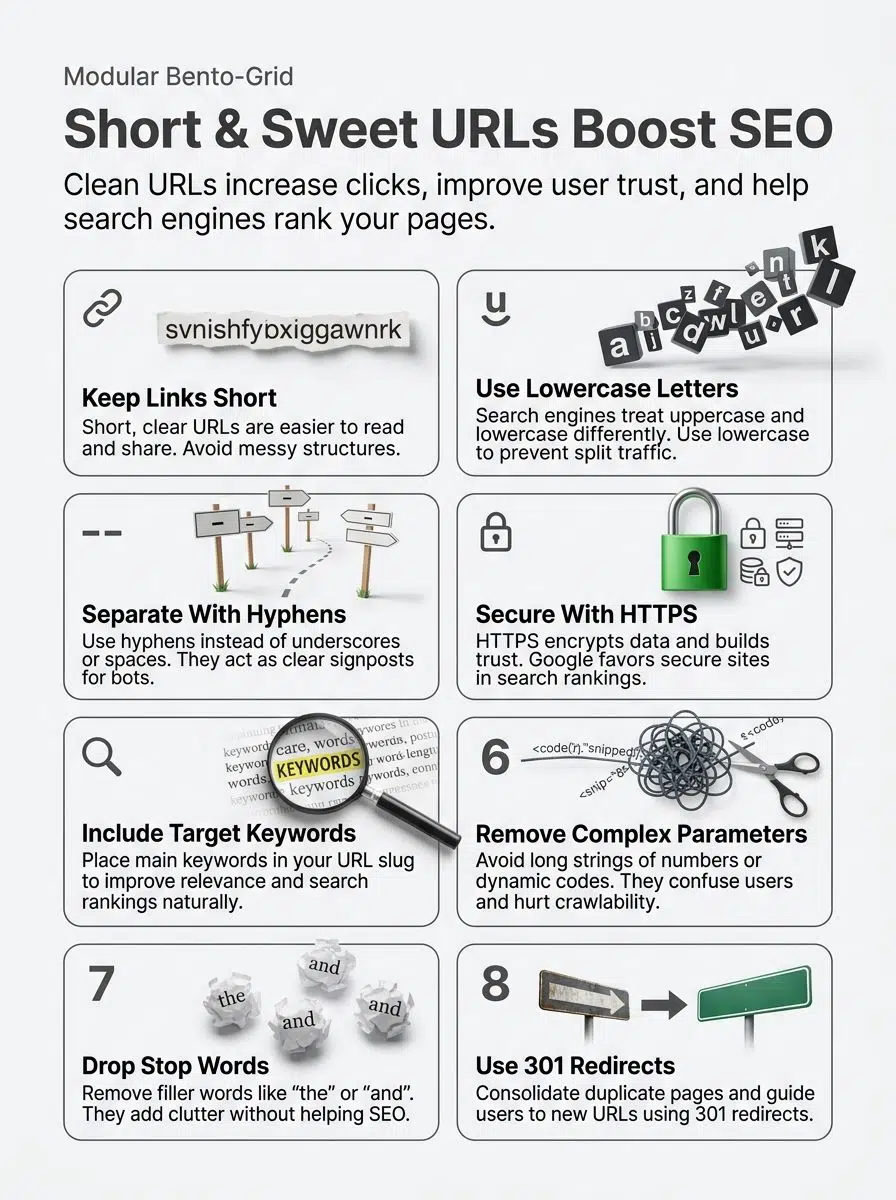
Short URLs are like clear road signs. People find them easy to follow and share. Search engines spot the main idea fast, boosting your site’s chances to shine.
Improved user experience
A clean and short URL helps people feel confident about clicking a link. Long URLs with random numbers or strange symbols can look confusing or even scary. If a link looks like spam, users will bounce before the page even loads.
For example, www.example.com/shoes/kids is much easier to read than a messy string of characters. People spot what they get right away. Easy-to-read URLs also let users recall the website faster.
Site visitors spend less time guessing where each click leads, which reduces stress and keeps them browsing longer. Simple URL structure improves web traffic as users share links more often with friends.
Higher click-through rates
Short URLs help people trust your links, boosting the chances they will actually click. No one wants to follow a confusing trail with words and numbers everywhere. Clean URLs grab attention in search results and on social media feeds, making them look safe and easy to understand.
Recent 2026 data from link management platforms shows that branded, short, and descriptive links can drive up to a 34% increase in click-through rates compared to messy, unbranded ones.
Google notes that users are more likely to click short, descriptive web addresses. Simple addresses also fit better on mobile screens, so users spot what matters most right away.
Better crawlability for search engines
As click-through rates climb, another win comes with better crawlability for search engines. Easy-to-read URLs make it simpler for crawlers like Googlebot to scan your website.
Googlebot actually has a limited “crawl budget” for every site. If it wastes time trying to figure out a messy URL structure, it might leave before finding your best content. Clean URLs help bots move faster between pages.
This boosts how quickly your content shows up in search results. Using clear hyphens and short words helps each section stand out, improving index coverage and site structure recognition.
Best Practices for Creating SEO-Friendly URLs
Want to make your site shine in US search results? Explore these quick tips that will help you craft clean, strong URLs. Read on for these smart moves.
Use HTTPS for secure URLs
HTTPS keeps your website safe. It encrypts the data between users and servers, so hackers cannot steal information like passwords or payment details. Google strongly favors HTTPS sites in search engine rankings.
Secure URLs can boost trust and improve your click-through rates, too. Browsers like Google Chrome now actively display giant red warning screens for unsafe HTTP pages. This warning can scare off visitors fast, sending them straight to a competitor with a secure URL structure.
Switching your site from HTTP to HTTPS is one of the most important SEO best practices today.
Include target keywords
Target keywords act as magnets for search engines. Use your main keyword in the URL slug to improve relevance. For example, a blog about URL optimization should include those words right in the link.
Descriptive URLs improve search engine rankings and help users figure out what they will read next. Here are a few rules for adding keywords to your links:
- Keep it natural: Do not shove too many keywords together.
- Front-load them: Place your primary keyword as close to the domain name as possible.
- Match the title: Ensure your URL keyword aligns with your page’s H1 title.
- Stay focused: Pick one main keyword per page to avoid confusing search engines.
Proper use of keywords improves readability and helps both users and search bots find important content easily.
Avoid unnecessary parameters and dynamic strings
Long strings of confusing numbers or strange codes in URLs often scare folks away. Search engines also struggle to index those kinds of pages efficiently. For example, “/best-shoes-2026” is easier to read and share than “/product?id=12345&ref=abc”.
E-commerce sites often struggle with this when using sorting filters, which can turn a clean URL into something messy. Here are the most common parameter types that cause issues:
- Sorting filters: ?sort=price
- Color selections: ?color=blue
- Tracking codes: ?sessionid=8923
You can use the URL Parameters tool in Google Search Console to tell Google to ignore these specific strings. Plain language makes your URL slug stand out more on Google results.
Be consistent with trailing slashes
Avoiding dynamic URL strings helps keep things clean, but sticking to one style for trailing slashes is just as vital. For example, if you use https://example.com/page/, do not also allow https://example.com/page without the slash.
Search engines may see these as two different pages. This mix-up can cause duplicate content issues and hurt your search engine rankings. Keeping all links in a consistent format makes crawling easier for Google and other bots.
Always redirect one version to the other using a 301 redirect. You should also use a canonical tag pointing to your preferred version. This simple piece of code tells search engines exactly which page is the master copy.
Avoid using fragments for indexable pages
Consistency with trailing slashes helps users move through your site smoothly. Now, you need to watch out for fragments in URLs. Fragments are those bits after the hash symbol that tell browsers where to jump on the page.
Search engines usually ignore these fragments during indexing. Here is how fragments can cause issues:
- Hidden Content: If you use #section1 for a completely separate product, Google might miss it entirely.
- Diluted Value: Links pointing to fragment URLs do not always pass full SEO value to the main page.
- Tracking Errors: Analytics software often strips out fragments, making it hard to track web traffic accurately.
Keep all main page information above the hash mark in a URL structure. Let fragments help only with navigation inside a single page.
Common URL Structure Mistakes to Avoid
Even a tiny slip in URL structure can trip up your SEO. Stick around to keep your links sharp and your rankings happy.
Using uppercase letters
Using uppercase letters in URLs can cause all sorts of headaches for your SEO. Search engines treat uppercase and lowercase as different pages. A link to /About and /about could look like two separate places to Google.
This mix-up hurts your search engine rankings because it splits link power between both versions. Lowercase letters keep things neat and easy to read.
People rarely type capital letters into web addresses by hand. Big brands always use lowercase in their site architecture to help users find what they need fast. Clean URLs boost trust and make visitors feel safe about clicking links.
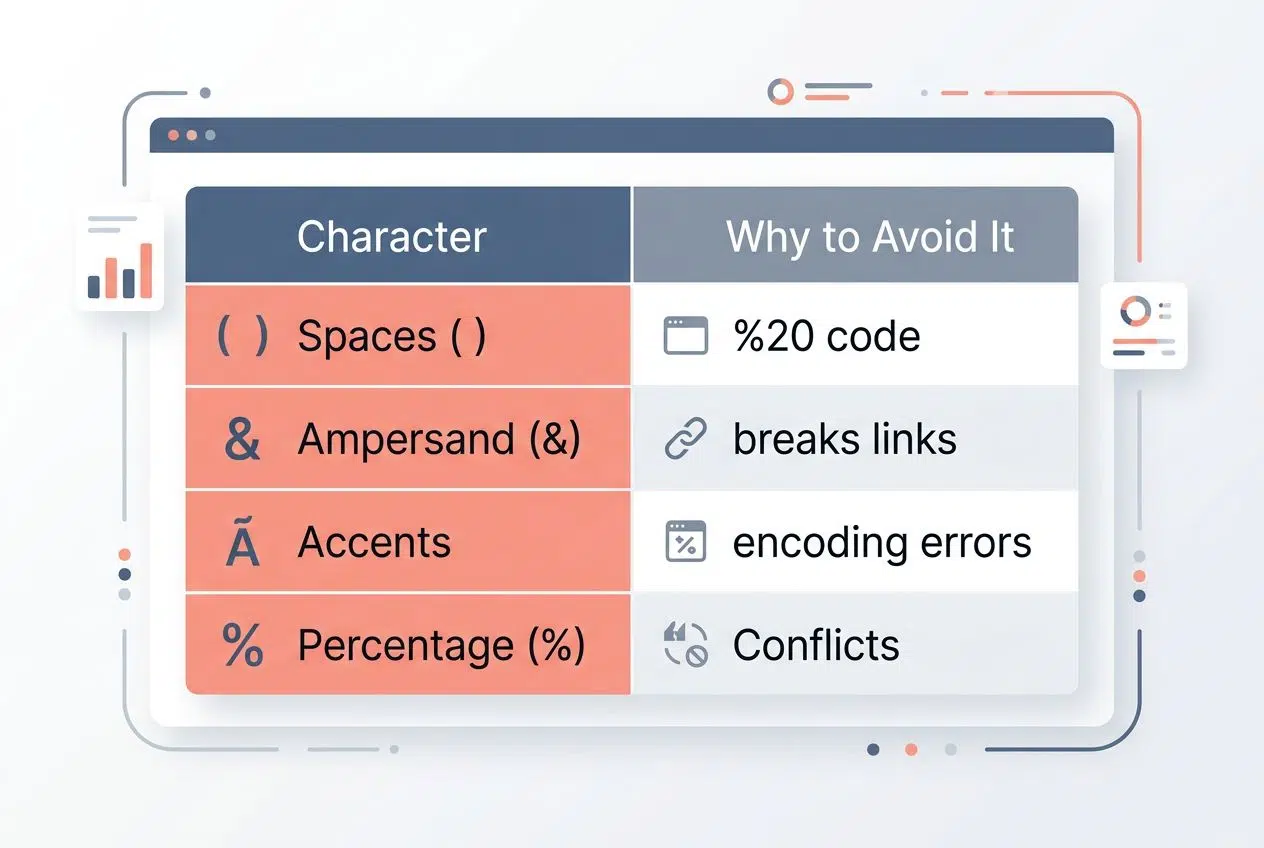
Overusing special characters or accents
Special characters and accents in URLs can confuse both search engines and users. Clean URLs help with SEO and make web pages easier to find.
| Character | Why Avoid It |
|---|---|
| Spaces ( ) | Browsers turn them into an ugly “%20” code. |
| Ampersand (&) | Often breaks links or acts as a parameter trigger. |
| Accents (é, ü) | Can cause encoding errors on older US servers. |
| Percentage (%) | Conflicts with the browser encoding language. |
Google prefers simple web addresses. Search engines might not index URLs packed with odd symbols or accents, which means less web traffic for you. Stick with plain letters and hyphens for better readability.
Including irrelevant stop words
Including small filler words in your URL slug adds unnecessary clutter. These words do not help search engines understand your page, so they are just extra baggage.
A short and clean URL structure helps visitors and Google alike. Google’s natural language processing algorithms are smart enough to understand context without them. Here are the most common stop words you should remove:
- The
- And
- Of
- For
- A / An
For example, use /seo-tips instead of /the-best-seo-tips-for-you. Clear URLs improve rankings on search results since keywords stand out more without those unnecessary stop words slowing things down.
Tips for Multi-Regional Websites
Running websites for different countries? You will want to make your URLs friendly for every region, so each visitor feels right at home.
Use localized URLs
Localized URLs help users find the right content fast. If someone in France clicks a link, seeing “/fr/chaussures-homme” makes perfect sense. Google knows this page targets French speakers, so it ranks better for their specific searches.
This boosts web traffic from different countries. When targeting different regions, you have a few structural choices to make:
- Country Code Top-Level Domains (ccTLDs): Like example.co.uk. Great for local trust, but expensive to run separate sites.
- Subfolders: Like example.com/uk/. This is the easiest to manage and lets you share your main site’s SEO authority.
- Subdomains: Like uk.example.com. Good for separating different server locations, but it can split your SEO power.
Clean URLs with clear country codes are easy to read and please both people and bots. Nobody likes landing on a page that looks out of place.
Avoid duplicate content across regions
Google flags duplicate content fast. That can really hurt your search engine rankings and web traffic, especially if you run sites for different regions. Use descriptive URLs with region codes like “/us/” or “/uk/” so each region stands out as its own page.
You must set up hreflang tags to help Google know which version belongs to which country. These tags tell Google to show the US URL to US searchers, and the UK URL to UK searchers.
Always write fresh content for each regional site or tweak it to fit local culture and keywords. This keeps every page clean and ready to welcome its home crowd.
How to Analyze and Optimize Your URL Structure
Curious about fixing up your URLs but not sure where to start? Let these handy tools shine a light on what is working and what needs a refresh.
Tools for assessing URL performance
Google Search Console shows exactly how users and search engines see your URLs. Use the Coverage report to check if Google crawls and indexes your pages correctly. You can also use professional third-party software to speed up this process:
- Ahrefs Site Audit: Instantly spots broken links and tracks keyword rankings in your URLs.
- Screaming Frog SEO Spider: Use its URI tab to filter out URLs that are too long, contain uppercase letters, or have strange characters.
- SEMrush: Finds slow-loading pages and flags messy URL slugs that hurt SEO optimization.
With just a few clicks, you can boost web traffic simply by fixing issues flagged by these powerful platforms.
Steps to improve existing URLs
Start by checking your URLs for extra words or strange symbols. Swap out long strings of numbers or odd characters for simple, lowercase words that match your content.
Here is a simple process to clean up your links safely:
- Audit Your Site: Export a list of all your current URLs using a tool like Google Search Console.
- Map the Changes: Use a spreadsheet to match your old, messy URLs to your proposed new, clean URLs.
- Remove the Clutter: Replace spaces with hyphens and delete stop words like “and” or “the”.
- Implement Redirects: Apply 301 redirects from the old links to the new ones to protect your web traffic.
- Update Internal Links: Change the links inside your website’s content to point directly to the new URLs.
This keeps web traffic flowing without hiccups. Next, we will cover when an update helps you reach higher search engine rankings without losing users.
When to Update an Existing URL Structure
Think of changing your URLs like swapping old shoes for new ones. They should fit better and feel right. Sometimes, small tweaks open big doors for search engines and users alike.
Consolidating duplicate URLs
Duplicate URLs can confuse both people and search engines. For example, yoursite.com/page, yoursite.com/page/, and yoursite.com/PAGE might show the exact same information. This splits your web traffic and lowers search engine rankings.
Use 301 redirects to send all versions of a page to one clean URL. Pick a single format, like lowercase with hyphens, for easy readability.
Search engines find it much easier to crawl sites without duplicates blocking their path. Save your spot in the ranking race by fixing duplicate content fast.
Implementing 301 redirects
After merging pages with duplicate URLs, it is incredibly smart to use 301 redirects. A 301 redirect tells search engines and visitors that a page has moved for good. This way, you keep your site’s search engine rankings strong and send web traffic straight to the right spot.
A proper 301 redirect passes about 90% to 99% of your original ranking power to the new page. If you skip this step, you are throwing away all your hard-earned SEO authority.
Think of a 301 redirect as forwarding your mail after you move houses, ensuring nothing gets lost in the shuffle. Search engines notice this change fast, protecting your SEO efforts and user experience.
Wrapping Up
Good URL structure shapes how people and search engines find your content. Short URLs with keywords win clicks, boost SEO, and make it easy for visitors to share links.
Following the rule of SEO-friendly URL Structure is the easiest way to win clicks. Using lowercase letters, hyphens instead of underscores, and simple words will help you stand out in search results.
Secure your site with https for better trust. Clean URLs are less likely to confuse users or bots crawling your pages. Change messy strings into readable slugs so everyone knows what to expect after clicking the link. Keep making small changes for big wins in web traffic and search engine rankings.