Choosing the best educational games for kids is no longer just about digital babysitting; in 2026, it is about providing a platform for critical thinking and future-proof skill acquisition. Modern educational gaming has evolved to blend high-quality graphics with adaptive learning algorithms that respond to a child’s individual pace. By focusing on math and coding, parents can help their children develop the logic and problem-solving skills necessary for the modern world while keeping them genuinely entertained.
The following games have been selected for their ability to turn screen time into an active, brain-boosting experience.
How We Selected Our 15 Best Educational Games For Kids
Our selection process involved analyzing specific pedagogical metrics and engagement factors. We prioritized games that offer a balance between fun mechanics and rigorous educational content. Below are the exact criteria and target metrics we used to rank these STEM-focused games.
| Criteria | Description | Target Metric |
| Curriculum Alignment | Adherence to core math and logic standards | 90%+ Topic Accuracy |
| Engagement Level | The ability to hold a child’s attention without overstimulation | 20+ Minute Play Session |
| Adaptive Learning | AI-driven difficulty adjustments based on performance | Real-time Scalability |
| Safety & Privacy | Absence of ads and secure data handling | COPPA/GDPR Compliant |
| Progress Tracking | Availability of detailed reports for parents and teachers | Weekly Performance Logs |
The 15 Best Educational Games for Kids (Math & Coding)
Equipping your child with the right digital tools can transform their perception of difficult subjects. Here is our comprehensive breakdown of the top math and coding games available today.
1. Prodigy Math
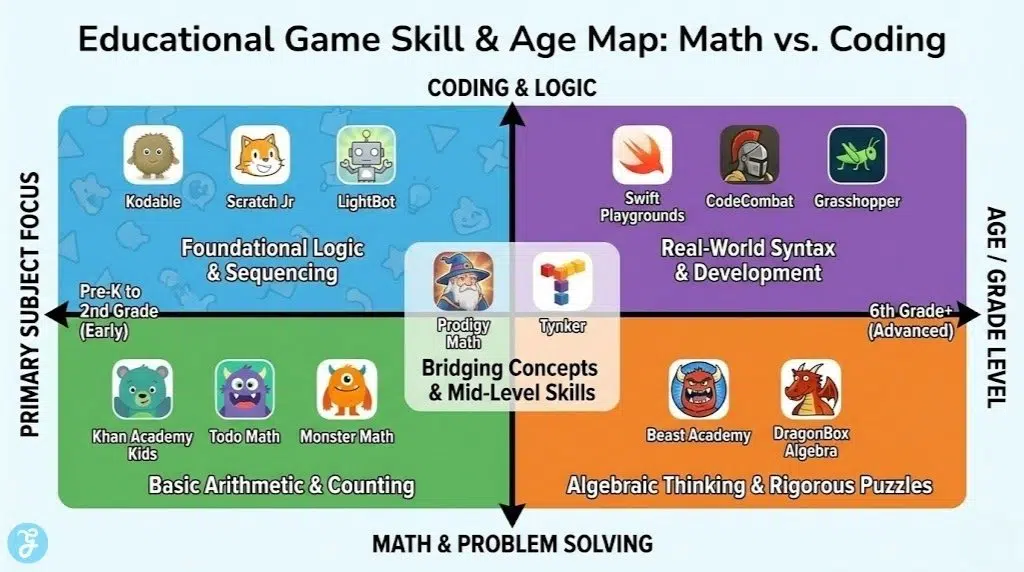
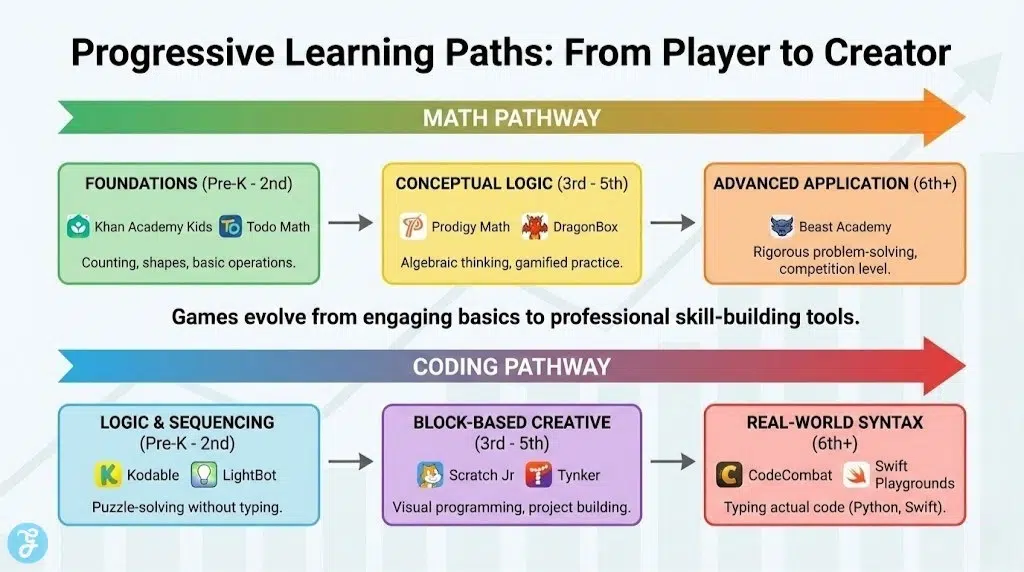
Prodigy Math turns math practice into an epic fantasy adventure where students must solve problems to win magical duels. The game covers a vast array of curriculum-aligned topics from 1st to 8th grade, adapting the difficulty as the player progresses. It encourages regular practice by rewarding players with new gear and pets for their avatars. This gamified approach has made it one of the most popular math tools in schools worldwide.
-
Best features: Engaging fantasy world with a built-in placement test.
-
Pros: Totally free for the core educational content and highly motivating.
-
Things to consider: The “Premium” membership prompts can be frequent.
2. Kodable
Kodable is designed to introduce the basics of programming to children as young as four years old. It uses a series of puzzles that teach fundamental concepts like loops, sequences, and conditions before moving on to actual JavaScript and Swift. The game features a colorful cast of characters and a self-paced learning path that builds confidence. It is a perfect starting point for children who show an early interest in how computers work.
-
Best features: Transition from block-based logic to real-world code.
-
Pros: Excellent for early learners and offers a comprehensive parent dashboard.
-
Things to consider: Requires a subscription for access to the full curriculum.
3. DragonBox Algebra 5+
DragonBox Algebra 5+ is a revolutionary game that teaches the principles of algebra without the child even realizing they are doing math. It uses intuitive touch-screen mechanics to manipulate icons that gradually transition into variables and equations. By focusing on the “rules” of the game, children learn to solve linear equations through pure logic. It is widely praised by educators for making abstract concepts incredibly concrete and accessible.
-
Best features: Innovative visual method for teaching complex algebraic logic.
-
Pros: Zero text required to start learning and very satisfying gameplay.
-
Things to consider: It is a paid app with no free-to-play tier.
4. Swift Playgrounds
Swift Playgrounds is an Apple-exclusive app that teaches the Swift programming language through a beautiful 3D world. Players control a character named Byte, using real code to navigate puzzles and complete challenges. The app features various “playgrounds” that range from beginner basics to advanced app development concepts. It is an industry-standard tool for older children ready to bridge the gap between games and real-world software creation.
-
Best features: Uses the actual Swift language used by professional developers.
-
Pros: Free to use on iPad and Mac with high-quality 3D graphics.
-
Things to consider: Only available on Apple devices, limiting accessibility for some.
5. Beast Academy
Beast Academy is the gaming extension of the renowned Art of Problem Solving curriculum, aimed at children ages 8-13. It offers a rigorous and challenging math experience that focuses on deep conceptual understanding rather than rote memorization. The game features a comic-book-style narrative with quirky monster characters who guide students through tough puzzles. It is ideal for students who find standard school math too easy and want to be pushed further.
-
Best features: High-level problem-solving puzzles and engaging graphic novel style.
-
Pros: Deeply educational and great for students seeking a challenge.
-
Things to consider: The difficulty curve is significantly steeper than most math games.
6. LightBot
LightBot is a puzzle game that focuses purely on the logic of programming rather than the syntax of a specific language. Players must “program” a small robot to light up tiles on a grid using commands like move, turn, and jump. It introduces complex concepts like recursion and procedures through increasingly difficult levels. It is a fantastic tool for developing the “programmer’s mindset” without the frustration of typing code.
-
Best features: Focuses on pure logic and algorithmic thinking.
-
Pros: Simple interface that is easy for children to pick up quickly.
-
Things to consider: The later levels can be quite difficult and may require adult help.
7. Monster Math
Monster Math provides a fun and fast-paced environment for children to practice basic arithmetic operations. The game follows Maxx the monster as he travels through various worlds to save his friend from an evil wizard. It covers addition, subtraction, multiplication, and division, allowing parents to customize which operations the child needs to focus on. The adaptive difficulty ensures that the child is always challenged but never discouraged.
-
Best features: Customizable skill sets to target specific learning gaps.
-
Pros: Fast gameplay that keeps children engaged during short sessions.
-
Things to consider: The storyline is quite simple and aimed at younger audiences.
8. Tynker
Tynker is a massive educational platform that offers thousands of coding activities, from block-based puzzles to Minecraft modding. It provides a structured learning path that allows children to build their own games, apps, and animations. The platform also features “Code-a-Bot” challenges and robotics integration for a more hands-on experience. It is one of the most comprehensive coding resources available for home use in 2026.
-
Best features: Massive variety of content, including Minecraft and Barbie themed lessons.
-
Pros: Versatile enough to grow with the child from age 5 to 15.
-
Things to consider: The interface can feel a bit cluttered due to the sheer volume of content.
9. Khan Academy Kids
Khan Academy Kids is a completely free, award-winning app that covers a wide range of subjects, including a robust math section. The app features a cast of adorable animal characters and uses interactive stories and games to teach foundational skills. It is designed to foster a love for learning through discovery rather than high-pressure testing. The app is entirely ad-free and contains no in-app purchases, making it a safe choice for toddlers.
-
Best features: Entirely free with high-quality pedagogical design.
-
Pros: Safe for very young children and covers multiple subjects.
-
Things to consider: The content is primarily aimed at the preschool through 2nd-grade range.
10. Grasshopper
Grasshopper is a coding app developed by Google that focuses on teaching the fundamentals of JavaScript through quick, bite-sized lessons. It uses a puzzle-solving format that works well on mobile devices, making it perfect for learning on the go. The app provides real-time feedback and visual representations of the code being written. It is an excellent choice for middle-schoolers looking for a professional but accessible entry into programming.
-
Best features: Professional JavaScript curriculum in a mobile-first format.
-
Pros: Clean design and completely free to use.
-
Things to consider: It is text-heavy, so it is not suitable for children who aren’t strong readers.
11. SplashLearn
SplashLearn offers a comprehensive math and reading program for children in Pre-K through 5th grade. The math section features over 400 interactive games that align with Common Core standards. It uses a “reward-based” system where children earn coins to decorate their in-game aquarium or jungle. The parent app provides detailed real-time reports so you can see exactly where your child is excelling or struggling.
-
Best features: Comprehensive curriculum alignment and excellent parent reporting.
-
Pros: Highly engaging rewards system and works on multiple platforms.
-
Things to consider: Requires a monthly subscription for full access.
12. CodeCombat
CodeCombat is a unique RPG (role-playing game) where players must type actual Python or JavaScript code to control their hero. It is designed for older children and teens who want to learn real programming syntax while playing a high-quality game. The levels involve battling ogres, navigating dungeons, and solving logic puzzles. It is a highly effective way to transition from block-based coding to real-world software engineering.
-
Best features: Real-world coding syntax integrated into a fun RPG.
-
Pros: Highly addictive gameplay that teaches professional-level skills.
-
Things to consider: Requires a keyboard, so it is best played on a computer or laptop.
13. Math Tango
Math Tango makes learning addition, subtraction, multiplication, and division fun by having children build two unique islands. As children solve math problems, they earn “Monsters” and “Decorations” to populate their worlds. The game uses a clever “Tango” method that helps children visualize the relationship between different numbers. It is a visually beautiful game that provides a low-stress environment for math practice.
-
Best features: Unique island-building mechanic and beautiful character design.
-
Pros: Great for visual learners and very easy to navigate.
-
Things to consider: The transition between addition/subtraction and multiplication/division requires a separate app purchase.
14. Scratch Jr
Scratch Jr is an introductory programming language that enables young children (ages 5-7) to create their own interactive stories and games. By snapping together graphical programming blocks, children can make characters move, jump, dance, and sing. It is based on the famous Scratch language used by millions of older kids but simplified for early learners. It encourages creativity and self-expression alongside basic logic and sequencing.
-
Best features: High focus on creativity and storytelling through code.
-
Pros: Completely free and developed by experts at MIT.
-
Things to consider: It is an open-ended tool, so children may need initial guidance on what to build.
15. Todo Math
Todo Math is a comprehensive math app designed for children with a wide range of learning abilities, including those with special needs. it features over 2,000 interactive activities that cover everything from counting to geometry and word problems. The app uses a “Universal Design for Learning” approach, making it accessible to as many children as possible. It is a fantastic option for families looking for a supportive and inclusive math tool.
-
Best features: Inclusive design that supports a wide range of learning styles.
-
Pros: Vast amount of content and very clear, high-contrast visuals.
-
Things to consider: The daily “missions” can be quite short, leading children to want more quickly.
Quick Overview
The following table summarizes our top picks to help you quickly identify the best educational game based on your child’s age and interest.
Comparison Table
| Game Name | Primary Subject | Age Range | Platform |
| Prodigy Math | Math | 6-14 | Web, iOS, Android |
| Kodable | Coding | 4-10 | Web, iOS |
| DragonBox Algebra | Algebra | 5-12 | iOS, Android |
| Swift Playgrounds | Coding | 10+ | iPad, Mac |
| Beast Academy | Advanced Math | 8-13 | Web, iOS, Android |
| LightBot | Coding Logic | 6-12 | iOS, Android |
| Monster Math | Arithmetic | 6-10 | iOS, Android |
| Tynker | Coding | 5-15 | Web, iOS, Android |
| Khan Academy Kids | Foundation Math | 2-8 | iOS, Android |
| Grasshopper | JavaScript | 12+ | iOS, Android |
| SplashLearn | Math | 4-11 | Web, iOS, Android |
| CodeCombat | Python/JS | 9+ | Web |
| Math Tango | Arithmetic | 5-10 | iOS, Android |
| Scratch Jr | Coding | 5-7 | iOS, Android |
| Todo Math | Math | 3-9 | iOS, Android |
Quick Picks
If you are looking for an immediate recommendation for your child’s specific needs:
-
Best for Early Math Foundations: Khan Academy Kids
-
Best for Advanced Math Students: Beast Academy
-
Best for Early Coding Exposure: Kodable
-
Best for Real-World Programming: Swift Playgrounds
Final Thoughts On Educational Screen Time
Finding the best educational games for kids is an ongoing journey that should adapt as your child grows and their interests change. We highly recommend playing these games alongside your child for the first few sessions to understand the mechanics and encourage their progress. By integrating these math and coding tools into their weekly routine, you are providing them with a significant head start in subjects that are often seen as intimidating. Remember that the goal is to foster a “growth mindset” where challenges are seen as fun puzzles rather than obstacles.