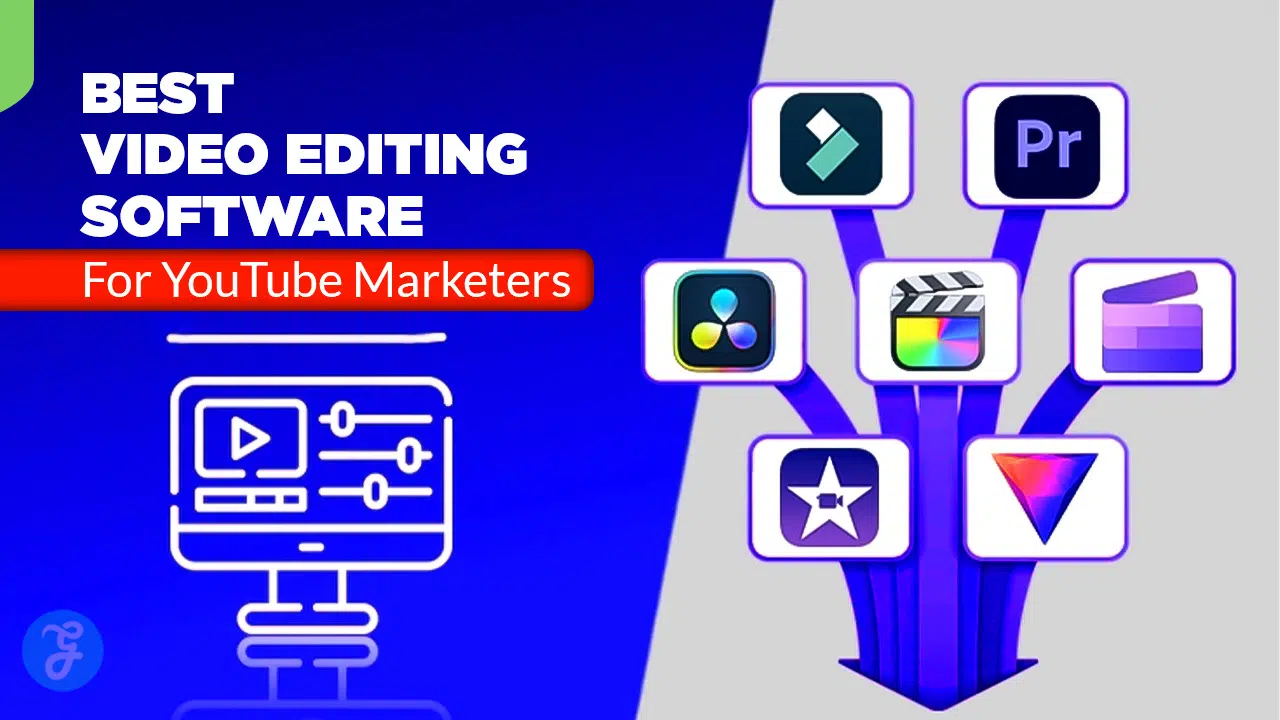
YouTube marketing rewards speed, clarity, and consistency. The best editing software helps you ship more videos per week, keep your branding tight, and repurpose long-form content into Shorts without rebuilding everything from scratch.
If you’re choosing today, think less about “most features” and more about “fastest repeatable workflow” for your content style.
How We Picked Our 10 Best Video Editing Software for YouTube Marketers?
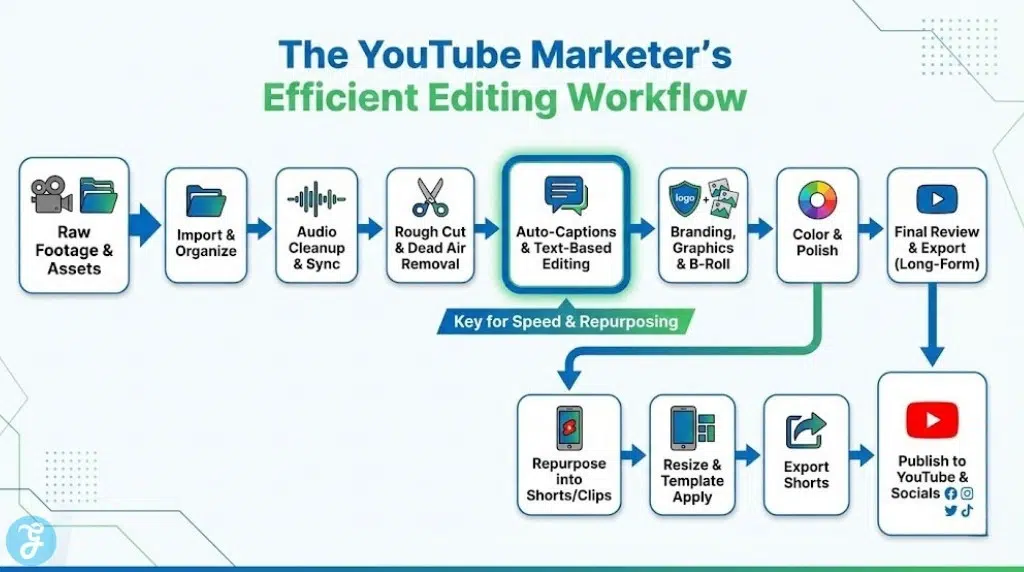
YouTube marketers need a slightly different toolkit than filmmakers. This list prioritizes tools that reduce friction in real marketing workflows, like turning talking-head footage into clean, captioned videos quickly.
-
Captions and text workflow: Auto-captions, subtitle editing, and on-screen text speed (Premiere’s Speech-to-Text, for example).
-
Short-form repurposing: Easy resizing, templates, and quick exports for Shorts-style edits.
-
Audio cleanup: Practical tools for dialogue and voiceovers (plus strong audio pages where relevant).
-
Speed to publish: Performance, timeline workflow, and “repeatable” editing patterns (background rendering helps on Mac).
-
Team fit: Collaboration, review loops, and handoffs when you work with editors or a marketing team.
Comparison Table
This table is meant to help you shortlist fast. Pick 2–3 that match your content type and your weekly output pace.
| Software | Best For | Learning Curve | Captions | Shorts/Repurpose | Audio | Best Strength | Main Watch-Out |
|---|---|---|---|---|---|---|---|
| Adobe Premiere Pro | Pro marketing teams | Medium | Strong | Strong | Strong | Industry-standard workflow | Subscription + complexity |
| Final Cut Pro | Mac-first creators | Medium | Growing (AI features vary) | Strong | Strong | Speed on Apple hardware | Mac-only |
| DaVinci Resolve | Best all-in-one finishing | Medium–High | Good | Medium | Excellent | Color + audio in one app | Heavier learning curve |
| CapCut (Desktop/Web) | Fast social edits | Easy | Strong | Excellent | Medium | Templates + captions speed | Less “pro NLE” depth |
| Descript | Talking-head + podcast clips | Easy | Strong | Good | Strong | Edit video like text | Less cinematic control |
| Canva Video Editor | Brand-first marketing teams | Easy | Medium | Good | Basic | Templates + brand assets | Limited timeline depth |
| Filmora | Fast creator edits | Easy–Medium | Strong | Good | Medium | Dynamic captions + ease | Not as deep as pro tools |
| PowerDirector | Feature-rich consumer/prosumer | Medium | Strong | Good | Medium | AI subtitles + speed | UI can feel busy |
| Camtasia | Tutorials + screen recording | Easy–Medium | Strong | Medium | Medium | Screen capture + training style | Less cinematic grading |
| VEED (Online) | Browser-based captioned videos | Easy | Strong | Good | Basic | Auto subtitles + quick edits | Not ideal for heavy timelines |
10 Best Video Editing Software for YouTube Marketers
Here are 10 Best Video Editing Software for YouTube Marketers options to edit faster, keep branding consistent, and publish more videos per week.
1) Adobe Premiere Pro
Premiere Pro is a top choice if you need a serious timeline editor with a strong caption workflow for marketing content. Its Speech-to-Text flow supports automatic transcription and captions, which is a huge time-saver for talking-head videos and tutorials.
-
Best For: Marketers who publish weekly long-form content and need reliable pro tooling
-
Pros: Strong auto-captions workflow; huge plugin/template ecosystem; great for team collaboration
-
Cons: Subscription cost; can feel heavy for simple Shorts-only workflows
2) Final Cut Pro
Final Cut Pro is built for speed on Mac, and background rendering can keep playback smooth while you work. It’s a strong fit for YouTube marketers who value fast editing and a clean, consistent interface, especially on Apple Silicon.
-
Best For: Mac-based creators who want fast turnaround without subscription pricing
-
Pros: Background rendering for smoother workflow; strong performance/value; efficient editing feel
-
Cons: Mac-only; some newer AI features may depend on newer hardware
3) DaVinci Resolve
DaVinci Resolve is a “do-everything” option that shines when you want your videos to look premium, especially with color and audio handled in one ecosystem. Its Fairlight page is packed with professional audio tools, which is ideal when your channel is voiceover-heavy.
-
Best For: Marketers who want the best polish for color + audio without bouncing between apps
-
Pros: Elite color tools; powerful Fairlight audio suite; strong finishing workflow
-
Cons: More learning curve; can feel like “too much” for quick edits
4) CapCut (Desktop/Web)
CapCut is built for speed and social-native editing, especially captions and templates. If your YouTube strategy includes Shorts (or repurposing clips for other platforms), CapCut’s caption template workflow is a big advantage.
-
Best For: Shorts-first marketers and teams repurposing content at scale
-
Pros: Caption templates and quick styling; fast turnaround; creator-friendly workflow
-
Cons: Less suited for complex, long-form timeline projects than pro NLEs
5) Descript
Descript is perfect when your content is mostly spoken-word: interviews, podcasts, webinars, and talking-head marketing videos. You can remove filler words quickly and edit by changing text, which speeds up cleanup and repurposing dramatically.
-
Best For: Talking-head creators who want fast cleanup and clip creation
-
Pros: Filler word removal; text-based editing; team-friendly collaboration features
-
Cons: Less control for advanced visual effects and cinematic editing
6) Canva Video Editor
Canva is a strong pick for brand-led marketing teams that want consistent styling, quick turnarounds, and lots of ready-to-use design assets. It’s not the deepest timeline editor, but it’s excellent for promos, simple edits, and branded social-first video production.
-
Best For: Marketers who want fast brand-consistent videos without heavy editing complexity
-
Pros: Drag-and-drop speed; design assets built-in; easy for non-editors
-
Cons: Not ideal for complex multi-track editing and advanced color work
Filmora is a good middle-ground for YouTube marketers who want an easier editor that still feels modern and capable. Its Dynamic Captions feature generates stylized captions from speech, which can boost retention for tutorial and explainers.
-
Best For: Creators who want fast edits + attention-holding captions without pro-level complexity
-
Pros: AI-driven Dynamic Captions; approachable UI; strong creator features
-
Cons: Power users may outgrow it for advanced workflows
8) CyberLink PowerDirector
PowerDirector is a feature-rich editor that’s popular for creators who want speed plus modern AI tools. CyberLink highlights AI subtitle generation in multiple languages, which is useful if your channel targets more than one audience region.
-
Best For: YouTube marketers who want AI subtitle support and a robust editor without a steep pro learning curve
-
Pros: AI subtitles in multiple languages; fast creator workflow
-
Cons: Interface can feel dense compared to simpler tools
9) Camtasia
Camtasia is a go-to for tutorial-style YouTube marketing: screen recordings, walkthroughs, product demos, and training content. TechSmith’s workflow supports generating captions using Speech-to-Text inside the editor, which fits educational marketing content well.
-
Best For: SaaS marketers, educators, and tutorial channels that rely on screen capture
-
Pros: Screen recording + editing in one tool; caption workflow supported
-
Cons: Not built for heavy cinematic editing, advanced grading, or high-end VFX
10) VEED (Online Editor)
VEED is a strong browser-based option when your workflow is “caption, trim, brand, export” with minimal friction. It focuses heavily on auto subtitles and supports generating subtitles in many languages, which is great for accessibility and global reach.
-
Best For: Teams that want fast, web-based editing with strong subtitles
-
Pros: Auto subtitles; language coverage; simple online workflow
-
Cons: Not ideal for large, complex projects with heavy multi-track timelines
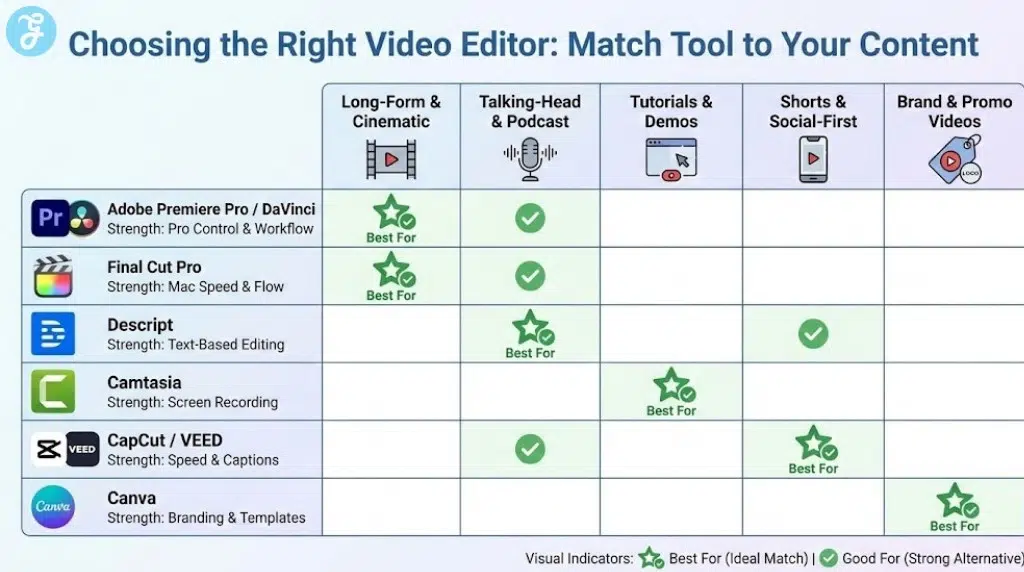
How to Choose the Right Video Editor for YouTube Marketing
The “best” tool depends on what you publish most often. Once you match the editor to your format, everything else gets easier.
-
Content type: Tutorials and demos (Camtasia), talking-head and podcasts (Descript), Shorts-heavy (CapCut), high-polish long-form (Premiere/Resolve/Final Cut).
-
Caption workflow: If captions are non-negotiable, prioritize tools with strong Speech-to-Text and editable captions.
-
Your hardware: Mac creators may benefit from Final Cut’s performance approach and background rendering behavior.
Small Decision Table
| Your Priority | Best Picks |
|---|---|
| Publish long-form weekly with pro control | Premiere Pro, DaVinci Resolve |
| Fast Mac workflow without subscription | Final Cut Pro |
| Shorts and repurposing at speed | CapCut, Canva |
| Talking-head cleanup and clipping | Descript |
| Tutorials and screen-recorded marketing | Camtasia |
High-Retention Editing Tips for YouTube Marketers
Tools matter, but repeatable editing habits usually move your results more than switching software.
-
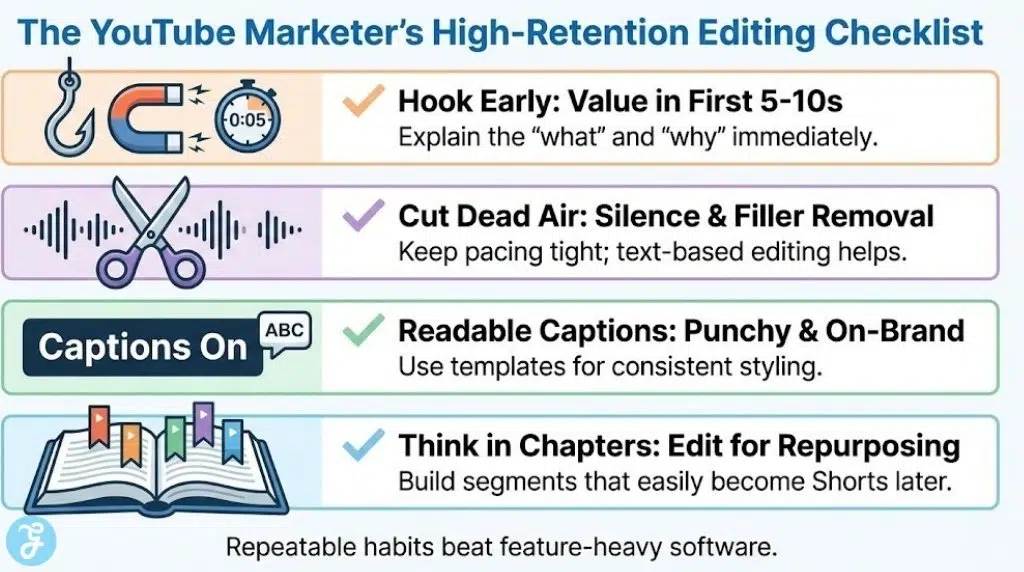
Hook early: Put the outcome in the first 5–10 seconds, then explain the “how.”
-
Cut dead air: Remove pauses, filler, and repeated phrases (text-based editing helps a lot here).
-
Make captions readable: Keep them punchy, correct, and consistent with your brand styling (caption templates help).
-
Use chapters mentally: Edit in blocks so you can repurpose segments into Shorts later.
To Sum Up
If you want the most “future-proof” marketing setup, pick one tool you can publish with every week and build templates around it. Premiere Pro and DaVinci Resolve are excellent when you need pro control, while Final Cut Pro is a strong speed pick for Mac creators.
If your goal is volume and repurposing, CapCut, Descript, and VEED can dramatically reduce time-to-publish, especially when captions are part of your content style.