In the digital world, first impressions matter. Website loading speed is a critical factor in determining whether visitors stay on your site or bounce away.
With research indicating that 53% of mobile users abandon sites that take longer than three seconds to load, the need to optimize your website’s loading speed has never been more pressing.
Not only does a faster site enhance user experience, but it also positively impacts your search engine rankings, conversion rates, and overall business success.
In this article, we’ll explore the 10 best ways to optimize your website’s loading speed, providing practical tips and actionable insights to help you create a faster, more efficient online presence.
1. Analyze Your Current Loading Speed
Before implementing any optimization strategies, it’s crucial to understand where your website currently stands in terms of speed. This baseline assessment will guide your efforts and help you measure improvement over time.
Tools for Speed Testing
Utilizing various tools can provide you with a comprehensive view of your website’s performance.
| Tool | Key Features | Best For |
| Google PageSpeed Insights | Provides scores for mobile and desktop, actionable suggestions | Comprehensive analysis |
| GTmetrix | Offers detailed reports including fully loaded time, total page size | In-depth performance metrics |
| Pingdom | Monitors uptime and performance from multiple locations | Ongoing monitoring |
Interpreting Speed Test Results
Focus on these key metrics to gauge your website’s performance:
- First Contentful Paint (FCP): Measures the time it takes for the first piece of content to appear. Aim for less than 1 second for optimal performance.
- Time to Interactive (TTI): Indicates how long it takes for the page to become fully interactive. A TTI of under 5 seconds is ideal.
- Speed Index: This metric represents how quickly the content of a page is visibly populated. A lower score indicates faster loading.
2. Optimize Images
Images are often the largest files on a website, and optimizing them can significantly reduce load times without sacrificing quality.
Importance of Image Optimization
Optimized images help improve website performance and user engagement. When images load quickly, users are more likely to stay on your site and explore further.
Choosing the Right File Format
Different image formats have unique advantages:
| Format | Best Use Case | Pros | Cons |
| JPEG | Photographs and images with many colors | High compression, good quality | No transparency support |
| PNG | Graphics with transparency or text | Lossless compression, supports transparency | Larger file size |
| WebP | Modern web usage, offers better compression | Superior quality at lower file size | Limited browser support |
Compressing Images Without Losing Quality
Use tools like TinyPNG or ImageOptim to reduce file sizes without losing image fidelity. These tools employ smart compression techniques, preserving quality while minimizing file sizes.
Using Responsive Images
Implement responsive images to ensure users receive the correct image size based on their device. Use the <picture> element and srcset attribute to provide different resolutions.
3. Minimize HTTP Requests
Every element on your web page generates an HTTP request, and reducing these requests can drastically improve loading speed.
Understanding HTTP Requests
A webpage consists of various elements, and each requires a separate HTTP request to load. Reducing the number of requests can lead to quicker load times.
Techniques to Reduce Requests
Combining Files
Combine multiple CSS and JavaScript files into a single file to reduce the number of requests. This not only speeds up load times but also minimizes the number of connections the browser has to make.
Using CSS Sprites
CSS sprites consolidate multiple images into a single image file. This technique is particularly effective for icons and buttons, leading to fewer requests.
Example of CSS Sprites
Consider a website that uses 10 small icons. Instead of having 10 separate image files, you can create one sprite sheet that combines all icons. The CSS would then only require one HTTP request to load the entire sprite, significantly reducing load times.
4. Enable Browser Caching
Browser caching allows visitors’ browsers to store certain files, preventing them from being reloaded every time the user visits your site.
What is Browser Caching?
Caching is crucial for enhancing performance and user experience. When a visitor returns to your site, the browser retrieves cached files rather than downloading them again, leading to faster loading times.
How to Set Up Caching
Expiry Headers
Set expiry headers for your resources, indicating how long browsers should store them. For instance, static resources like images can be cached for a longer duration (e.g., one year), while dynamic content may need shorter caching times.
Leveraging Cache-Control
Use cache-control directives to manage how and for how long resources are cached. For example, you might want to set up:
| Directive | Purpose | Example |
| max-age | Defines how long a resource is cached | max-age=31536000 (1 year) |
| must-revalidate | Forces a revalidation on cached resources | must-revalidate |
5. Use a Content Delivery Network (CDN)
A CDN is a network of servers that delivers content to users based on their geographic location, significantly improving load times.
Benefits of a CDN
Using a CDN can dramatically enhance your website’s performance by:
- Reducing Latency: CDNs store cached content on servers located closer to users, minimizing the time it takes for data to travel.
- Improving Scalability: CDNs handle increased traffic loads effectively, preventing slowdowns during peak usage.
- Enhancing Security: Many CDNs provide security features like DDoS protection, further safeguarding your site.
Choosing the Right CDN Provider
Consider the following factors when selecting a CDN provider:
| Factor | Considerations |
| Pricing | Evaluate costs based on your traffic needs |
| Performance | Look for providers with high uptime and speed |
| Geographic Distribution | Ensure they have servers close to your user base |
Popular CDN providers include Cloudflare, Akamai, and Amazon CloudFront.
6. Minify CSS, JavaScript, and HTML

Minification involves removing unnecessary characters from your code, which can significantly reduce file sizes.
What Does Minification Mean?
Minification optimizes code by stripping out comments, whitespace, and formatting. This results in smaller file sizes, leading to faster loading times.
Tools for Minification
Online Minifiers
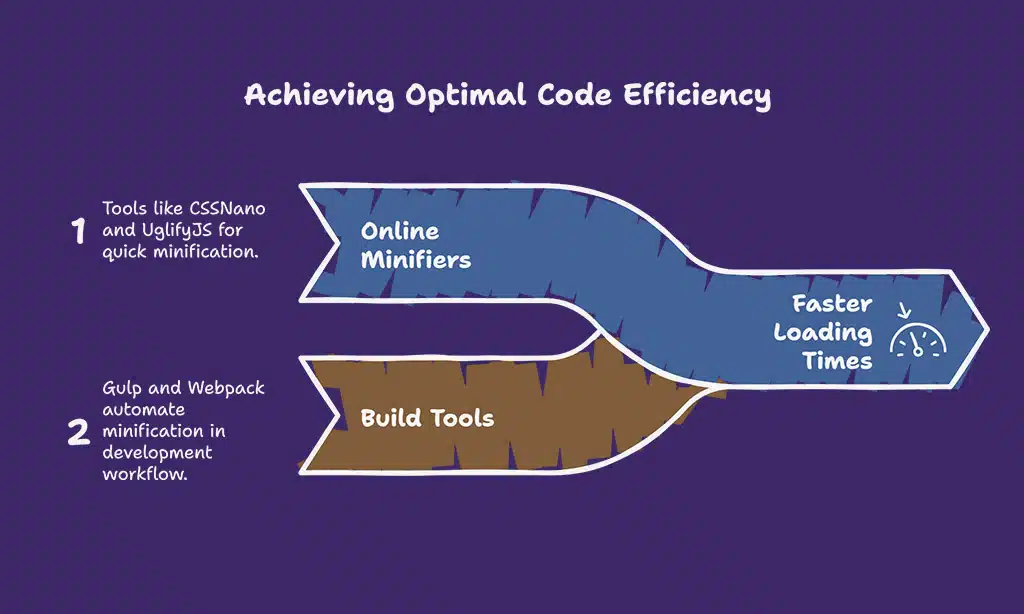
Use tools like CSSNano for CSS and UglifyJS for JavaScript to quickly minify your files online.
Build Tools for Automation
Integrate build tools like Gulp or Webpack into your development workflow to automate minification. This ensures that every time you deploy your site, your files are optimized.
Example of Minification
For instance, a CSS file of 500KB might be reduced to 300KB through minification, which can lead to noticeable improvements in loading speed, particularly for mobile users.
7. Optimize Your Server Response Time
Server response time is critical to website speed. Slow server response can lead to frustrated users and higher bounce rates.
Factors Affecting Server Response Time
The following factors can impact server response time:
- Server Location: The physical distance between the server and the user can affect latency.
- Hosting Plan: A shared hosting plan can slow down performance, especially during peak traffic.
- Server Configuration: Proper configuration and optimization can greatly enhance response times.
Tips for Reducing Server Response Time
Upgrading Hosting Plans
Consider upgrading to a VPS or dedicated hosting plan if you experience consistent slowdowns. This gives you more resources and better performance.
Implementing a Web Application Firewall (WAF)
A WAF can improve site speed by filtering out harmful traffic and ensuring that legitimate requests are processed quickly.
8. Reduce Redirects
Redirects can slow down your site, so minimizing them is essential for optimizing speed.
Understanding Redirects
Redirects occur when a user is sent from one URL to another, adding additional load time to the page.
How Redirects Affect Speed
Each redirect adds time to the loading process. Aim to reduce unnecessary redirects to enhance performance.
Strategies to Minimize Redirects
- Update Internal Links: Ensure that all internal links point directly to the final destination URL.
- Avoid Redirect Chains: Minimize the number of redirects by linking directly to the end URL, eliminating unnecessary steps.
9. Implement Lazy Loading
Lazy loading improves load times by only loading images and resources as they come into the viewport.
What is Lazy Loading?
Lazy loading defers the loading of off-screen images and resources until users scroll down to them, reducing initial load times and improving user experience.
Benefits for Loading Speed
This technique minimizes the amount of data loaded initially, making pages faster and more responsive for users.
How to Implement Lazy Loading
Use the loading=”lazy” attribute in your image tags to easily enable lazy loading. JavaScript libraries such as lazysizes can also facilitate this process.
10. Monitor and Maintain Your Site’s Performance
Ongoing monitoring is crucial to ensure your website continues to perform optimally.
Regular Speed Testing
Conduct speed tests regularly to identify any new issues that may arise.
Tools for Ongoing Monitoring
| Tool | Purpose | Key Features |
| Google Analytics | Tracks page load times and user behavior | In-depth analysis and reporting |
| Pingdom | Monitors performance and uptime | Alerts for performance drops |
Staying Up-to-Date with Trends
Keep an eye on current trends in website performance. For example, with the rise of Core Web Vitals as a ranking factor, it’s essential to stay informed about metrics that affect your site’s visibility in search results.
Wrap Up
Optimizing your website’s loading speed is not just a technical endeavor; it’s a fundamental aspect of providing a superior user experience and achieving business success.
By following these 10 best ways to optimize your website’s loading speed, you can ensure that your site is fast, responsive, and ready to meet the expectations of today’s users.
Remember, continuous improvement and regular monitoring are key to maintaining an optimal online presence.
Additional Resources
- Recommended Tools and Plugins: Explore options like WP Rocket for caching and ShortPixel for image optimization.
- Further Reading on Website Optimization Techniques: Look into progressive web apps and their impact on performance.
Call to Action
Now that you have the knowledge to optimize your website’s loading speed, it’s time to take action! Test your site, implement these strategies, and share your results. If you have any questions or need further assistance, feel free to reach out!