

Struggling to crack the leaderboard in a Kahoot game? You’re not alone. Many players feel frustrated when answering fast isn’t enough to win. Kahoot is fun, but losing can take out some of the joy.
Luckily, there’s a way some tech-savvy users tilt the scales: Kahoot Hacks! These are clever scripts shared on GitHub that can auto-answer questions, flood games with bots, or tweak scores.
In this blog post, we’ll unpack these tools and show you how they work. Keep reading—the tricks might surprise you!
Key Takeaways
- Kahoot hack scripts on GitHub can auto-answer questions, flood games with bots, or change scores during gameplay.
- Auto-answer tools use JavaScript or Node.js to pick answers faster than humans. They act as browser extensions or script files.
- Game flooders send fake players into lobbies and disrupt quizzes by overwhelming the system with bots.
- Risks include malware, phishing from fake repositories, and detection by schools or teachers for unfair play.
- Using hacks may violate ethics and Kahoot’s policies but testing in private settings can minimize disruptions.
Popular Kahoot Hack Scripts on GitHub

GitHub is full of clever scripts that can twist the way Kahoot works. These tools automate answers, flood games, and even mess with scores!
Auto-answer scripts
Auto-answer scripts make quizzes super easy. They read questions and pick the right answers automatically. Using JavaScript or tools like Node.js, these hacks interact with Kahoot’s code in real-time.
Once installed as a browser extension or script file, they trigger as soon as you enter a game pin on kahoot.it.
These scripts press the correct options faster than any human can click. Some even include custom settings to hide activity from the host! New users often struggle to install them but find free repositories on GitHub helpful.
Always check metadata and updates like the latest commit to avoid bugs or limits during usage.
Game flooders and bots
Game flooders overwhelm a Kahoot game by pushing hundreds of fake players into the lobby. Imagine 100 random names appearing on your screen at once! This overload can make it hard for the host to manage or even start the quiz.
Users often rely on software like GitHub scripts for this trick, where a command-line interface runs bot codes and floods games instantly.
Bots also add chaos to the gameplay itself. They may join using funny nicknames or spam strings of text in chat. Some scripts even include options for sending “Rick Roll” lyrics repeatedly.
These bots distract real players, reduce privacy, and abuse features intended for fun learning. The next hack focuses on points and scores manipulation—stick around!
Point stealers and score manipulators
Bots flood games, but point stealers are sneakier. These scripts alter scores during a game of Kahoot! They let users grab unfair points or lower others’ scores in real-time. Some hacks tweak answers directly for higher accuracy and faster speed boosts.
Developers usually create these scripts using tools like JQuery or custom Chrome browser commands. Others rely on cross-site scripting methods, exploiting software bugs. The host’s platform often becomes the target here.
This hack allows control over scoring mechanics without alerting players or hosts instantly.
How to Use Hack Scripts Safely and Ethically
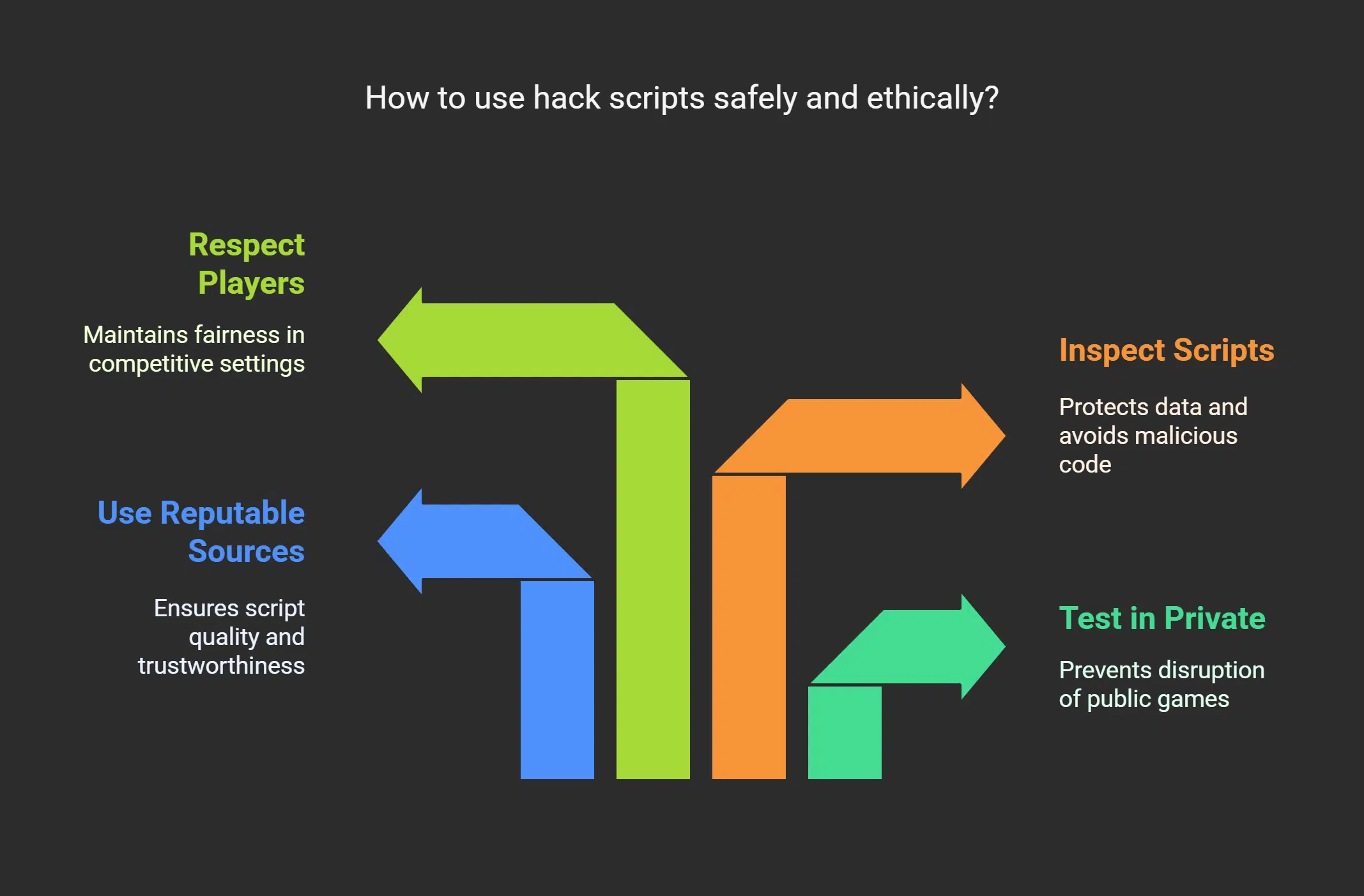
Hack scripts can be tempting. Using them safely and ethically is crucial to avoid trouble.
- Always test scripts in a private game or workshop setting. Create an account on kahoot.com, choose a Kahoot, and generate at least three Game PINs for practice purposes. This helps prevent disrupting public games.
- Use reputable sources like GitHub to find safe hack scripts. Popular repositories often highlight contributors, making it easier to trust the code’s quality and function.
- Open your browser’s console or command line carefully before running any script. Ensure your actions align with Kahoot’s privacy policy and ethical guidelines to protect your data.
- Keep your keyboard shortcuts ready for quick navigation while testing scripts. This improves efficiency without causing unexpected errors or freezes during use.
- Consider security risks like cookies and malicious codes hidden in scripts from less-trusted repositories. Never execute scripts blindly; inspect their code structure first.
- Always share feedback if you use open-source tools for testing or activities like workshops involving kahoot.js-updated modules linked with repositories such as https://hack.af/kahoot-repl.
- Avoid disruptive hacks like game flooders during actual gameplay sessions involving others unless permitted by the host’s rules or settings shared at the start of the event.
- Respect other players by not using point stealers or auto-answer functions unfairly during competitive games with peers on sites like Kahoot Live Events or LinkedIn Learning classes hosted online.
- Do not misuse scripts to manipulate scores displayed in Kahoot’s reports tab after sessions where participation counts equally with learning engagement efforts over mere results alone.
- Stay updated about deprecated features like kahoot.js-updated modules, which remain functional but may pose limitations due to lack of future support updates under Sourcegraph-changed policies post-2023 directives globally impacting similar third-party tools worldwide!
Risks and Limitations of Using Kahoot Hacks Scripts
Using Kahoot hack scripts may seem tempting, but risks are everywhere. Many scripts require enabling JavaScript in your browser, which increases the chance of malware infections or phishing attacks.
Security hackers can exploit this and may steal your data. A single wrong click on a fake GitHub repository could cost you 100 times more trouble than it’s worth.
Cheating also has limits beyond security threats. Schools and teachers track unusual scores easily. Auto-answer tools might not work with every quiz because custom question types confuse these scripts.
Some websites block bots during user games to stop point stealing or spam flooders altogether. Tools like Sourcegraph need proper settings too, adding another hurdle while using cheats effectively!
Takeaways
Hack scripts on GitHub for Kahoot can be fascinating and tempting to explore. They bring a mix of creativity, skill, and risk. While they may offer an edge in games, they also come with ethical challenges.
Use them wisely, if at all, keeping fairness in mind. Gaming is most fun when everyone plays fair.
FAQs on Kahoot Hacks
1. What are Kahoot hack scripts on GitHub?
Hack scripts on GitHub let users modify or automate actions in a Kahoot game, like auto-answering questions or adjusting the page menu for better control.
2. Can I use these hacks to join a game of Kahoot?
Yes, some scripts help you join a game of Kahoot faster or with added features, but using them might go against the platform’s rules.
3. Do these hacks work across all browsers?
Most hacks are designed to work with popular browsers, but compatibility can depend on how they’re coded and your browser’s settings.
4. Are these tools essential for playing Kahoot effectively?
Not really! While they may seem useful for quick answers or power controls, playing fairly is always more rewarding and fun in the long run.






















