Making a website isn’t easy, and small mistakes can cause big problems. Web development has grown a lot since the days of early HTML pages, but challenges still remain. This post will show common web development mistakes and how to avoid them step by step.
Keep reading—you’ll save time and improve your skills!
10 Common Web Development Mistakes And How To Avoid Them
1. Overlooking Mobile Optimization
More than 50% of global web traffic comes from mobile devices. Websites lacking responsive design fail to adapt to various screen sizes, leading to poor user experience and higher bounce rates.
| Issue | Impact | Solution |
|---|---|---|
| Slow-loading pages | Users leave if a page takes too long to load | Optimize images, enable caching, use a CDN |
| Unresponsive design | Poor mobile navigation | Implement responsive web design |
Tools like Google PageSpeed Insights help identify speed issues quickly. Web developers must prioritize mobile-first development to meet user expectations and improve SEO rankings.
2. Ignoring Web Accessibility Standards
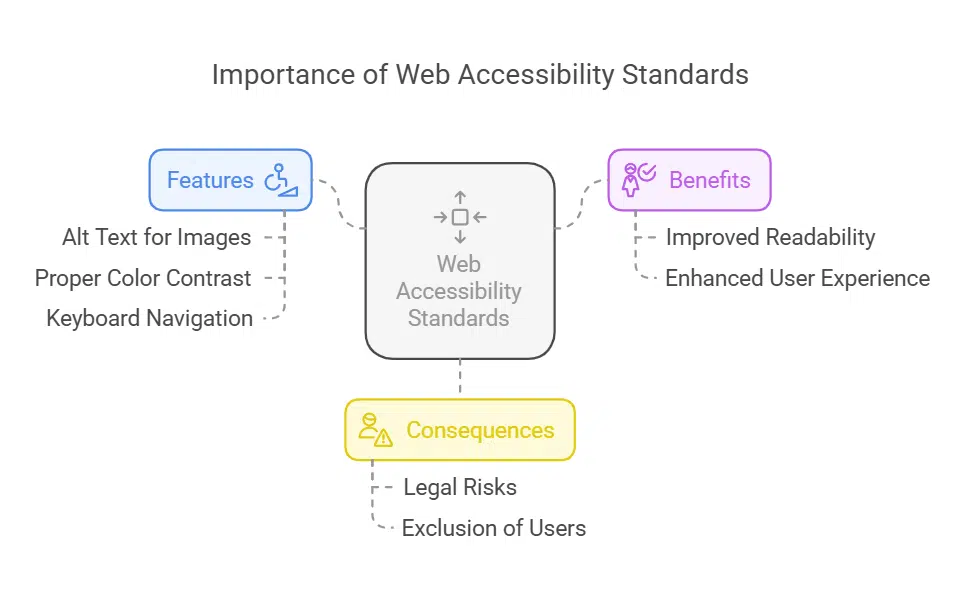
| Feature | Benefit |
| Alt text for images | Helps screen readers describe visuals |
| Proper color contrast | Improves readability for visually impaired users |
| Keyboard navigation | Allows non-mouse users to navigate easily |
Skipping web accessibility standards leaves some users behind. Over 1 billion people worldwide live with disabilities, including vision or hearing impairments. Websites must meet guidelines like WCAG (Web Content Accessibility Guidelines).
Features such as alt text for images and proper color contrast help screen readers assist visually impaired users. Without these standards, your site may face lawsuits under laws like the Americans with Disabilities Act (ADA).
Legal issues can harm businesses while turning away potential customers who rely on accessible design.
Accessibility also improves website usability for all visitors. Simple navigation boosts user engagement and lowers bounce rates. Search engines favor accessible websites because they are easier to crawl, enhancing SEO rankings.
For instance, clear headings and descriptive links improve search engine results while assisting people using keyboard-only setups or voice commands. Regular testing ensures features work effectively across platforms—including mobile devices—making your site welcoming for everyone.
3. Poor Performance Optimization
Slow-loading pages drive users away quickly. Research shows that 53% of visitors leave if a page takes more than three seconds to load. Bloated CSS or JavaScript files worsen this issue.
Compress these files to reduce their size and improve site speed. Tools like Gzip can help with HTTP compression, while minimizing redundant code keeps things efficient.
Browser caching is another must for boosting performance. It allows repeated users to load your website faster by storing static assets locally on their devices. Use content delivery networks (CDNs) as well—these distribute data across multiple servers worldwide, cutting down response times for global audiences.
Faster websites lower bounce rates and keep visitors engaged longer.
4. Incomplete Input Validation
Hackers exploit inadequately validated inputs. SQL injection is one of the most common attacks, ranked in OWASP’s Top 10 security vulnerabilities. Without proper checks, malicious users can insert harmful commands into forms like login pages or search bars.
These attacks harm your web application and expose user profiles or credentials.
Validate all input on both client and server sides to prevent risks. Always approach user input as if it’s unsafe until verified. For instance, sanitizing username fields can block unauthorized code entries.
This step protects web servers from unanticipated bugs or breaches and ensures secure website design practices are followed.
5. Using Unoptimized Visuals
Large image files slow down websites. A 15MB homepage takes forever to load on slower connections. This frustrates users and increases bounce rates. Slow sites also hurt site performance and damage user experience (UX).
People will leave before your content even loads.
Optimizing visuals fixes this issue. Shrink image sizes using tools like TinyPNG or built-in settings in photo editors. Use the correct formats—JPEG for photos, PNG for graphics with transparency.
Minify JavaScript and CSS files to reduce HTTP requests further. Enable server-side compression like gzip for faster delivery of images, code, and data across browsers or mobile devices.
| Image Optimization Method | Benefit |
| Compress images using TinyPNG | Reduces file size without losing quality |
| Use WebP format | Smaller and faster than JPEG & PNG |
| Implement lazy loading | Loads images only when needed |
6. Cross-Browser Incompatibility
Testing in only one browser can lead to major issues. A site may work perfectly on Chrome but fail on browsers like Safari or Firefox. Web developers often overlook this until late in the process, causing last-minute fixes and delays.
Frequent browser switching during development helps spot problems early. Avoid using browser-specific HTML code or CSS classes that break functionality elsewhere. Tools like BrowserStack make testing across multiple browsers easier, ensuring consistent performance and better user experience throughout the web design stages.
7. Failing to Plan for Scalability
Not planning for scalability can cripple growth. Many web developers rush to build Minimum Viable Products (MVPs) but ignore future demands. For example, storing profile pictures directly on a web server may work at first.
But in a load-balanced environment, this setup often causes glitches and slowdowns.
Instead, use shared or remote file storage from the start. Ensure all layers—databases, servers, and APIs—can handle higher traffic over time. A scalable site improves user experience and reduces bounce rates as your audience grows.
8. Neglecting Proper SEO Practices
Ignoring SEO can harm your site’s visibility. A crawlable site architecture is key for search engines to understand and rank your pages. Pages with duplicate content confuse algorithms, leading to lower search result rankings.
Using alt text for images boosts accessibility and improves SEO performance too. Slow load times drive users away, increasing bounce rates and damaging your reputation.
Skipping SEO early causes costly rewrites later. Web developers should include proper backlinks from trusted sources during the planning phase of web design. Poor navigation or hard-coded elements frustrate both users and crawlers like Googlebot, affecting ranking positions.
Aligning responsive design strategies with targeted user feedback creates stronger landing pages for digital marketing success.
| Common SEO Mistakes | Fixes |
| Missing alt text | Add alt text to images for better indexing |
| Slow page speed | Optimize performance for fast loading |
| Poor URL structure | Use clean, keyword-friendly URLs |
9. Inadequate Security Measures
Weak security makes websites easy targets for attackers. SQL injection is one of the top threats listed by OWASP, where hackers can manipulate databases through vulnerable input fields.
Not using HTTPS leaves data like passwords and personal information exposed to theft. Outdated plugins or ignoring updates in libraries also create weak spots for exploitation.
Strong defenses, such as firewalls and security plugins, protect user data from breaches. Penetration testing and regular audits by certified experts uncover hidden risks. Sharing cybersecurity updates within teams strengthens prevention efforts.
Companies must invest early in web security to avoid costly damage later on.
10. Overloading Websites with Unnecessary Plugins

Too many plugins slow websites down. Each plugin increases load time, affecting site performance and user experience. This frustrates visitors and raises bounce rates. Poorly chosen or outdated plugins also create security vulnerabilities, leaving sites open to threats.
Limit active plugins to the essentials. Regularly review your plugin list and remove unused ones. Conflicts may occur between plugins, hurting functionality or breaking features. Fewer plugins help maintain a better crawlable site architecture for SEO best practices while improving overall speed on both desktop and mobile devices.
Not Testing Code Properly Across Environments
Code testing is a vital step in web development. Failing to test it across different environments can cause major issues.
- Missed bugs can cause crashes or incorrect behavior on mobile devices or browsers. Testing ensures smooth functionality regardless of the platform.
- Environment-specific errors may go unnoticed without proper checks. Some software behaves differently in staging versus production setups.
- Ignorance of cross-browser testing leads to incompatibility issues. Users on Chrome, Firefox, or Safari may face problems if code isn’t tested properly.
- Hard-coded configurations often break scalability and flexibility. Code must adapt seamlessly across servers and regions.
- Security vulnerabilities grow when tests are skipped. Secure requests through HTTPS, cookies, and authenticated sessions should work universally.
- Poor testing hurts performance optimization efforts like load balancing. Unchecked code could overload servers under high traffic.
- Not using automated testing tools increases human error risks. Tools like Selenium streamline the process for web developers.
- Unverified RESTful APIs might fail during integration with other systems. Proper API checks ensure data flows smoothly between applications.
- Forgotten white space usage can affect user experience design negatively in certain environments. Testing helps maintain clean layouts everywhere.
- Broken search results impact SEO rankings over time as crawlers detect errors caused by untested website features or architecture updates.
Ignoring User Experience (UX) Design Principles
Ignoring UX design principles can destroy site performance and user satisfaction. Poor navigation or cluttered layouts frustrate users and increase bounce rates. Excessive pop-ups can drive visitors away fast.
Strong UX focuses on balancing beauty with functionality while keeping the target audience in mind.
Good UX also means listening to user feedback. Skipping this step leads to missed improvement opportunities. Transitional states, like loading screens or button clicks, need attention for a smooth experience.
Don’t forget UX writing—it guides users clearly through the interface and boosts usability.
Using Outdated or Deprecated Code
Outdated or deprecated code can cause security vulnerabilities and poor site performance. For example, relying on Flash-based elements slows down load times and makes sites less compatible with modern browsers.
Old libraries in a JavaScript framework may also lack updates to address new threats.
Regular website maintenance is essential for fixing these risks. Web developers should stay informed about current tools, web standards, and technologies. Replace hard-coded solutions with scalable and secure alternatives like HTTP verbs (e.g., HTTP GET).
This ensures your site remains fast, safe, and platform independent.
Not Implementing Version Control Systems
Skipping version control systems can cause chaos in web development. Code changes become hard to track, making teamwork messy. Conflicts arise when team members work on the same files without coordination.
Without a system, reverting to older versions during errors is nearly impossible.
Using tools like Git helps organize and manage code efficiently. They store project history and maintain clean workflows for growth. Web developers save time, reduce risks, and improve collaboration by implementing such systems early on.
Skipping Clear and Consistent Code Documentation
Neglecting documentation makes web development harder. Web developers waste time understanding messy code later. Tools like JSDoc or Markdown simplify writing clear instructions for everyone.
Proper documentation helps teams track changes and avoid confusion.
Always update notes when updating code. This keeps the project organized for future maintenance. Consistent details in comments also help reduce security vulnerabilities by ensuring nothing gets missed during updates or debugging.
Failing to Clear Browser Cache During Development
Old files in the browser cache can cause major headaches for web developers. Changes to a site may not show up because the browser loads cached versions of CSS, JavaScript, or images instead.
This slows down frontend development and leads to confusion when debugging.
Use keyboard shortcuts like Ctrl+Shift+R on Windows or Cmd+Shift+R on Mac to refresh pages without using cached content. Tools like the Firefox “Web Developer” add-on make clearing caches easier during testing.
To avoid caching issues long-term, set Cache-Control and Expires headers on your server. These steps ensure smooth updates and better site performance for users.
Takeaways
Avoiding common web development mistakes makes a big difference. Focus on things like performance, SEO, and user experience from the start. Test your code often and plan for growth.
Small steps now can prevent big problems later. Build smart, secure, and scalable sites users will love!
FAQs on Web Development Mistakes And How To Avoid Them
1. What are common web development mistakes?
Common mistakes include poor navigation, ignoring responsive design for mobile devices, neglecting SEO best practices like alt tags and crawlable site architecture, and leaving security vulnerabilities unaddressed.
2. How can I improve my site’s user experience?
Focus on clear interface design, use white space effectively, ensure fast site performance, and gather user feedback to make improvements based on real needs.
3. Why is responsive design important in web development?
Responsive design ensures your website works well on all devices, including mobile devices. Without it, users may leave quickly—leading to higher bounce rates.
4. How do I avoid security vulnerabilities in my code?
Use unit tests regularly to check for issues, avoid hard-coded data where possible, and implement tools like load balancers to protect against attacks.
5. Can bad SEO practices hurt my site’s visibility?
Yes! Missing alt text or using a poorly structured library of content makes it harder for search engines to index your pages—lowering rankings across the World Wide Web.
6. What role does market research play in avoiding web design mistakes?
Market research helps you understand your audience’s needs so you can create a unique selling point (USP), build digital accessibility into your designs, and provide features that keep users logged in or engaged longer with apps or websites.