

OpenAI has unveiled a new beta feature for ChatGPT called “Tasks,” aimed at helping users schedule and manage actions and reminders effortlessly. Starting today, this feature is available for subscribers to the Plus, Team, and Pro plans, marking a significant step toward transforming ChatGPT into a versatile digital assistant. Unlike traditional digital assistants such as Google Assistant or Siri, ChatGPT brings the advantage of advanced language processing capabilities, enabling a broader range of interactions.
What Is the Tasks Feature?
The Tasks feature allows users to schedule actions or set reminders with ease. This functionality is designed to handle both simple and recurring tasks. Here are some examples of what Tasks can do:
- Daily Updates: Request a weather report every morning at a specific time.
- Reminders: Get notified about important dates, such as a passport’s expiration or a work deadline.
- Fun and Creative Uses: Schedule lighthearted activities, like a daily knock-knock joke for your kids before bedtime.
Users can configure tasks by selecting the “4.0 with scheduled tasks” option in the ChatGPT model picker. Once enabled, they simply need to type out the desired action and specify the timing. For example, users might ask, “Remind me to water my plants every Monday at 8 AM,” or “Send me a motivational quote at 9 AM every day.”
ChatGPT takes it further by proactively suggesting potential tasks based on ongoing conversations. However, these suggestions are entirely optional and require explicit user approval to be created. This ensures that the feature doesn’t accidentally clutter your schedule with unwanted tasks.
Managing Your Tasks
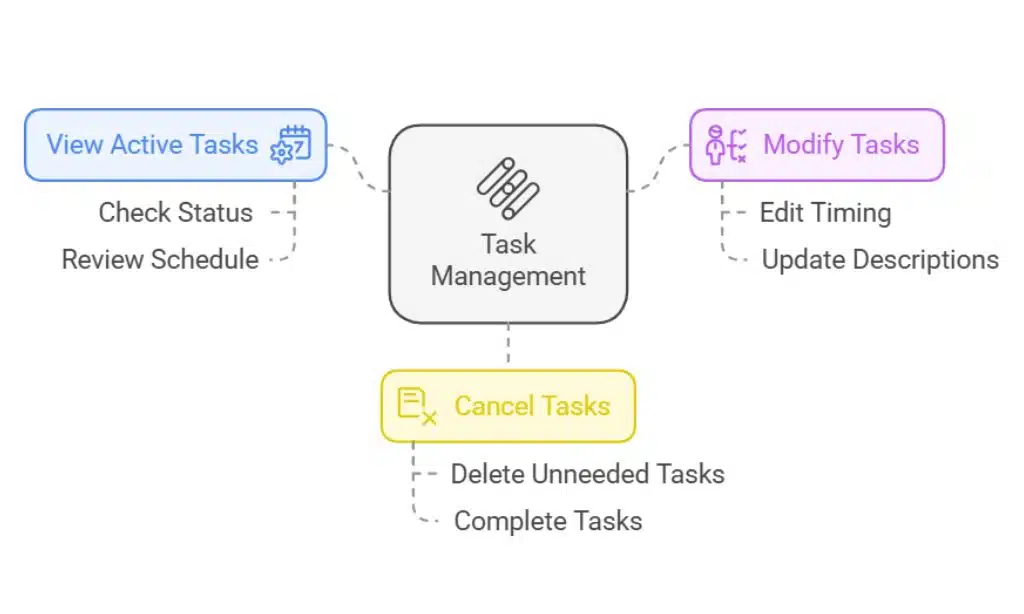
Tasks are easy to monitor and modify. OpenAI has introduced a dedicated “Tasks” section in the web interface, accessible through the profile menu. Here, users can:
- View Active Tasks: Check all scheduled tasks and their statuses.
- Modify Tasks: Edit details like timing or task descriptions.
- Cancel Tasks: Remove tasks that are no longer needed.
Alternatively, tasks can also be managed directly within individual chat threads. Notifications about task completions will be sent across all platforms where ChatGPT is available, including web, desktop, and mobile. This ensures users never miss an important update, no matter which device they are using.
One limitation to note is the cap on active tasks. At present, users can have a maximum of 10 active tasks running simultaneously. While this limit may be restrictive for some power users, it’s likely a measure to ensure optimal system performance during the beta phase.
Will Tasks Be Available for Free Users?
As of now, OpenAI has not disclosed plans to bring Tasks to the free-tier version of ChatGPT. The feature is exclusive to subscribers of the Plus ($20/month) and Pro ($200/month) plans. This pricing strategy highlights OpenAI’s effort to position Tasks as a premium feature, enhancing the value proposition of its paid offerings.
Expanding ChatGPT’s Capabilities: A Shift Toward Digital Assistance
The introduction of Tasks marks a significant shift in how ChatGPT operates. Traditionally, ChatGPT has been a reactive tool, responding to immediate user queries in real-time. With the addition of Tasks, OpenAI is expanding the platform’s capabilities into proactive assistance, allowing it to handle future planning and ongoing responsibilities. This evolution brings it closer to the role of a comprehensive virtual assistant.
While similar features have been available in traditional digital assistants, ChatGPT’s natural language processing capabilities allow it to offer a more personalized and nuanced experience. For instance, beyond setting reminders, ChatGPT can craft detailed messages or adjust its outputs to suit specific tones or contexts. This flexibility opens up possibilities for creative and professional use cases that go beyond what current virtual assistants offer.
OpenAI’s Broader Vision: Operator and Caterpillar
Tasks is just one piece of OpenAI’s broader strategy to enhance ChatGPT’s functionality. Reports indicate that OpenAI is working on additional features that could further transform the platform into an advanced assistant:
- Operator: According to Bloomberg, OpenAI is set to release an autonomous AI agent called Operator. This system is designed to control computers independently, enabling tasks such as running software, managing files, and automating workflows without human intervention.
- Caterpillar: Another initiative uncovered by reverse engineer Tibor Blaho, codenamed Caterpillar, appears to integrate with Tasks. It could allow ChatGPT to:
- Search for specific information online.
- Analyze complex problems and summarize findings.
- Navigate websites and retrieve data.
- Access and process documents stored locally or in the cloud.
These advancements could significantly enhance ChatGPT’s utility for both personal and professional tasks, enabling users to delegate complex responsibilities to the AI.
Reliability Concerns and Beta Testing
Despite its potential, the Tasks feature’s success will depend on its reliability. In the past, AI systems—including those developed by OpenAI—have faced criticism for generating inaccurate or incomplete information. By launching Tasks as a beta feature, OpenAI aims to collect valuable feedback from real-world use cases to address these concerns and refine the system.
For now, users are advised not to rely on Tasks for critical or time-sensitive matters. For example, while it’s a convenient tool for general reminders or casual updates, it may not yet be dependable enough for crucial meeting alerts or high-stakes deadlines. Over time, as OpenAI gathers data and improves the feature, it’s likely to become more robust.
The Economics Behind Tasks
The launch of Tasks also underscores the economic considerations behind AI development. Running advanced AI systems like ChatGPT requires substantial computational resources, which come with high costs. By introducing premium features such as Tasks, OpenAI is creating additional revenue streams to support its infrastructure.
Moreover, features like Tasks represent the early stages of what many in the AI field refer to as “agentic AI.” These systems aim to not only complete predefined tasks but also interact with their environments, learn from feedback, and make decisions independently. While Tasks currently functions as a sophisticated automation tool, its long-term potential lies in evolving into a true intelligent agent.
If you’re a paying subscriber to ChatGPT, you can start exploring the new Tasks feature today. Simply select the “4.0 with scheduled tasks” option from the model picker and experiment with scheduling reminders, actions, and updates. Remember, the feature is still in beta, so it’s a good idea to use it cautiously for now. With continued improvements, Tasks could become an indispensable tool for managing your daily life and work.






















