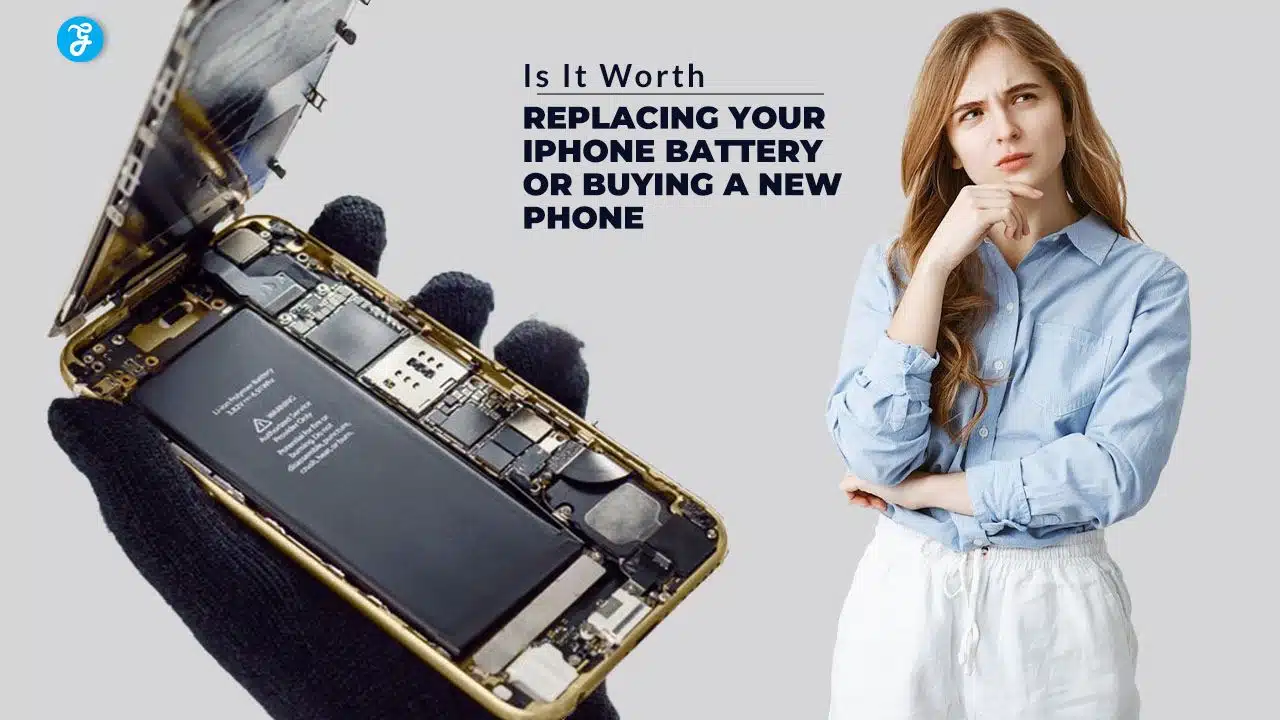
In today’s fast-paced world, smartphones have become an essential part of our daily lives, acting as tools for communication, productivity, and entertainment. For many iPhone users, the seamless performance and reliability of their device is paramount. However, as the years go by, a common issue arises—battery degradation. The once-reliable battery that powered your day now struggles to last even a few hours. This leads to a crucial question: should you replace your iPhone battery, or is it time to upgrade to a brand-new device?
This decision isn’t always straightforward. Factors like cost, performance, environmental considerations, and your phone’s overall condition come into play. With newer iPhone models boasting cutting-edge features and improved technology, it might be tempting to make the leap. On the other hand, battery replacement is a far more economical and eco-friendly solution, especially if your current device still meets your needs. In this article, we’ll explore the benefits and drawbacks of both options, equipping you with all the information you need to make the best choice for your lifestyle, budget, and values.
Quick Decision Guide
Before we dive deep, here’s a quick reference table to help you decide:
| Factor | Replace Battery If… | Buy New Phone If… |
|---|---|---|
| Phone Age | Less than 3 years old | Over 3 years old |
| Current Battery Health | Below 80% | Multiple issues beyond battery |
| Budget | Under $100 available | $600+ available |
| Phone Condition | Works perfectly otherwise | Has other problems |
| Features Needed | Happy with current features | Want newer capabilities |
Understanding Your iPhone’s Battery Health (Like a Pro)
The Real Story Behind iPhone Batteries
Think of your iPhone battery like a car’s engine – it won’t last forever, but proper maintenance can extend its life significantly. Modern iPhones use lithium-ion batteries that typically maintain peak performance for about 500 complete charge cycles. But what does this really mean for you?
Let’s break it down in simple terms:
- One charge cycle = Using 100% of your battery capacity (not necessarily in one go)
- Example: Using 60% one day and 40% the next = one complete cycle
- Most users complete about 1 cycle per day
- After 500 cycles (roughly 1.5 years), your battery might hold only 80% of its original capacity
Warning Signs You Can’t Ignore
Your iPhone might be crying for help if you notice:
- Dead by lunch when it used to last all day
- Surprising shutdowns even at 30-40% battery
- Gets uncomfortably hot during normal use
- Battery percentage looks like it’s playing jump rope
- That annoying “Service” message in your battery settings
The Real Costs: Breaking Down Your Options
Battery Replacement: What You’ll Really Pay in 2024
| iPhone Model | Apple Store Cost | Authorized Repair Cost | Independent Shop Cost |
|---|---|---|---|
| iPhone 15 Series | $99 | $89-99 | $69-89 |
| iPhone 14 Series | $99 | $89-99 | $59-79 |
| iPhone 13 Series | $69 | $69-89 | $49-69 |
| iPhone 12 Series | $69 | $69-89 | $49-69 |
| iPhone 11 Series | $69 | $69-79 | $45-65 |
| iPhone X/XS/XR | $69 | $69-79 | $40-60 |
| iPhone SE (2/3) | $49 | $49-69 | $35-55 |
New iPhone Investment: 2024 Prices with Trade-In Options
| Model | Base Price | With Trade-In (Good Condition) |
|---|---|---|
| iPhone 15 Pro Max | $1,199 | From $699 |
| iPhone 15 Pro | $999 | From $499 |
| iPhone 15 | $799 | From $399 |
| iPhone 14 | $699 | From $299 |
| iPhone 13 | $599 | From $199 |
The Battery Replacement Journey: What to Really Expect
The Good News
- Quick Fix: Most battery replacements take 1-2 hours
- Data Safe: Your data stays intact (but back up anyway!)
- Like New Power: Expect performance similar to when your phone was new
- Warranty: 90-day warranty on the repair
- Environmental Win: Keeps your phone out of the landfill
The Watch-Outs
- Water resistance might be compromised
- Risk of repair complications (though rare)
- Battery quality varies by repair provider
- Might need to wait without your phone
- Could be throwing good money after bad on an old device
The New Phone Path: What You’re Really Getting
Latest Features That Might Matter to You
- Crash Detection could save your life
- Better photos in low light
- 5G speeds for faster everything
- All-day battery life (for real this time)
- Better security features
Real-World Improvements
- Apps open instantly (A16/A17 chip)
- Photos that make you look like a pro
- Battery lasts noticeably longer
- Stronger screen less likely to crack
- More storage for all those videos
Smart Money-Saving Tips (Whether You Replace or Buy New)

If Replacing Battery:
- Check multiple repair options for best pricing
- Ask about multi-service discounts
- Look for seasonal repair promotions
- Consider third-party repair insurance
- Check if your credit card offers repair coverage
If Buying New:
- Time your purchase (September-November best deals)
- Trade in your old device
- Check carrier promotions
- Consider certified refurbished
- Look at previous generation models
The Environmental Story
The Numbers That Matter
- One new iPhone = 79 kg CO2 emissions
- Battery replacement = 2 kg CO2 emissions
- Average smartphone lifespan = 2.5 years
- Extending to 3.5 years = 31 kg CO2 saved
Making Your Final Decision
Battery Replacement Makes Sense When:
✓ Your phone is your trusted buddy (less than 3 years old) ✓ Only the battery gives you grief ✓ Your budget is tight ✓ You’re environmentally conscious ✓ You hate learning new tech
New Phone Is The Way When:
✓ Your current phone is showing its age (3+ years) ✓ Multiple features are failing ✓ You need better performance ✓ You can afford the investment ✓ You love having the latest tech
Pro Tips for Any iPhone Owner
Keep Your Battery Healthy
- Avoid extreme temperatures (below 32°F or above 95°F)
- Use official or certified chargers
- Keep battery between 20-80% when possible
- Update iOS regularly
- Clean charging port monthly
Must-Do Settings Changes
- Turn on auto-brightness
- Check battery-hungry apps
- Use Low Power Mode smartly
- Manage location services
- Control background app refresh
Takeaway
Think of your iPhone like a car – sometimes a tune-up (battery replacement) is all you need, but there comes a time when upgrading to a new model makes more sense. If your iPhone is relatively young and only suffering from battery issues, a replacement battery could give it another lease on life for a fraction of the cost of a new phone. However, if your phone is showing other signs of age or you’re missing out on features that would genuinely improve your daily life, a new iPhone might be the better long-term investment.
Remember, there’s no one-size-fits-all answer. Consider your unique needs, budget, and how you use your phone. Whatever you decide, proper care of your device will help it last longer and maintain its value.