You want your website to show up on Google, but it feels tough sometimes. SEO often sounds big and confusing. You might feel lost in all the options and tools available right now. Search engines keep changing, leaving most folks scratching their heads. Here is something wild to consider. Over 53% of all website traffic comes from organic search, according to BrightEdge. If your site is not set up right, people may never find you at all. This is where the Best SEO Plugins For WordPress come in to save the day.
I am going to break down the top plugins for 2026 in plain words. You will see which ones make sense for beginners or experts. We will look at real features and pricing to help you choose wisely. Ready to give your website a boost? Let’s get started.
Why Use an SEO Plugin for WordPress?
SEO plugins make your WordPress site easier to find on search engines like Google. With a few clicks, you can improve your website and get more visitors. Think of these tools as your translator.
Google looks at over 200 factors to decide where your page ranks. A good plugin handles the technical language for you so you do not have to learn code.
Benefits of SEO plugins for WordPress
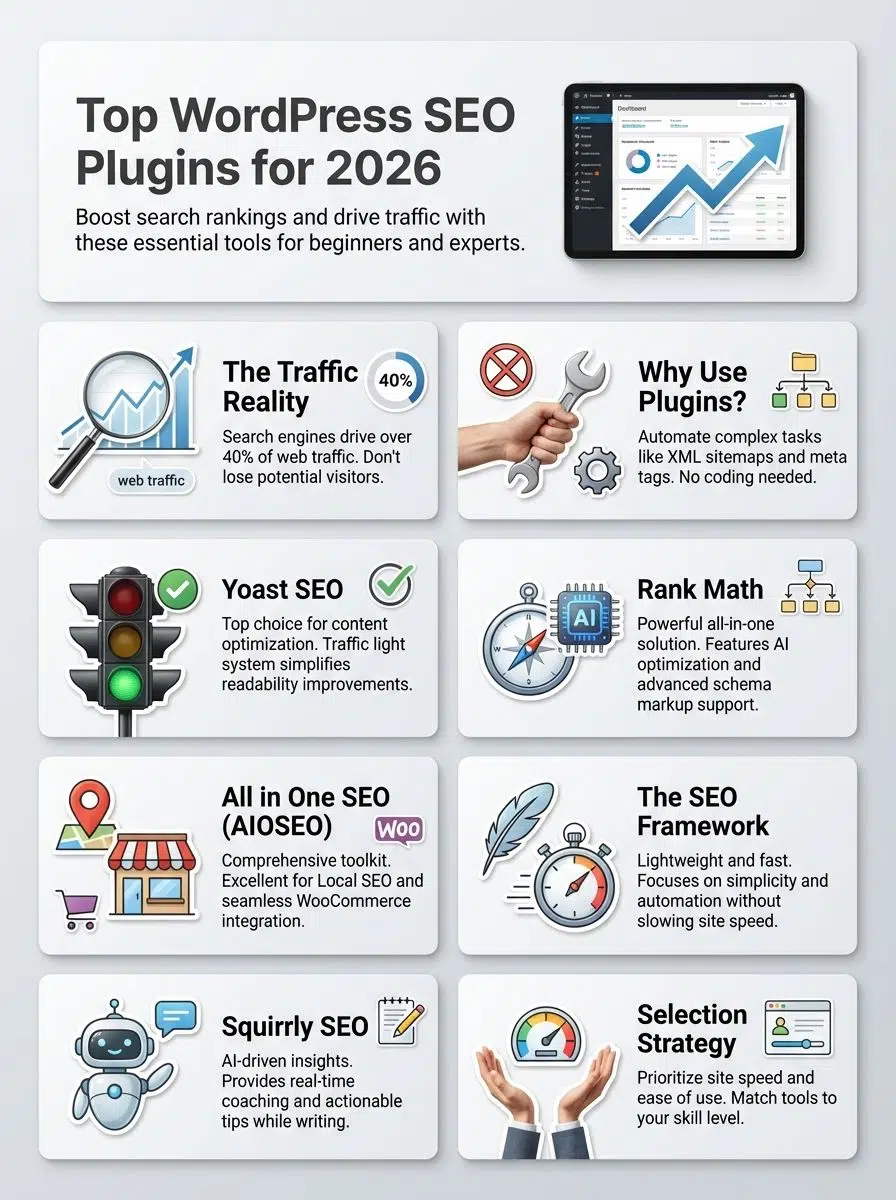
SEO plugins help boost your traffic by making it easier to show up in search results. They create XML sitemaps, add meta tags, and suggest keywords so your content stands out. Here is exactly what they handle for you:
- Automatic Sitemaps: They generate a sitemap.xml file that tells Google exactly where to find your pages.
- Meta Management: They let you write the blue title link and description text that users see in search results.
- Content Analysis: Tools like Yoast SEO guide you step-by-step to use your keywords correctly.
Plugins update often to match Google’s new rules right away. Many also give analytics tools that track what works best on your site. For example, you can see which pages bring the most visitors or which posts need more love.
These WordPress tools save time with automatic optimization. They fix small technical SEO issues before they grow into bigger problems for your marketing goals.
Simplifying technical SEO for beginners
Getting started with technical SEO feels like learning a new dance. Tools make it much easier. Plugins handle hard jobs like setting up canonical URLs or adding schema markup.
Picture a plugin as your digital helper that fixes site speed or tells search engines how to find your content. Most plugins offer simple checklists. You do not need coding skills for tasks such as:
- Setting up Open Graph data so your links look good on Facebook.
- Fixing broken 404 links that frustrate visitors.
- Improving user experience by organizing your site structure.
“A good SEO plugin acts like a guardrail,” says WordPress expert Syed Balkhi. “It keeps you on the track to higher rankings without requiring a degree in computer science.”
With the right WordPress tools in place, even beginners can tackle complex Search Engine Optimization tasks. This helps their sites appear higher in search results.
Yoast SEO: Best for Content Optimization
Yoast SEO helps you polish your posts and pages. It makes them shine for search engines. Many beginners use it to boost their site’s visibility without stress.
It is one of the most popular tools in the US market. It currently runs on over 13 million websites.
Key features of Yoast SEO
Green and orange lights make content easy to fix. The famous “traffic light” system is its best feature. It gives you a clear green bullet point when your content is good to go.
Built-in analysis looks at readability using the Flesch Reading Ease score. This ensures your sentences are short enough for online readers to understand quickly. It suggests keywords, checks your meta tags, and gives tips for better titles.
- Snippet Preview: Shows exactly how your post looks in Google mobile and desktop results.
- Semrush Integration: Helps you find related keywords that real people are searching for right now.
- Social Previews: Displays how posts appear on Facebook or Twitter with Open Graph tools set up by default.
XML sitemap support helps search engines find all pages fast. Clear instructions take the guesswork out of Search Engine Optimization. That is why Yoast remains a crowd favorite.
Pros & Cons of Yoast SEO
Yoast SEO helps boost search engine rankings with content optimization tools and clear analytics. You get handy color signals for on-page improvements. The plugin guides you as you write.
Bloggers and business owners can add meta tags and XML sitemaps in a few clicks. However, you should know about the costs. The Premium version costs $99 per year for features like the redirect manager.
| Pros | Cons |
|---|---|
| User-friendly “Traffic Light” system | Premium version is expensive ($99/yr) |
| Checks readability (Flesch score) | Too many ads in the backend of the free version |
| Huge community support and tutorials | Can feel “bloated” with features you don’t use |
Yoast can weigh down smaller websites if too many features are active at once. The free version offers strong basics but locks some options behind a paywall. Advanced users may find fewer technical settings than with Rank Math.
Still, many appreciate its quick tips to improve user experience without needing deep web development skills.

Rank Math: Best for All-in-One SEO Solutions
Rank Math packs many SEO tools into one plugin. You get a strong boost right out of the gate. It brings clear guidance and smart features that even new users can enjoy easily.
It has grown fast because it offers premium features for free. It is a favorite for people who want more data without paying extra.
Key features of Rank Math
Rank Math manages technical SEO tasks with just a few clicks. The plugin gives automatic suggestions for meta tags, titles, and descriptions. It supports 24 schema types to help search engines better read your content.
This makes websites smarter for Google, Bing, and Yahoo in 2026. You can set up XML sitemaps fast. It also uses easy tools to connect your website with Google Analytics 4 (GA4).
- Content AI: It uses artificial intelligence to suggest words and link counts based on current US search trends.
- 404 Monitor: It automatically tracks broken links and lets you redirect them to fix errors.
- Modular Design: You can turn off features you do not use to keep your site fast.
Users get local SEO options if they run a nearby shop or service business. Built-in keyword ranking lets you track how well pages perform without leaving WordPress. Open Graph support means social shares look sharp on Facebook and Twitter, too.
Pros & Cons of Rank Math
You might wonder what makes Rank Math different from other SEO plugins for WordPress. Many users love how easy it is to set up this plugin. With its one-click import feature, switching from Yoast SEO is simple.
People enjoy having advanced analytics built right into their dashboard. They can track keyword rankings and website traffic stats. They get Google Search Console data without leaving WordPress.
The Pro version starts at $59 per year, which is cheaper than many competitors.
Rank Math supports up to 5 keywords per post for optimization in the free version. Most other free tools only allow one keyword in 2026.
Even so, not all feedback is glowing. Some say there are too many settings at first glance. It can seem overwhelming if you are new to search engine optimization tools.
While basic features come free, some parts, like advanced schema markup, need paid upgrades by 2026. If your site uses lots of third-party plugins, rare conflicts may pop up.
Still need more reasons? Users mention that support gets better every year. However, it can feel slow during high-traffic times such as Black Friday sales.
All in One SEO (AIOSEO): Best for Comprehensive SEO Tools
All in One SEO, or AIOSEO, packs loads of smart features right out of the box. With strong tools for every site’s needs, it fits both small blogs and large online shops alike. Over 3 million professionals use it. It is known for having a very powerful Setup Wizard.
Key features of AIOSEO
AIOSEO offers smart options for search engine optimization. It creates an automatic XML sitemap. This makes your site easy to find on Google and Bing. The plugin adds meta tags like titles and descriptions without extra work from you.
One specific standout feature is the TruSEO score. This gives you a checklist of actionable items to improve your page, such as sentence length and keyword distribution.
- ChatGPT Integration: It can automatically generate post titles and descriptions for you using AI.
- WooCommerce Support: It has specific tools to help product pages rank, like automatic product image SEO.
- Link Assistant: It finds internal linking opportunities within your own content automatically.
It helps local businesses appear in map searches with Local SEO support. AI-powered suggestions improve content optimization by showing tips as you write. Simple settings help beginners make technical SEO changes easily.
Pros & Cons of AIOSEO
AIOSEO packs a punch with its full toolbox. You get easy on-page SEO, smart XML sitemaps, and social media Open Graph tags. Many users like the simple setup wizard that guides you step by step in under 10 minutes. Even folks new to Search Engine Optimization can start fast. You will not feel lost in settings.
Some features hide behind the paywall. Free users miss out on advanced options like the Redirection Manager. Pricing starts around $49.60 per year for the Basic plan, but it renews at a higher rate.

AIOSEO works for most sites. Heavy customization could leave experts wanting more control over technical SEO tweaks. However, for business owners who want it done right, it is a top choice.
The SEO Framework: Best for Simplicity and Automation
The SEO Framework keeps things simple so you can focus on your content. It runs quietly in the background. It handles tricky tasks like a silent helper.
This plugin is famous among developers for being lightweight. It does not have the “bloat” or heavy code that slows down other plugins.
Key features of The SEO Framework
Setup takes only minutes. The plugin runs right out of the box. Auto-generated meta tags help your website show up in search engine results faster.
It uses a unique color-coded bar on your post list. This shows you instantly if your title, description, and indexing settings are correct without needing to open the post.
- No Ads: Even the free version has zero advertisements in your dashboard.
- Extension Manager: You only install the specific features you need, like “Local SEO” or “Focus,” keeping your site fast.
- Anti-Spam: It helps combat scraper sites from stealing your content with better canonical rules.
Settings come preconfigured for the best technical SEO. This avoids overwhelming beginners with options. Built-in local SEO tools work well for businesses targeting customers nearby.
Regular updates keep things running smoothly. Users focus more on creating content rather than worrying about plugin performance.
Pros & Cons of The SEO Framework
After learning about its key features, it helps to weigh the ups and downs. The SEO Framework stands out for its speed. Websites load fast since this plugin stays lightweight. Beginners enjoy using it because the setup is quick. There are fewer confusing options crowding their screens.
Automation tools handle sitemaps and Open Graph details in just a few clicks. No ads show up in your dashboard. This is pure bliss for anyone tired of pop-ups.
On the flip side, advanced users might miss deep analytics. There are no built-in content analysis tools that highlight keyword stuffing. You have to judge your own writing style.
Local SEO features exist, but may need more manual work than AIOSEO. Still, most websites wanting simple Search Engine Optimization will find this plugin a breeze.
Squirrly SEO: Best for AI-Powered SEO Insights
Squirrly SEO uses smart tools to give you quick tips. It is almost like having a wise sidekick for your search engine goals. If you feel stuck on what to do next, this plugin brings fresh ideas right to your website’s doorstep.
It is distinct because it is designed for non-SEOs. It focuses heavily on “Focus Pages” to help you rank your most important content.
Key features of Squirrly SEO
This plugin uses AI Optimization to make your content better for search engines. It gives smart tips as you write. You can fix things in real time.
The SEO Live Assistant is a highlight. The checks turn green as you type, ensuring you are 100% optimized before you hit publish. It is more interactive than the passive checklists in other tools.
- Focus Pages: You pick your top pages, and Squirrly gives you a specific list of tasks to rank them better.
- Keyword Research Tool: It includes a built-in tool to find better keywords without paying for extra software.
- Copyright-Free Images: It helps you find and insert legal images directly from the dashboard.
It tracks keywords and shows how your website performs against others. Open Graph tools are built-in for smooth social media sharing. Local SEO features help small businesses appear higher in nearby searches, too.
Pros & Cons of Squirrly SEO
After looking at the tools Squirrly SEO gives, you might wonder what works well. Many users like its simple AI suggestions for SEO tasks. The plugin helps with keyword research and on-page content optimization.
Its step-by-step guidance feels easy. Even if you are new to digital marketing, you can improve your website performance fast.
Some people find all those notifications a bit much. They wish things moved faster inside the dashboard. Squirrly can use more server resources than lighter plugins such as The SEO Framework.
Not all advanced analytics features come free. The Business plan costs $71.99 per month, which is steeper than others. However, fans say its strong AI optimization makes it stand out against many other search engine plugins in 2026.
How to Choose the Right SEO Plugin for Your Website
Choosing a tool for your site can feel like picking the right shoes. You need comfort and fit. Take your time, compare features, and peek at what others are saying before making a pick.
Factors to consider when selecting an SEO plugin
Think about your site’s needs first. A plugin should make Search Engine Optimization simple, not harder. Here is a quick comparison to help you decide:
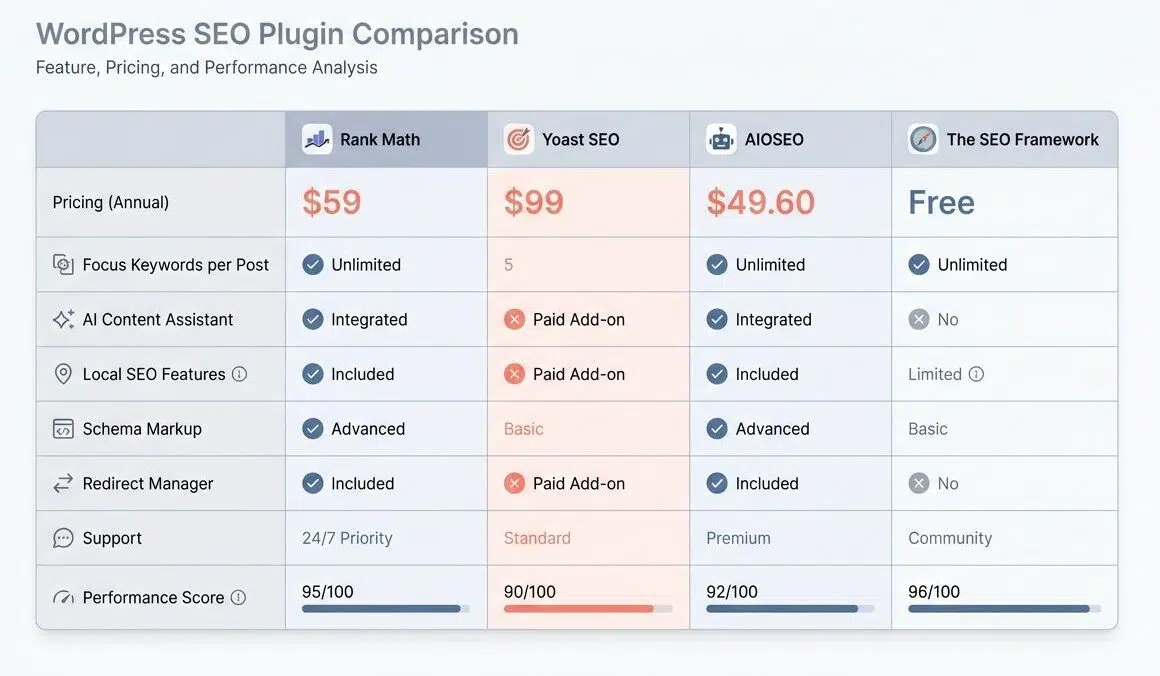
| Plugin | Best For | Price (Approx/Year) | Key Feature |
|---|---|---|---|
| Rank Math | Budget-conscious Pros | $59 (Pro) | 30+ SEO modules included |
| Yoast SEO | Content Writers | $99 (Premium) | Readability analysis |
| AIOSEO | Business Owners | $49.60 (Basic) | TruSEO Score & Wizard |
| The SEO Framework | Speed/Developers | Free (Extensions paid) | No ads, lightweight code |
Speed matters a lot. Some plugins slow sites down with too many extras. Read recent reviews from 2025 or 2026 to spot complaints about performance drops.
Good analytics help track website traffic and user experience changes after installation. Pick an option that matches your knowledge level. An easy setup helps beginners feel confident fast.
The Bottom Line
Your website needs the right SEO plugin to stay on top, get more traffic, and boost your search engine rankings in 2026. Tools like Yoast SEO, Rank Math, AIOSEO, The SEO Framework, and Squirrly SEO help with content optimization.
Choosing the best tool depends on what you want. Some focus on AI Optimization or easy analytics. Others shine at technical SEO or improving user experience and performance.
Pick one that matches your skills and goals so your site can grow strong roots online. Don’t just aim to show up in Google results. Make every click count for real growth.