When it comes to optimizing WordPress website performance, speed, security, and user experience are paramount. One of the most effective tools to achieve these goals is a Content Delivery Network (CDN).
CDNs play a crucial role in reducing website load times, improving performance, and offering enhanced security. They help deliver content to users from the server closest to them, which lowers latency, boosts speed, and enhances the overall experience.
In this comprehensive guide, we’ll dive into the 7 best CDN services for WordPress websites. We’ll explore their features, pros and cons, real-world use cases, and how to integrate them into your site effectively.
This article will also provide actionable tips, case studies, and insights, helping you make an informed decision on the best CDN for your WordPress website.
Why a CDN Is Essential for WordPress Websites
A Content Delivery Network (CDN) is a system of distributed servers that deliver web content to users based on their geographic location. The CDN’s servers cache static assets like images, videos, stylesheets, and scripts.
When a user visits a website, the CDN serves the requested content from the closest server, reducing the distance between the user and the server, which results in faster page loading.
For WordPress websites, which often rely on dynamic content, a CDN is essential for:
- Accelerating page load times and ensuring a smooth user experience
- Reducing server load, which helps your site handle high traffic
- Enhancing SEO performance, as faster websites tend to rank higher on search engines
- Improving security, especially with built-in protections like DDoS mitigation and SSL support
Key Benefits of Using a CDN for WordPress
- Speed Boost: With a CDN, content is delivered from the server closest to the user, cutting down on latency and improving website speed.
- Scalability: A CDN can handle high traffic loads, ensuring your WordPress site remains fast and functional even during traffic spikes.
- Improved SEO: Fast-loading sites are favored by Google. A CDN can contribute to better Core Web Vitals and overall SEO rankings.
- Security Enhancements: Most CDNs offer features like SSL encryption, DDoS protection, and firewalls, securing your site from attacks.
- Global Reach: For websites with international audiences, CDNs ensure fast delivery of content regardless of user location.
How to Choose the Best CDN for Your WordPress Website?
When selecting a CDN for your WordPress site, consider the following criteria to find the right fit for your needs:
Key Factors to Consider
- Performance and Speed: Look for a CDN with a large global network and a solid reputation for fast delivery. More PoPs (Points of Presence) typically lead to lower latency and faster load times.
- Security Features: Prioritize CDNs that offer advanced security features, including DDoS protection, Web Application Firewall (WAF), and SSL certificates.
- Ease of Integration: The best CDNs for WordPress offer seamless integration through plugins, making setup easy, even for non-technical users.
- Support and Documentation: Opt for a CDN provider that offers 24/7 support and extensive documentation to guide you through the integration process.
- Pricing: Compare pricing models to ensure that the service fits your budget. Some CDNs offer free plans for basic usage, while others have pay-as-you-go or subscription-based pricing structures.
Additional Considerations
- Global Audience: For websites with international traffic, prioritize CDNs with a global server network to ensure optimal performance across regions.
- Traffic Volume: For high-traffic sites, look for a CDN that offers unlimited bandwidth or affordable pricing for large amounts of data transfer.
- Customer Reviews: Check user reviews on platforms like Trustpilot, G2, or Capterra to gauge the real-world performance and reliability of the CDN.
Top 7 Best CDN Services for WordPress Websites
Let’s take a look.
1. Cloudflare
Cloudflare is one of the most popular CDNs globally, offering both free and premium plans. It has a vast network of 200+ data centers and is known for providing high-speed content delivery, security features, and ease of integration.
Key Features for WordPress
- Global Network: With over 200 PoPs worldwide, Cloudflare ensures that content is delivered quickly to users regardless of their location.
- Free Plan: The free plan provides essential CDN features, DDoS protection, and caching capabilities.
- Security: Built-in DDoS protection, WAF, SSL certificates, and Bot Management help secure your site against attacks.
- Integrated Analytics: Cloudflare offers real-time performance analytics and traffic insights.
Pros and Cons
| Pros | Cons |
| Free plan with essential features | Premium features require a paid plan |
| Excellent security features | Free plan can have limited performance |
| Easy WordPress plugin integration | Advanced configurations may require a learning curve |
| 24/7 customer support | Some issues with caching for dynamic content |
Real-World Example
Cloudflare powers millions of websites, including popular sites like Shopify and Zendesk. A small e-commerce website saw a 20% improvement in load time after implementing Cloudflare’s CDN, resulting in higher conversion rates.
2. KeyCDN
KeyCDN is an affordable and reliable CDN that focuses on performance and simplicity. It’s designed for budget-conscious WordPress users who still need a fast and reliable service.
Key Features for WordPress
- 34 PoPs worldwide
- Pay-as-you-go pricing structure, ideal for sites with varying traffic levels
- HTTP/2 support and SSL for secure content delivery
- Real-time analytics and traffic reports
- Easy WordPress integration via plugin
Pros and Cons
| Pros | Cons |
| Affordable pricing model | No free plan available |
| Easy integration with WordPress | Limited security features compared to other providers |
| Fast and reliable performance | Support only via email and chat |
Real-World Example
A digital marketing agency saw an 18% decrease in bounce rates after switching to KeyCDN for their client’s WordPress site, thanks to faster load times.
3. StackPath
Formerly known as MaxCDN, StackPath is a high-performance CDN service that provides fast content delivery with a focus on security. It’s perfect for WordPress websites that require both speed and robust security features.
Key Features for WordPress
- 45 PoPs worldwide
- Built-in DDoS protection and WAF
- Customizable caching rules and real-time reporting
- Easy WordPress integration via StackPath plugin
Pros and Cons
| Pros | Cons |
| Excellent security features | More expensive than some alternatives |
| Fast content delivery | Higher learning curve for configuration |
| 24/7 support with live chat | No free plan available |
Real-World Example
A popular WordPress-based news website saw a 25% increase in load speed and a significant reduction in malicious traffic after switching to StackPath’s CDN.
4. BunnyCDN
BunnyCDN is known for its affordable pricing and impressive performance, especially for image-heavy WordPress websites. It offers excellent value for small to medium-sized websites.
Key Features for WordPress
- 50+ PoPs globally
- Built-in image optimization and video delivery capabilities
- Affordable pay-as-you-go pricing
- HTTP/2 and SSL support for fast and secure delivery
- Easy integration with WordPress through the BunnyCDN plugin
Pros and Cons
| Pros | Cons |
| Low-cost, pay-as-you-go pricing | Lacks advanced security features compared to others |
| Excellent image and video optimization | Smaller network than some competitors |
| Fast and reliable performance | Limited customer support options |
Real-World Example
A WordPress photography website utilizing BunnyCDN reported a 30% reduction in page load time, resulting in better user engagement and improved SEO rankings.
5. AWS CloudFront
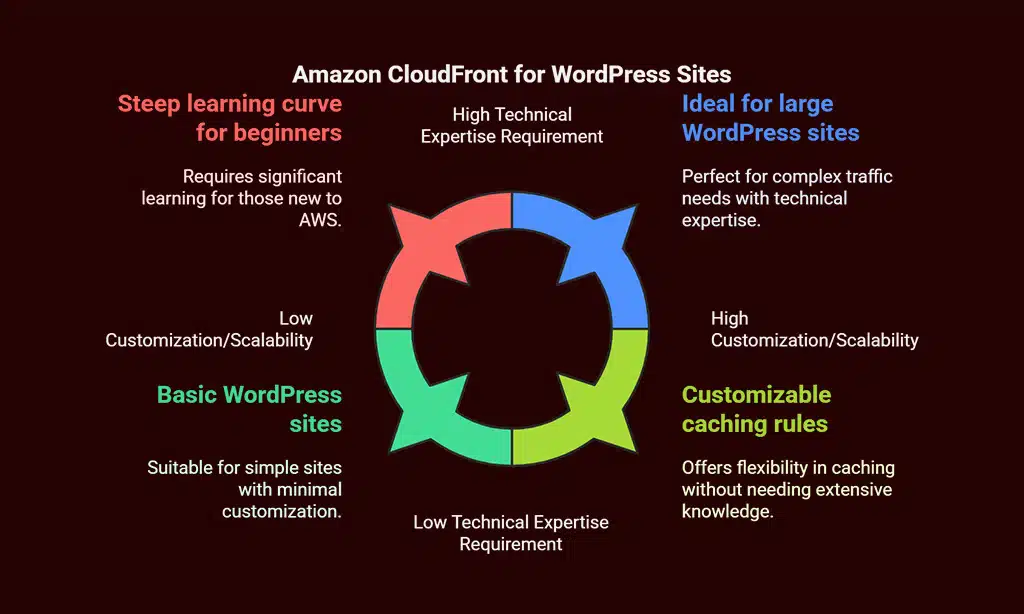
Amazon CloudFront is a robust CDN that leverages the power of Amazon Web Services (AWS). It’s highly customizable and ideal for larger WordPress sites or those with complex traffic needs.
Key Features for WordPress
- 230+ PoPs worldwide
- Customizable caching rules and Lambda@Edge for serverless functions
- Integrated with AWS’s powerful infrastructure, ensuring high scalability
- SSL encryption and DDoS protection for enhanced security
Pros and Cons
| Pros | Cons |
| Highly customizable and scalable | Steep learning curve for beginners |
| Extensive AWS integration | Pricing complexity and potential for high costs |
| Excellent performance for large sites | Requires technical expertise for setup |
Real-World Example
A major e-commerce platform running on WordPress saw improved performance during peak shopping seasons, with CloudFront’s scalability handling 10x more traffic without affecting site speed.
6. Fastly
Fastly is a high-performance CDN known for its real-time content delivery and edge computing capabilities. It is ideal for websites that require rapid changes or updates to their content, such as news websites or high-traffic blogs.
Key Features for WordPress
- 60+ PoPs globally
- Real-time caching and edge computing for immediate content updates
- Built-in SSL support and DDoS protection
- Detailed analytics and traffic monitoring tools
Pros and Cons
| Pros | Cons |
| Real-time content delivery and updates | Higher cost compared to other CDNs |
| Powerful features for developers | Requires technical setup and knowledge |
| Excellent for dynamic content | No free plan available |
Real-World Example
A WordPress-based streaming service switched to Fastly and reduced video load times by 40%, significantly enhancing user experience during high traffic events.
7. Sucuri
Sucuri is a security-focused CDN that provides advanced protection alongside fast content delivery. It’s an excellent option for WordPress websites that need extra layers of security and DDoS mitigation.
Key Features for WordPress
- 15+ PoPs globally
- DDoS protection, WAF, and SSL encryption
- Malware scanning and site cleaning features
- Easy integration with WordPress via Sucuri plugin
Pros and Cons
| Pros | Cons |
| Advanced security features | Limited network compared to other CDNs |
| Malware scanning and site protection | Higher cost compared to non-security-focused CDNs |
| Excellent for security-focused sites | Smaller global network |
Real-World Example
A high-profile WordPress blog was able to mitigate multiple cyberattacks thanks to Sucuri’s security features, including DDoS protection and real-time malware scanning.
Comparison Table: Key Features of the 7 Best CDNs for WordPress
| CDN Provider | Global Network | Free Plan | DDoS Protection | SSL Support | Ease of Integration | Pricing |
| Cloudflare | 200+ PoPs | Yes | Yes | Yes | Easy via plugins | Free/Paid |
| KeyCDN | 34 PoPs | No | No | Yes | Easy via plugins | Paid |
| StackPath | 45 PoPs | No | Yes | Yes | Easy via plugins | Paid |
| BunnyCDN | 50+ PoPs | No | No | Yes | Easy via plugins | Paid |
| AWS CloudFront | 230+ PoPs | No | Yes | Yes | Moderate (AWS) | Paid |
| Fastly | 60+ PoPs | No | Yes | Yes | Moderate | Paid |
| Sucuri | 15+ PoPs | No | Yes | Yes | Easy via plugins | Paid |
How to Set Up a CDN on Your WordPress Website?
Step-by-Step Integration Guide
- Sign Up for a CDN Service: Choose the best CDN service based on your website’s needs, and sign up for an account.
- Install the CDN Plugin: Many CDN services, like Cloudflare and StackPath, offer WordPress plugins. Install the plugin directly from your WordPress dashboard.
- Configure the Plugin: After installation, configure the plugin by entering your CDN credentials, such as API keys or access tokens.
- Update DNS Settings: For services like Cloudflare, update your DNS settings to route traffic through their network.
- Test Performance: Use tools like Google PageSpeed Insights or GTmetrix to test the performance of your site after the CDN setup.
Troubleshooting Common Issues
- Cache Not Clearing: Clear the CDN cache from the service dashboard or plugin settings to serve the most recent content.
- SSL Errors: If SSL issues arise, ensure both your site and the CDN are configured for SSL. Most CDNs provide SSL certificates as part of their service.
Wrap Up: The Right CDN for Your WordPress Website
Choosing the best CDN for WordPress websites depends on your specific needs, including budget, traffic volume, and security requirements. Whether you opt for a free service like Cloudflare or a more robust solution like AWS CloudFront, integrating a CDN is one of the most effective ways to optimize your site’s performance and security.
By considering factors like global network reach, security features, and pricing, you can select the perfect CDN that will help boost your site’s speed, improve SEO rankings, and deliver a better user experience.
Investing in the right CDN can be a game-changer for your WordPress website, especially as user expectations for speed and security continue to rise.