The next fake image or video you encounter may not look fake at all. It could be a fully generated clip, a subtly edited photograph, a cloned voice, or genuine footage presented with a completely false caption.
As creation and editing tools improve, visual inspection becomes less reliable. Strange hands, distorted text, unnatural shadows, and robotic voices are no longer dependable clues. In many cases, the content looks convincing because there is nothing visibly wrong with it.
When I examine suspicious content, I want more than an AI detector’s percentage score. I want to know who created the file, which device or software handled it, what changed, when those changes occurred, and whether the available record can be trusted.
That is where digital provenance technologies become valuable. They create signals that help document a file’s origin and history. These signals may include signed metadata, invisible watermarks, content fingerprints, verified identities, timestamps, and external records.
However, provenance is not a digital truth machine. A genuine camera can record a staged event. A verified publisher can make a false claim. An authentic photograph can be shared with a misleading caption. Provenance helps us inspect the process behind content, but context and human judgment still matter.
What Digital Provenance Can, and Cannot, Tell Us
Digital provenance is the recorded history of a digital asset. Depending on the system, that history may identify the original device, creator, editing application, AI model, modification steps, timestamps, or organization responsible for a claim.
Cryptographic signatures can make this information tamper-evident. If someone changes the protected file or its signed record, verification should fail. This can reveal that something changed after signing.
The correct term is tamper-evident, not tamper-proof. A technically valid record may still contain an inaccurate claim, and someone can create misleading content before the file is signed.
Digital provenance also differs from conventional AI detection.
| Question | Digital provenance system | Content-based AI detector |
| What does it examine? | Attached, embedded, or registered origin signals | Statistical patterns within the content |
| What does it usually provide? | Source, signer, tool history, watermark, or timestamp | A probability or classification |
| Does it require cooperation from the creator or tool? | Usually | Not always |
| What is its main weakness? | Signals may be missing, stripped, or incomplete | False results and inconsistent performance |
| Does it prove factual truth? | No | No |
The distinction matters. AI detectors estimate what content might be. Provenance systems provide evidence about where it came from and what happened to it.
Digital Provenance Technologies at a Glance
No single technology protects the entire journey from creation to publication. The strongest content-authenticity systems combine several independent signals.
| No. | Technology | What it contributes | Main limitation |
| 1 | C2PA Content Credentials | Signed origin and editing history | Cannot establish factual truth |
| 2 | Secure capture and hardware signing | A trusted record near the moment of capture | Cannot detect staging or false context |
| 3 | Invisible AI watermarks | A hidden signal within generated media | May be weakened or removed |
| 4 | Perceptual hashes and fingerprints | Recognition of modified copies | Can produce false matches or misses |
| 5 | Durable Content Credentials | Recovery after metadata is stripped | Depends on external infrastructure |
| 6 | Verifiable identity assertions | Connection between an identity and an asset | Identity does not guarantee honesty |
| 7 | Trusted timestamps and transparency logs | Evidence of chronology and registration | Time evidence does not validate a claim |
| 8 | Verification tools and platform labels | Understandable information for viewers | Missing signals remain inconclusive |
1. C2PA Content Credentials
The Coalition for Content Provenance and Authenticity, known as C2PA, publishes an open standard for attaching signed provenance information to digital content.
The resulting record is commonly called a Content Credential or C2PA manifest. It may describe:
- Where an asset originated
- Which device or software handled it
- Whether generative AI was involved
- What edits or transformations occurred
- Which source materials were used
- Who or what signed the record
Cryptographic hashes connect the manifest to the asset. Certificates and digital signatures then allow verification software to check whether the protected information has changed.
C2PA specification 2.4, released in April 2026, expanded the standard with a machine-readable AI Disclosure Assertion, repository receipts, and support for HTML and structured text. Provenance is therefore moving beyond ordinary image and video files.
Content Credentials can expose an editing history and identify a known signer or application. They cannot prove that a scene was unstaged, a caption was accurate, or the signer acted honestly.
Their absence proves little as well. Screenshots, unsupported editors, format conversions, and social platforms may remove embedded credentials from legitimate content.

2. Secure Capture and Hardware-Backed Signing
Secure-capture technology creates authenticity information when a camera or phone records an image or video. The device hashes the media and signs its provenance using a protected cryptographic key.
Keeping that key inside a secure element or trusted execution environment makes it harder for ordinary applications or attackers to steal or misuse it.
This technology has moved beyond the experimental stage. Leica’s M11-P can sign photographs in-camera. Sony supports authenticity functions on selected cameras. Qualcomm and Truepic have demonstrated C2PA signing inside Snapdragon’s trusted environment. Google has also introduced native-camera Content Credentials on supported Pixel devices.
Signing at capture creates a stronger starting point than adding metadata later. It can connect a file to a supported physical device and reveal changes made after the original signature.
However, a secure camera cannot understand what it sees. It could record a fabricated image displayed on a screen, a staged event, or a real scene later presented with a deceptive description.
Hardware-backed signing strengthens the chain of evidence. It does not close the gap between a digital recording and the meaning people attach to it.
3. Invisible AI Watermarks
An invisible AI watermark places a machine-detectable signal inside the content. Unlike ordinary metadata, the signal becomes part of the image, video, audio, or text itself.
The watermark is not a visible logo. A compatible detection system looks for patterns introduced during generation or processing.
Google’s SynthID is one of the most developed examples. It supports multiple media types and is designed to remain detectable after some common changes, including compression, cropping, filtering, and added noise.
In May 2026, Google reported that SynthID had been applied to more than 100 billion images and videos and 60,000 years of audio. OpenAI also combines SynthID with C2PA metadata for supported generated images.
Pairing the two approaches makes sense. Content Credentials provide detailed history, while an embedded watermark may be more likely to survive redistribution.
Watermarks are not unbreakable. Heavy editing, paraphrasing, translation, or deliberate attacks may weaken them. Text watermarking is especially difficult because short samples and rewritten passages may not retain enough of the original signal.
A missing watermark does not prove human authorship. A detected watermark may also indicate that an AI tool processed the content without generating every part of it.
4. Perceptual Hashes and Content Fingerprints
A conventional cryptographic hash is highly sensitive. Changing even one byte produces a very different result. That makes it useful for confirming whether two files are exactly identical.
It is less useful when a platform resizes, crops, or recompresses an image.
A perceptual hash, sometimes called a content fingerprint, works differently. It measures recognizable similarities so that related versions of the same asset can still be matched.
A verification service can calculate the fingerprint of a suspicious file and search for an earlier or registered version. This may help:
- Locate the original content
- Detect recycled or repurposed media
- Recognize a recompressed copy
- Recover an external provenance record
- Compare different versions of the same asset
Perceptual matching is probabilistic rather than absolute. Two different files may occasionally appear similar to the algorithm, while major edits may prevent a correct match.
A fingerprint also does not establish authorship. I would treat it as a path toward stronger evidence, not a final authentication verdict.
5. Durable Content Credentials
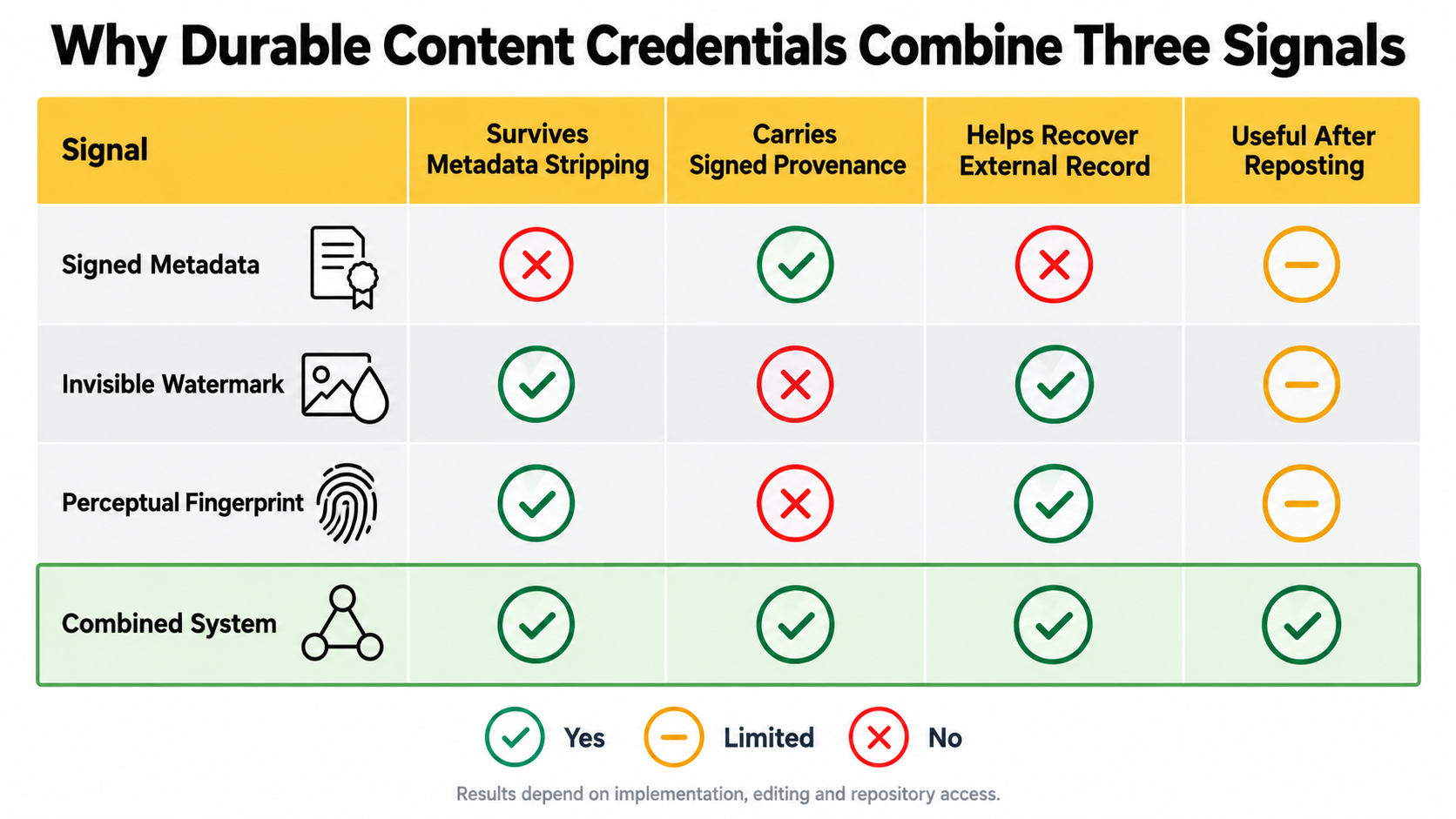
Ordinary embedded credentials are useful until a website or application strips them. Durable Content Credentials address this weakness by combining several forms of evidence.
A durable system may use:
- Signed metadata containing the detailed provenance history
- An invisible watermark carrying a lookup identifier
- A perceptual fingerprint connecting the media to an external record
The complete manifest can be stored in a repository. If the embedded version disappears, a verifier may use the watermark or fingerprint to locate and validate the external copy.
C2PA refers to these recovery mechanisms as soft bindings. Its newer specification also supports repository receipts that can document when a manifest was accepted by a repository.
This layered model makes provenance more resilient to routine sharing, compression, and format changes. It does not make the record permanent.
Successful recovery still depends on watermark durability, fingerprint accuracy, repository availability, compatible verification software, and adoption across platforms.
6. Verifiable Creator Identity Assertions
A technical signature may identify the camera, application, or service that signed a file without revealing which person or organization stands behind it.
Verifiable identity assertions are designed to add that missing layer.
The Creator Assertions Working Group has developed an Identity Assertion specification that allows someone to prove control of a digital identity and bind it to an asset or selected provenance claims. The approach draws on the W3C Verifiable Credentials model.
This could help confirm that:
- A news organization authorized a photograph
- An artist approved a digital work
- A company issued an official announcement
- A public figure participated in a particular recording
- A suspicious account is impersonating a known publisher
Verified identity improves accountability, but it does not guarantee truthfulness. A confirmed person or organization can still publish misleading information.
Identity verification does not automatically prove copyright ownership either. Contracts, licences, employment terms, and local laws may determine who owns a work.
Privacy must remain part of the design. Journalists, activists, whistleblowers, and witnesses may need to establish credibility without revealing sensitive identity or location data publicly.
7. Trusted Timestamps and Transparency Logs
Trusted timestamps provide evidence that a file or signed statement existed by a particular time.
Under the RFC 3161 model, a trusted authority signs time evidence connected to the data. This can strengthen a chain of custody and preserve useful validation information after the signer’s original certificate expires.
Transparency logs add an external, append-only record. Signed statements can be registered, while cryptographic receipts show that the log accepted them. The IETF’s SCITT architecture demonstrates how this approach can support auditable digital supply chains.
For digital media, timestamps and logs may help establish:
- When a particular version appeared
- Which version came first
- Whether a statement was registered
- Whether someone attempted to rewrite a historical record
- Whether content existed before a disputed event
Chronology is still not truth. False material can receive a valid timestamp, and an inaccurate claim can be registered successfully.
The evidence is only as trustworthy as the signing process, time authority, log governance, and original information being recorded.
8. Provenance Verification Tools and Platform Labels
Digital provenance has limited public value if only technical specialists can interpret it. Verification tools convert complex signatures, manifests, trust lists, hashes, and watermarks into information ordinary viewers can understand.
These tools may appear in:
- Dedicated Content Credentials verifiers
- Search engines and browsers
- AI-provider verification services
- Editing applications
- Newsroom systems
- Social-media platforms
- Automated content-moderation tools
OpenAI and Microsoft provide verification options for supported provenance signals. Google has expanded provenance and watermark checks across its products. TikTok uses Content Credentials to apply automatic labels to some AI-generated content received from other platforms.
The interface must explain uncertainty honestly.
A “valid credential” label should not be interpreted as “every claim is true.” Similarly, “no supported signal detected” must not be presented as proof that the file is authentic or human-made.
The file may come from an unsupported tool, predate the technology, or have lost its provenance during sharing.
Good labels should distinguish between fully generated media, AI-assisted editing, translation, enhancement, compositing, and ordinary camera capture. A vague “AI” badge often conceals more than it explains.
Why a Layered Provenance System Works Better
Every technology in this list covers a different failure point.
A signed manifest can carry detailed history but may be stripped. A watermark may survive reposting but cannot contain the same level of detail. A fingerprint can reconnect a modified copy to an external record but may produce matching errors. Identity adds accountability without proving honesty.
A stronger evidence chain may look like this:
- A trusted device or AI model records where the media began.
- A signed manifest documents the tools and editing actions.
- A watermark or fingerprint helps recover the history after reposting.
- An identity assertion shows who stands behind the asset.
- A timestamp establishes when the record existed.
- A verification interface explains the evidence to the viewer.
Combining independent signals does not make deception impossible. It makes useful evidence harder to erase, easier to inspect, and more expensive to counterfeit convincingly.
Final Thoughts
The strongest digital provenance technologies do not ask us to trust a polished badge. They give us evidence we can inspect: a signed history, a protected capture event, a recoverable watermark, a matching fingerprint, a verified identity, or a trustworthy timestamp.
I do not expect provenance to eliminate fake content. That would be an unrealistic standard. Its more practical promise is to move online verification away from “this looks real” and toward “this is what we can confirm about how the file was created, handled, and changed.”
Combined with source checks, context, media literacy, and human judgment, these technologies could make deceptive content easier to investigate and harder to pass off without scrutiny.
Frequently Asked Questions about Digital Provenance Technologies
Can someone remove C2PA Content Credentials?
Yes. Screenshots, file conversion, unsupported editing, and platform processing may remove embedded credentials. Watermarks, fingerprints, and external repositories may help recover the record, but recovery is not guaranteed. A missing credential does not prove manipulation.
Can fake content copy a genuine Content Credential?
Someone can copy ordinary metadata, but a proper verifier checks whether the signed manifest is cryptographically bound to the file. Placing the record on unrelated content should break verification. Stolen signing keys and poor implementations remain possible risks.
Does an AI-generated label mean the content is false?
No. AI-generated content may be accurate, artistic, educational, or clearly disclosed. The label describes how the content was created or modified. It does not determine whether the message is truthful or deceptive.
Is blockchain necessary for digital provenance?
No. Digital signatures, timestamps, external repositories, and transparency logs can support provenance without a blockchain. A blockchain may record that data existed, but it cannot determine whether the original information was honest.
Can digital provenance survive a screenshot?
Embedded metadata usually does not survive a screenshot. An invisible watermark may remain detectable, while a perceptual fingerprint may reconnect the screenshot with a registered original. Neither method works in every situation.
Does verified creator identity prove copyright ownership?
Not by itself. An identity assertion may show who authorized or participated in a provenance claim. Copyright ownership can depend on contracts, employment agreements, licensing terms, jurisdiction, and other legal evidence.