
A finance employee receives a message from a supplier the company has worked with for years. The supplier says its bank details have changed and asks that the next payment go to a new account. The name is familiar. The logo looks right. The message arrives just before a payment deadline.
The employee does not need a lesson on spotting bad grammar. They need to know the company’s rule for changing payment details, where to find the supplier’s existing contact number, and whom to tell if the request proves false.
That is the test of employee security training: does it help someone make a sound decision while doing their job?
Verizon’s 2026 Data Breach Investigations Report found a human element in 62% of the breaches it studied. The figure covers different kinds of human involvement; it does not mean employees caused all those breaches. It does show why organizations need to prepare people for the requests and mistakes they may encounter, while also protecting their systems.
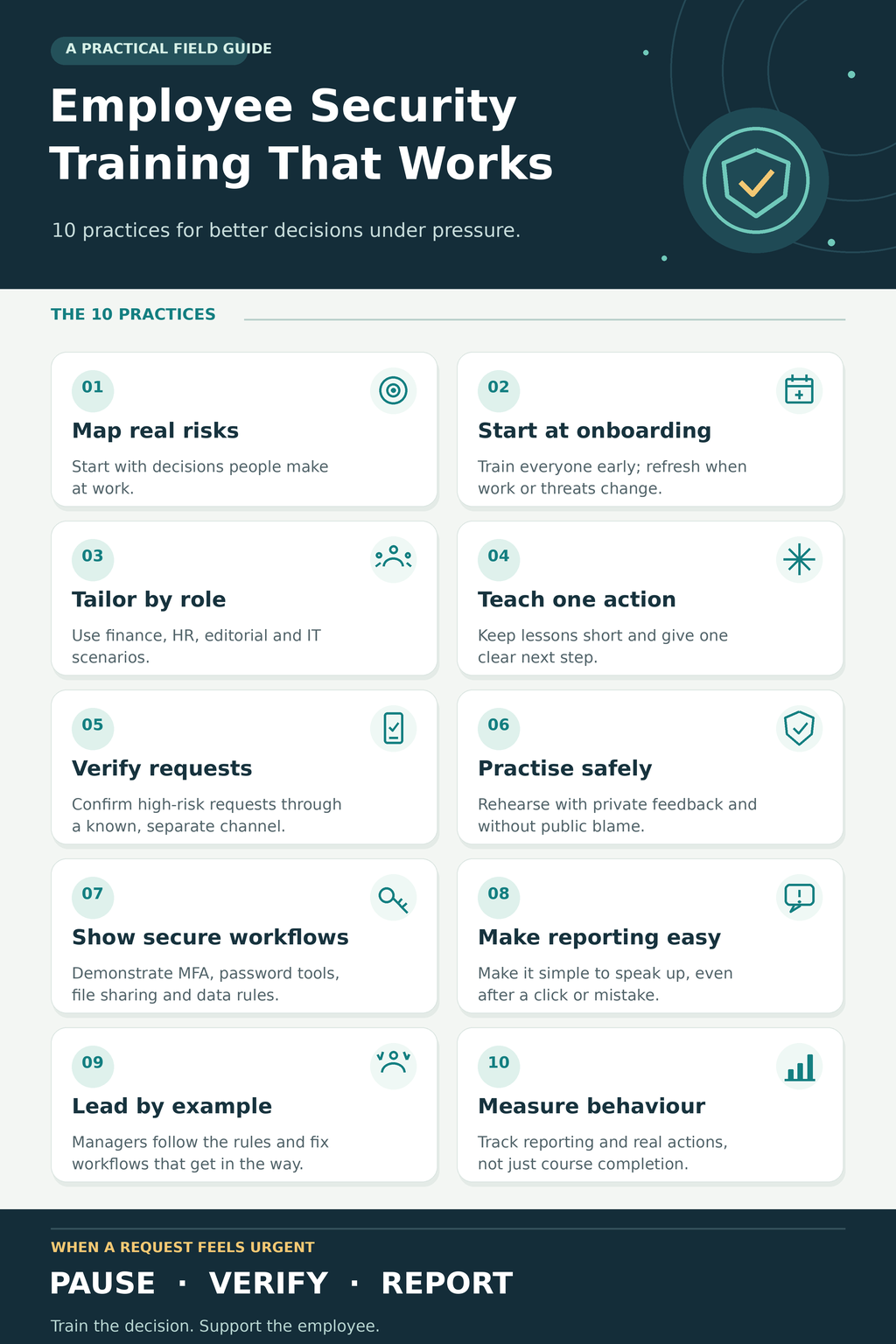
These ten practices provide a useful way to build that preparation.
1. Start with the risks in everyday work
A training program should begin with the work people do, not the course catalogue a company happens to have bought.
Ask each team where an unexpected request could lead to harm. Finance may change payment details. HR handles payroll records. Customer support may be asked to reveal account information. Editorial and marketing staff receive outside files and manage publishing accounts. IT can grant access that affects the entire organization.
From there, write down the action employees should take. “Verify a supplier’s new bank details using a contact number already on file” gives a trainer something specific to teach. “Be careful with phishing” leaves too much for an employee to work out under pressure.
Start with a small number of consequential decisions. Staff can help identify them: they know which requests are common, which deadlines are tight, and where a security rule is difficult to follow.
2. Cover the essentials during onboarding, then refresh them
A new employee should learn the reporting route and basic account rules when they receive access to company systems. They should know which tools are approved, how to handle sensitive information, and where to find help.
That foundation also matters for contractors and other people with relevant access. Leaders need it too. An executive who can approve a payment or access confidential files faces decisions with real consequences.
Training then needs to stay current. A new file-sharing service, a changed payment procedure, or a scam targeting the company may call for a short update. Recurring training can ensure everyone is reached, but the content should reflect the risks employees face now.
There is no universal monthly or quarterly schedule for every workplace. Set a regular rhythm, meet any requirements that apply to your organization, and add focused refreshers when work or threats change.
3. Give each team scenarios that fit its responsibilities
All employees need to understand account protection, suspicious requests, and reporting. Beyond that, the examples should become more specific.
| Team | A decision worth practising |
| Finance | A supplier appears to request a change to its bank details. |
| HR | Someone posing as an employee asks to change payroll information. |
| Editorial or marketing | An outside contact sends an unexpected file or publishing-account invitation. |
| IT | A caller claims to be a colleague who urgently needs access restored. |
The value lies in the response. A finance employee should know which record contains the supplier’s established number and who must approve the change. An IT employee should know the identity-checking procedure, even when the caller says the delay is holding up important work.
This approach also reveals missing processes. If a team is told to “verify independently” but has no reliable contact record, more training will not solve the problem. The organization needs to fix the workflow.
4. Teach one useful action at a time
A long presentation can cover many threats without leaving employees confident about any of them. Smaller lessons work better when each has a clear task.
For example, show a message that asks an employee to reset a work password. Ask how they would reach the genuine sign-in page without using the message’s link. Then demonstrate the approved route. In another lesson, walk through what to do when a work phone is lost.
Choose the format to suit the task. A screen demonstration helps with a reporting button. A discussion may be better for an unusual payment request. Give employees written instructions they can return to later, and make the material accessible to staff working remotely or unable to attend a live session.
Keep the examples close to the tools and situations people recognize. If the company changes those tools, update the lesson.
5. Teach verification across email, text, phone, and chat
Attackers are not limited to badly written emails. A request may arrive through a text message, a phone call, or a familiar work channel. It may use a real colleague’s name or a convincing voice.
Employees should know which requests require a pause. Payments, changes to bank details, requests for authentication codes, unusual account access, and transfers of sensitive data all deserve a defined verification step.
That step must use an established channel. Call a supplier using the number already in the company’s records. Contact a colleague through the usual internal route. Open a service through a saved bookmark or the address normally used at work. Do not rely on a phone number or link supplied in the questionable message.
Make this a normal part of the process, particularly for financial and access changes. An employee can then say, “I need to follow our verification procedure,” without having to argue that a message looks suspicious.
6. Practise without embarrassing people
Employees need chances to apply what they have learned. A short group exercise can start with an unexpected call from someone claiming to be IT. The caller wants an authentication code to “fix” an account. What should the employee do, and how can they reach the real support team?
Phishing simulations are another option, but use them with care. An especially convincing message can produce a different click rate from an obvious one, even if employees’ knowledge has not changed. One result should not be treated as a verdict on a person or a training program.
More seriously, public criticism or punishment can make employees reluctant to report a real click. If the organization plans to run simulations, involve HR in the design, explain the purpose, and give private, useful feedback. A tabletop discussion may be more suitable when the aim is to practise how several teams respond together.
The exercise should leave people better prepared to act, including when they realize they have made a mistake.
7. Show employees the safe way to complete routine tasks
Security advice needs to match the security tools people are expected to use.
If the company provides a password manager, demonstrate how to save and share credentials according to policy. If it requires multifactor authentication, show staff how to set it up and where to report an unexpected sign-in prompt. Explain the approved way to share a sensitive document, connect remotely, and request access.
Data handling deserves the same clarity. Employees should know which information can go in an email, a shared folder, or an AI tool used for work. A rule buried in a policy document is easy to miss when someone is trying to finish a task.
The company has responsibilities here as well. IT may manage updates and device settings centrally; staff need to know what actions are theirs and how to report a problem. Training becomes more useful when the secure route is available, documented, and reasonably easy to follow.
8. Make it easy to report a concern after a mistake
Some employees will identify a scam before acting. Others will become suspicious after opening a link, sending information, or approving a request. The reporting process must work for both.
Tell staff exactly whom to contact and what details to provide. Give them another route if they cannot use their usual account or device. Acknowledge reports and let people know what action to take next.
Managers should make one point unmistakable: report it as soon as you realize something may be wrong. Waiting out of embarrassment can cost the response team valuable time.
This is also where a company learns. Reports may show that several people received the same message, that an instruction was unclear, or that a routine business process is easy to imitate. Treat that information as a chance to improve the process.
9. Ask leaders to follow the same procedures
Employees notice when a manager skips an approval step or asks for a special exception. The training loses credibility if the people with the most authority treat its rules as optional.
Leaders should take part in relevant training and follow established verification and reporting procedures. They should support an employee who pauses a payment or checks an unusual request, even when the check causes a short delay.
They should also listen when a process causes repeated problems. If staff have to work around a rule to finish legitimate work, ask why. The answer may be a missing tool, an unclear instruction, or an approval route that is too slow. Fixing that obstacle may do more for secure behaviour than another reminder email.
10. Measure actions, not just attendance
A completion report tells you who finished a course. It cannot tell you whether someone will verify a payment request or report a suspicious message.
Choose measures that connect to the goals set at the start. You might review how quickly concerns reach the right team, whether staff follow the verification procedure, whether approved security tools are being used, and what employees remember in a later exercise. Ask them where the instructions remain confusing.
Read the results in context. More reports might indicate that people feel safer speaking up; it might also mean more suspicious messages are getting through. A change in simulation click rates may reflect a change in the difficulty of the messages. Look for patterns over time and use them to improve the training and the underlying process.
I would judge the program by what happens when an employee is uncertain. Can they find the rule, reach the right person, and get help promptly? That is more revealing than a perfect completion dashboard.
How to put these practices into place
Begin with three situations that could cause serious harm in your organization. For each one, write down the safe action, the person who can help, and the procedure employees should follow. Check that the tools and contact details they need are available.
Use those situations in onboarding. Give relevant teams a chance to practise them. Then ask employees what felt unclear or unrealistic, and revise the instructions. As new risks appear, add lessons where they will be useful instead of expanding the program for its own sake.
Frequently asked questions on employee security training
How often should employees receive security training?
Cover essential procedures during onboarding. Reinforce them regularly and provide updates when tools, roles, policies, or threats change. The exact schedule should reflect the organization’s risks and any requirements it must meet.
What should an employee do after clicking a suspicious link?
They should stop interacting with the page and report the incident through the company’s established route as soon as possible. The security or IT team can then give instructions suited to what happened. Employees should know that route before an incident occurs.
Are phishing simulations enough to measure training?
No. A simulation shows how people responded to one exercise, and its difficulty affects the result. Review reporting, knowledge retention, use of approved processes, and employee feedback alongside simulation results.
The decision that matters
Return to the supplier’s request to change bank details. A prepared employee knows where to find the genuine contact number, has permission to pause the payment, and can report the message without fearing blame. The company has made those steps possible before the request arrives.
That is what employee security training should build: clear actions that hold up during ordinary, pressured work.