A polished demonstration will not reveal whether your billing administrator must re-enter invoice details or your lawyers can find the latest document before a hearing. Working out how to choose legal practice management software means testing those ordinary, consequential tasks before committing the firm to a new system.
Start with the work that needs fixing. Then assess billing, security, migration, and total cost against it. Software earns its place when staff can complete that work reliably and the firm can meet its local obligations without building a second process around the product’s limitations.
How to Choose Legal Practice Management Software That Fits Your Firm
Bring a practising lawyer, the billing lead, and whoever manages administration or IT into the selection process. In a solo practice, examine the purchase from each perspective yourself.
Follow one matter from enquiry to closure. Record where information enters, who checks it, which documents are produced, how deadlines are assigned, and when money changes hands. Include the awkward steps: correcting a bill, reassigning an absent lawyer’s tasks, or finding a document saved under the wrong name.
Turn those problems into testable requirements. “Better billing” is vague. “A billing administrator can prepare draft invoices, obtain partner approval, and issue them without re-entering time records” gives vendors something concrete to demonstrate.
Separate requirements into three groups:
- Mandatory: Local client-money controls, required permissions, essential billing formats, and usable data exports.
- Operational priorities: The improvements that justify changing systems.
- Optional: Features that would be welcome but do not resolve a current problem.
Appoint one decision owner, but give the people responsible for finance and compliance authority to flag unacceptable gaps. A feature that impresses a partner should not displace a control the accounts team needs every day.
Decide How Much Software You Actually Need
Legal practice management software generally combines matter records, contacts, tasks, calendars, time recording, and billing. Establish what the quoted package includes.
A solo advisory practice might need straightforward matter management and invoicing. A litigation team should give more attention to deadline handling, document workflows, and responsibility for overdue tasks. Firms serving institutional clients may need detailed billing codes, approval controls, and client-specific invoice formats.
Keep systems that already serve the firm well. Replacing document management and accounting alongside matter management adds training and migration work. An LPMS should not automatically be assumed to replace specialist document management, full accounting, legal research, or electronic discovery tools.
For firms without dedicated infrastructure staff, a cloud service is a sensible starting point for evaluation. An on-premises deployment deserves consideration when a concrete contractual, technical, or operational requirement justifies it and the firm can maintain it.
Neither deployment model removes responsibility for access controls, recovery planning, and staff behaviour. If lawyers need documents in locations with unreliable internet, test exactly what remains available offline and how later changes are synchronised.
Make Vendors Demonstrate a Complete Matter
Send shortlisted vendors the same demonstration script, using fictional client information. Ask them to perform the work in the subscription tier being quoted.
A useful scenario begins with an enquiry, includes a conflict search and engagement process, and finishes with payment and file closure. Introduce an exception midway through: a changed deadline, a revised fee arrangement, or an invoice correction.
Check the points where mistakes become expensive
Begin the conflict search with a former client, an associated company, an opposing party, and a name variation. Examine which records are searched and how results are documented. Search functionality supports a lawyer’s conflict assessment; it does not establish that accepting a matter is permissible.
Next, change a triggering date and observe what happens to dependent deadlines and tasks. If the vendor offers court-rule calculations, verify jurisdiction coverage, update responsibility, and the review process. Keep a named person accountable for checking dates.
Document handling deserves more than an upload demonstration. Retrieve an earlier version, file an email against a matter, and search for an attachment. Then attempt to open a restricted matter using a test account without permission.
Finally, use the client portal from the client’s side on a phone. Check invitations, password recovery, document uploads, notifications, and whether another matter’s information remains inaccessible. A portal that requires repeated staff assistance can simply move administration elsewhere.
Put Billing and Client Money Through Separate Tests
Billing deserves an early place in any discussion of how to choose legal practice management software. A workaround that takes a few minutes on one invoice becomes a recurring burden across a monthly billing run.
Use examples that reflect the firm’s fee arrangements: hourly work, fixed fees, staged payments, or other locally permitted structures. Test rate changes, write-downs, tax treatment, disbursements, partial payments, refunds, and approval permissions.
Where a client requires LEDES electronic invoices or particular task codes, validate a sample against that client’s requirements. Generating an electronic file does not prove the client will accept it.
Client or trust money needs its own assessment. Ask the accounts lead to demonstrate individual client ledgers, separation from operating funds, reconciliation, correction records, and the approval trail.
Requirements vary by jurisdiction. For firms within its scope in England and Wales, SRA Accounts Rule 8.3 requires client-account reconciliation at least every five weeks, with the record signed off by the compliance officer for finance and administration or a firm manager. That interval is not a global standard.
Have the person responsible for local compliance approve the proposed workflow. Software described as “compliant” still requires correct configuration, records, supervision, and use.
For payment processing, also establish where fees, refunds, and chargebacks are debited. Check supported countries, currencies, settlement arrangements, and the terms applying to client funds.
Ask for Security Evidence and Clear Data Terms
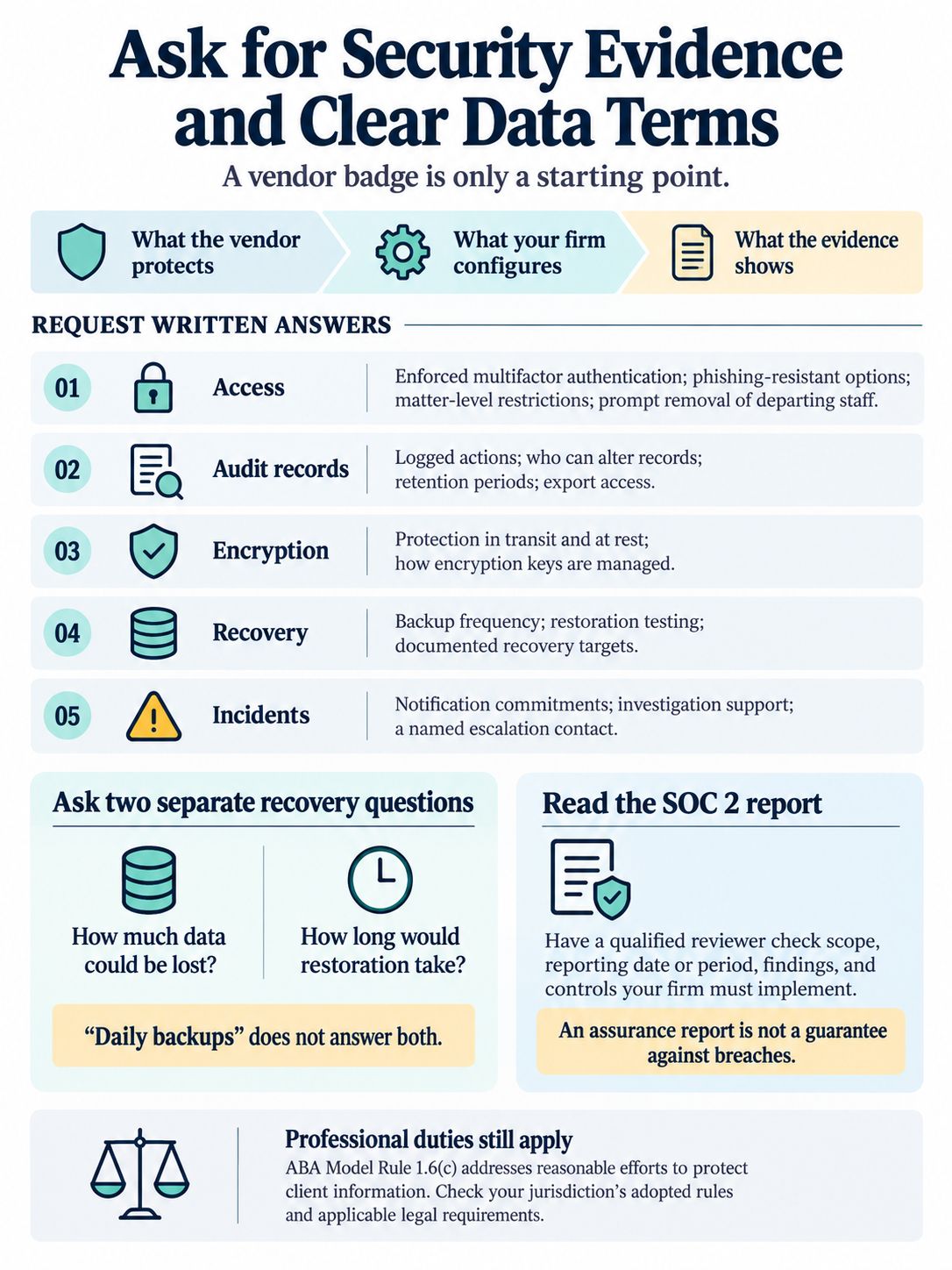
Security review should establish what the vendor protects, what the firm must configure, and what evidence supports those assurances. A badge on a sales page cannot answer all three.
The ABA’s Model Rule 1.6(c), for example, addresses reasonable efforts to prevent unauthorised access or disclosure of client information. US firms should check their applicable jurisdiction’s adopted rules; firms elsewhere should use their own professional and legal requirements.
Request written answers covering:
- Access: Enforced multifactor authentication, available phishing-resistant methods, matter-level restrictions, and prompt removal of departing staff.
- Audit records: Which actions are logged, who can alter records, retention periods, and export access.
- Encryption: Protection during transmission and storage, plus how encryption keys are managed.
- Recovery: Backup frequency, restoration testing, and stated recovery targets.
- Incidents: Notification commitments, investigation support, and an escalation contact.
Ask how much data could be lost after an incident and how long restoration is expected to take. These are separate questions. “Daily backups” does not answer both.
Where a vendor supplies a SOC 2 report, have a qualified reviewer examine its scope, reporting period, findings, and any controls the firm must implement itself. SOC 2 is an assurance report about specified controls, not a guarantee against breaches.
Check where information goes
Identify the locations used for primary storage, backups, support access, and subcontracted processing. A selected hosting region does not, by itself, settle every data-protection question.
Where the UK GDPR applies to a controller-processor relationship, Article 28 requires contractual provisions addressing matters such as instructions, confidentiality, security, subprocessors, and return or deletion of data. Assess international transfers separately under the applicable regime.
For embedded AI features, request explicit terms on model training, retention, and third-party access. Establish whether the firm can disable unapproved features, and require human review before generated content reaches clients or filings.
Test Integrations Beyond the Logo List
A marketplace listing does not show how an integration handles your records.
For each essential connection, establish what moves, in which direction, how often, and what happens when synchronisation fails. Decide which system holds the definitive record and who resolves discrepancies.
For example, if the LPMS creates an invoice and an accounting package receives it, test a later credit, refund, and tax adjustment. Check whether both systems remain consistent without duplicate entries.
Use the actual versions and regional editions of Microsoft 365, Google Workspace, accounting software, and document tools your firm runs. Include shared mailboxes and calendars where relevant.
For custom integrations, obtain API documentation, access costs, usage limits, and maintenance responsibilities before signing. Budget for ongoing support and require documentation another developer could use.
Treat Migration and Exit as Buying Criteria
A vendor’s ability to import contacts says little about its ability to preserve a firm’s working history.
Ask for a written migration scope distinguishing opening balances from transaction history, current documents from earlier versions, and standard fields from custom information.
Clio’s migration documentation illustrates the distinction: its standard process lists accounts receivable and trust balances as summary line items, while excluding historical invoices and accounting transactions. Document migration is subject to scoping and additional fees. Confirm the current scope for any proposed implementation.
Test a representative sample before agreeing to the final transfer. Include an active matter, a closed matter, an unusual fee arrangement, and a record with restricted access.
Reconcile financial balances and record counts. Check document links, dates, responsible lawyers, and permissions. A transfer can complete technically while leaving information in the wrong place.
Agree on the cutover date and who captures changes made after the export. Without that arrangement, a new deadline or payment entered into the old system may never reach the new one. Set conditions for delaying launch, and preserve necessary historical records in an accessible form.
Then test leaving. Request a sample export of matters, contacts, documents, financial records, and audit information. Establish formats, relationships between files, charges, delivery time, and access after termination. A folder of PDFs may preserve readable records while losing information needed to run the next system.
Clio’s contact export documentation, for example, directs users to separate subtabs to export associated notes, documents, and transactions. A list export is not necessarily a complete exit package.
Compare Three-Year Costs and Contract Terms
The subscription quote is only part of the purchase. Build a three-year estimate using current headcount and a plausible growth scenario.
Include implementation, data cleaning, migration, training, integrations, extra storage, payment processing, internal administration, and any required modules. Add temporary overlap with the existing system and the cost of retaining historical records.
Clarify which users need paid licences. Support staff, contractors, and external collaborators may have different access and pricing arrangements.
Be sceptical of savings calculations that turn every administrative hour saved into billable revenue. Time released has value, but the firm may use it to reduce overtime, clear a backlog, or improve client service. Compare the investment with outcomes you can measure, such as invoice preparation time, billing corrections, and overdue work.
Read the order form alongside the service terms. Review renewal dates, notice periods, price changes, minimum commitments, support coverage, service exclusions, termination assistance, and liability provisions.
Do not buy around a promised feature that the firm needs on launch day. Critical functionality should be available, demonstrated, and included in writing.
Use a Scorecard, Then Run a Small Pilot
After excluding vendors that fail mandatory requirements, use a weighted scorecard to compare the remaining options. The following is an illustrative allocation, not an industry benchmark.
| Evaluation Area | Suggested Weight | Evidence to Require |
|---|---|---|
| Matter workflows and usability | 30% | Staff complete representative tasks |
| Billing and client-money handling | 25% | Accounts team validates transactions |
| Security and data governance | 20% | Documents and controls reviewed |
| Migration and integrations | 15% | Sample transfer and connections checked |
| Cost, support, and exit terms | 10% | Written quote and contract reviewed |
Adjust these weights before demonstrations. Security or regulatory failures remain grounds for rejection regardless of the total score.
Score each area from zero to five: zero for absent functionality, three for an acceptable demonstrated result, and five for a strong result. Divide the score by five and multiply by its weight. Record the evidence; do not score an untested assurance as a completed task.
Pilot the leading option with representative users, including someone who struggles with the current system. Begin with fictional or appropriately sanitised data, then let staff attempt tasks without the salesperson directing every click. Record errors, workarounds, and the help people need.
Send a realistic support question during the pilot. Assess the usefulness of the answer as well as response time, and confirm that the quoted support hours cover the firm’s working day.
Test reporting too: can a partner identify overdue matters, unbilled work, and unpaid invoices without commissioning a custom report?
Before rollout, assign owners for configuration, permissions, training, data validation, and support. Schedule the change around filing and billing commitments. Require approval of critical workflows and migrated data before the old system becomes unavailable.
Final Thoughts
To put this guidance on how to choose legal practice management software into practice, write a one-page buying brief: problems to solve, non-negotiable requirements, and tasks vendors must demonstrate.
Use that brief to narrow the field before negotiating. If the preferred product still has unresolved gaps in billing, permissions, or data migration, resolve them in writing before signing. A discount does not make those gaps less consequential once the firm’s work depends on the system.
Frequently Asked Questions
Should a firm replace its software or improve how it uses the current system?
First establish what is causing the problem. Inconsistent matter naming, unclear responsibilities, and unused features may call for better configuration or training. Replacement becomes more defensible when essential work still requires repeated manual fixes, necessary controls are unavailable, or the vendor cannot support the firm’s requirements.
How long should a firm allow for implementation?
Set the timeline after reviewing the data, integrations, configuration, and training involved. Avoid committing to a launch date based only on the vendor’s standard onboarding estimate. Request a written schedule with responsibilities and acceptance checks, leaving room to correct a trial migration before moving live work.
Should every practice area use the same system?
Start by testing whether one platform can support shared records and financial controls while allowing different matter workflows. Separate tools may be justified where a practice needs specialist functionality, but establish how information will move between them and who will maintain it. Do not force a poor fit simply to reduce the number of subscriptions.
When is an independent implementation consultant worth considering?
Consider outside help when the firm lacks someone who can assess complex migrations, accounting connections, security requirements, or custom workflows. Define the consultant’s deliverables and ask about vendor commissions or referral arrangements. Keep configuration records and documentation so the firm can manage the system after the engagement ends.