A small business can depend on a handful of email accounts, a payment system, shared files, and one person who manages its technology. That can make cybersecurity seem expensive or complicated. Affordable cybersecurity for small businesses starts with a more manageable task: identify what the business depends on, protect access to it, and decide what to do if something goes wrong.
You do not need to buy every security product on the market. You do need someone responsible for the basics: account security, software updates, backups, staff guidance, and incident response. The right priorities depend on your business, the data you handle, and the rules that apply where you operate.
Find Your Biggest Risks
Before shopping for software, list the devices, online services, business records, and outside providers your business relies on. Include laptops and phones, customer information, accounting software, payment systems, business email, cloud storage, payroll, and your website.
Then ask: What would hurt the business most if it were exposed, changed, or unavailable? Who needs access? Where is the information stored?
A customer list might live in a sales platform and in a spreadsheet downloaded to a laptop. A retailer may depend on both its payment terminal and online store. These details show where a problem could spread and which systems deserve attention first. This basic inventory is a useful starting point for affordable cybersecurity for small businesses.
The National Institute of Standards and Technology (NIST) offers a free, voluntary Cybersecurity Framework 2.0 and a small-business quick-start guide. The framework groups risk management into six functions: Govern, Identify, Protect, Detect, Respond, and Recover. It can help organize a plan without requiring a company to buy a NIST product.
Protect Key Accounts
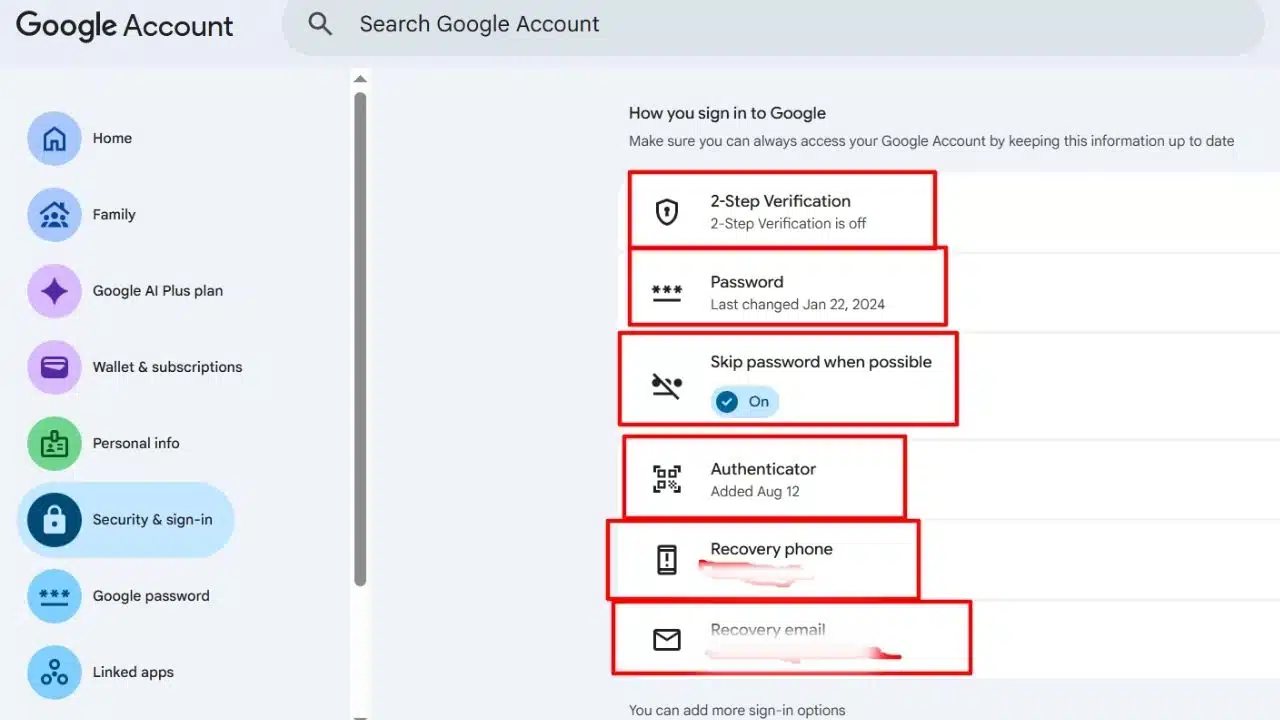
Start with business email and accounts that control money, customer data, file storage, or administrator access. Turn on multi-factor authentication (MFA) wherever it is available. MFA asks for another proof of identity in addition to a password. CISA recommends it for systems such as email, file storage, and remote access.
For affordable cybersecurity for small businesses, securing these accounts is a practical early step. Use a unique password for each account. A password manager can help staff store them without relying on memory or shared spreadsheets. Make sure the business controls account-recovery details, and remove a person’s access when their role or contract ends.
Review permissions, too. A staff member may need access to shared customer files but not payroll records or administrator settings. An old contractor account that still works after a project ends is an avoidable risk.
Update Devices and Software
Turn on automatic updates for operating systems, browsers, business applications, and security software where practical. For software that cannot update automatically, assign someone to check for updates. Unsupported software needs a replacement plan; the UK National Cyber Security Centre advises small organizations to find an alternative when a product no longer receives updates.
For a new or existing business device, check that it has a screen lock, current software, and encryption where available. Remove software and accounts the business no longer needs. If a device can no longer receive security updates, prioritize replacing it based on the work it does and the information it holds.
The office network deserves a quick review as well. Change the router’s default administrator password, use WPA2 or WPA3 Wi-Fi encryption if supported, and keep the router updated. If customers or visitors need Wi-Fi, put them on a separate guest network. The FTC includes these steps in its small-business cybersecurity guidance.
Back Up Essential Data
A backup matters only if it includes the files you need and you can restore them. A business that changes orders throughout the day has different recovery needs from one that mainly stores reference documents. Decide which records are essential and how much recent work the business could afford to lose.
Use automated backups where they fit your setup, and protect at least one copy from ordinary user accounts and the systems being backed up. Do not assume that file syncing or cloud storage alone gives you a recoverable backup. The UK NCSC advises organizations not to rely solely on an online service’s built-in mechanisms for backing up critical data. CISA’s ransomware guidance also recommends maintaining backups and practicing restoration.
Test the process with a non-critical file. Check whether email, shared folders, business applications, website files, and customer records each have their own backup settings. Knowing who can restore data—and how to contact them if the usual administrator is unavailable—is part of affordable cybersecurity for small businesses.
Help Staff Spot Suspicious Requests
Staff should know how to report a suspicious email, unexpected login prompt, lost device, or unusual payment request. Make it easy to ask for a second opinion before anyone shares credentials or changes payment details.
For example, if an email appears to come from a supplier requesting new bank details, verify the request using a phone number already on file. Do not rely on contact details in the message. The FTC recommends independently verifying sensitive requests and giving employees a clear way to report possible incidents.
Keep training tied to actual work. A clinic, online shop, and construction company face different kinds of requests and handle different records. Short reminders about those workflows are more useful than a lengthy policy employees rarely revisit. A reporting process that staff understand is a low-cost part of affordable cybersecurity for small businesses.
Keep Less Customer Data
Review what customer information the business collects, where it is stored, who can access it, and how long it needs to be retained. Securely dispose of information that no longer serves a business or legal purpose.
Keeping less data can limit what is exposed if an account is compromised or a device goes missing. The FTC advises businesses to inventory sensitive information and keep it only as long as there is a business reason or legal requirement to retain it.
If a vendor handles customer data, ask what security practices and incident-notification terms apply. Put expectations in writing where possible. Your business should know what information the vendor holds and whom to contact if there is a problem.
Prepare a Response Plan
A response plan can be short. Record who coordinates the response, who is the backup contact, and how to reach your IT provider, hosting company, bank, insurer, and key vendors. Include how to secure a compromised account or affected device, and how essential operations can continue.
Keep the plan somewhere staff can reach if business email or shared storage is unavailable. Review it when systems, providers, staff responsibilities, or legal obligations change. Having an alternate contact matters: a plan that only one busy owner can access may not help when that person is unavailable.
If customer data may have been exposed, preserve relevant records and seek qualified legal or security advice before making notification decisions. Reporting duties vary by location, industry, type of data, and contract. The FTC’s breach-response guidance also emphasizes that the right steps depend on the incident.
Spend Where It Matters
Affordable cybersecurity for small businesses means prioritizing protections according to the damage a failure could cause. First, check the security settings included with business email, cloud storage, accounting software, website hosting, and payment services. Ask providers what they handle, what you need to configure, and how they support customers during an incident.
Outside IT support may make sense if no one on staff can maintain devices, manage accounts, or restore data. Compare the actual scope: does the service cover updates, backup monitoring, account administration, and incident support? A clearly defined review or support arrangement may be more useful than paying for a broad service the business cannot assess.
Cyber insurance may be worth considering, but it does not replace basic safeguards. Check a policy’s requirements, exclusions, incident-reporting process, and covered losses before buying. NIST’s small-business framework includes assessing third-party risks and deciding whether cyber insurance is appropriate for the organization.
A Practical First 90 Days
A phased plan lets a small team improve security alongside its regular work.
- In the first month: Inventory key accounts, devices, sensitive records, and providers. Enable MFA on email and other high-impact accounts, update devices, and change default or shared passwords. Assign someone to track the work.
- In the second month: Review staff and vendor access, confirm what backups cover, and test restoring a file. Give staff a clear way to report suspicious messages and lost devices.
- In the third month: Write the response plan, check provider contacts and responsibilities, and review legal and contractual requirements. Set a recurring date to review accounts, updates, backups, staff access, and the plan.
This timeline is a starting point, not a compliance standard. Businesses that handle regulated data, provide critical services, or have specific contractual security requirements may need qualified help to prioritize those obligations. A phased approach keeps affordable cybersecurity for small businesses grounded in the risks the company actually faces.
Avoid Common Gaps
A long policy cannot make up for accounts no one reviews. Avoid rules staff cannot follow or that conflict with everyday work. Keep instructions brief, assign responsibility, and make the reporting route clear.
Security software does not replace account protection, updates, backups, or staff training. Tools need to be configured and maintained. And a backup that has never been restored is untested; set a reminder to check that the recovery process works.
Final Thoughts
Affordable cybersecurity for small businesses is built through consistent, focused work. Start by securing the accounts that could expose other systems, then check updates and test a backup restore. Assign someone to own those tasks and make sure staff know how to report a concern.
Review the plan as the business changes. Bring in qualified help when your data, contracts, or legal obligations exceed what your team can confidently manage.
Frequently Asked Questions (FAQs) on Affordable Cybersecurity for Small Businesses
What should a small business secure first?
Start with business email and accounts that control money, customer data, file storage, or administrator access. Enable MFA, use unique passwords, and check who has access.
Are cloud services enough to protect business files?
Not necessarily. Cloud services may include useful security and recovery features, but coverage and settings vary. Check what is included and maintain a backup plan you have tested.
Does a small business need a cybersecurity consultant?
Not every business needs ongoing consulting. Outside help is sensible when the business cannot secure important systems, restore data, assess an incident, or meet legal and contractual requirements with its current staff.