
AI Crawlers like GPTBot, ClaudeBot, and PerplexityBot frequently scan your site, but blocking them completely can hurt your online visibility. While stopping these bots protects your content from being scraped for model training, it can also hide your articles from AI-powered search engines, answer engines, and open-web archiving.
Instead of a blanket block, the smart strategy is targeted management: separate data scrapers from AI discovery bots so you preserve your search reach while retaining control over your content.
What AI Crawlers Actually Do
An AI crawler is an automated client that requests and processes website content for an AI-related service. Depending on its design, it may follow links, read page text and metadata, revisit updated URLs, download files, or render JavaScript.
The broad label covers several activities:
- Training crawlers collect material that may contribute to AI model development.
- AI search crawlers index current pages so an AI service can answer questions with recent information and source links.
- User-triggered fetchers visit a page because someone asked an assistant to open or summarize it.
- Open-web crawlers build datasets and archives that other organizations may reuse.
- Scrapers extract selected information and may not identify themselves honestly.
A crawler visit does not prove that the page entered a training dataset. Provider documentation generally says collected content may be used. Allowing a training crawler also carries no guaranteed payment, citation, referral traffic, or favorable placement.
One Provider May Operate Several Different Bots
Crawler names need to be read carefully. Major providers increasingly publish separate controls for different uses.
OpenAI uses GPTBot for content that may be used in model training. OAI-SearchBot supports ChatGPT search and is controlled separately. ChatGPT-User handles certain user-initiated requests; OpenAI notes that robots.txt rules may not apply to those visits.
This means a publisher can block GPTBot while continuing to allow OAI-SearchBot. Blocking GPTBot alone should not remove pages from ChatGPT search.
Google uses Google-Extended as a robots.txt control for Gemini model training and certain grounding uses. Grounding means supplying current information from Google’s search index when a model answers a prompt.
Google-Extended is not a separate crawler that appears in logs. It is a control token applied to content collected through Google’s existing crawling systems. Google states that blocking it does not affect inclusion or ranking in Google Search.
Anthropic identifies three relevant agents. ClaudeBot collects public material that could contribute to model training, Claude-SearchBot supports search, and Claude-User handles user-directed retrieval. Anthropic says site owners can manage all three through robots.txt.
Applebot-Extended is another usage control rather than a page-fetching crawler. It determines whether content collected by Applebot may be used to train Apple’s foundation models. Blocking Applebot-Extended does not block ordinary Applebot search crawling. Apple also supports nosnippet when a publisher wants to limit how content appears in web answers or supplies current context to AI-generated responses.
PerplexityBot is documented as a search crawler, not a foundation-model training crawler. Perplexity-User handles user-requested visits and generally ignores robots.txt because the fetch was initiated by a person.
These policies can change. Crawler rules copied from an old blog post should not be treated as permanent documentation.
Should You Block AI Crawlers?
For a public, advertising-supported publication, blocking AI search crawlers by default is difficult to justify if reach and brand discovery matter. Search bots may surface an article as a cited source, although they do not promise meaningful referral traffic.
Training access deserves a separate decision. Blocking it may be reasonable when:
- Licensed articles, photographs, or syndicated material have restricted reuse rights
- Subscription research or proprietary data drives the business
- Client-funded reports were not intended for wider machine processing
- The organization has adopted a formal policy against training use
- A crawler creates excessive load or ignores published restrictions
The strongest reasons are usually contractual, commercial, or operational. A vague fear of “AI taking the content” is not enough to design a useful technical policy.
Private material is a different matter. Account pages, customer records, staging sites, internal documents, and confidential files should be protected with authentication and server-side authorization. Listing a directory in robots.txt does not make it private. Because the file is public, it may draw attention to the path.
How to Block Selected AI Training Controls
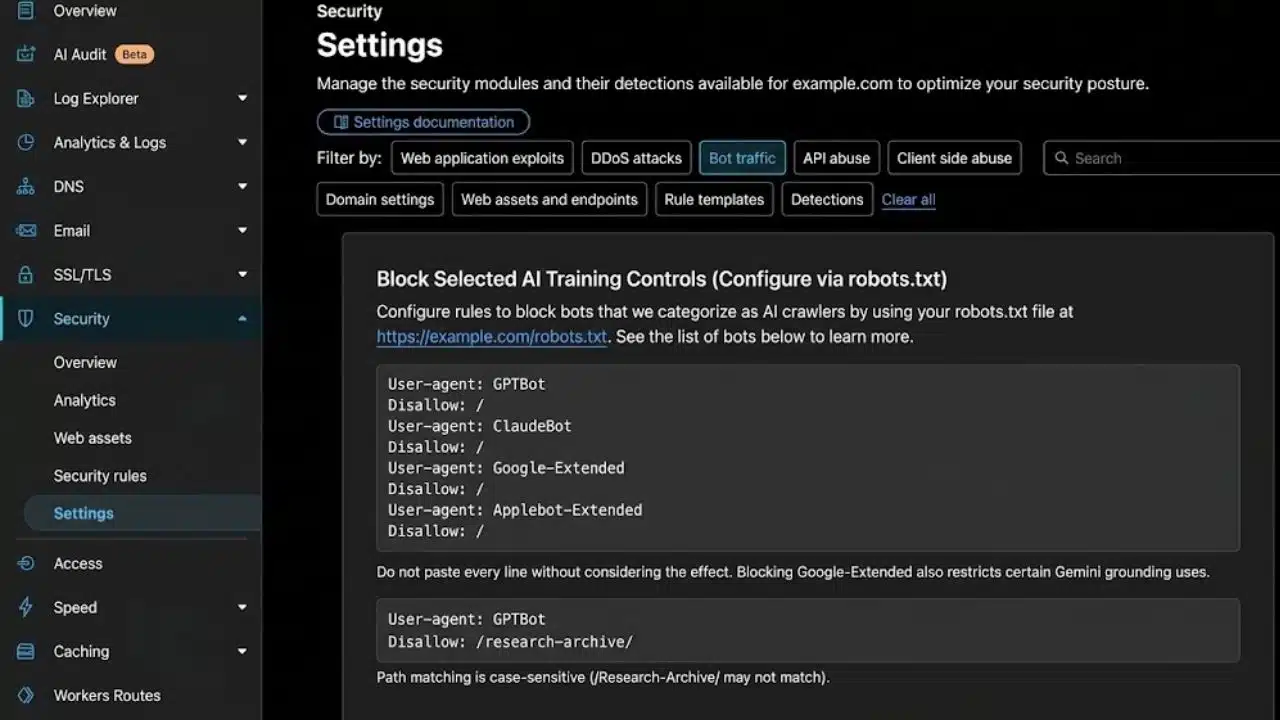
The usual starting point is the robots.txt file at the root of the site:
https://example.com/robots.txt
This example blocks several current training-related controls without blocking ordinary search bots:
User-agent: GPTBot
Disallow: /
User-agent: ClaudeBot
Disallow: /
User-agent: Google-Extended
Disallow: /
User-agent: Applebot-Extended
Disallow: /
Do not paste every line without considering the effect. Blocking Google-Extended also restricts certain Gemini grounding uses, not only model training.
A rule can cover one public section rather than the entire site:
User-agent: GPTBot
Disallow: /research-archive/
Path matching is normally case-sensitive, so /Research-Archive/ may not match the same URLs.
Common Crawl Is a Separate Choice
Common Crawl maintains an open repository of web-crawl data. Its CCBot is not presented as an AI-company training crawler, although the resulting data can be reused for research and other purposes.
To exclude a site from future CCBot crawling:
User-agent: CCBot
Disallow: /
That decision has a broader effect than blocking one AI provider, so it should not be hidden inside a generic “block AI” setting.
Review Existing Rules Before Adding New Ones
Crawling is normally allowed when no applicable Disallow rule exists. An explicit group such as this is therefore usually unnecessary:
User-agent: OAI-SearchBot
Allow: /
It may also weaken existing restrictions. A crawler with its own specific group does not normally combine that group with rules under User-agent: . If the global group blocks /wp-admin/ or an internal search path, those restrictions may need to be repeated in the bot-specific group.
Before editing the file, check for existing sitemap entries, CMS rules, media restrictions, internal search paths, and duplicate-content controls.
One robots.txt file also does not cover every version of a site. Rules on www.example.com do not automatically apply to media.example.com, another protocol, or a nonstandard port.
After editing, open the live robots.txt URL and check the content. Clear CMS and CDN caches if necessary, then verify it again. A correct file sitting inside a plugin editor is useless if the server continues delivering an older version.
Robots.txt Is Not a Security Barrier
The Robots Exclusion Protocol tells compliant automated clients which paths they are requested to avoid. It is not authentication, and it cannot enforce secrecy.
Its limitations are practical:
- A dishonest scraper can ignore it.
- A user agent can falsely claim to be a trusted crawler.
- User-triggered fetchers follow different provider policies.
- A new restriction does not erase content already collected or cached.
- Blocking one crawler does not remove copies held by other services.
Robots.txt should not be confused with noindex, either. If Googlebot cannot crawl a page, it may be unable to see a noindex directive placed on that page. The URL could still be discovered through external links and appear without a normal snippet.
Use robots.txt to manage crawling, supported indexing directives to control search appearance, and authentication to protect private content.
When Stronger Enforcement Is Needed
Server or CDN logs should be the first place to investigate. Check the requested paths, user agent, source IP, response codes, and frequency of visits.
Compare suspicious traffic with the IP ranges or verification methods published by the crawler operator. Do not trust the user-agent name alone.
A CDN or web application firewall can then block, rate-limit, or monitor requests at the network edge. Cloudflare’s AI Crawl Control is one current example; other platforms place similar tools under bot management or firewall settings.
Use those controls for actual enforcement. Keep robots.txt available when using it to communicate preferences to compliant bots.
A Practical Decision Process
Before changing the site, answer four questions:
- Is the requested material public, paid, licensed, or private?
- Is the bot used for training, search, user retrieval, or general web archiving?
- Does allowing access provide a realistic publishing or business benefit?
- Can the policy be checked against logs and enforced if ignored?
Record why each rule exists. That small step makes later reviews much easier when crawler names or provider policies change.
Final Thoughts
Most websites do not need to choose between allowing all AI crawlers and blocking every one of them. Search, training, retrieval, and scraping deserve different decisions.
For a public publisher, the practical starting point is to preserve traditional search access, evaluate AI search as a discovery channel, and make a separate policy for training crawlers. Protect genuinely sensitive material with authentication, not a public text file.
Review the current robots.txt file before adding anything, verify the crawler’s identity, and check the logs after deployment. That is far safer than copying a large blocklist and hoping it does what its name suggests.
Frequently Asked Questions (FAQs)
Will a robots.txt change take effect immediately?
Not always. OpenAI and Perplexity say some crawler-policy changes may take about 24 hours to propagate, while Google commonly caches robots.txt for up to 24 hours. Server and CDN caching can add further delay, so confirm both the live file and subsequent crawler activity.
Can images and PDFs be controlled separately?
Yes, if the crawler supports the relevant rule. Robots.txt can restrict paths containing images or PDFs. Some services also support HTTP response headers for non-HTML files. A separate media or CDN subdomain needs its own robots.txt policy.
Does blocking training crawlers hurt ordinary Google rankings?
Targeting GPTBot, ClaudeBot, or Applebot-Extended does not block Googlebot. Google also states that Google-Extended is not a Search ranking signal. Problems arise when a broad rule accidentally blocks Googlebot or uses User-agent: with Disallow: /.