The getting things done methodology is a comprehensive personal workflow system designed by productivity consultant David Allen. It clears mental clutter by transferring open commitments, ideas, and tasks out of your head and into a structured external tracking system.
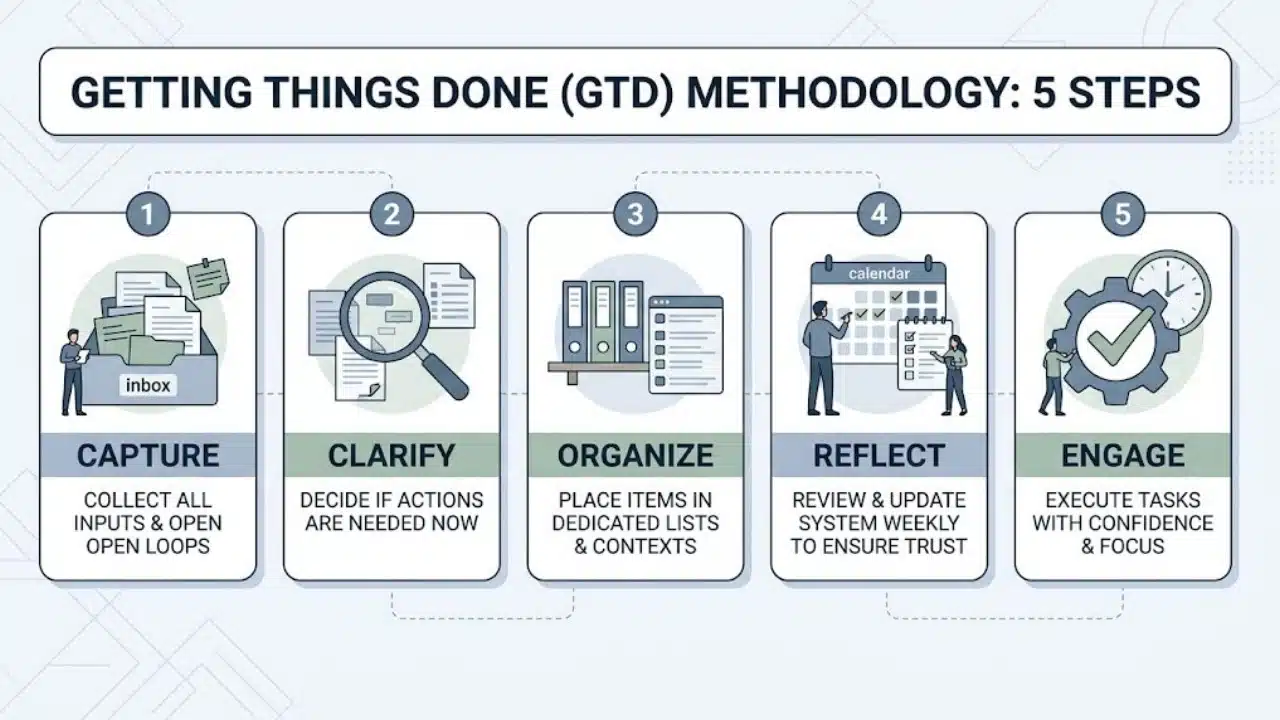
| GTD Phase | Primary Objective | Key Action Required |
| 1. Capture | Collect all incoming inputs | Move thoughts, notes, and requests into trusted inboxes. |
| 2. Clarify | Determine what each item means | Decide if an item is actionable, reference, or trash. |
| 3. Organize | Sort items into dedicated lists | Assign tasks to context lists, projects, or reference folders. |
| 4. Reflect | Review system contents regularly | Update project status and reset focus during a weekly review. |
| 5. Engage | Execute tasks with total clarity | Select actions based on context, available time, and energy. |
Understanding the Getting Things Done Methodology
The getting things done methodology operates on a core psychological principle: human working memory is optimized for active problem-solving rather than storing information. When you rely on memory to track tasks, deadlines, and project details, your brain maintains a state of continuous cognitive tension known as open loops.
These unorganized open loops create constant background anxiety and distraction. GTD resolves this issue by offloading every commitment into a trusted external framework. Once your brain trusts that an idea or obligation is recorded in a reliable system, cognitive load drops significantly, allowing complete focus on the work in front of you.
The 5 Core Stages of the GTD Workflow
Mastering the getting things done methodology requires integrating five sequential habits into your daily routine.
1. Capture Everything in External Inboxes
The capture phase requires gathering every idea, obligation, administrative task, or project detail as soon as it arises. Nothing stays in short-term memory.
Maintain as few collection tools as possible to prevent maintenance friction:
-
Physical Desktop Tray: Collects incoming paper mail, printed documents, receipts, and handwritten notes.
-
Digital Note App: Captures quick ideas, meeting highlights, or voice notes while away from your desk.
-
Primary Email Inbox: Receives incoming digital communication and project requests.
The goal is exhaustive collection. Capturing everything ensures that incomplete tasks do not consume valuable mental bandwidth throughout the workday.
2. Clarify Incoming Items
Clarifying is the systematic process of processing captured inputs down to empty. Schedule brief daily windows to evaluate each item in your inboxes using a strict decision tree:
-
Is it actionable? If an item requires no action, immediately delete it, file it as reference material, or place it on a long-term idea list.
-
Does it take less than two minutes? If an actionable task requires under two minutes, execute it immediately rather than writing it down.
-
Is it a single action or a multi-step project? Outcomes requiring two or more steps belong on a project list, with the first physical step logged separately.
-
Are you the right person for the job? If a task belongs to someone else, delegate it and track the handoff.
| Decision Criteria | Evaluation Output | Resulting Action |
| Non-Actionable | Trash, reference, or future goal | Delete, archive in reference, or log in Someday/Maybe. |
| Quick Action | Requires under 2 minutes | Execute immediately. |
| Delegated Task | Belongs to a teammate or vendor | Assign task and add to Waiting For list. |
| Single Task | Requires over 2 minutes | Add directly to Next Actions list. |
| Multi-Step Outcome | Requires 2 or more actions | Log goal on Projects list and define first Next Action. |
3. Organize Items into Dedicated Lists
Once an item is clarified, place it into a dedicated list category. The getting things done methodology intentionally avoids using a single master to-do list, which quickly becomes overwhelming.
Organize tasks across five distinct functional categories:
-
Next Actions List: Single-step physical tasks ready for execution as soon as time permits.
-
Projects List: High-level outcomes requiring multiple steps, such as “Upgrade Office Security System.”
-
Waiting For List: Tasks delegated to colleagues or deliverables pending vendor responses.
-
Someday/Maybe List: Future projects, travel plans, or personal goals to evaluate during lower-priority periods.
-
Reference Archive: Non-actionable information, manuals, documents, and research saved for future lookup.
To streamline execution, tag tasks on your Next Actions list with specific contexts:
-
@Computer: Tasks requiring dedicated laptop access, such as writing reports or building spreadsheets.
-
@Calls: Outbound phone calls to make when you have brief schedule breaks.
-
@Errands: Physical tasks to handle while out of the office, such as buying supplies or visiting the bank.
-
@Office: Location-dependent work requiring specific physical equipment or team access.
4. Reflect Through the Weekly Review
A productivity system fails the moment you lose confidence in its accuracy. The weekly review is the essential maintenance ritual that keeps the getting things done methodology operating smoothly.
Set aside 45 to 60 minutes at the end of every workweek to execute three review stages:
-
Clear Your Mind and Inboxes: Process physical trays, digital notes, and desktop files down to zero.
-
Update Active Lists: Review your Next Actions list, check off completed tasks, and follow up on pending items in your Waiting For list.
-
Align Long-Term Projects: Scan your Projects list to ensure every active project has at least one clear physical next step assigned. Review your Someday/Maybe list for new ideas to activate.
5. Engage and Execute
With an updated, reliable system, choosing what to work on becomes effortless. Rather than guessing priorities under pressure, select your immediate action using four flexible criteria:
-
Context: What tools, equipment, or locations are currently available to you?
-
Time Available: How many minutes do you have before your next meeting or commitment?
-
Energy Level: Do you have the cognitive energy for deep analytical writing, or should you process routine administrative chores?
-
Priority: Given your constraints, which available task yields the highest overall return?
How to Set Up Your GTD System: Digital vs. Analog
The getting things done methodology is completely tool-agnostic. You can build a fully functional system using paper notebooks or modern digital productivity platforms.
| Feature / Criteria | Digital Setup (Apps) | Analog Setup (Paper) |
| Recommended Tools | Todoist, Notion, Microsoft To Do, Google Keep | Bullet journal, physical index cards, filing folders |
| Best For | Mobile synchronization, searchability, automated reminders | Tactile clarity, zero digital distractions, fast physical writing |
| Search & Archiving | Instant keyword search across massive data volumes | Requires manual indexing and physical storage space |
| Setup Complexity | Higher initial configuration time | Lower setup barrier, immediate implementation |
A Real-World Example of GTD in Action
To understand how the getting things done methodology handles complex incoming information, consider this practical scenario:
-
Incoming Request: You receive an email stating, “We need to update our client onboarding process before next quarter.”
-
Capture: You forward the email to your digital inbox or write “Update client onboarding process” in your physical notebook.
-
Clarify: During your daily inbox review, you evaluate the item. It is actionable and requires multiple steps, making it a project.
-
Organize: You add “Redesign Client Onboarding Workflow” to your Projects list. You then define the immediate physical first step and add “Draft 3 outline points for onboarding document” to your Next Actions list under the @Computer context.
-
Engage: Later that day, you have a 30-minute window at your laptop with high mental energy. You filter by @Computer, see your outline task, and complete it without hesitation.
Common GTD Pitfalls and How to Overcome Them
Beginners adopting the getting things done methodology often encounter predictable implementation hurdles:
-
Defining Vague Action Steps: Writing “Work on marketing plan” on a list invites procrastination. Replace vague statements with physical verbs, such as “Draft introductory paragraph for marketing proposal.”
-
Over-Engineering the System: Spending days building complex digital tagging structures distracts from executing actual work. Keep your initial list layout simple until habits are firmly established.
-
Skipping the Weekly Review: Omitting weekly maintenance allows stale tasks to accumulate, causing you to lose trust in the system and fall back on mental tracking.
Building a Lasting GTD Practice
Mastering the getting things done methodology is an ongoing operational habit rather than a one-time software setup. By consistently offloading commitments into trusted lists and protecting your weekly review routine, you regain complete control over your attention and daily schedule. Start small by establishing a single capture inbox today, commit to your first weekly review, and let the system bring long-term clarity and focus to your workflow.
Frequently Asked Questions (FAQs) About Getting Things Done Methodology
What is the getting things done methodology in simple terms?
The getting things done methodology is a personal productivity framework that helps you capture every task and idea in an external system. By organizing thoughts into actionable physical steps, you free up mental bandwidth and focus entirely on executing work.
What are the 5 steps of the getting things done methodology?
The five steps are Capture (collecting incoming items), Clarify (deciding what items mean), Organize (sorting items into dedicated lists), Reflect (reviewing your system weekly), and Engage (executing actions based on context and energy).
Do I need special software to use the getting things done methodology?
No, GTD is tool-agnostic and works equally well with digital apps or analog tools. You can build a complete system using simple tools such as a paper notebook, physical file folders, or basic list apps like Google Keep and Todoist.
What is the 2-minute rule in GTD?
The 2-minute rule states that during the clarification phase, if an incoming task takes less than two minutes to complete, you should execute it immediately rather than deferring or filing it. This prevents small administrative chores from clogging your lists.
How long does a GTD weekly review take?
A standard weekly review typically takes 45 to 60 minutes depending on your workload volume. Consistently setting aside this time ensures your system remains accurate, updated, and