The worst part of a SaaS outage is not always the outage itself. It is the silence around it. Customers do not know whether the problem is on their side, whether their work has been saved, or whether clicking the same button again will make things worse. Learning how to handle SaaS downtime means reducing that uncertainty while the technical team works to restore the service.
No sensible SaaS company can promise that nothing will ever fail. Cloud providers have incidents. Deployments go wrong. Databases become overloaded. A small configuration change can have a much larger blast radius than anyone expected. What a company can control is how quickly it recognizes customer impact, how clearly it communicates, and whether it fixes the weaknesses exposed by the incident.
I see downtime response as three connected responsibilities: restore the service, help customers make decisions, and learn enough to reduce the chance or impact of a repeat. If any one of those is missing, the response is incomplete.
Prepare for Downtime Before Anything Breaks
An outage is a bad time to decide who is in charge, where updates should be posted, or what qualifies as a major incident. These decisions need to exist before the alert arrives.
Start with a simple severity system based on customer impact. It does not need to be elaborate, but the team should be able to classify an incident without holding a meeting about the classification.
| Severity | Typical customer impact | Communication approach |
| Minor | A noncritical function is slow or intermittently unavailable for a limited group | Update affected customers or the relevant status component |
| Major | A core workflow is unavailable, a large group is affected, or no practical workaround exists | Declare an incident, publish promptly, and send regular updates |
| Critical | The service is broadly unavailable, data integrity may be at risk, or the incident has security, legal, or safety implications | Activate the full response plan and involve leadership, support, security, legal, or compliance as needed |
Severity should reflect what customers are experiencing, not how technically dramatic the failure looks internally. A single healthy server tells you very little if customers cannot log in, submit payments, upload files, or retrieve their work.
That is why customer-facing monitoring matters. Internal CPU, database, and queue metrics are useful, but they should be supplemented with checks that simulate important user journeys. Support tickets and customer reports also belong in the detection system. If customers repeatedly discover outages before monitoring does, the monitoring is incomplete.
Give Everyone a Clear Role
A well-run incident normally needs four responsibilities:
- Incident commander: Coordinates the response, establishes priorities, and makes sure decisions have clear owners.
- Technical lead: Investigates the problem and directs mitigation or recovery work.
- Communications lead: Converts confirmed information into customer and internal updates.
- Scribe: Records timestamps, decisions, observations, attempted fixes, and changes in impact.
A small company may not have four people available. Two people can cover several roles, provided they state clearly who owns what. What does not work is allowing every engineer to debug, answer executives, reply to customers, and edit the status page at the same time.
The response plan should also include current runbooks, rollback instructions, escalation contacts, status-page access, message templates, and a backup communication channel. If the company normally coordinates incidents in its own product, or through an identity system that could fail alongside it, it needs an alternative.
Run the occasional incident exercise as well. A failover process that has never been tested is a theory, not a recovery plan.
Build a Status Page Customers Can Actually Use
A status page should describe the service from the customer’s point of view. It is not a public copy of an engineering dashboard.
Keep It Outside the Main Failure Path
The status page should remain reachable when the product is not. Ideally, it should be hosted away from the primary application infrastructure and should not require the product’s normal login, database, API, or deployment pipeline.
Check the less obvious dependencies too. A page hosted by another cloud provider may still be difficult to update if it shares the same DNS setup, single sign-on service, administrator accounts, or internal communication system as the failed product. Test access during incident exercises instead of assuming the page is independent.
Use Names Customers Recognize
Components should represent functions customers understand, such as:
- Login and authentication
- Dashboard
- API
- File uploads
- Reports and exports
- Payments
- Email notifications
- Webhooks
- Mobile app
Internal labels such as prod-api-gateway or eu-worker-cluster may help engineers, but they do not tell customers whether they can finish their work.
Avoid the opposite problem as well. Listing every microservice creates a crowded page that few customers can interpret. The right level of detail is enough to show which recognizable functions, locations, or account groups are affected.
Show More Than a Green or Red Icon
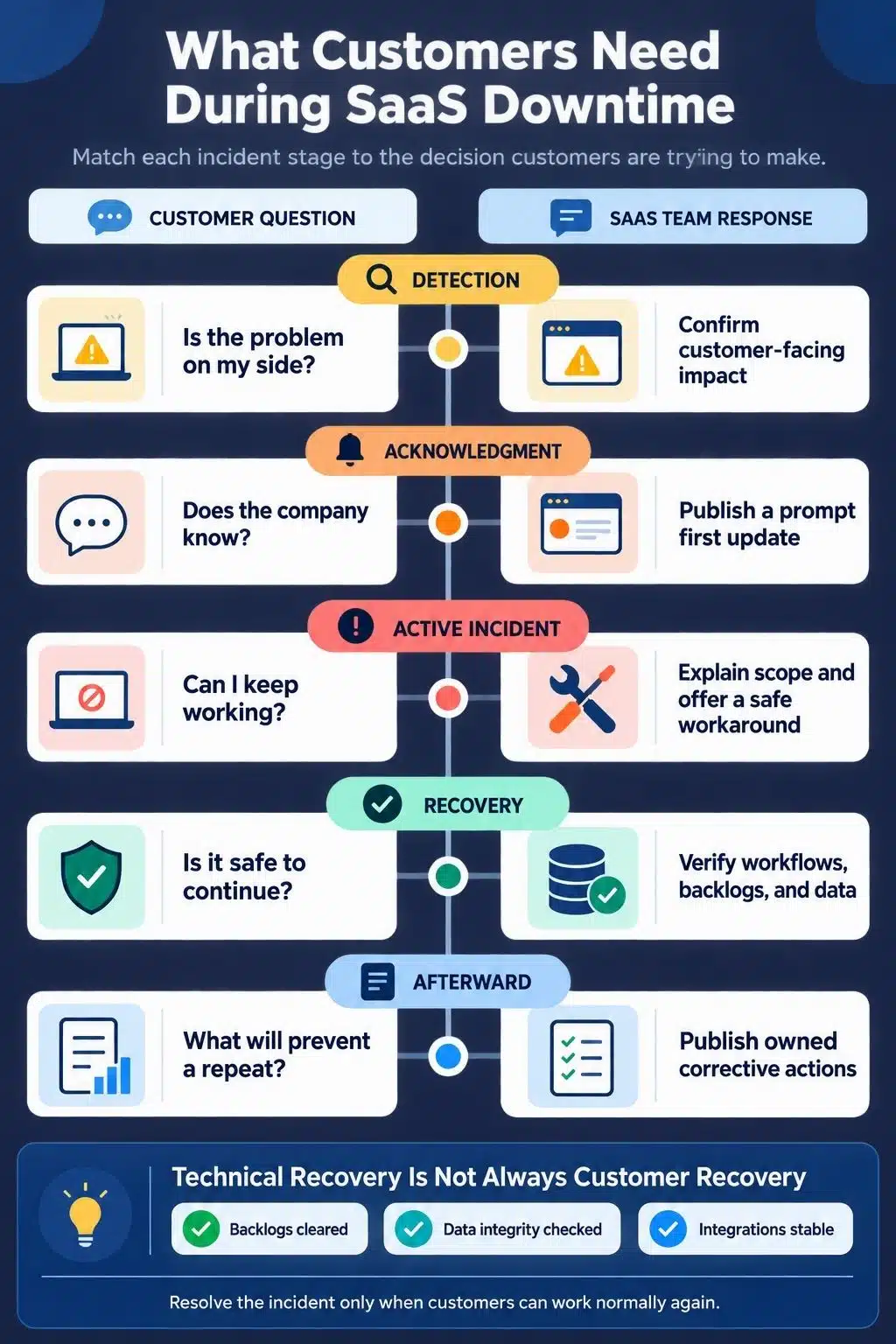
During an incident, the page should answer the questions customers are likely to have:
- Which functions are affected?
- Who or which regions are affected?
- When did the problem begin?
- What symptoms should customers expect?
- Is there a safe workaround?
- Is the company investigating, mitigating, monitoring, or finished?
- When was the page last updated?
- When will the next update appear?
The page should also provide subscription options where practical, such as email, SMS, Slack, RSS, or webhooks. Component-level subscriptions are especially useful for products with several independent services because they reduce irrelevant notifications.
Be careful with the overall banner. Marking the entire platform as operational while a core workflow is failing makes the status page feel dishonest, even if most infrastructure is technically healthy.
Communicate Before You Know the Root Cause
Companies often delay the first update because they want to understand exactly what happened. That instinct is understandable, but customers do not need a root-cause analysis in the opening minutes. They need confirmation that the company sees the problem.
A useful first message can be short: We are investigating reports that some customers cannot generate invoices. The issue began at approximately 14:10 UTC. We will provide another update by 14:30 UTC.
That message does four things: acknowledges the incident, describes the visible symptom, provides a known start time, and commits to another update. It does not guess.
Every company should choose an internal target for publishing its first notice. For a serious customer-visible incident, 10 to 15 minutes after detection is a practical starting point for many teams. Critical services may need a faster target. The right number depends on the product, but leaving it undefined almost guarantees hesitation.
Write for the Person Whose Work Has Stopped
Customers usually care about five things:
- What can I not do?
- Is the company aware of it?
- Is there a workaround?
- Is my data safe?
- When will I hear more?
This is more useful than explaining that an internal database replica is unhealthy. Technical detail can be added later when it improves understanding. During the incident, describe the effect in task-based language: payments are failing, exports are delayed, new users cannot sign in, or webhooks are being queued.
Use a Consistent Update Sequence
| Stage | Example update |
| Investigating | “We are investigating reports that customers cannot generate invoices. We will provide another update by 14:30 UTC.” |
| Impact scoped | “Invoice generation is failing for accounts in the EU region. Existing invoices remain available. Customers do not need to resubmit failed requests.” |
| Identified or mitigating | “We identified the affected processing service and are applying a mitigation. Invoice generation remains unavailable in the EU region. The next update will be posted by 15:00 UTC.” |
| Monitoring | “Invoice generation has resumed. We are monitoring new requests and clearing the delayed processing queue. Some invoices may still take longer than normal.” |
| Resolved | “Invoice generation and delayed processing have returned to normal. The incident affected EU accounts from 14:10 to 15:26 UTC. We will publish a review after completing our investigation.” |
These are structures, not scripts to copy blindly. Each update must reflect what the team has actually confirmed.
Replace Guesswork With a Next-Update Time
An unsupported recovery estimate creates another problem when the deadline passes. If the team cannot defend an ETA, it should say so and provide the time of the next update instead.
An ETA becomes more reasonable when recovery follows a measurable process, such as restoring a known-size backup or clearing a queue at an observed rate. Even then, communicate it as an estimate and explain what it represents.
The same discipline applies to statements about data. Do not say that no data was lost, corrupted, exposed, or duplicated until the relevant checks are complete. During an active security investigation, do not publish speculative attribution or details that could create further risk.
Keep Updating Even When There Is No Breakthrough
If the company promises an update at 15:00, it should post one at 15:00. “No material change” is still meaningful when it confirms that the team is working and the known impact has not expanded.
For example:
The investigation is continuing and customer impact remains unchanged. We have ruled out the payment provider but have not yet isolated the failing component. The next update will be posted by 15:30 UTC.
Long incidents may need a slower cadence to avoid sending empty notifications every few minutes. If the cadence changes, tell customers when the next message will arrive.
Use the status page as the canonical public timeline. Emails, in-app banners, support replies, social posts, and account-manager messages should match it. Enterprise customers with contractual notification requirements may still need direct communication through agreed channels.
Restore the Customer Experience, Not Just the Server
An error graph returning to normal does not always mean the incident is over. Customers may still face delayed jobs, stale data, missing emails, failed integrations, expired sessions, duplicate submissions, or queues that need time to clear.
Before declaring the incident resolved, confirm that:
- Customer-facing success rates and response times have returned to normal.
- Important workflows work from beginning to end.
- Backlogs are cleared or their remaining impact is explained.
- Data-integrity checks have passed.
- Dependent services and integrations have recovered.
- Support reports are consistent with monitoring.
- The service remains stable through a reasonable observation period.
If customers need to retry an operation, reconnect an integration, or check a transaction, say so in the resolution message. If work is still delayed, use “monitoring” or “recovering” rather than “resolved.”
API providers can also help clients behave safely during temporary failures. A 503 Service Unavailable response may include a Retry-After value when the waiting period is genuinely known. Client libraries should use bounded retries with backoff rather than sending a flood of synchronized requests into an already struggling system.
Run a Postmortem That Produces Real Change
A postmortem should not be reserved only for spectacular, company-wide outages. Define the trigger before incidents happen. Reasonable triggers include:
- Customer-visible downtime or degradation beyond an agreed threshold.
- Actual or suspected data loss, corruption, or exposure.
- A long or unusually difficult recovery.
- Emergency intervention such as rollback, failover, or traffic rerouting.
- Failure of monitoring to detect customer impact.
- A serious near miss that caused no harm mainly because the team was lucky.
The goal is not to write an impressive document. It is to understand why the system allowed the incident to happen, why the response unfolded as it did, and what will change.
What a Useful Postmortem Includes
- Summary: What happened, who was affected, and how long the impact lasted.
- Customer impact: Failed tasks, delayed transactions, affected accounts or regions, and any data consequences.
- Detection: How the incident was discovered and why it was not detected sooner, if applicable.
- Timeline: The triggering event, detection, escalation, major decisions, mitigation, recovery, and verification.
- Technical explanation: How the failure occurred in language the intended reader can understand.
- Contributing factors: Conditions that increased the likelihood, spread, or duration of the failure.
- Response review: What helped, what caused delay, and where coordination broke down.
- Communication review: Whether customers received timely, accurate, and useful information.
- What went well: Safeguards or decisions that limited the damage.
- Corrective actions: Specific improvements with priority, owner, due date, and completion criteria.
- Open questions: Anything still being investigated.
Write the timeline from evidence where possible, including monitoring data, change logs, incident chat, support reports, and deployment records. It should begin with the event that triggered the failure, not merely the moment someone received an alert.
Make Corrective Actions Specific
| Weak action | Stronger action |
| “Be more careful during deployments.” | Add automated validation that blocks malformed configuration before deployment. |
| “Improve monitoring.” | Alert when invoice completion falls below the agreed threshold for five minutes, with a linked response runbook. |
| “Train the team.” | Add a tested rollback procedure to the runbook and run a recovery exercise every quarter. |
| “Add redundancy.” | Remove the identified single dependency and verify failover under realistic load by a defined date. |
| “Communicate faster.” | Set a first-update target for major incidents and assign the communications role when the incident is declared. |
Every action needs an owner and a deadline. Someone should review outstanding items regularly and escalate overdue reliability work. Publishing a thoughtful postmortem while leaving its corrective actions unfinished is documentation, not improvement.
Treat Downtime as a Test of Trust
The practical answer to how to handle SaaS downtime is not “buy a status-page tool.” Prepare the team, detect customer impact, communicate what people need to know, verify the whole service has recovered, and turn the postmortem into completed improvements.
Customers may tolerate an occasional failure. What is much harder to tolerate is a company that stays silent, guesses, shifts blame, declares victory too early, or repeats the same preventable incident. Handle the technical problem urgently, but remember that the real standard is how well the response reduces customer harm, uncertainty, and the chance of recurrence.
Frequently Asked Questions on How to Handle SaaS Downtime
1. How quickly should a SaaS company publish an outage notice?
There is no universal deadline, but a serious customer-visible problem should be acknowledged promptly. A target of 10 to 15 minutes after detection is practical for many teams. The first notice can simply confirm the symptom, state that an investigation is underway, and promise the next update.
2. Should a company publish an incident before confirming its cause?
Yes, when customer impact is credible. A status update can acknowledge what customers are experiencing without speculating about the cause. Waiting for a complete diagnosis can leave customers troubleshooting a problem that is not theirs.
3. How often should customers receive updates during an outage?
Choose a cadence appropriate to the severity and keep the promise you make. Major incidents often justify updates every 20 to 30 minutes early in the response. Longer incidents may use a slower cadence, but customers should always know when the next update will arrive.
4. Does every SaaS outage require a public postmortem?
No. Companies should define thresholds based on customer impact, duration, data risk, recovery difficulty, and contractual expectations. Significant incidents need an internal review, while the public version can be shorter and omit security-sensitive or confidential details.
5. Can an outage count as a personal data breach?
An ordinary service interruption is not automatically a data breach. However, an incident that destroys personal data or prevents access in a way that could harm people may create data-protection obligations. Security, privacy, and legal specialists should assess the actual incident and the rules that apply in each jurisdiction.