


A SaaS product can have a perfectly translated dashboard and still feel foreign. The problem becomes obvious when a customer encounters an unfamiliar address form, sees prices only in US dollars, receives a payment error in English, or discovers that support is unavailable in the language used to sell the product.
That is why, when I think about how to localize a SaaS product for global markets, I do not start with a list of languages. I start with a more important question: can someone in the target market discover, understand, buy, use, and get help with the product without working around assumptions made for another country?
Translation matters, but it is only the most visible layer. Successful SaaS localization also involves product architecture, user experience, payments, pricing, accessibility, customer support, privacy, and local business expectations.
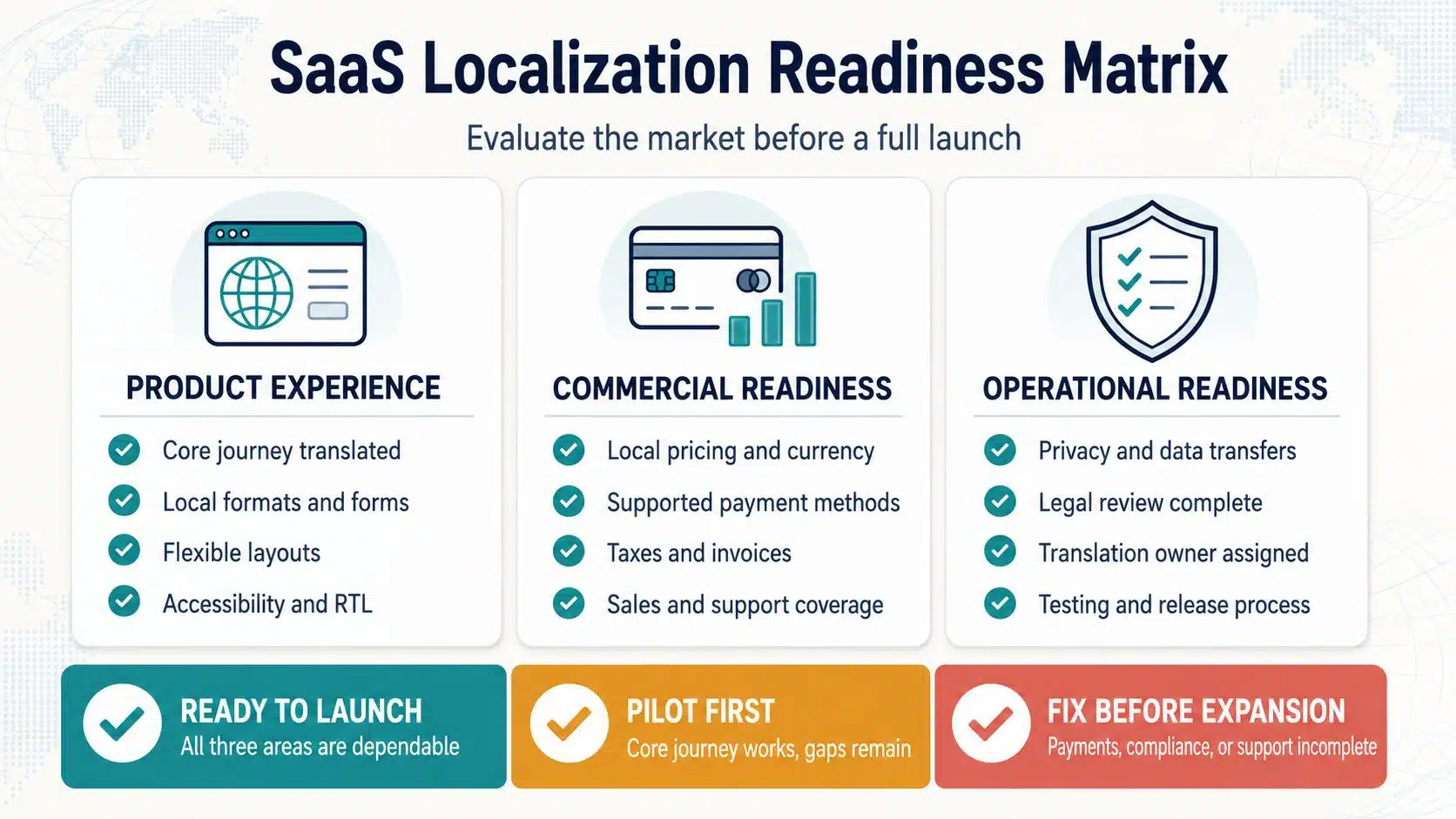
What SaaS Localization Really Means
Translation converts text from one language to another. Localization adapts the full product experience for a specific language, region, or market.
Internationalization is the technical preparation that makes this possible. It allows a product to support different scripts, formats, layouts, and grammatical rules without rebuilding the application for every new market.
This distinction matters because many localization problems cannot be fixed by a translator. If dates are hardcoded, every form expects a US address, or buttons cannot accommodate longer text, even an excellent translation will not create a usable experience.
A properly localized SaaS product may need to adapt:
- Navigation, labels, tooltips, and error messages
- Dates, times, numbers, currencies, and units
- Names, addresses, phone numbers, and postal codes
- Signup, onboarding, billing, and cancellation
- Emails, notifications, reports, and exported files
- Help documentation and customer support
- Fonts, keyboard input, text direction, and page layouts
- Pricing, payment methods, taxes, and invoices
- Privacy notices, contracts, and consent flows
- Integrations and market-specific workflows
The goal is not to make the product look translated. It is to make the product understandable, reliable, and natural to use.
Start With a Market, Not a Language
A widely spoken language does not automatically represent the best expansion opportunity. I would rather localize for one market where the product already has clear demand than translate into several languages based on population size alone.
Before committing resources, examine the evidence you already have:
- Which countries generate qualified website traffic?
- Where are trial registrations and sales inquiries coming from?
- Are users in those markets activating and staying?
- What product gaps appear in support tickets or sales conversations?
- Can the company reach customers through search, partnerships, communities, or local sales channels?
- Do local companies use workflows the product can already support?
- Are suitable currencies, payment methods, and invoicing options available?
- What would local support, compliance, and implementation require?
The decision should focus on a market and locale together. “Spanish” is a language, not a complete expansion strategy. Customers in Spain, Mexico, Argentina, and other Spanish-speaking markets may use different terminology, currencies, tax systems, payment methods, and business processes.
The same applies to Portuguese in Brazil and Portugal, French in France and Canada, and Chinese written in simplified or traditional scripts. Shared language does not guarantee an identical product experience.
Separate User Preferences From Business Settings
Many SaaS products treat locale as a single setting. That becomes difficult when users, workspaces, and billing accounts have different requirements.
A global SaaS platform may need separate controls for:
- Interface language
- Workspace language
- User timezone
- Workspace or reporting timezone
- Billing country
- Contract currency
- Tax jurisdiction
- Data-hosting region
- Notification language
- Customer-support language
Consider an employee in Germany using a workspace operated by a Japanese company. The employee may prefer German navigation, while the organization uses English reports, Japanese billing information, and a company-wide timezone based in Tokyo.
Those settings should not all change because the employee’s browser happens to be set to German.
Browser language and location can provide sensible defaults, but users should be able to change them. The product should also explain which settings affect the individual and which affect the entire organization.
Prepare the Technical Foundation Before Translation
Internationalization is far easier when it is part of product development rather than a repair project before launch.
The technical foundation should include:
- Unicode and UTF-8 support across the interface, databases, APIs, imports, exports, and backend systems
- Interface text stored separately from application code
- Complete translatable messages instead of disconnected sentence fragments
- Locale-aware handling of dates, numbers, currencies, units, and plural forms
- Standard locale identifiers and clearly defined fallback languages
- Layouts that can handle longer or shorter translations
- Fonts that support every required script and symbol
- Right-to-left and mixed-direction text support
- Locale-aware searching and sorting
- A system for finding missing and outdated translations
Established locale libraries should handle formatting wherever possible. Writing separate custom rules for each language or country creates unnecessary maintenance work and increases the chance of subtle errors.
Avoid Building Sentences From Fragments
An application might create an English message like this: “You have” + number + “new notifications.”
That structure assumes every language follows English word order and plural rules. Many do not. Translators should receive the complete message with a variable for the number so they can arrange it naturally.
Dates and times need similar care. A product may need to distinguish between the user’s timezone, the workspace timezone, and the timezone in which an event was created. Simply changing the order of the month and day does not solve the full problem.
Localize One Complete Customer Journey
One of the weakest approaches is translating the homepage and a few dashboard labels while leaving the rest of the experience untouched.
Instead, map the journey a customer actually takes:
- Marketing or product page
- Pricing page
- Signup and verification
- Onboarding
- First meaningful product action
- Core recurring workflow
- Upgrade and payment
- Transactional emails
- Help and support
- Account management and cancellation
A smaller but complete localized journey is more useful than a large collection of partially translated screens.
Pay particular attention to content that appears when something goes wrong. Payment failures, password resets, validation errors, permission warnings, security alerts, and deletion confirmations may not appear in a product demo, but they affect trust at critical moments.
If customers can create an account in their language but cannot understand why a payment failed, the experience is not ready.
The public website also needs a clear language switcher. Separate URLs for localized pages, correct language signals, and properly configured regional alternatives can help search engines understand the available versions. Avoid forcing visitors into a language based only on their IP address. Suggest a version if useful, but let them choose.
Build a Repeatable Localization Workflow
Software strings are often ambiguous outside the product. A word such as “close” might mean dismissing a window, ending a conversation, completing a task, or shutting an account.
Translators need more than a spreadsheet of isolated words. A dependable workflow should provide:
- Screenshots or in-product previews
- Descriptions explaining where each string appears
- The purpose of buttons, labels, and notifications
- Variables and plural information
- Character limits where space is genuinely restricted
- A glossary of approved product terminology
- A language-specific style guide
- Rules for product names that should remain unchanged
- Previously approved translations
- A clear review and approval process
Source writing matters too. Simple, specific product copy is easier to localize than jokes, idioms, vague metaphors, or unnecessarily clever button labels.
Localization should become part of the normal release process. When developers add or change a string, the localization team should be able to identify it, translate it, review it, and see whether it is ready for release. Otherwise, localized versions will gradually fall behind the main product.
Use AI Translation According to Risk
AI translation can help with prototypes, internal testing, first drafts, and large amounts of lower-risk content. It becomes more useful when it has access to approved terminology, previous translations, style guidance, and product context.
However, fluent wording does not guarantee that a message is correct for the situation.
I would require qualified human review for:
- Legal and privacy documents
- Billing and renewal commitments
- Security notices
- Destructive actions
- Technical instructions that could cause data loss
- Regulated or industry-specific content
- Important onboarding and marketing messages
The practical question is not simply whether to use AI or a human translator. It is how risky the content is, how much context is available, and who is responsible for approving the result.
Adapt the Experience to Local Expectations
Localization can require changes to the interface, commercial model, and operating process. These adaptations should be planned alongside the translation work.
Interface, Forms, and Accessibility
Translated text may be much longer or shorter than the original. A label that fits neatly in English might overflow a button, break a dashboard card, or make mobile navigation difficult.
Test layouts for:
- Text expansion and line wrapping
- Responsive navigation
- Tables and dashboard cards
- Forms and validation messages
- Charts, legends, and tooltips
- Mobile screens
- Reports, PDFs, and exported files
Forms deserve particular attention. Not every name follows a first-name and last-name structure. Addresses, postal codes, tax identifiers, and phone numbers also vary. Collect only the information the product genuinely needs and allow valid local formats.
Right-to-left languages introduce further requirements. Supporting Arabic, Hebrew, Urdu, and similar languages affects navigation, tables, forms, punctuation, and mixed-direction content such as email addresses or product codes. It is not simply a matter of right-aligning every paragraph or mirroring every icon.
Accessibility must remain intact after localization. Pages should identify their language correctly so screen readers can apply the appropriate pronunciation. Translated versions should also preserve useful labels, alternative text, keyboard navigation, contrast, and readable layouts.
Pricing, Payments, and Invoices
Displaying a local currency can remove uncertainty, but currency conversion alone is not a complete pricing strategy.
A SaaS company must decide whether it will:
- Convert its existing price automatically
- Set fixed prices for each currency
- Adjust pricing for specific markets
- Change plans or billing periods
- Keep one contract currency for selected customers
Each option affects margins, exchange-rate risk, refunds, invoices, and customer expectations.
Payment methods also vary by market. A provider that supports a currency may not support every local payment method or recurring subscription. Verify the exact combination of business location, customer country, currency, payment method, and billing model before announcing availability.
The company should also determine whether prices include taxes, what information belongs on invoices, how failed renewals are handled, and how customers cancel or request refunds.
Privacy, Tax, and Legal Requirements
Entering a new market can create obligations even if the SaaS company has no office there. A translated website, local currency, regional advertising, or ability to order in a local language may help demonstrate that the company is intentionally targeting that market.
Depending on the jurisdiction and product, a company may need to review:
- Privacy and cookie requirements
- Cross-border data transfers
- Data-processing agreements
- Subprocessor disclosures
- Data access and deletion procedures
- Subscription and renewal rules
- Cancellation and refund terms
- VAT, GST, sales tax, and invoicing
- Accessibility obligations
- Marketing consent
- Industry-specific regulations
Language localization and data residency are related but separate decisions. Hosting data in a particular country does not automatically satisfy every privacy or security requirement. Contracts, transfer mechanisms, access controls, retention policies, and procedures for handling user requests may still be necessary.
Legal documents should receive market-specific review. A literal translation of an agreement written for one jurisdiction may be linguistically clear while remaining legally unsuitable elsewhere.
Test Before and After Translation
Testing should begin before real translations are purchased. Pseudo-localization replaces the source text with an altered version that expands strings, introduces unfamiliar characters, or changes text direction. It can expose:
- Hardcoded text
- Missing translation resources
- Broken characters
- Concatenated messages
- Truncated buttons
- Inflexible layouts
- Incorrect variables
- Directional problems
After translation, native-language reviewers should test the product in context. They should look for inconsistent terminology, awkward tone, untranslated content, misleading messages, and visual problems.
Functional testing should cover more than the main screens. Check emails, notifications, payments, password recovery, reports, exports, search, sorting, imports, language fallback, account deletion, and user-generated content.
Finally, test with a small group of people from the target market. Translators can confirm whether the language is correct. Actual users are more likely to reveal whether the workflow, terminology, pricing, and support experience make sense.
Launch in Phases and Measure Customer Outcomes
A phased launch gives the team time to learn without making a broad promise it cannot yet support.
A practical sequence is:
- Confirm market demand and product fit.
- Complete the essential internationalization work.
- Localize one full customer journey.
- Conduct linguistic, functional, and accessibility testing.
- Release to a limited customer group.
- Fix terminology, workflow, payment, and support issues.
- Expand marketing after the experience is dependable.
- Add secondary features and content based on actual use.
Results should be measured separately for each market and locale. Useful metrics include:
- Signup completion
- Activation rate
- Time to first value
- Trial-to-paid conversion
- Payment failure rate
- Feature adoption
- Retention and churn
- Support contacts per active customer
- Localization-related defects
- Delay between the main release and localized releases
- Revenue and acquisition cost by market
Traffic growth alone does not prove that localization worked. A market can generate plenty of registrations while producing weak activation and retention. That may indicate successful promotion but poor product fit.
A Sensible Way to Expand
I would begin with one promising market and one essential customer journey. Confirm that the product solves a real local problem, prepare the technical foundation, involve native reviewers, and test everything from discovery through payment and support.
Only then should the company translate secondary features or commit to more markets. The best way to localize a SaaS product is not to translate everything as quickly as possible. It is to remove the assumptions that make customers feel as though the product was built for someone else.
Frequently Asked Questions on Localize a SaaS Product
1. What is the difference between SaaS translation and localization?
Translation changes the language of the text. Localization adapts the wider experience, including formats, forms, layouts, payments, support, legal requirements, and local workflows. Translation is one part of localization.
2. How should a SaaS company choose its first localization market?
Start with evidence such as qualified traffic, trial activity, customer requests, retention, product fit, and reachable acquisition channels. Compare that opportunity with the cost of payments, support, compliance, integrations, and ongoing maintenance.
3. Should I localize the website or the product first?
They should support the same complete journey. A localized landing page can help test demand, but it should set honest expectations if the product is not yet available in that language. Before a full launch, localize the path from signup through core use, payment, and support.
4. Can AI translate an entire SaaS product?
AI can create useful drafts and accelerate lower-risk content, particularly when it has product context and approved terminology. Important legal, billing, security, onboarding, and destructive-action content should still receive qualified human review.
5. Does entering a new market always require local data hosting?
No. Hosting requirements depend on the jurisdiction, industry, customer contract, and data involved. Local hosting may help meet certain expectations, but it does not replace privacy, security, data-transfer, retention, and access-control obligations.























