
Notion vs Obsidian is a choice between two very different ways of managing knowledge. Obsidian gives you a local library of connected files that you control. Notion gives you a structured online workspace where notes can become databases, projects, and shared processes.
For a private, long-term personal second brain, I would choose Obsidian. If that second brain also needs to coordinate deadlines, records, and other people, Notion is usually more practical. The difficult part is recognizing which kind of system you are actually building before templates, plugins, and dashboards distract you from the decision.
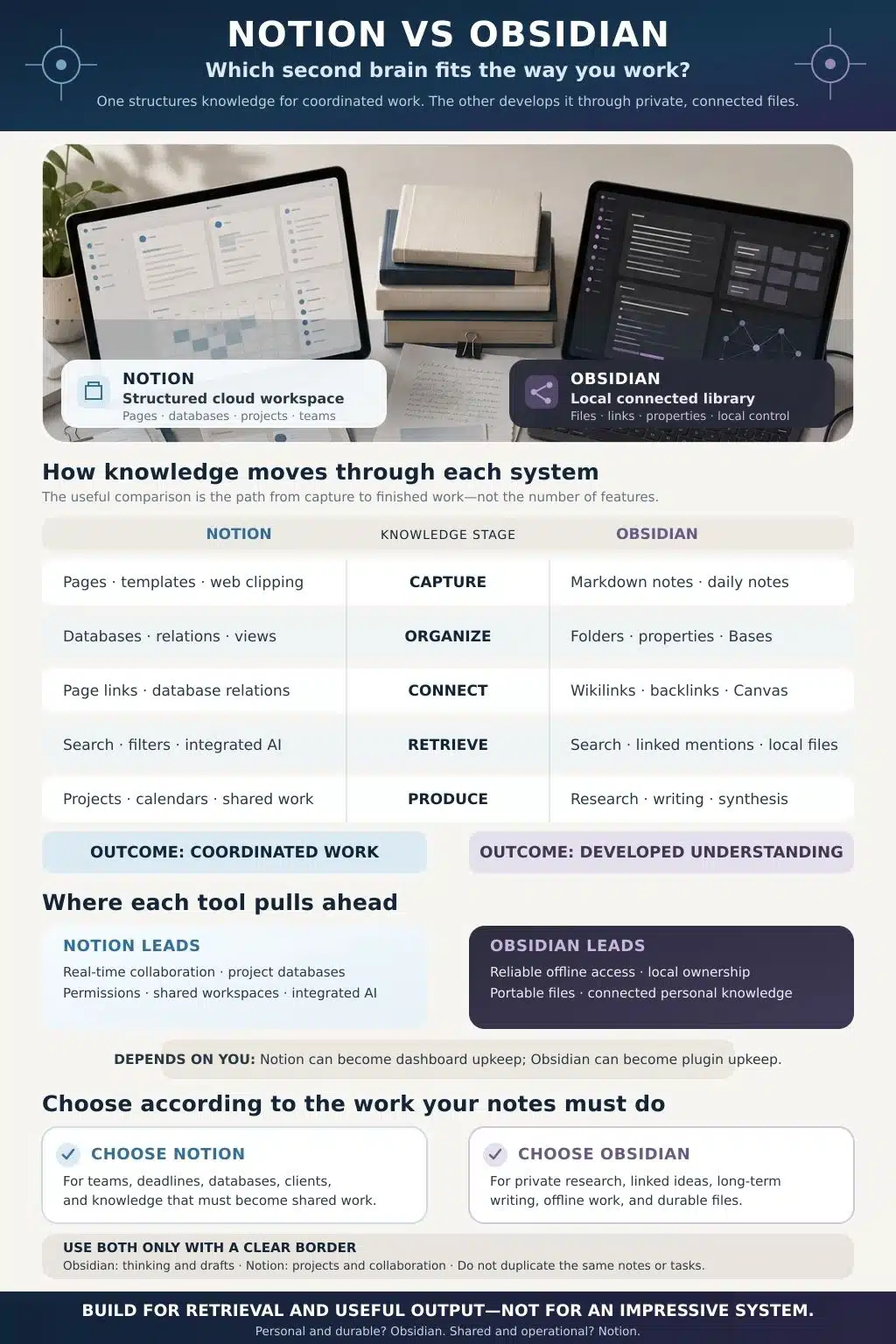
Notion vs Obsidian: Choose According to the Work Your Notes Must Do
The familiar advice, Obsidian for individuals, Notion for teams, is broadly useful, but too simple. A freelancer working alone may still need Notion’s client databases. A student may prefer Obsidian for connected research notes and Notion for a group project. A writer might keep source notes in Obsidian while managing an editorial calendar in Notion.
| Decision area | Notion | Obsidian |
| Best overall fit | Projects, databases, operations, and shared knowledge | Private notes, research, writing, and long-term knowledge |
| Core structure | Cloud workspace built from pages, blocks, and databases | Local vault built from Markdown files, links, and properties |
| Strongest advantage | Collaboration and structured workflows | Ownership, linking, offline reliability, and portability |
| Main friction | Database upkeep and dependence on a proprietary workspace | Setup choices, backup responsibility, and plugin maintenance |
| My personal choice | Best operational tool | Best personal tool |
I would not choose either app because of an attractive template, an elaborate graph, or a polished AI demonstration. Choose according to what must happen after you save a note.
The Architectural Difference Shapes Everything Else
Notion and Obsidian have borrowed ideas from each other. Notion now offers meaningful offline access, and Obsidian has native database-like views. Describing one as an online database and the other as a bare Markdown editor no longer reflects the products accurately.
Their foundations remain different, and those foundations shape the daily experience more than the overlapping feature lists suggest.
Notion: A Cloud Workspace Built Around Structured Information
Notion treats content as blocks placed inside pages. Pages can sit in databases, where properties record details such as status, owner, date, category, or a relation to another database. The same records can appear as a table, board, calendar, timeline, gallery, or filtered view.
This is valuable when a note has an operational life. An interview note can belong to a content project, connect to a publication date, carry an approval status, and appear automatically in a writer’s assigned-work view. The note does more than hold information; it participates in a process.
The upkeep begins to grow once relations, rollups, formulas, templates, permissions, and automations accumulate. Each may solve a real problem, but each also creates another choice to maintain. Designing the entire information architecture before you understand how you work usually means administering assumptions.
Obsidian: A Local Library Built Around Files and Links
An Obsidian vault is an ordinary folder on your device. Notes are stored as Markdown-formatted plain-text files, so they can be opened and edited outside Obsidian. The app builds a richer environment around those files through links, backlinks, properties, search, Canvas, core plugins, community plugins, and themes. Obsidian’s storage documentation explains the local file model directly.
You can begin with a small number of folders, link a note to related concepts, and let useful patterns emerge. Backlinks show which notes refer to the current one. Unlinked mentions help uncover references that have not yet been connected. Canvas gives you a visual space for arranging notes and other material when a linear document is too restrictive.
Obsidian also includes Bases, a core plugin that creates table, list, card, and map views from notes and their properties. It supports sorting, filtering, grouping, and formulas while keeping the underlying data in local files. This narrows the database gap, although it does not turn Obsidian into Notion. Obsidian Bases organizes a file library; Notion databases are designed more deeply around shared records and workflows.
How Notion and Obsidian Handle the Life of a Note
A feature checklist can confirm that both apps have links, templates, search, and structured views. It says little about how a captured idea moves from an inbox into useful work. That movement, from capture to retrieval and output, is a better way to judge a second brain.
Capture Should Be Easy, but Not Indiscriminate
Notion works well when you already know what a new item is. A source can enter a reading database with a topic, status, and project relation. Forms, database templates, and browser capture can standardize repeated inputs. This is useful for client requests, research libraries, or any material that must enter an established workflow.
It feels heavier when a fleeting idea asks you to choose several properties before you can move on. A complicated inbox can discourage capture or become a queue of entries waiting to be classified.
Obsidian is more comfortable with loosely formed thoughts. Daily Notes can hold quick observations without forcing an immediate filing decision. Its official Web Clipper can save material to the vault, while templates and properties add structure only where you need it. You will, however, have to decide how attachments, clipped pages, and mobile syncing should be handled.
Both tools can encourage indiscriminate collection. I would keep one inbox, review it regularly, and delete more than the average template tutorial suggests. Capture is temporary work, not a permanent destination.
Organization Can Quietly Become Administration
Suppose you are researching several articles at once. In Notion, a sources database can show unread material, filter references by article, and connect each source to an active project. Update a record once, and that change appears in every relevant view.
This explicit structure is useful when the categories are stable. Early research is often messier. A topic may change direction, two categories may turn out to be the same, and the field you considered essential may never help you find anything. Notion makes it easy to build detailed metadata before you have evidence that the detail serves a purpose.
Obsidian allows a looser beginning. Folders can set broad boundaries, links can represent conceptual relationships, and properties can be reserved for note types that genuinely benefit from them. Bases adds filtered views without requiring every note to begin inside a central database.
That flexibility still needs care. Inconsistent filenames, duplicate concepts, sprawling tags, and plugin-dependent conventions can make a vault harder to navigate. The advantage is that you can postpone some structural decisions until your own use reveals which ones matter.
Obsidian Is Better at Letting Ideas Develop
For research synthesis and long-form thinking, Obsidian has the clearer advantage. Linking a person, argument, source, project, or concept while writing is quick. Backlinks reveal the contexts in which a note appears elsewhere, and local graph views can help you inspect a small neighborhood of related knowledge.
The full graph is often oversold. A dense constellation of dots may look impressive without revealing anything useful. Meaning comes from the notes and the relationships you chose to record. Five developed notes can help more than 5,000 shallow captures held together by broad tags.
Notion supports page links, backlinks, mentions, and database relations. Those tools are often enough when the connection follows a known structure: this source supports that article; this meeting belongs to that project; this decision affects those tasks. Developing a network of small, evolving conceptual notes feels less natural there.
Retrieval Depends on the Habits Behind the App
Poor titles, indiscriminate capture, and hundreds of overlapping tags will weaken either system. Software can improve retrieval, but it cannot supply the missing context that a rushed note never contained.
Notion is especially good when you remember the context rather than the exact wording. A filtered view can surface every approved idea for a publication, every source related to an active project, or every note owned by a team member. Workspace search and native AI can broaden that retrieval across pages and connected services, depending on the plan and configuration.
Obsidian combines full-text search with links, backlinks, properties, Bases, and queries. Because the files are local, other tools can search or process them as well. It feels particularly natural when you arrive through a related note and follow a meaningful chain of ideas.
Whichever app you use, a note still needs a clear title, enough context to make sense months later, and some indication of why it was worth keeping. Search can locate a paragraph. It cannot make that paragraph useful.
Finished Work Exposes the Real Difference
Notion becomes much stronger once knowledge has to move through stages, people, or deadlines. Content calendars, course plans, client portals, campaign trackers, editorial pipelines, and product work fit naturally into its databases and views. A source note can sit beside its deadline, owner, brief, and approval status instead of living in a separate project system.
Obsidian is most persuasive during the slower work of thinking: developing an argument, tracing research, studying related concepts, or keeping a private draft alongside its sources. Bases and plugins can add project management, but recreating a sophisticated team workflow requires effort and still does not provide Notion’s collaboration model.
If your notes mainly need room to develop, Obsidian’s defaults are helpful. If they need to move reliably through a shared process, Notion saves considerable assembly.
Offline Access, Data Ownership, and Long-Term Portability
The claim that Notion simply does not work offline is outdated. All plans let users download pages for offline use in the desktop and mobile apps. Paid plans also download recent and favorited pages automatically.
There are still boundaries. Offline mode is unavailable in a web browser, subpages must be downloaded separately, and a downloaded database initially includes only the first 50 rows of its first view. AI blocks, forms, buttons, embeds, sharing, and permission changes require a connection. Notion lists the current limits in its offline-use documentation.
Obsidian remains more dependable offline because the entire vault is already on the device. There is no separate step to mark a note as available. Multiple devices still require a sync method, and not every option behaves equally well across platforms. Local storage also carries an easily missed responsibility: sync is not a backup. Accidental deletion can travel between devices as efficiently as a useful edit.
Portability is similarly nuanced. Notion can export pages and workspaces as HTML, PDF, or Markdown and CSV. Non-database pages become Markdown; full-page databases export as CSV with Markdown files for their subpages. Complex relations and workflows do not leave as a perfect working copy of the original system. Notion’s export guide explains the available formats, but any serious migration will need inspection and cleanup.
Obsidian notes already exist as readable files, which lowers exit costs and makes a long-lived personal archive easier to defend. Obsidian-specific features, plugin syntax, embedded queries, and complex Bases may still need adjustment elsewhere. Open files reduce lock-in; they do not make every part of a system universally portable.
Privacy and Security Point in Different Directions
Obsidian is the more private default for personal notes because the company does not need to receive the contents of a local vault. Optional Obsidian Sync uses end-to-end encryption. For confidential research, journals, or personal archives, keeping the source files on your own device is a meaningful advantage.
The user also inherits more responsibility. A stolen, unencrypted laptop can expose local notes. A missing backup can turn device failure into data loss. Community plugins inherit Obsidian’s access and may read computer files, connect to the internet, or install other programs. Obsidian recommends independently auditing plugins used with sensitive data in its plugin-security guidance.
Notion uses a managed cloud-security model. It documents AES-256 encryption at rest, TLS 1.2 or higher in transit, daily automated backups, access monitoring, and AWS hosting. These are substantial controls, particularly for teams that would struggle to maintain an equivalent environment. Notion personnel and subprocessors remain part of the service model, and the content does not stay solely on the user’s device. Notion’s security documentation describes those practices in detail.
So privacy and security do not produce one universal winner. Obsidian gives you more control over data location and asks you to protect devices, backups, sync, and plugin access. Notion manages more of the security and recovery environment, while requiring trust in a cloud service and careful workspace permissions.
Collaboration Is Where Notion Still Pulls Clearly Ahead
Notion supports live editing, comments, mentions, guests, groups, teamspaces, shared databases, and several permission levels. A colleague can review a draft without gaining access to every private note. A project manager can update a record while another person comments on the page behind it.
Obsidian collaboration is real, but narrower. Obsidian Sync supports shared vaults with up to 20 collaborators. Each collaborator needs an active Sync subscription, fine-grained permissions are unavailable, and members effectively receive the same vault access. Two people cannot see each other editing the same file live; simultaneous changes are merged when syncing. The official shared-vault documentation states these limitations.
A shared vault may suit a small, trusted research group. It is a poor substitute for a client workspace, departmental wiki, or operational system with different access needs. When collaboration is part of the daily work, I would choose Notion rather than spend time forcing Obsidian into that role.
Build for Retrieval and Output
For a personal productivity tool meant to preserve, connect, and develop ideas over many years, Obsidian is my stronger recommendation. Its local files, flexible links, dependable offline access, and lower exit cost suit knowledge that grows gradually.
For a system that must coordinate projects, records, deadlines, and people, Notion is more practical. Its databases and collaboration features move knowledge into shared work with much less assembly.
Whichever you choose, keep the system small enough to use and clear enough to trust. It should help you recover an idea when it matters and turn that idea into something useful. If most of your energy goes into maintaining the setup, it is no longer supporting the work.
Frequently Asked Questions on Notion vs Obsidian
1. Is Obsidian better than Notion for a second brain?
Obsidian is generally better for a personal second brain built around connected notes, private research, offline work, and long-term file ownership. Notion is better when the same system also needs databases, project tracking, live collaboration, and permissions.
2. Is Notion or Obsidian better for students?
Notion suits students who want to manage classes, assignments, calendars, and group projects in one structured workspace. Obsidian suits students who want to connect concepts, develop research notes, and keep a personal knowledge archive beyond a single semester.
3. Does Notion work offline now?
Yes. Notion’s desktop and mobile apps allow users on all plans to download individual pages for offline use. Paid plans automatically download recent and favorited pages. The web app does not work offline, subpages require separate downloads, and some database content and advanced blocks remain limited.
4. Does Obsidian have databases?
Obsidian has an official core plugin called Bases. It creates database-like table, list, card, and map views from local notes and their properties, with filtering, sorting, grouping, and formulas. Notion still provides the more mature environment for relational databases and collaborative workflows.
5. Is Obsidian more private than Notion?
Obsidian is more private by default because vaults are stored locally and the company does not need access to their contents. Optional Obsidian Sync is end-to-end encrypted. Actual security still depends on device protection, backups, sync choices, and community plugins. Notion uses a managed cloud model with encryption, monitoring, backups, and organizational controls.