

A website can look beautiful, publish excellent content, and still quietly sabotage itself with crawl traps, broken canonicals, redirect chains, slow templates, duplicate pages, thin indexable URLs, and JavaScript rendering problems. That is why technical SEO audit tools matter so much now. They help you see the invisible mess behind a website before search engines, users, or revenue numbers punish you for it.
This list compares crawler-first platforms, enterprise-level SEO audit software, free Google tools, and specialist website audit tools built for serious site health work. Some are ideal for agencies handling client audits. Others are better for enterprise teams, ecommerce sites, publishers, SaaS brands, or small businesses that need practical technical SEO tools without drowning in raw crawl exports.
Our Selection Criteria
A good technical audit tool should do more than scare you with a long list of errors. The better question is whether it helps you understand what matters, why it matters, and what should be fixed first.
| Criteria | What We Looked For |
|---|---|
| Crawl depth | Ability to crawl pages, links, status codes, canonicals, redirects, metadata, directives, and architecture |
| Issue prioritization | Whether the tool separates urgent problems from low-impact noise |
| Indexing insight | Support for crawlability, indexability, sitemaps, robots.txt, canonicalization, and Google signals |
| Performance checks | Page speed, Core Web Vitals, JavaScript, rendering, and template-level technical issues |
| Reporting workflow | Clear exports, dashboards, client reports, stakeholder-friendly summaries, and monitoring |
| Best-fit user | Whether the tool fits agencies, freelancers, developers, enterprise teams, or smaller site owners |
The goal is not to say every website needs the most advanced crawler on the market. The goal is to match the tool to the kind of technical SEO work you actually need to perform.
Who This Is For
This guide is for SEO specialists, content teams, developers, agencies, ecommerce managers, publishers, SaaS marketers, and business owners who need cleaner site health. It is especially useful if your site has hundreds or thousands of URLs, regular content changes, migration risk, international pages, faceted navigation, JavaScript templates, or recurring indexing problems.
If your website has ten pages, you can get a lot done with Google Search Console and PageSpeed Insights. But if your site drives serious traffic or revenue, stronger technical SEO tools can save you from expensive mistakes that do not show up in a basic visual review.
The 13 Best Technical SEO Audit Tools for Cleaner Website Health
Before choosing from this list, remember that technical SEO is not one single job. Crawling, monitoring, log analysis, performance testing, rendering checks, and indexing diagnostics often require different kinds of data.
1. Screaming Frog SEO Spider
Screaming Frog SEO Spider remains one of the most trusted technical SEO audit tools because it gives experienced SEOs direct control over crawl data. It is excellent for checking status codes, redirects, page titles, meta descriptions, canonicals, headings, internal links, duplicate content, hreflang, structured data, pagination, and more. The tool is especially powerful when paired with Google Analytics, Google Search Console, PageSpeed data, custom extraction, and JavaScript rendering. It ranks first because it is flexible, fast, and still one of the most practical tools for real technical audits.
Best Feature/For:
- Best for hands-on technical SEOs, agencies, and consultants.
- Strong for detailed crawl analysis, exports, custom checks, and site migration audits.
Why We Chose It:
- Gives deep crawl control instead of hiding everything behind simplified scores.
- Excellent for diagnosing technical issues across large and small websites.
- Strong custom extraction makes it useful for structured data, templates, and unusual site checks.
- Works well for audits, migrations, internal linking reviews, and redirect analysis.
Things to consider:
- Beginners may find the interface dense at first.
- It is strongest when the user understands technical SEO concepts already.
2. Sitebulb
Sitebulb is one of the best website audit tools for SEOs who want strong crawl data presented in a more visual, explainable way. It combines technical crawling with prioritized hints, diagrams, internal link visuals, audit scores, and client-friendly reporting. This makes it especially helpful when you need to explain complex technical issues to non-technical stakeholders. It ranks second because it balances depth and communication better than most crawler-first tools.
Best Feature/For:
- Best for agencies and consultants who need to present technical SEO findings clearly.
- Strong for visual crawl analysis, prioritized hints, and stakeholder-ready reports.
Why We Chose It:
- Makes technical audit findings easier to understand and communicate.
- Strong visualization helps reveal architecture, crawl depth, and internal linking problems.
- Useful for client work where reporting clarity matters.
- Offers a good bridge between raw crawler data and practical recommendations.
Things to consider:
- It may feel heavier than needed for quick one-page checks.
- Advanced users may still prefer Screaming Frog for certain custom workflows.
3. Semrush Site Audit
Semrush Site Audit is a strong choice for teams that want technical SEO auditing inside a broader marketing platform. It can crawl a site, flag technical and on-page issues, track site health over time, and connect audit work with keyword research, competitor analysis, backlink data, and content planning. This is useful for teams that do not want separate tools for every SEO function. It ranks third because it is one of the most practical all-in-one options for ongoing SEO management.
Best Feature/For:
- Best for marketing teams and agencies that want SEO audit software inside a full SEO suite.
- Strong for scheduled audits, issue tracking, and campaign-level SEO workflows.
Why We Chose It:
- Combines technical audit data with keyword, competitor, backlink, and content tools.
- Good for recurring audits rather than one-off site checks.
- Useful dashboard format for teams that need simple issue tracking.
- Helps connect technical problems to broader SEO performance work.
Things to consider:
- It is not as flexible as specialist crawlers for deep custom audits.
- Pricing may be too much if you only need technical crawling.
4. Ahrefs Site Audit
Ahrefs Site Audit is a strong option for SEO teams that already use Ahrefs for backlinks, keyword research, and competitor analysis. It crawls websites, highlights technical and on-page issues, and provides health scoring and detailed reports across important SEO areas. Its real strength is the way audit insights sit alongside Ahrefs’ broader backlink and competitive data. It ranks fourth because it is especially useful when technical issues need to be understood alongside authority, content, and competitor context.
Best Feature/For:
- Best for SEO professionals already using Ahrefs.
- Strong for combining technical audits with backlink and competitor research.
Why We Chose It:
- Good site health reporting for recurring SEO checks.
- Useful when technical issues may be connected to content or authority problems.
- Clean interface makes issue review easier for experienced marketers.
- Strong fit for teams already invested in the Ahrefs ecosystem.
Things to consider:
- It may not replace a dedicated crawler for very complex technical investigations.
- Some users may buy Ahrefs mainly for backlinks and use Site Audit as a companion feature.
5. SE Ranking Website Audit
SE Ranking Website Audit is one of the best value-focused SEO audit software options for freelancers, small agencies, and growing in-house teams. It checks a wide range of technical issues, gives site health scores, supports scheduled audits, and fits naturally with SE Ranking’s rank tracking, competitor research, backlink monitoring, and reporting tools. It is easier to adopt than some heavier platforms while still offering enough depth for serious site maintenance. It ranks fifth because it gives smaller teams a practical balance of features and affordability.
Best Feature/For:
- Best for freelancers, small agencies, and growing SEO teams.
- Strong for scheduled audits, issue prioritization, and value-focused SEO workflows.
Why We Chose It:
- Good mix of technical audit checks and broader SEO features.
- Easier to manage than many enterprise platforms.
- Useful for competitor website audits and recurring site health tracking.
- Strong fit when budget matters but basic free tools are not enough.
Things to consider:
- Large enterprise websites may need more advanced crawl and log analysis.
- Some advanced capabilities may depend on plan limits.
6. Lumar
Lumar is built for enterprise-scale website health, technical SEO, accessibility, performance, and large-site auditing. It is especially useful for organizations with huge sites, many templates, complex architecture, governance needs, or multiple teams involved in fixing problems. Lumar focuses on scalable crawling, detailed reporting, prioritization, and workflows that help large teams move from issue discovery to resolution. It ranks sixth because it is powerful, but its best fit is clearly larger organizations rather than casual site owners.
Best Feature/For:
- Best for enterprise SEO teams and large websites.
- Strong for scalable audits, site health governance, and cross-team technical workflows.
Why We Chose It:
- Built for auditing large and complex websites.
- Strong for technical SEO, accessibility, performance, and site health monitoring.
- Helpful when multiple teams need to understand and prioritize fixes.
- Good fit for brands where technical problems can affect many pages at once.
Things to consider:
- It may be excessive for small websites.
- Pricing and setup are better suited to enterprise budgets.
7. Botify
Botify is an enterprise SEO platform designed for large websites where crawling, indexing, content, and search visibility are tied directly to revenue. It is especially relevant for ecommerce, publishers, marketplaces, classifieds, travel brands, and other sites with complex URL structures. Botify helps teams understand which pages are crawlable, indexable, discoverable, and worth improving. It ranks seventh because it is excellent for enterprise SEO operations, but it is not built for someone who just needs a quick audit of a small business website.
Best Feature/For:
- Best for enterprise ecommerce, marketplaces, publishers, and large-scale SEO teams.
- Strong for crawl, indexation, content, and visibility analysis at scale.
Why We Chose It:
- Built for complex websites where technical SEO has direct business impact.
- Useful for connecting crawl and indexation problems to revenue-sensitive pages.
- Strong fit for organizations managing huge inventories of URLs.
- Helps enterprise teams prioritize technical fixes at scale.
Things to consider:
- It is not a lightweight tool for beginners.
- Smaller teams may find the platform too advanced or expensive.
8. Oncrawl
Oncrawl is a strong technical SEO platform for data-driven teams that need crawler data, log analysis, segmentation, and deeper SEO diagnostics. It is especially useful for large websites where understanding search bot behavior matters as much as finding broken links. Oncrawl can help teams connect crawl data with log files and other data sources to understand how search engines interact with important pages. It ranks eighth because it is excellent for advanced technical SEO, especially when standard crawl reports are not enough.
Best Feature/For:
- Best for data-driven technical SEOs and large websites.
- Strong for crawl analysis, log analysis, segmentation, and indexation investigation.
Why We Chose It:
- Helps connect technical issues with actual crawler behavior.
- Strong for large sites, marketplaces, ecommerce, and complex architecture.
- Useful for identifying crawl budget waste and indexation gaps.
- Works well for advanced SEO teams that want raw data and flexible analysis.
Things to consider:
- It requires more technical SEO maturity than beginner tools.
- Smaller websites may not need log-level analysis.
9. JetOctopus
JetOctopus is a specialist technical SEO crawler and log analyzer that is especially useful for large websites, ecommerce sites, and teams that care about crawl budget. It combines crawling, log file analysis, indexation checks, and bot behavior insights so SEOs can understand what search engines are actually doing on the site. That makes it valuable when a normal audit says one thing, but Googlebot behavior tells a different story. It ranks ninth because it is highly useful for advanced audits, but less necessary for small, simple sites.
Best Feature/For:
- Best for crawl budget analysis, log file analysis, and large-site technical SEO.
- Strong for ecommerce, marketplaces, and websites with many URLs.
Why We Chose It:
- Reveals how search bots interact with the website.
- Useful for finding crawl barriers, indexation gaps, and wasted crawl activity.
- Strong companion to traditional website crawling.
- Good fit for advanced technical SEO teams handling large URL sets.
Things to consider:
- Log analysis requires the right access and technical understanding.
- It may be too specialized for basic audits.
10. Conductor Monitoring
Conductor Monitoring, formerly associated with ContentKing-style real-time monitoring, is useful for teams that want continuous technical SEO and content change alerts. Instead of waiting for a monthly audit, it helps teams detect technical changes, SEO issues, and visibility risks as they happen. This is valuable for websites where developers, editors, product teams, and CMS changes can accidentally break important pages. It ranks tenth because real-time monitoring is not always the first tool you need, but it can be extremely valuable once the site is active and business-critical.
Best Feature/For:
- Best for real-time SEO monitoring and change detection.
- Strong for teams that need alerts before technical changes damage visibility.
Why We Chose It:
- Helps catch unexpected SEO problems quickly.
- Useful for large editorial, ecommerce, SaaS, and enterprise sites with frequent changes.
- Strong for monitoring important templates and revenue-sensitive pages.
- Reduces the risk of discovering technical damage too late.
Things to consider:
- It is more monitoring-focused than deep one-time crawling.
- Best used alongside a crawler or broader SEO platform.
11. SISTRIX Optimizer
SISTRIX Optimizer is a useful option for teams that want technical on-page auditing inside the wider SISTRIX SEO ecosystem. It automatically crawls websites, identifies technical weaknesses, and organizes issues by importance so teams can work through fixes. SISTRIX is especially known in European SEO markets and can be a solid fit for teams already using the platform for visibility and competitive analysis. It ranks eleventh because its audit functionality is useful, though the platform’s strongest appeal may depend on your market and existing SEO workflow.
Best Feature/For:
- Best for SISTRIX users and teams that want on-page auditing inside a broader SEO toolkit.
- Strong for technical issue detection and organized fix prioritization.
Why We Chose It:
- Useful for identifying common technical and on-page website problems.
- Fits well with visibility tracking and broader SISTRIX workflows.
- Good for teams that want guided prioritization rather than raw crawl exports.
- Helpful for recurring site health checks.
Things to consider:
- It may be less familiar to users outside markets where SISTRIX is widely used.
- Dedicated crawlers may offer more flexible audit customization.
12. Google Search Console
Google Search Console is not traditional SEO audit software, but it is one of the most important technical SEO tools because it shows how Google sees your website. It helps identify indexing problems, crawl issues, sitemap status, page experience signals, manual actions, security problems, search performance, and URL-level inspection data. No third-party crawler can fully replace it because the data comes from Google’s own search systems. It ranks twelfth only because it is not a full crawler, not because it is optional.
Best Feature/For:
- Best free tool for understanding Google indexing, crawling, and search performance.
- Strong for site owners, SEO teams, developers, and content managers.
Why We Chose It:
- Provides direct Google data about indexing and search performance.
- Useful for validating whether technical fixes are actually reflected in Google.
- Essential for sitemap checks, URL inspection, and coverage issues.
- Free and important for websites of every size.
Things to consider:
- It does not replace a full website crawler.
- It shows Google-side signals but may not explain every technical cause clearly.
13. Google PageSpeed Insights
Google PageSpeed Insights is a focused but important website audit tool for performance and user experience. It reports on mobile and desktop page experience, Core Web Vitals, lab diagnostics, and performance improvement opportunities. While it will not crawl your entire site like Screaming Frog or Sitebulb, it is very useful for checking important templates, landing pages, product pages, and pages that affect conversions. It ranks thirteenth because it is narrow, but it belongs in every technical SEO workflow.
Best Feature/For:
- Best free tool for checking page speed and Core Web Vitals signals.
- Strong for developers, SEOs, UX teams, and site owners improving key templates.
Why We Chose It:
- Helps diagnose speed and user experience problems.
- Useful for checking mobile and desktop performance.
- Good for validating improvements after technical fixes.
- Free and easy to use for important page-level checks.
Things to consider:
- It audits individual pages, not full sites.
- It should be paired with a crawler for broader technical SEO audits.
A Quick Overview
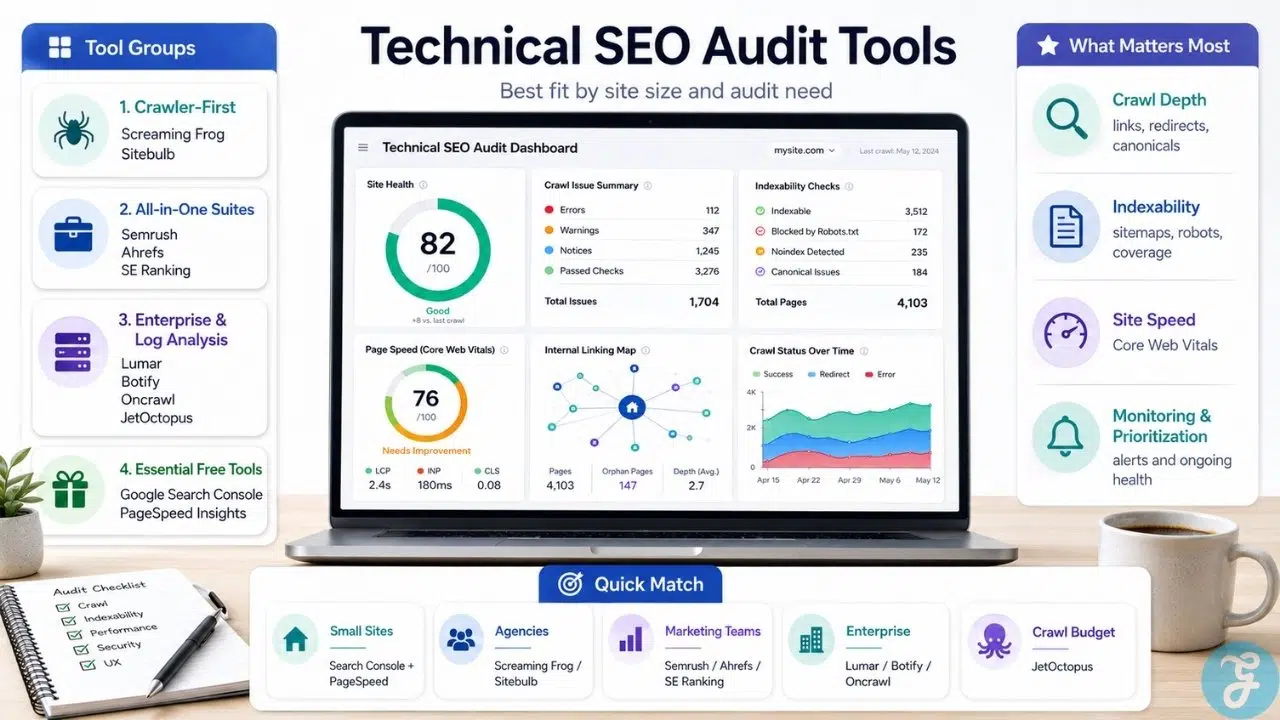
The strongest choice depends on your site size, technical skill level, and workflow. A consultant may need Screaming Frog or Sitebulb, a small agency may prefer SE Ranking or Semrush, and an enterprise ecommerce site may need Lumar, Botify, Oncrawl, or JetOctopus.
Here’s a faster way to compare the tools by practical fit, main strength, and biggest limitation.
| Rank | Tool | Best For | Main Strength | Biggest Limitation |
| 1 | Screaming Frog SEO Spider | Technical SEOs and agencies | Deep crawl control and custom extraction | Steeper learning curve |
| 2 | Sitebulb | Agencies and consultants | Visual audit reports and prioritized hints | Heavier than quick checkers |
| 3 | Semrush Site Audit | Marketing teams and agencies | Audit workflow inside full SEO suite | Less customizable than specialist crawlers |
| 4 | Ahrefs Site Audit | SEO teams using Ahrefs | Audit data tied to backlink and competitor insights | Not purely audit-focused |
| 5 | SE Ranking Website Audit | Freelancers and small agencies | Strong value and scheduled audits | Less enterprise-focused |
| 6 | Lumar | Enterprise SEO teams | Large-scale website health and governance | Too advanced for small sites |
| 7 | Botify | Enterprise ecommerce and publishers | Crawl, indexation, and visibility at scale | Enterprise-level complexity |
| 8 | Oncrawl | Data-driven technical SEO teams | Crawl data plus log analysis | Requires technical maturity |
| 9 | JetOctopus | Large sites and crawl budget work | Log analysis and bot behavior insights | Specialized use case |
| 10 | Conductor Monitoring | Change-heavy websites | Real-time SEO monitoring | Not a standalone deep crawler |
| 11 | SISTRIX Optimizer | SISTRIX users and SEO teams | On-page audit inside SEO suite | Less flexible than dedicated crawlers |
| 12 | Google Search Console | Every website owner | Direct Google indexing and search data | Not a full crawler |
| 13 | Google PageSpeed Insights | Performance and UX checks | Core Web Vitals and page speed diagnostics | Page-level, not site-wide |
This comparison matters because “best” changes with context. The right tool for a 30-page local business site is not the same as the right tool for a million-URL ecommerce platform.
Our Top 3 Picks and Why?
For this list, a top-three section makes sense because technical SEO audits often start with one primary tool and then add specialist tools later.
| Pick | Best Match | Why It Stands Out |
| Screaming Frog SEO Spider | Best overall technical crawler | Flexible, powerful, and trusted for serious hands-on audits |
| Sitebulb | Best for visual audit reporting | Turns technical findings into clearer reports and prioritized insights |
| Semrush Site Audit | Best all-in-one SEO suite option | Connects technical site health with keyword, competitor, and campaign workflows |
Screaming Frog is the safest choice if you want raw crawl control and technical depth. Sitebulb is excellent when communication and visual explanation matter. Semrush Site Audit is the practical pick when technical auditing is only one part of a wider SEO operation.
How to Choose the Right Technical SEO Audit Tool for Your Site
Choosing the right tool starts with your website’s real problems. A slow five-page brochure site does not need enterprise crawl governance, and a giant ecommerce site should not rely on a single free page-speed checker.
The Selection Framework
- Match the tool to site size: Small sites can start with Google Search Console and PageSpeed Insights, while large sites need crawlers, monitoring, and possibly log analysis.
- Check crawl and indexation depth: Strong tools should help you inspect status codes, canonicals, redirects, robots.txt, sitemaps, internal links, and indexability.
- Consider reporting needs: Agencies need client-friendly reports, while technical SEOs may care more about exports, custom extraction, and raw crawl data.
- Think beyond one-time audits: If your site changes often, ongoing monitoring may be more valuable than a quarterly crawl.
A smart technical SEO stack may include more than one tool. For example, an agency might use Screaming Frog for deep crawling, Google Search Console for indexing validation, PageSpeed Insights for template performance, and Sitebulb or Semrush for reporting.
The Final Checklist
Before choosing a technical audit tool, run through these five checks:
- Does it crawl enough URLs for your current and future website size?
- Can it identify crawlability, indexability, canonical, redirect, and internal linking problems clearly?
- Does it help prioritize issues instead of treating every warning like a crisis?
- Can your team understand and act on the reports without endless manual cleanup?
- Does it fit your workflow, whether that means exports, dashboards, alerts, client reports, or developer collaboration?
If a tool cannot help you move from problem detection to actual fixes, it is not doing enough. Technical SEO is not about collecting warnings; it is about removing barriers between your best pages and search visibility.
The Real Value Is Not the Audit, It Is the Fix
The uncomfortable truth is that technical SEO audit tools do not fix websites. They expose problems, organize evidence, and help teams prioritize work. The actual improvement still depends on developers, editors, SEO judgment, CMS limitations, budget, and whether the business cares enough to fix what the audit reveals.
This is where many technical audits fail. Teams export 4,000 issues, panic for two days, then fix nothing because everything looks equally urgent. The smarter future of technical SEO will depend less on longer issue lists and more on prioritization, automation, monitoring, and tying fixes to business impact.
My practical view is simple: choose the tool your team will actually use. The best technical SEO audit tools are not the ones with the most intimidating dashboards. They are the ones that help you find the real blockers, explain them clearly, and get them fixed before rankings, traffic, or conversions quietly slip away.
Frequently Asked Questions (FAQs) About Technical SEO Audit Tools
What are technical SEO audit tools used for?
Technical SEO audit tools help identify problems that affect crawling, indexing, site structure, page speed, redirects, canonicals, internal links, metadata, and search visibility. They are used to diagnose hidden site health issues that may prevent pages from ranking properly.
Which technical SEO audit tool is best for beginners?
Google Search Console, PageSpeed Insights, SE Ranking Website Audit, and Semrush Site Audit are easier starting points for beginners. They provide clearer dashboards and guided issue explanations compared with more advanced crawlers.
What is the best technical SEO crawler?
Screaming Frog SEO Spider and Sitebulb are two of the strongest crawler-first options. Screaming Frog is better for deep custom analysis, while Sitebulb is stronger for visual reporting and stakeholder-friendly audit explanations.
Do I need paid SEO audit software?
Not always. Small websites can start with Google Search Console and PageSpeed Insights, but paid SEO audit software becomes more useful when you manage larger sites, frequent changes, client reporting, migrations, or complex technical issues.
How often should I run a technical SEO audit?
Small sites can usually run audits monthly or after major changes. Large, ecommerce, news, SaaS, or enterprise websites should use scheduled crawling or continuous monitoring because technical problems can appear quickly after releases, CMS updates, or content changes.






















