Growing a customer base is challenging, especially when choosing the right email marketing platforms feels overwhelming. With countless tools available, confusing features, and rising costs, selecting the wrong platform can waste both time and resources.
Many businesses struggle with software that lacks essential features like automation, customizable templates, and reliable performance—common concerns with platforms such as Mailchimp or ActiveCampaign.
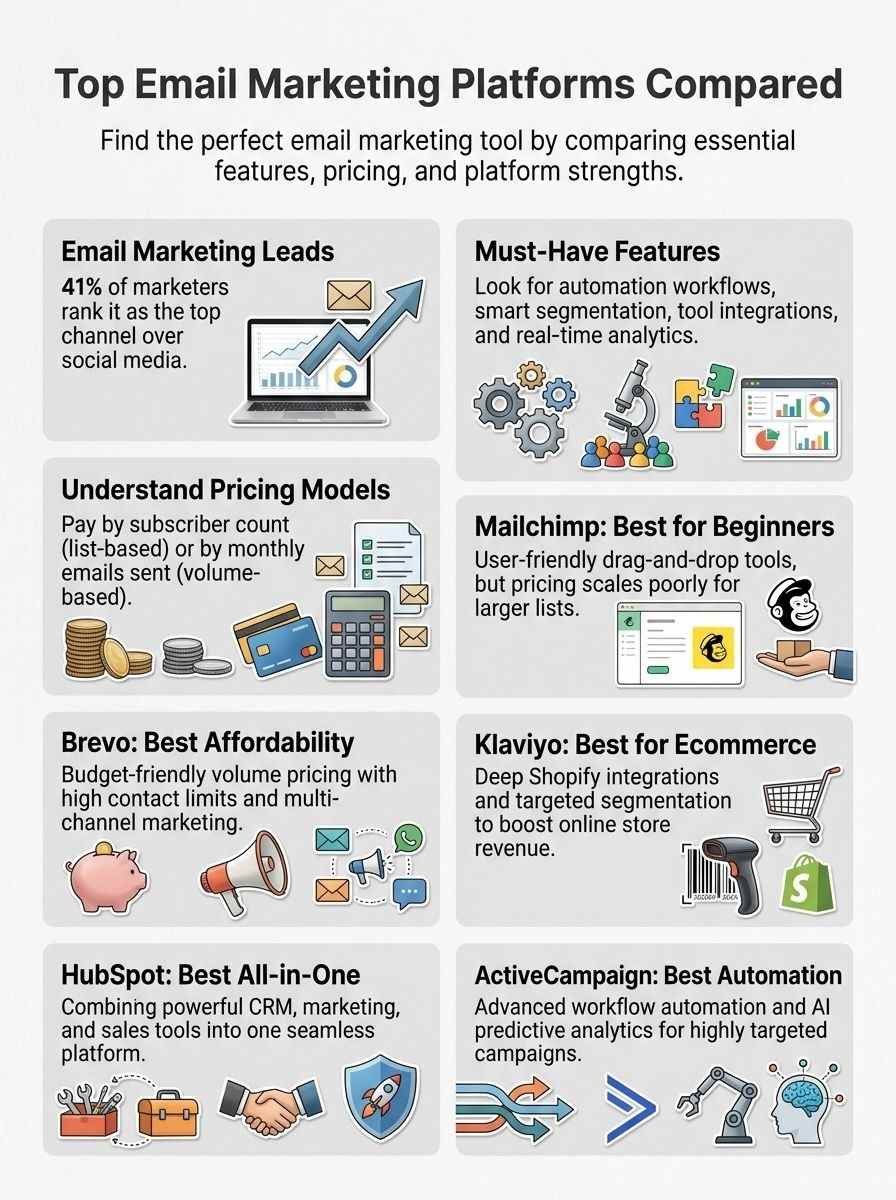
Email marketing remains the most effective channel, with 41% of marketers ranking it above all others, far surpassing social media at just 16%.
This guide compares top email marketing platforms based on price and features. It explores options like Klaviyo for eCommerce, HubSpot for CRM integration, and Brevo for budget-friendly solutions. Key aspects such as segmentation, analytics, free plans, and deliverability are also covered.
Find the platform that best fits your business needs and growth goals.
Why Choosing the Right Email Marketing Platform Matters
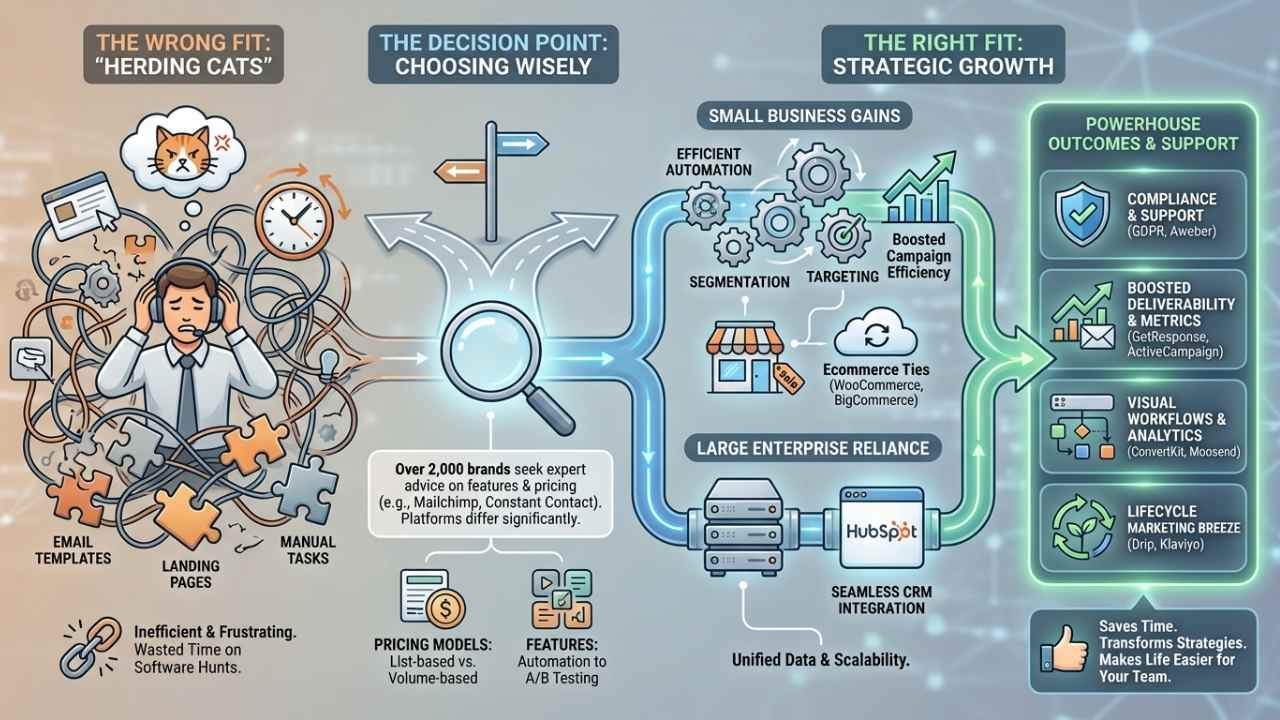
Picking the right email marketing platform saves you tons of time on software hunts. Think about it, over 2,000 senders and brands have turned to experts for advice on tools like Mailchimp or Constant Contact.
These choices matter because platforms differ a lot in features and pricing, from marketing automation to A/B testing. Small businesses gain big from efficient campaign automation, segmentation, and targeting.
Large enterprises rely on them too, for seamless integration with CRM systems like HubSpot. Imagine juggling email templates and landing pages without the right fit; it’s like herding cats.
Tools such as GetResponse or ActiveCampaign support strategies that boost deliverability rates and email metrics. They handle everything from SMS marketing to GDPR compliance, making life easier for your team.
The correct platform supports efficient campaign automation, segmentation, and targeting, notes a Venture Harbour report, highlighting how over 2,000 brands seek expert guidance.
Email marketing platforms stand as key players for both small businesses and large enterprises. They offer substantial differences in pricing models, like list-based or volume-based structures.
Take ConvertKit or Moosend; these provide visual workflow builders and analytics that transform your marketing strategies. Customer support shines in options like Aweber, while others excel in ecommerce ties with WooCommerce or BigCommerce.
Lifecycle marketing becomes a breeze with Drip or Klaviyo, turning basic email campaigns into powerhouse tools.
Key Features to Look for in Email Marketing Platforms
You know, picking the best email marketing tool feels like choosing a trusty sidekick for your business adventures, and it all boils down to those game-changing traits that boost your sends.
Think about how tools like MailerLite or SendGrid shine with email automation that saves you time, and you’ll see why digging deeper into these perks can supercharge your strategy.
Automation and workflows (Key Features)
Automation tools in email marketing platforms help you set up campaigns that run on their own. They include visual workflow builders, which let you create intuitive setups without much hassle.
Think of it as drawing a map for your emails to follow, step by step. Platforms like ActiveCampaign provide over 900 customizable workflow templates, ready for you to tweak. Pre-built templates cover common needs, such as abandoned carts and lead nurturing.
Workflow triggers respond to actions like web tracking, customer behavior, and sign-up events. Advanced options even use AI-powered predictive analytics for smart targeting. Email automation makes this process smooth, saving you time and effort.
Picture your emails working like a well-oiled machine, reacting to what customers do. Tools from providers like Klaviyo or Brevo integrate these features with customer relationship management (CRM) systems.
You get to build flows that personalize messages based on real actions. Some platforms, including Omnisend and MailerLite, offer email marketing tools with these automation perks. Beehiiv and EmailOctopus add in options for HTML emails in workflows.
Benchmark Email and Mailjet focus on triggers that boost engagement. Sendpulse and SendGrid enhance this with marketing automation insider tips. Zoho Campaigns and Cakemail let you tie in analytics for better results.
Segmentation and personalization (Key Features)
Segmentation tools split your contacts based on engagement, behavior, or subscription types. They help you target folks who open emails often, or those who buy certain products. Platforms like Omnisend offer a Customer Lifecycle Map.
This tool assesses engagement and suggests nurturing actions, like follow-up messages. Advanced segmentation boosts targeting and makes campaigns more effective. Contact tagging and automated list management give you granular control.
You can group subscribers by past buys or interests.
Personalization adds that special touch, with dynamic content tied to customer website interactions. Imagine sending an email that shows products a shopper viewed last week. Tools from Flodesk or SmartrMail make this easy, and reviews on G2, Trustpilot, or Capterra praise their setup.
Campaigner excels here too, letting you tailor messages without hassle. An email marketing agency might charge big bucks for similar feats, but these platforms keep costs down with smart pricing structures.
Think of it as chatting with a friend who knows your favorites, not blasting generic spam.
Integration with other tools (Key Features)
Email marketing platforms connect to e-commerce and social media setups. This teamwork boosts your campaigns. You gain smooth data flow. Mailchimp provides over 300 integrations. AWeber links to more than 750 third-party tools.
Platforms often tie in CRM, SMS, and transactional email services. HubSpot blends sales, marketing, service, and eCommerce. Imagine your tools chatting like old friends, sharing tips on the fly.
Tools like Resend fit right in for quick email sends. You avoid silos. Data moves fast. Teams stay in sync. Pick platforms that play well with your favorites. This setup saves time, cuts errors.
Your marketing grows stronger.
Analytics and reporting (Key Features)
Analytics tools track engagement, conversions, and customer journeys in email marketing platforms. You get clear insights into how subscribers interact with your campaigns, like opens and clicks.
Real-time reporting helps minimize bounces and boost deliverability, take Mailjet as an example. Platforms like beehiiv offer detailed growth dashboards and analytics, so you see progress at a glance.
Imagine spotting trends early, like a detective piecing together clues from data trails.
Conversion tracking shines with e-commerce integrations in advanced setups, such as Campaigner. Reporting features cover A/B test results, campaign comparisons, and advanced deliverability metrics.
These tools let you refine strategies on the fly, turning numbers into smart decisions. Picture chatting with a friend about your latest campaign wins, all backed by solid stats.
Pricing Models Explained
Email marketing services often base costs on your subscriber count, like a party where you pay per guest invited. Others charge by the emails you send each month, think of it as postage stamps for your digital flyers, so pick what fits your budget to keep growing without surprises.
List-based pricing (contact count)
List-based pricing ties costs to your contact count. Platforms charge you based on how many subscribers sit in your database. You pay more as that list grows. Take Mailchimp, for example.
Their paid plans kick off at $13 a month for 500 contacts and 5,000 emails. Picture it like renting space in an apartment building, where each resident ups your bill.
MailerLite offers a steal at $9 a month for up to 1,000 subscribers. Kit jumps in at $39 a month for the same number. HubSpot starts at $20 a month, covering 1,000 contacts. Campaigner asks $59 a month for 5,000 contacts and 30,000 emails.
This model fits folks who build steady audiences, like a gardener tending rows that expand over time.
Volume-based pricing (emails sent)
Volume-based pricing charges you based on how many emails you send each month, not just your contact list size. Think of it like paying for gas by the mile you drive, instead of owning the car outright.
Platforms use this model to fit businesses that blast out lots of messages without a huge audience. Mailjet starts at $17 a month for volume-based plans, and it offers unlimited contacts right from the get-go.
Brevo kicks off its paid options at $8.08 monthly for up to 5,000 emails, plus a generous contact limit that scales with your needs.
You get flexibility here, especially if your sending habits fluctuate like the weather. Moosend prices at $7 a month for 500 contacts but throws in unlimited emails, no cap on volume at all.
Omnisend begins at $16 monthly for 500 contacts and 6,000 emails, keeping things straightforward for growing shops. Benchmark Email sets you up at $13 a month for 500 contacts and 7,500 emails, perfect if you want to test the waters without overcommitting.
This approach saves money for sporadic senders, you know, like avoiding a gym membership when you only hit the treadmill twice a year.
Mailchimp: Best for Beginners and Small Businesses
Mailchimp shines as your go-to buddy when you’re just starting out, offering easy drag-and-drop tools that let you build stunning campaigns without breaking a sweat. Imagine whipping up personalized newsletters that hit the mark every time, all while keeping costs low for your growing list of subscribers.
Features & Pricing Overview (Mailchimp)
Let’s jump right into Mailchimp’s features and pricing, folks, keeping things simple and straight to the point like chatting over coffee.
| Aspect | Details |
|---|---|
| Launch Year | They kicked off in 2001. This makes them one of the oldest platforms people know. |
| Paid Plans Start | Prices begin at $13 each month. That covers 500 contacts and 5,000 emails. |
| Free Plan | You get basic tools for free. But features fall short next to rivals. |
| Email Builder | It feels easy to use. Drag and drop your way to sharp designs. |
| Integrations | Links up with over 300 apps. Think Shopify or WordPress for smooth workflows. |
| Cost Factors | Bills add up fast. They charge for inactive contacts, plus strict limits on contacts and emails. |
| Automation Tools | Set up drip campaigns. Personalize based on user actions, like a welcome series that hits home. |
| Segmentation | Group your list by behavior. Send targeted messages, boosting open rates like magic. |
| Analytics | Track clicks and opens. Reports show what works, helping you tweak for better results. |
Pros & Cons (Mailchimp)
Mailchimp shines in some areas, yet it trips up in others, much like a trusty old bike that gets you places but needs a tune-up for longer rides.
| Pros | Cons |
|---|---|
|
|
Brevo (formerly Sendinblue): Best for Affordability
Brevo, once called Sendinblue, fits budgets like a glove for small teams chasing big results. Picture sending sharp emails with easy automation that costs pennies, drawing you in for the full scoop on its perks.
Features & Pricing Overview (Brevo)
You want the scoop on Brevo’s features and pricing, right? This table breaks it down simply.
| Aspect | Details |
|---|---|
| Free Plan | Allows 100,000 contacts. Sends 300 emails per day. Perfect for testing the waters without spending a dime. |
| Paid Plans | Start at $8.08 per month. Cover 5,000 emails. Come with a contact limit of 500,000. Scale up as your list grows, like adding fuel to your marketing engine. |
| Core Tools | Includes email marketing. Adds SMS marketing. Features CRM. Handles transactional emails. Think of it as your all-in-one toolbox for customer chats. |
| Templates and Workflows | Provides over 40 templates for email creation. Offers 12 pre-built workflow templates. Automation gets easy, like setting up a robot helper for your campaigns. |
| Extra Perks | Offers sales CRM. Includes live chat. Provides SMS marketing tools. Integration feels seamless, boosting your personalization game without the hassle. |
Pros & Cons (Brevo)
Brevo shines with its high contact limits, letting you reach tons of folks without breaking the bank. Imagine, you get a free plan that kicks things off easy, and the paid options stay affordable, like a budget-friendly sidekick in your marketing adventures. It handles multi-channel marketing too, blending email, SMS, and CRM tools into one smooth operation, so you connect with customers on multiple fronts without extra hassle. Folks love how it scales up for growing lists, making it feel like a reliable old friend who grows with you.
On the flip side, Brevo skimps on email templates, offering just a limited selection that might cramp your creative style. Design support falls short as well, so if you crave fancy layouts or easy tweaks, you could end up frustrated, like trying to paint with only three colors. That said, these drawbacks push you to get hands-on, turning limits into a chance to craft something truly your own.
Klaviyo: Best for Ecommerce Businesses
Klaviyo shines in the ecommerce world, turning customer data into smart email campaigns that drive real sales. Boosting your online store’s revenue with flows that sync perfectly with platforms like Shopify—want to see how its pricing stacks up?
Features & Pricing Overview (Klaviyo)
You love ecommerce, right? Klaviyo shines there with strong tools for email and SMS marketing. It offers smart automation that triggers messages based on customer actions, like abandoned carts. Think of segmentation as sorting your audience into groups for targeted campaigns. Personalization feels like chatting with friends, using data to tailor content. Analytics track opens, clicks, and sales in real time. Integrations link smoothly with platforms like Shopify and BigCommerce.
Pricing starts free for up to 250 contacts and 500 emails a month. Paid plans scale by contact count, from $20 monthly for 500 contacts. You get unlimited emails on all tiers, a big plus. Costs rise as your list grows, hitting $100 for 5,000 contacts. No hidden fees surprise you, and features expand with higher plans. Ecommerce folks, this setup fits like a glove for boosting revenue.
Pros & Cons (Klaviyo)
Klaviyo shines with its deep ecommerce integrations, like seamless ties to Shopify and BigCommerce. Users get powerful tools for segmentation based on shopping behavior, which boosts sales through targeted emails. Automation flows run smoothly, pulling real-time data to personalize messages. On the flip side, prices climb fast as your contact list grows, hitting your budget hard for bigger operations. The interface feels complex at first, demanding time to master all those advanced options. Still, if you run an online store, this platform acts like a smart sidekick, turning customer data into gold.
HubSpot: Best All-in-One CRM and Marketing Platform
HubSpot combines CRM tools with powerful email marketing features, making it a top pick for teams that want everything in one spot. Imagine streamlining your sales pipeline and customer service while tracking campaigns, all without switching apps—sounds like a game-changer, right?
Features & Pricing Overview (HubSpot)
HubSpot integrates CRM tools for sales, marketing, and customer service, making it a powerhouse for teams that crave seamless workflows. Imagine, you run email marketing right next to SMS and social campaigns, all in one spot, like juggling balls without dropping any. The Marketing Hub packs tools for email marketing, automation, and analytics, so you track what works and tweak on the fly. It feels like having a smart sidekick that anticipates your next move.
The free CRM tier gives you 100 contacts, 2,000 emails, 20 landing pages, 1 pipeline, website and blog, social ads, and live chat, perfect for dipping your toes in without spending a dime. Paid plans kick off at $20 per month for 1,000 contacts and 5,000 emails, scaling up as your list grows. You get more bang for your buck here, especially if you need that all-in-one vibe to keep things humming.
Pros & Cons (HubSpot)
HubSpot shines as an all-in-one platform that ties together marketing, sales, service, and eCommerce tools. You get a strong free CRM option right out of the gate, which feels like finding money in an old jacket pocket. This setup works great for businesses big and small, letting teams collaborate without jumping between apps. Imagine streamlining your whole operation, like herding cats into a neat line.
Costs do climb for those bigger business plans, though, so watch your budget as you grow. That price jump can sting if you’re scaling fast, like biting into a lemon you thought was an orange. Still, the integration perks often outweigh the hit to your wallet for many users.
ActiveCampaign: Best for Advanced Automation
ActiveCampaign powers up your email game with smart automation that feels like magic. Picture setting up workflows that tag contacts, trigger messages, and track opens—all while you sip your coffee.
Features & Pricing Overview (ActiveCampaign)
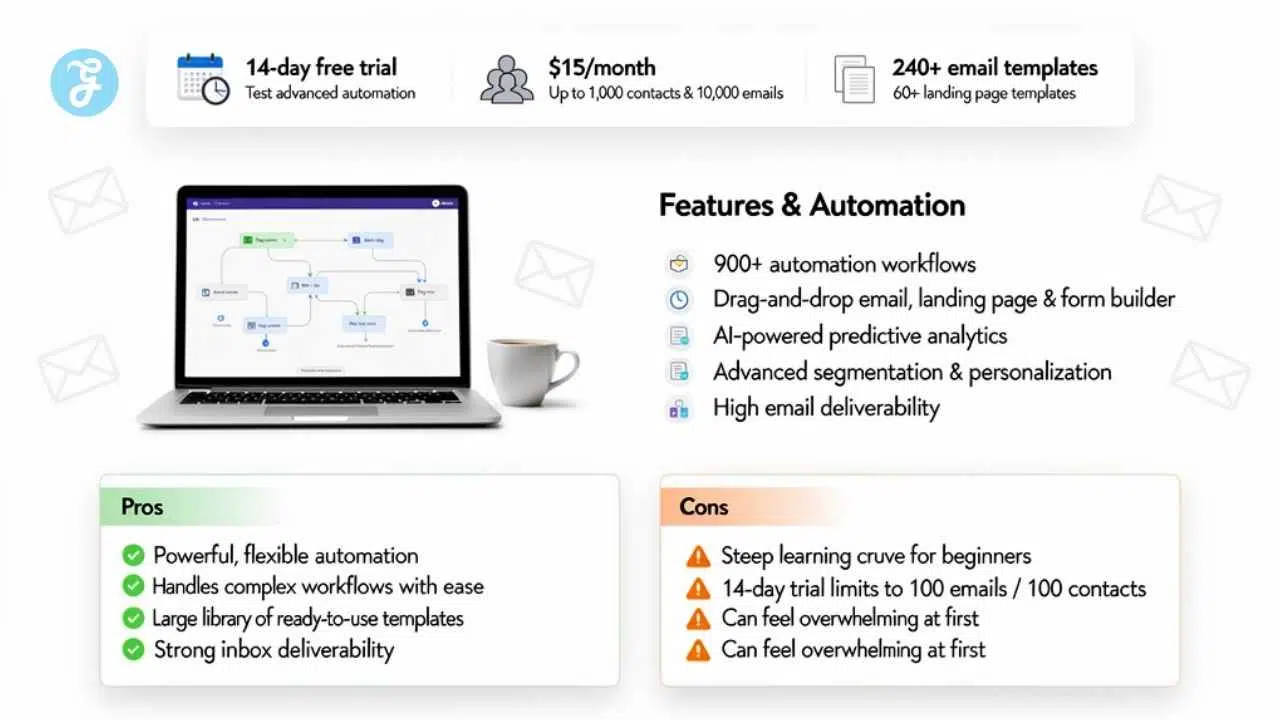
ActiveCampaign shines in marketing automation, and it kicks off with a 14-day free trial to test the waters. Paid plans begin at $15 per month, handling up to 1,000 contacts and 10,000 emails, which fits small teams like a glove. You get over 240 email templates plus more than 60 landing page templates, ready to tweak. The platform dishes out 900+ customizable workflow templates, making automation feel like a walk in the park. Build HTML emails, landing pages, and forms using a drag-and-drop editor that saves time, no coding needed.
Imagine you tap into AI-powered predictive analytics for sharp targeting, boosting your campaigns like a secret weapon. High email deliverability rates keep your messages landing in inboxes, not spam folders. This setup integrates seamlessly with tools for segmentation and personalization, turning data into gold. Automation workflows run smooth, and analytics track every move. Ecommerce folks, you might find this a game-changer for sales funnels.
Pros & Cons (ActiveCampaign)
Active Campaign shines with its extensive automation capabilities. You get tools that handle complex workflows with ease, like setting up triggered emails based on user actions. The large template library offers plenty of ready-to-use designs, saving you time on creation. AI-powered analytics dig into your data, helping spot trends and improve campaigns. High deliverability means your messages land in inboxes, not spam folders. Imagine building a smart system that nurtures leads while you sip coffee, it’s like having a tireless assistant.
On the flip side, beginners face a steep learning curve. Jumping in feels overwhelming at first, with so many options to grasp. The 14-day free trial caps you at sending 100 emails to 100 contacts, which might cramp your testing style. Picture trying on shoes that don’t quite fit yet, you need patience to break them in.
Final Thoughts
You’ve explored top email platforms like Mailchimp for starters, Brevo for budget picks, Klaviyo for online shops, HubSpot for full CRM setups, and ActiveCampaign for smart automations.
These choices make picking the right tool a breeze, with features that fit small teams or big brands without the hassle. Think about your needs: Do you want free trials to test drives, or paid plans that scale with your list? Email marketing boosts sales big time, turning simple messages into serious cash flow, as stats show returns up to 3,800 percent.
Check out more reviews from experts like Jordie van Rijn, who’s helped thousands pick winners over 13 years. Imagine your inbox as a gold mine, waiting for the right dig. Grab one of these platforms today, and watch your business grow like wildfire.
Frequently Asked Questions (FAQs) About Email Marketing Platforms
1. What makes the top email marketing platforms stand out when compared by price and features?
Well, you know, it’s like picking the right tool from a crowded toolbox; platforms like Mailchimp and Constant Contact shine with user-friendly interfaces and automation perks, all while keeping costs in check for small teams. But hey, don’t forget to weigh those extras against your budget, or you might end up paying for bells and whistles you never ring.
2. How do prices stack up among these email marketing platforms?
Prices vary wildly, from free tiers on Sendinblue to premium plans on ActiveCampaign that climb as your list grows. Think of it as shopping for shoes; what fits your wallet today might pinch tomorrow if your needs expand.
3. Which features should I compare in top email marketing platforms?
Start with basics like drag-and-drop editors and analytics dashboards, they’re the bread and butter for any campaign. Then, dive into advanced stuff, such as A/B testing and segmentation tools, to really supercharge your outreach. Remember, the best feature is one that solves your headaches without creating new ones, like a trusty sidekick in your marketing adventures.
4. Is there a best email marketing platform for beginners based on price and features?
For newbies, MailerLite offers a sweet spot with low prices and essential features like templates and autoresponders. It’s straightforward, almost like riding a bike with training wheels, helping you build confidence without breaking the bank.