Artificial intelligence is no longer a futuristic concept—it has become a core driver of how modern businesses operate, collaborate, and scale. From automating repetitive tasks to delivering data-driven insights in real time, AI-powered SaaS tools are reshaping productivity across industries. Whether you’re a freelancer, startup founder, or part of a large enterprise, these tools are helping teams work smarter, faster, and more efficiently than ever before.
In today’s highly competitive digital landscape, leveraging the right AI solutions can mean the difference between staying ahead or falling behind. From intelligent project management platforms to advanced content generation and customer support automation, AI-driven SaaS products are streamlining workflows and unlocking new levels of performance.
In this article, we explore the top AI-powered SaaS tools that are transforming productivity in 2026—helping individuals and organizations optimize their time, enhance creativity, and achieve more with less effort.
The Rise of AI in the Modern Workplace
The transition to autonomous workflows is happening much faster than most companies anticipated just a few years ago. We are seeing a massive shift from basic generative features to fully autonomous agents that can execute multi-step processes without human supervision. Businesses are heavily investing in these platforms to cut down on software bloat and consolidate their tech stacks into single, intelligent hubs. This shift fundamentally changes how teams collaborate, moving away from manual updates and toward intelligent systems that proactively surface information exactly when it is needed. Understanding this landscape is crucial for leaders who want to keep their overhead low while expanding their market reach.
Why Automation is Essential for Growth
Teams relying on manual data entry and traditional project management are quickly falling behind competitors who automate those exact same steps. Modern software now integrates deeply with your communication channels, customer relationship management systems, and calendar applications. This interconnected approach means information flows freely across your organization without someone having to copy and paste it from one window to another. When you eliminate the friction of managing the work, your team can finally focus on actually doing the work that moves the needle.
Before we dive into the specific platforms, here is a quick breakdown of how traditional workflows compare to modern automated environments.
| Traditional Workflow | AI-Powered Workflow | Impact on Output |
| Manual calendar tetris | Autonomous schedule optimization | Saves hours of weekly planning |
| Siloed knowledge bases | Cross-app intelligent search | Eliminates lost information |
| Reactive task management | Predictive bottleneck identification | Keeps projects on timeline |
| Human meeting transcription | Instant summaries and action items | Ensures perfect team alignment |
Leading Software Revolutionizing Daily Tasks
Choosing the right software requires looking past flashy marketing campaigns and understanding exactly how a platform handles your specific operational bottlenecks. The market has matured significantly, dividing into specialized categories like intelligent scheduling, autonomous content generation, and seamless workflow automation. We evaluated the current landscape to identify platforms that offer genuine utility rather than just bolting a basic chatbot onto legacy software. These selections represent the most reliable, secure, and impactful options for modern teams looking to scale.
Motion
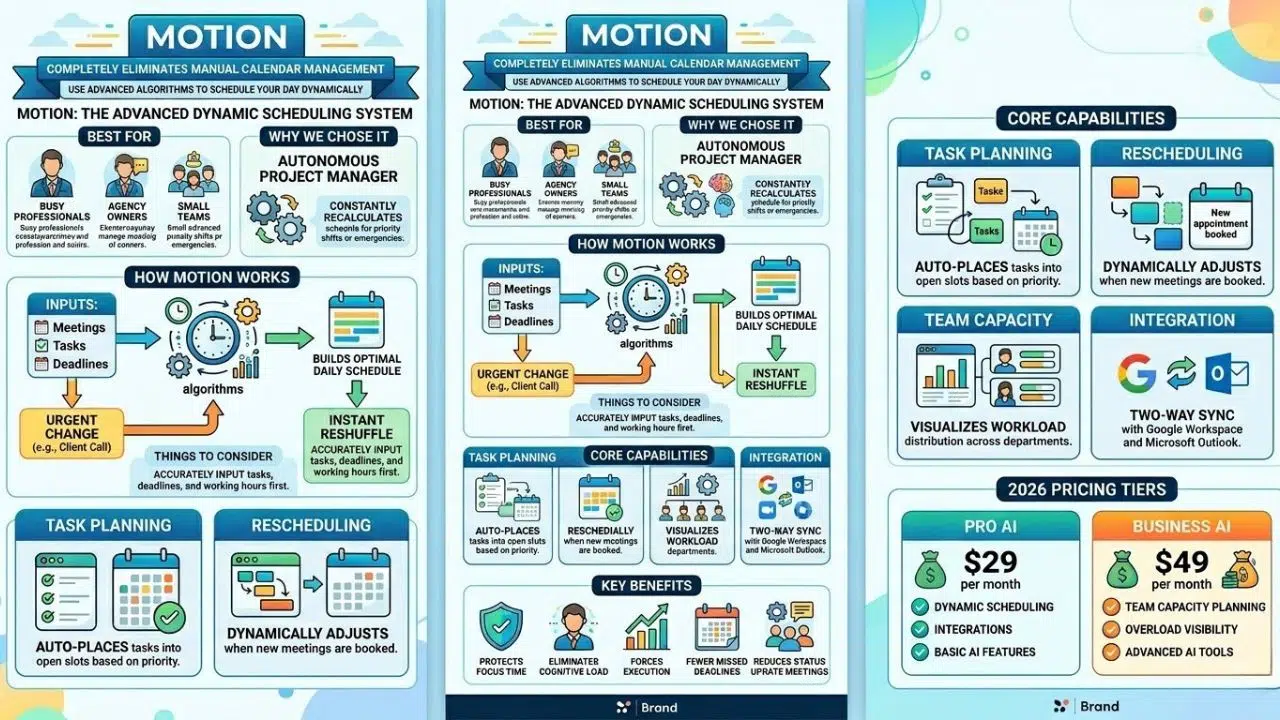
Motion completely eliminates the need to manually manage your calendar by using advanced algorithms to schedule your day dynamically.
-
Best for: Busy professionals, agency owners, and small teams struggling to balance endless meetings with deep work.
-
Why We Chose It: It acts as an autonomous project manager that constantly recalculates your schedule when priorities shift or emergencies happen.
-
Things to consider: The setup phase requires you to input all your tasks, deadlines, and working hours accurately before the system becomes truly useful.
Motion takes your meetings, tasks, and project deadlines and automatically builds the most efficient daily schedule for you. If an urgent client call pops up and derails your afternoon, the software instantly reshuffles your remaining tasks to ensure you still hit your deadlines without having to manually drag blocks around your calendar. The 2026 pricing tiers reflect its shift into a comprehensive workspace, offering a Pro AI plan at 29 dollars per month and a Business AI plan at 49 dollars per month. The higher tier provides incredible team capacity planning, showing managers exactly who is overloaded and who has room for more work, completely eliminating the need for constant status update meetings.
Beyond just scheduling, it protects your focus time fiercely. It treats your internal task list with the exact same importance as a scheduled meeting with your biggest client. By removing the daily cognitive load of deciding what to work on next, it forces you to actually execute your tasks rather than just planning them. For teams juggling multiple client projects, this means fewer missed deadlines and a significant reduction in late-night catch-up work.
Here is a closer look at the core mechanics that make Motion so effective.
| Feature Category | Capability Details |
| Task Planning | Automatically places tasks into open calendar slots based on priority. |
| Rescheduling | Dynamically adjusts timelines when new meetings are booked. |
| Team Capacity | Visualizes workload distribution across entire departments. |
| Integration | Two-way sync with Google Workspace and Microsoft Outlook. |
Jasper
Jasper has evolved from a simple writing assistant into a comprehensive content operations platform built specifically for enterprise marketing teams.
-
Best for: Marketing departments, advertising agencies, and content creators who need to scale their output rapidly.
-
Why We Chose It: It maintains strict brand voice consistency across multiple campaigns, formats, and team members.
-
Things to consider: The platform is heavily geared toward external marketing and sales copy, making it less ideal for general internal communications or data analysis.
Jasper allows you to feed it your brand guidelines, past successful content, and specific style rules so that every single piece of text it generates sounds exactly like your company. You can brief it on a single product launch, and it will autonomously generate the blog post, the email sequence, the social media captions, and the ad copy all at once. This significantly compresses the timeline from initial brainstorming to final publication, turning a week-long campaign build into a morning task. It integrates directly with major content management systems and social media schedulers, pulling the drafting and publishing processes into a single, seamless workflow.
The platform also includes robust team collaboration features, allowing editors to review, tweak, and approve the generated content before it ever goes live. This ensures that while the speed of creation increases exponentially, the quality, accuracy, and brand safety remain firmly under human control. It also features built-in SEO tools that analyze top-ranking competitor pages to suggest structural improvements to your articles.
This table outlines Jasper’s primary content generation capabilities.
| Feature Category | Capability Details |
| Brand Voice | Learns and replicates specific company tones and terminology. |
| Campaign Generation | Creates multi-channel assets from a single central brief. |
| SEO Optimization | Integrates with analytics tools to improve search rankings. |
| Workflow Management | Offers built-in review and approval stages for content teams. |
Notion AI
Notion AI transforms the popular workspace app into a proactive, intelligent agent that organizes knowledge and executes multi-step actions across your business.
-
Best for: Knowledge workers, product development teams, and companies needing a highly customizable central hub.
-
Why We Chose It: The 2026 update introduces Agentic AI that can autonomously search connected apps like Slack, Jira, and Google Drive.
-
Things to consider: The sheer amount of customization can be overwhelming for users who just want a rigid, out-of-the-box solution with strict guardrails.
Notion AI now features Custom Agents powered by top-tier models like GPT-5 and Claude Opus, allowing you to choose the best engine for your specific task. You can give the agent a command to research a competitor, build a comparison table in a specific database, and draft a summary document while you step away from your desk. It bridges the gap between your scattered software tools by searching across your entire tech stack to find the exact document or conversation you need, even if you forgot where it was originally posted.
The AI can also clean up messy data, automatically tag new entries based on their content, and summarize incredibly long strategy documents into actionable bullet points. At a flat rate for the AI add-on, it essentially replaces the need for multiple separate subscriptions to other major language models. Entire engineering and product teams now use Notion not just as a wiki, but as an active participant in sprint planning and bug tracking.
This table details the intelligent features inside the Notion workspace.
| Feature Category | Capability Details |
| Autonomous Agents | Executes complex workflows without manual supervision. |
| Enterprise Search | Retrieves information from connected external applications. |
| Database Autofill | Automatically categorizes and tags new database entries. |
| Document Generation | Drafts and formats text directly inside your workspace. |
Otter.ai
Otter remains the absolute gold standard for meeting intelligence, turning verbal conversations into highly accurate, searchable text assets.
-
Best for: Sales teams, project managers, and remote organizations that spend hours every week in video conferences.
-
Why We Chose It: It reliably captures action items and syncs them directly to your project management tools without human intervention.
-
Things to consider: Audio quality heavily dictates the accuracy of the transcription, so poor microphone setups or unstable internet connections can cause errors.
Otter seamlessly connects to your calendar and automatically joins your Zoom, Google Meet, or Microsoft Teams calls as a silent participant. It transcribes the conversation in real time, automatically capturing slides shared on the screen and inserting them into the notes for perfect visual context. When the meeting ends, it instantly generates a crisp summary, highlights the key decisions made, and lists out the assigned action items for each specific participant. This eliminates the need for anyone to act as the dedicated note-taker, allowing everyone to actually participate in the discussion and look at the camera.
It also features a conversational chat interface where you can ask questions about past meetings. Instead of reading through hours of transcripts, you can simply ask the AI exactly what the client requested regarding the budget during the kickoff call three weeks ago, and it will pull the exact quote. It pushes these notes directly into Salesforce or HubSpot, ensuring your CRM is always up to date.
This table explains Otter’s automated meeting management features.
| Feature Category | Capability Details |
| Real-time Transcription | Converts speech to text instantly during live calls. |
| Automated Summaries | Generates concise overviews of long, complex discussions. |
| Asset Capture | Automatically grabs and stores shared presentation slides. |
| CRM Integration | Pushes meeting notes directly to customer records. |
Zapier
Zapier is the ultimate connective tissue for the internet, and its new intelligent features make building complex automations incredibly simple for anyone.
-
Best for: Operations managers, non-technical founders, and anyone tired of manually moving data between different apps.
-
Why We Chose It: The natural language workflow builder allows anyone to create complex software integrations simply by typing what they want to happen.
-
Things to consider: Highly complex, multi-step integrations with thousands of monthly actions can become expensive depending on your pricing tier.
Zapier AI allows you to simply type out what you want to happen in plain English, and the system automatically builds the logic required to connect the applications. If you type that you want to save new email attachments from specific clients to a secure cloud folder and alert the legal team in a Slack channel, the AI maps the exact trigger and action steps for you. This dramatically lowers the barrier to entry for workflow automation, meaning you do not need an engineering background or a developer on staff to streamline your operations.
It currently connects over six thousand different applications, ensuring that even obscure, industry-specific software tools can communicate with your main tech stack seamlessly. By automating these repetitive administrative tasks—like lead routing, onboarding emails, and invoice generation—companies are recovering thousands of hours of lost labor every single month and completely eliminating human data entry errors.
This table summarizes Zapier’s powerful automation capabilities.
| Feature Category | Capability Details |
| Natural Language Builder | Creates workflows from simple text descriptions. |
| Multi-step Logic | Executes complex conditional formatting and routing. |
| App Ecosystem | Connects over six thousand different software platforms. |
| Error Handling | Automatically pauses and alerts users when connections fail. |
ChatGPT Plus
ChatGPT Plus serves as the foundational universal assistant that can adapt to almost any productivity challenge you throw at it.
-
Best for: Individuals, developers, and teams looking for a flexible, all-purpose tool for coding, writing, and deep data analysis.
-
Why We Chose It: The ability to build custom GPTs allows teams to create highly specialized tools trained strictly on their exact internal processes.
-
Things to consider: It operates primarily in a chat interface, meaning it requires active prompting from the user rather than running passively in the background.
ChatGPT Plus provides access to the most advanced models available, offering incredibly deep reasoning and analytical capabilities that outpace almost every other tool. You can upload massive, messy spreadsheets containing raw sales data, and the Advanced Data Analysis feature will clean the data, analyze the hidden trends, and generate comprehensive visual charts in a matter of seconds.
The custom GPT feature is a massive advantage for growing businesses. It allows you to train a specific version of the model on your proprietary company manuals, coding guidelines, or customer service protocols. This creates an instant internal expert that new employees can query instead of constantly interrupting senior staff members with basic questions. It remains the most versatile tool on the market, acting as a sounding board for high-level strategy, a rapid code debugger for developers, and a tireless research assistant for analysts.
This table highlights the core strengths of the ChatGPT Plus ecosystem.
| Feature Category | Capability Details |
| Data Analysis | Processes raw files to uncover trends and build charts. |
| Custom Assistants | Allows creation of specialized tools using company data. |
| Code Generation | Writes, debugs, and explains complex programming languages. |
| Vision and Voice | Interacts through spoken conversation and image analysis. |
Fireflies.ai
Fireflies provides deep voice intelligence that goes beyond transcription to actually analyze the content and tone of your meetings to improve team performance.
-
Best for: Sales leaders, customer success managers, and teams highly focused on improving their external communication skills.
-
Why We Chose It: It tracks specific topics and conversational metrics like talk-to-listen ratios across the entire organization.
-
Things to consider: Extensive recording and analysis require clear internal policies to ensure team members and clients feel comfortable with the technology.
Fireflies analyzes how your team actually communicates with clients and each other during high-stakes calls. It provides incredibly detailed metrics on who dominates the conversation, how fast people are speaking, the number of filler words used, and the overall emotional sentiment of the call. Sales leaders use it heavily to track specific objections, setting up automatic alerts for whenever a prospect mentions a competitor’s name, brings up pricing concerns, or asks about specific feature timelines.
This allows managers to coach their representatives based on hard, factual conversational data rather than just relying on memory or gut feeling after a ride-along call. It integrates perfectly with popular CRM platforms, automatically logging the full transcript and the actionable insights directly into the client profile so the entire company has context for the next interaction. It turns invisible verbal data into a highly searchable, highly actionable business asset.
This table outlines the deep analytical features of Fireflies.
| Feature Category | Capability Details |
| Conversation Metrics | Tracks talk time, monologues, and speaking speed. |
| Topic Tracking | Alerts users when specific keywords are mentioned. |
| Sentiment Analysis | Evaluates the emotional tone of customer interactions. |
| CRM Logging | Automatically updates client records with call data. |
Frequently Asked Questions (FAQs)
How do AI productivity tools actually save time?
They eliminate the administrative friction that surrounds your actual work. Instead of spending twenty minutes formatting a document, summarizing a meeting, routing a lead, or dragging tasks around a calendar, the software handles these steps instantly in the background. This recovers dozens of hours of lost labor every single week, allowing your team to focus exclusively on high-value, strategic execution rather than busywork.
Are these platforms safe for confidential business data?
Enterprise-grade tools now feature strict security protocols, including zero data retention policies. This means they explicitly state they do not use your private company data to train their public models. However, it is absolutely critical to review the specific privacy policy of each vendor. You must ensure they offer proper encryption, compliance with relevant local regulations like GDPR or SOC2, and role-based access controls before connecting them to your sensitive internal systems.
Do I need to know how to code to use them?
No, the current generation of software is built specifically for non-technical users. Tools that previously required custom API development now use natural language processing. This means you simply type what you want the software to do in plain English. The interfaces are highly intuitive, and the learning curve is generally focused on understanding how to write clear prompts rather than learning complex technical syntax or programming languages.
Can these tools replace my current employees?
These platforms function as highly capable assistants, not outright replacements for human judgment, empathy, and creativity. They handle the repetitive, mechanical aspects of a job, allowing your existing employees to manage much larger volumes of work with higher accuracy. The companies seeing the most massive returns on investment treat these systems as tools to augment their staff, empowering them to focus on relationship building, strategy, and complex problem-solving.
Final Thoughts
The integration of AI productivity tools is no longer a futuristic concept reserved for massive tech companies; it is the baseline requirement for running an efficient modern business. The platforms we explored offer immediate, highly tangible benefits by automating complex scheduling, streamlining rapid content creation, and deeply connecting siloed applications. Trying to manually outwork competitors who are heavily leveraging these autonomous systems is a losing strategy.
The most successful teams right now are the ones who aggressively audit their daily workflows, identify the repetitive administrative bottlenecks, and deploy the right software to eliminate them entirely. Adopting these systems allows you to reclaim your time, drastically reduce operational friction, and finally focus on the strategic work that actually drives your revenue forward.