
Running a large website can sometimes feel like herding cats. Pages are constantly being added, removed, or moved around. Because of this, search engines may miss new content or send visitors to outdated links, which can be incredibly frustrating.
XML sitemaps play a crucial role in solving this problem. They act like roadmaps for search engines, helping platforms like Google and Bing quickly locate the most important pages—even on massive websites with thousands of URLs.
This guide on sitemap best practices for large websites outlines clear steps for building effective XML sitemaps. It explains how to organize a site’s structure so search engines can crawl and index the pages that matter most.
With the right sitemap strategy, large websites can improve visibility, maintain accurate indexing, and ensure new content is discovered faster.
Why Sitemaps Are Essential for Large Websites
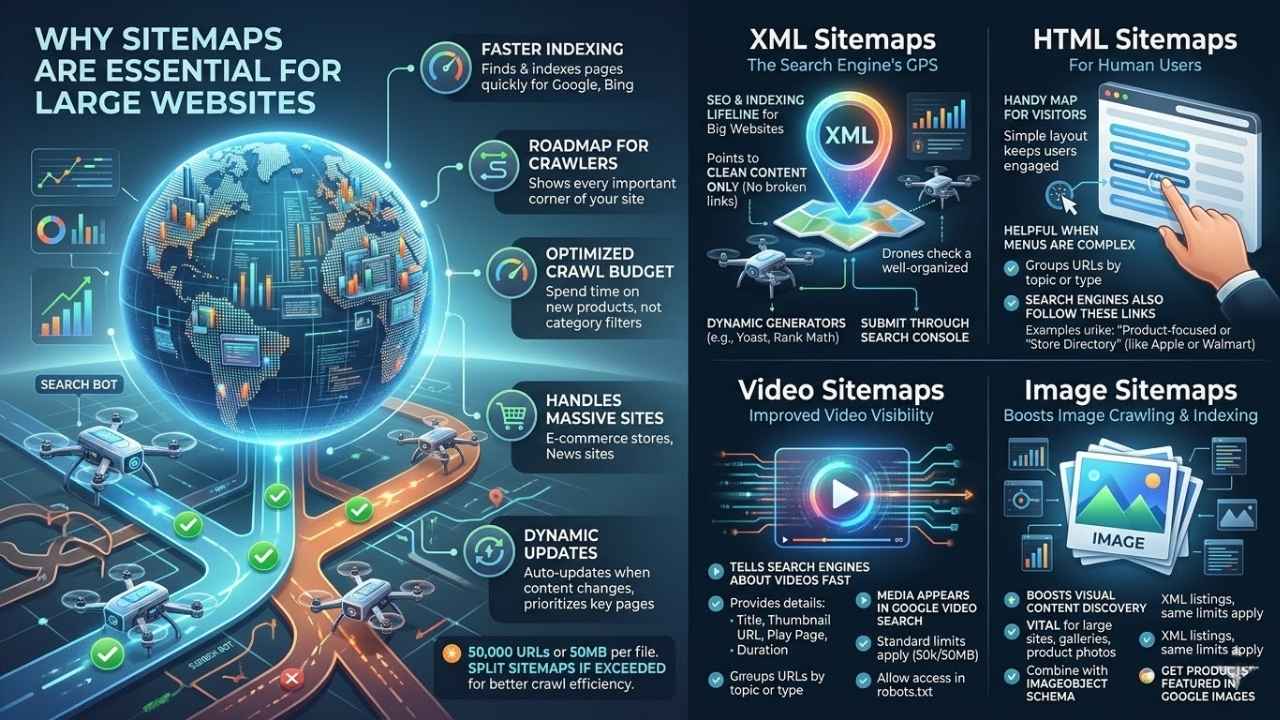
Search engines like Google rely on sitemaps to find and index pages quickly. This is especially true across massive websites. An XML sitemap acts as a clear roadmap. It shows search engines every important corner of your site.
Each individual file can list up to 50,000 URLs or reach 50MB in size. If you have more URLs, you must split your sitemap into multiple files for better crawl efficiency.
A well-optimized crawl budget means search bots spend time finding your new products, rather than getting lost in endless category filters.
Dynamic sitemaps update automatically whenever new content is added or old pages change. This keeps the latest updates visible to crawlers without delay. Prioritizing key pages helps search engines focus on what matters most for SEO and user experience.
Large stores with thousands of products or news sites bursting with daily posts would get lost in the shuffle without accurate sitemaps. These files safely guide web crawlers through massive digital archives.
Types of Sitemaps for Large Websites
Large sites often use more than one kind of sitemap. Each format is suited for different content. Exploring these types helps site owners guide both visitors and search engines with less guesswork.
XML Sitemaps
XML sitemaps act like a GPS for search engines. They help Google, Bing, and others find new pages fast. For big websites, they are a lifeline for SEO and proper indexing.
Each XML sitemap must strictly follow the rule of not exceeding 50,000 URLs or 50MB uncompressed. Once you hit those numbers, split your files to follow best practices and boost crawl efficiency.
- Search engines love clean files that point to important content only.
- Skip broken links or non-indexable pages to save your precious crawl budget.
- Dynamic generators, like Yoast SEO or Rank Math for WordPress, update fresh URLs automatically.
- Technical tools like Screaming Frog SEO Spider help validate your files before uploading them.
Submitting each XML file through Search Console gives direct signals to Google. Keeping your setup organized pays off every single day for better indexation.
HTML Sitemaps
HTML sitemaps act like a handy map for human users. These pages list out key links, helping visitors find important sections with just a few clicks.
Large websites use HTML sitemaps to help people quickly spot popular products or services. This is very helpful when main menus get too crowded or complex.
- A simple layout works best to keep users engaged.
- Major retailers like Apple use product-focused HTML sitemaps to group links cleanly by device line.
- Walmart organizes its store directory as a massive, searchable HTML sitemap for local shoppers.
- Search engines also follow these links, pointing crawlers toward high-value content.
Keep things organized by grouping URLs by topic or type. Always check that every link leads somewhere useful, and trim the page often as your site changes.
Video Sitemaps
Video sitemaps play a big part in helping search engines spot your videos fast. They give extra details, like the title, thumbnail URL, play page URL, and video duration.
This specific information helps Google figure out what each video is about. It allows your media to appear on standard results pages or inside Google Video Search.
Always use a dynamic video sitemap if you add new media often, ensuring bots catch your updates instantly.
Large websites should stick to standard limits here too. Cap each file at 50MB or 50,000 URLs, as Google sets these rules for all media types. Make sure your robots.txt allows access so nothing blocks search bots.
Image Sitemaps
Image sitemaps tell search engines about the specific pictures on your website. This boosts crawling and indexing, especially for large sites relying heavily on galleries or product photos.
You should use XML files to list each image URL. Just like standard pages, limit them to 50,000 URLs per file and keep each under 50MB.
Update these automatically using dynamic tools if your visual content changes often. Including only important and indexable image URLs helps improve SEO performance.
You can pair this strategy with Image Object schema markup to describe images in even greater detail to search engines. Many e-commerce stores depend on this approach to get their products featured in Google Images. Do not skip this step if you want better crawl efficiency for your media assets.
Best Practices for Managing Large Sitemaps
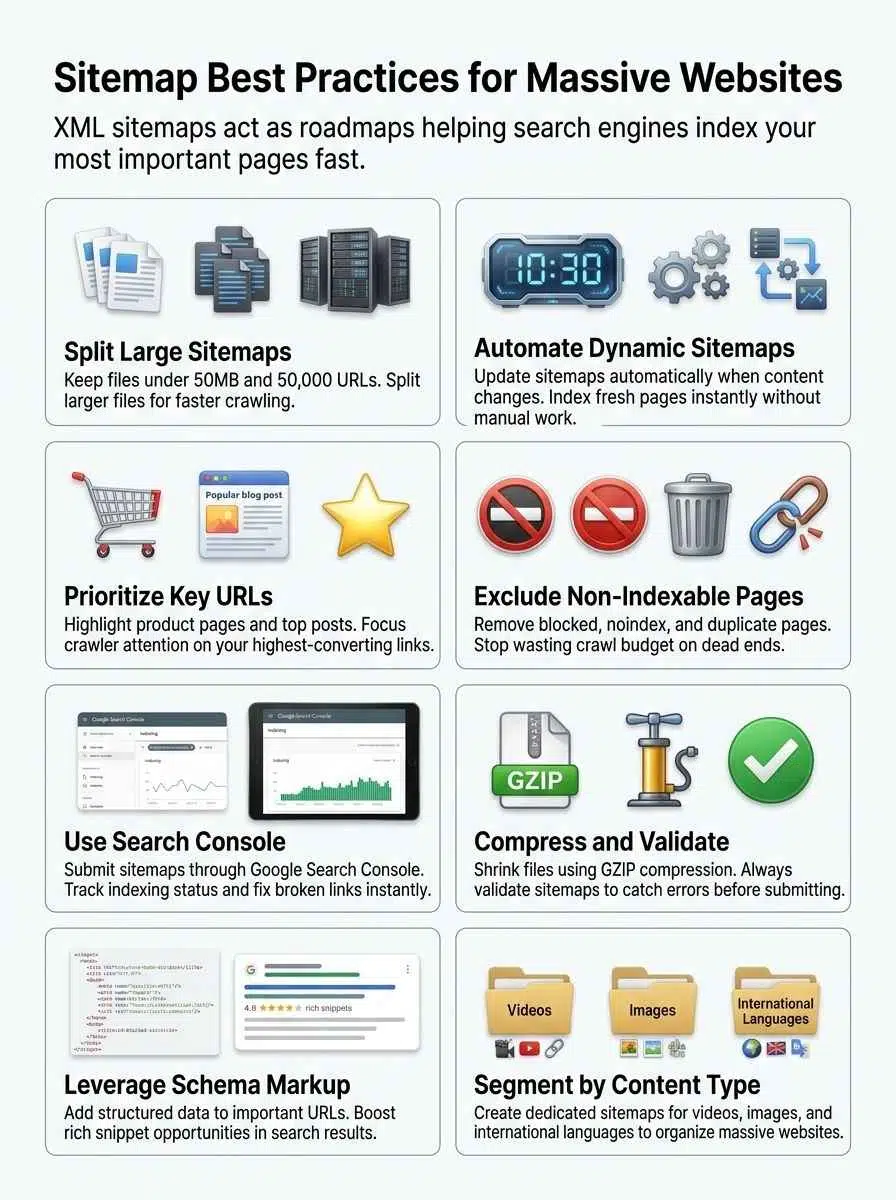
Handling a big sitemap can feel overwhelming, but smart tricks make it much easier. You will want clear steps that help both search engines and users find your most valuable pages fast.
Split Sitemaps into Manageable Files
Large websites can get tangled fast, especially with thousands of pages. Splitting sitemaps into smaller files makes things run smoother for search engines.
- Google sets a clear limit of 50,000 URLs or 50MB uncompressed per file.
- Breaking up files prevents search engine bots from choking on heavy data loads.
- E-commerce giants use a main sitemap index file to organize dozens of smaller, segmented lists.
- Smaller segments let you track indexing errors easily without messing with healthy URLs.
- Fast-changing sections, such as daily blogs, often get their own dedicated file for rapid updates.
- Using segmented lists boosts crawl efficiency because spiders scan fresh links instead of outdated ones.
Doing this keeps your website organized. It ensures search bots can process your updates quickly.
Prioritize Important URLs
Picking which URLs to highlight can boost both SEO and crawl efficiency. Focusing on key pages helps search engines find what matters fast.
- Place product pages, category hubs, or high-traffic posts near the top of your site architecture.
- Cut out low-value pages like duplicate content or expired listings.
- Focus on your accurate last mod dates, as Google officially confirmed they ignore the priority and change freq tags.
- For e-commerce sites, highlight items that convert best, much like Amazon focuses on trending products.
- Drop any URLs blocked by robots.txt or marked as no-index to preserve your crawl budget.
- Use dynamic tools so new important pages are added automatically.
Focusing on key links makes every crawl more powerful.
Use Dynamic Sitemaps for Frequent Updates
Large websites change fast. Dynamic sitemaps help search engines pick up these changes right away.
- These files update automatically as new pages are added or removed.
- Search engines index fresh content faster because the file acts like a real-time roadmap.
- For big e-commerce sites, an automatic system is vital for quick indexing of daily shifts.
- Dynamic tools make it easier to split large lists to stay under the 50,000 URL limit.
- Updates trigger bots to crawl your most recent pages first.
- Avoid manual uploads entirely, as human error often misses instant changes.
- Platforms like Shopify or WordPress with SEO plugins generate these without human effort.
Submit Sitemaps Through Search Console
Submitting your map through Google Search Console makes crawling your site reliable. This practice helps search engines understand new updates on large websites.
- Access Google Search Console with your verified website to start.
- Paste the full URL in the Add a new sitemap field, such as www.example.com/sitemap.xml.
- Keep each file under the 50MB limit to meet strict indexing requirements.
- Rely entirely on Search Console or robots.txt, as Google fully deprecated the HTTP ping endpoint in late 2023.
- Resubmit files after massive structural changes to ensure bots get fresh information fast.
- Track status and fix errors using the platform’s feedback tools to spot broken URLs.
Compress and Validate Sitemaps
Large websites grow fast, and their maps can get huge. Compressing your file saves space and speeds up crawling.
- Compress each file using gzip to shrink the size and help search engines access them faster.
- Smaller files load faster, making it easier for Googlebot to crawl more pages in less time.
- Validate your files with reliable tools like SEO ptimer’s XML Checker to catch errors before submitting.
- Broken links or formatting mistakes stop search engines from indexing your content properly.
- Avoid pointing to non-indexable pages to protect your crawl budget.
- Regularly check that every link leads to a live, indexable page.
Optimizing Sitemaps for SEO

Search engines love clear signals. Make it easy for them, and they will find your best pages much faster.
Use Canonical Tags Effectively
Canonical tags guide search engines to the original version of a page. For large websites with many similar pages, this helps avoid duplicate content issues and keeps your files clean.
- Use canonical tags on each important URL listed, pointing to your preferred page version.
- Google uses these cues to choose which pages appear in results, sharpening your crawl efficiency.
- Place canonical tags smartly to point back to core category pages if you have URL filter options.
- Always match your canonical tag links with the correct page structure in both dynamic and static files.
This simple step keeps your SEO optimization strong and focused.
Avoid Non-Indexable Pages
Pages blocked by robots.txt, marked as noindex, or hidden behind login walls should not appear in your file. Search engines can waste massive amounts of time trying to crawl these dead ends.
A major e-commerce site recently discovered that 68% of their AI crawler traffic was wasted on non-indexable faceted navigation filters.
For large websites, crawling dead ends slows site performance and hurts SEO optimization. Google recommends listing only pages you want indexed for the best crawl efficiency.
Removing non-indexable pages helps search engines discover fresh content faster. It forces bots to prioritize your most important URLs instead of getting stuck.
Include Schema Markup
Schema markup adds extra code to your site pages. This tiny detail makes a big difference for SEO optimization and crawling efficiency on large websites.
Adding schema helps search engines identify videos, images, products, or articles right away. This structured data gives clear signals that improve indexation and boost chances for rich results.
Bigger sites change fast, so updating schema as you update content is key. Brands favor these cues because they guide crawlers through thousands of entries quickly.
Use the most fitting types for your business. Applying Product schema on e-commerce pages or Article schema for news stories steers web crawling bots down the right path every single time.
Handling International and Multi-Language Sitemaps
International websites need special care with their organization. Search engines must know which pages serve which specific countries and languages.
A website can use hreflang tags inside the file to mark French, Spanish, or German versions of each page. That helps Google send users to the right version based on language or region.
- Large companies often break files down by country code, like example.com/fr/ for France and example.com/de/ for Germany.
- Each language gets its own dedicated map for better indexing and crawl efficiency.
- Dynamic tools should update automatically as new products launch in each language section.
- Using an organized URL structure, like /us/, /es/, or /jp/, makes it easier to split sections by area.
Tools like Search Console support multiple files under a single domain. This allows global teams to manage updates smoothly across many regions at once.
Common Mistakes to Avoid
Watch out for simple errors that can throw a wrench in your plans. Curious which ones trip up the most webmasters? Let us explore how to dodge these pitfalls.
Pointing to Irrelevant Pages
Pointing a crawler to pages that add no value wastes its time, plain and simple. Search engines face daily limits on how many URLs they check per site.
Listing login pages, cart steps, or old test content can ruin your smooth indexing. That means Google might miss high-value parts of your website because it gets lost chasing digital dead ends.
- Split files if you reach the 50MB or 50,000 URL limit.
- Focus every entry on crawlable and index-worthy content only.
- Save room for product pages, major category paths, and core articles.
- Skip out-of-date resources or private sections entirely.
SEO optimization is about adding the right stuff and leaving out what drags everyone down. A little pruning keeps the whole system healthy.
Overlooking Sitemap Validation
Missing validation steps can trip up even skilled website owners. Search engines rely on perfectly clean, accurate files to find and index your pages fast.
Broken links, outdated URLs, or XML formatting errors will completely block search bots, sometimes leaving content invisible for months.
For large websites with thousands of URLs, a single mistake might mean hundreds of important product pages get skipped. Regular checks help spot formatting errors and missing entries early.
Tools like the Google Search Console Sitemap report make this painless. Just upload your latest file and let the platform flag issues instantly. Routine validation keeps everything discoverable and tidy for both people and search engines alike.
Real-World Applications of Large Sitemaps

Large structures help massive websites stay organized and boost search engine performance. Proper implementation keeps your site running smooth as butter.
E-commerce Websites
E-commerce websites have thousands of product pages, category listings, and special sales URLs. Using a dynamic generator helps keep up with frequent changes, restocks, or new arrivals.
Each file should contain no more than 50,000 URLs to meet search engine guidelines. Segment them by categories like shoes, electronics, or clothing for better crawl efficiency and faster indexing.
- Search engines intensely value fresh content on online stores.
- Update automatically whenever products are updated or out of stock.
- Submit each segmented file through Google Search Console to boost department visibility.
- Compress large files with gzip before uploading so they load fast for bots.
Content-Rich Websites
Content-rich websites, like news portals or massive blogs, can have thousands of pages that update often. Automatic tools help these sites keep up with extremely fast changes.
For news specifically, Google News sitemaps have strict rules. They limit files to 1,000 URLs and only accept articles published within the last 48 hours. Older content must be removed to maintain compliance.
- Chunk massive archives by topic, date, or specific media type.
- Prioritize high-value URLs so crawlers spot fresh stories first.
- Use schema markup on major landing pages to boost your rich snippet chances.
- Check validation tools regularly, as broken links hurt indexation rates across the whole site.
Final Thoughts
Large websites thrive when their URLs are split into smaller files, updated often, and kept clear of broken or unimportant links. A strong structural foundation helps search engines crawl content faster and boosts your SEO efforts with very little fuss. Keeping each file under 50,000 URLs is smart and makes maintenance much easier for everyone involved.
If you want to dig deeper, the Google Search Console Help section has plenty of useful tips. Take action today, because good organization can turn a messy website into a massive success story that stands out in search results!