Imagine juggling a dozen eggs while riding a unicycle. That’s what managing inventory feels like for many business owners. You track stock levels, avoid running out, and prevent piles of unsold goods from eating up space.
One wrong move, and everything crashes. It’s frustrating when orders pile up or customers leave unhappy because you can’t keep up with demand.
Here’s a key fact: Spreadsheets and manual counts fall short in today’s fast-paced world of online sales and high expectations. This blog post breaks down 15 top inventory tracking tools, like Fishbowl Inventory and Zoho Inventory, with their features and how they fit different needs.
We’ll help you pick the right one to streamline your supply chain and boost efficiency. Ready to simplify your stock game?
Key Takeaways
- Fishbowl Inventory costs a one-time fee of $4,395. It helps manufacturing and wholesale firms with barcode scanning and QuickBooks integration.
- Zoho Inventory starts free for 50 orders per month. Paid plans begin at $39 monthly. It offers barcode scanning and Shopify integration.
- NetSuite Warehouse costs $999 or more per month. It fits big firms with ERP features and cloud access.
- Odoo has a free community version. Paid plans start at $31.10 per user monthly. It handles multi-warehouse tracking and e-commerce ties.
- Ordoro costs $349 monthly with a 15-day free trial. It automates shipping for e-commerce and gets 4.9 stars from Forbes Advisor.
What is Acctivate Inventory Software and How Does It Work?
Acctivate stands out as a solid inventory tracking solution, even if it sits in an extended list of over 45 options beyond the top 15. This tool helps businesses handle stock control, which tracks stock levels and movement, while tying into broader supply chain management for the full picture.
Picture a busy warehouse where items fly off shelves; Acctivate jumps in with automation to keep everything in check. It offers real-time visibility, so you spot low stock before it bites you in the butt, like a friend warning you about a bad blind date.
Businesses ditch manual tracking and spreadsheets because they flop for multichannel sales or high demands. Acctivate boosts inventory accuracy, cuts shrinkage, and amps up storage efficiency, all while supporting automation and integration that match your company’s size, industry, and growth goals.
Dive deeper, and Acctivate works by blending into systems like JIT, EOQ, perpetual, and MRP, the four main inventory management setups. You get features for demand forecasting, which predicts what customers want next, and inventory optimization to trim waste.
Stock management becomes a breeze with automated tracking that zaps errors. Imagine chatting with a coworker, “Hey, did we reorder those widgets?” No more guesswork; the software flags it instantly.
It tackles stock control head-on, ensuring realtime visibility across your operations. For folks seeking inventory tracking that simplifies supply chains, Acctivate delivers without the headaches of outdated methods.
How Can Fishbowl Inventory Help Manage Your Stock?
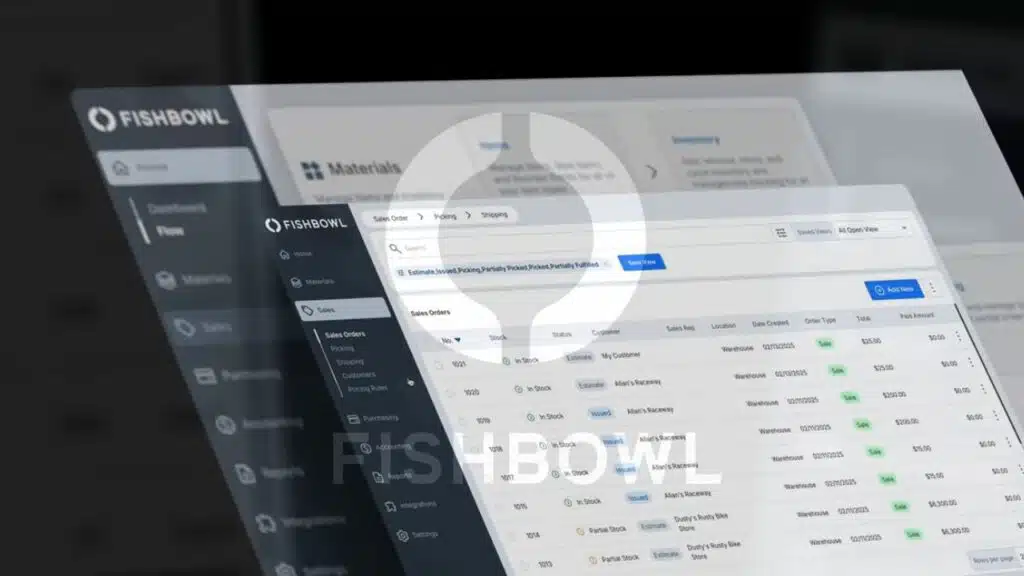
Fishbowl Inventory shines for manufacturing and wholesale businesses, folks. Imagine juggling stock like a circus act, but this manufacturing software turns chaos into smooth sailing.
It costs a one-time license fee starting at $4,395, which packs a punch for long-term value. You get advanced tracking with lot, batch, and serial control to keep tabs on every item.
Batch tracking becomes a breeze, reducing mix-ups that plague supply chain management. Plus, it includes work orders and bill of materials, or BOM, to streamline production. Barcode scanning and RFID tech make stock control quick and error-free.
Automation steps in to cut down mistakes, boosting inventory accuracy like a trusty sidekick. Integrates seamlessly with QuickBooks, Xero, Shopify, Amazon, and WooCommerce for that all-in-one feel.
Choose cloud or on-premise setup, whatever fits your wholesale solutions best.
Picture your team scanning items with ease, no more wild goose chases in the warehouse. This tracking system supports barcode scanning to speed up tasks and slash error rates. Automation handles the heavy lifting in inventory management, freeing you up for bigger wins.
Supply chain management gets a real boost with these tools. Work orders flow without hitches, and BOM keeps materials in check. Integration software links everything, from accounting to e-commerce platforms like Shopify or Amazon.
On-premise options give you control, while cloud deployment offers flexibility. Wholesale businesses see stock control improve overnight. Advanced features like serial control track unique items down to the last detail.
What Features Does inFlow Inventory Offer for Inventory Tracking?
InFlow Inventory shines for small business solutions with simple inventory management needs. You get barcode scanning and RFID tools to track stock fast, like a quick scan at the checkout.
It handles multiwarehouse setups, so you manage goods across spots without mix-ups. Pricing kicks off at $110 or more per month for two users, making it a smart pick for tight budgets.
Automation steps in for reordering and inventory notifications, alerting you before stock runs low. Imagine your system whispering, “Hey, reorder those widgets now,” to keep things smooth.
Reporting and analytics give you clear insights for smart choices, turning data into your secret weapon. Ecommerce integration links up with online stores, while POS systems connect for seamless sales.
A mobile app lets you handle mobile tracking on the go, perfect for checking inventory from your phone during a busy day. This setup boosts efficiency, cuts errors, and fits right into your daily grind.
What Does NetSuite Warehouse and Fulfillment Provide for Supply Chains?
NetSuite Warehouse and Fulfillment stands out in supply chain management. It fits enterprises perfectly with its ERP enterprise resource planning features. Large businesses turn to it for strong reporting and analytics.
They get advanced inventory tracking that keeps everything in check. Warehouse management becomes a breeze, like having a smart sidekick that spots issues before they grow. Pricing kicks off at $999 or more per month, with custom models to match your setup.
Automation handles workflows and replenishment, saving you time and headaches. Imagine your stock levels updating on their own, no more frantic checks.
This software integrates smoothly with accounting, e-commerce, and shipping platforms. Cloud-based deployment offers scalability and remote access, so you work from anywhere. Role-based access adds security, keeping data safe like a locked vault.
Supply chain pros love how it boosts efficiency through real-time insights. You avoid overstock pitfalls, almost like dodging raindrops in a storm. Enterprises scale up without a hitch, thanks to these tools.
How Can Zoho Inventory Improve Your Inventory Management?
Zoho Inventory stands out as the best budget option for inventory management. You get it free for up to 50 orders per month, and paid plans start at $39 or more each month. This tool integrates smoothly with platforms like Shopify, Amazon, WooCommerce, and POS systems, making ecommerce integrations a breeze.
Imagine your stock control turning into a well-oiled machine, with automated tracking that gives you real-time visibility into every item. Barcode scanning speeds up the process, so you avoid those frustrating miscounts that eat into your day.
Plus, the cloud-based software lets you access everything from anywhere, and the mobile app keeps you connected on the go. Think of it like having a trusty sidekick that handles the heavy lifting in your supply chain.
Automation features in Zoho Inventory handle reordering and workflow management with ease, cutting down on manual errors that plague order fulfillment. Reporting tools and analytics provide clear insights, helping you spot trends and make smart decisions fast.
You feel that rush when your inventory runs like clockwork, right? This setup supports your entire supply chain, from stock arrivals to shipments out the door. Real-time tracking means you always know what’s low, so you restock just in time, like dodging a bullet before shortages hit.
Teams love how it simplifies tasks, turning chaos into smooth sailing.
What Are the Benefits of Using Odoo Warehouse Management Software?
Odoo stands out as the top open-source software for inventory management. You get a free community version, or pay starting at $31.10 per month per user for more features. This tool handles advanced inventory tracking, like lot and serial number management, which keeps your stock precise.
Imagine juggling multiple sites; Odoo’s multi-warehouse management makes that a breeze, optimizing your supply chain without the usual headaches. It integrates smoothly with accounting, e-commerce, and shipping platforms, so your operations flow like a well-oiled machine.
Add in modular extras for manufacturing and supply chain tasks, and you’ve got a powerhouse for warehouse optimization.
Automation tools in Odoo speed up workflow management with smart notifications that alert your team right away. Think of it as having a vigilant sidekick that cuts down errors and saves time.
Role-based access controls boost security, letting you decide who sees what in your system. Multilocation tracking becomes simple, even across distant spots, while e-commerce integration ties everything together for faster orders.
Opensource software like this adapts to your needs, turning complex tasks into straightforward wins.
How Does Cin7 Core Simplify Inventory Tracking?
Cin7 Core shines for businesses juggling multi-warehouse setups in their inventory management. You get advanced features that track stock across locations with ease. Imagine scanning items on the fly; it supports barcode scanning and RFID technology, making counts quick and accurate.
This software integrates smoothly with tools like QuickBooks, Xero, Shopify, Amazon, and WooCommerce. Those connections keep your supply chain humming without hiccups. Plus, its manufacturing modules handle batch tracking, perfect for production lines.
Businesses love how it optimizes everything through reporting and analytics. They spot trends and cut waste fast. Cloud-based deployment scales as you grow, no sweat. Pricing kicks off at $325 or more per month, fitting various budgets.
Picture your team ditching spreadsheets for a system that feels like a trusted sidekick in inventory tracking. Cin7 Core automates the tough parts, so you focus on growth. It turns complex supply chains into smooth operations, like oiling a rusty machine.
Users rave about the real-time insights from its analytics. You avoid overstock or shortages with smart data at your fingertips. This tool builds efficiency right into your daily routine.
Teams adapt fast, thanks to its intuitive design. Scalability means it grows with your ambitions, keeping pace effortlessly.
What Makes Brightpearl a Good Choice for Inventory Management?
Brightpearl stands out in the extended list of inventory tracking solutions. It targets retailers and wholesalers who handle multichannel sales. Imagine juggling orders from stores, online shops, and markets, like a circus performer with too many plates.
This software makes it easy. It provides integrations with e-commerce platforms, POS systems, and shipping tools. You get seamless connections that keep everything in sync. Businesses love how it supports automation for order processing and inventory updates.
Orders fly through without manual hassle. Think of it as your trusty sidekick, always ready to lend a hand in retail management and wholesaling. Plus, it boosts operational efficiency, so you focus on growth instead of chaos.
This tool offers advanced analytics and reporting features that give you clear insights. You spot trends and make smart choices fast. It designs for companies that want to streamline operations, cutting down on wasted time.
Role-based access and permissions let you control who sees what, like assigning keys to different rooms in a house. Team members get just the right info. Scalable cloud deployment means it grows with your business, no big hardware worries.
Ecommerce integration ties in smoothly, and access control keeps things secure. Order processing automation handles the heavy lifting, while analytics and reporting paint the big picture.
Cloud deployment ensures you access it from anywhere, anytime.
How Does Katana Streamline Manufacturing Inventory?
Katana MRP shines for small manufacturers, folks. It tackles inventory management with ease, like a trusted sidekick in a busy workshop. Imagine you juggle production planning and supply chain optimization without breaking a sweat.
The software includes key modules for work orders and bill of materials, or BOM as insiders call it. You get batch and serial number tracking to keep tabs on every item. Automation tools handle production workflows, so tasks flow smooth as butter.
Plus, it integrates with accounting and e-commerce platforms for seamless order tracking. Small business solutions like these make manufacturing software a game-changer, right?
Pricing kicks off at $179 or more per month for up to 500 orders, or snag $399 per quarter instead. Katana offers a 14-day free trial, perfect to test the waters. E-commerce integration links your shop online, boosting efficiency.
You optimize manufacturing inventory processes with these features, turning chaos into order. Imagine chatting with a friend over coffee, “Hey, this tool just saved my day on the factory floor.” Automation cuts down manual work, freeing you up for what matters.
What Features Does Finale Inventory Include?
Finale Inventory packs a punch for inventory management and order fulfillment in your supply chain. Suppose you’re juggling stock control across multiple spots, and this cloud-based platform steps in with multi-warehouse management to keep things smooth.
It supports advanced inventory tracking, like lot and serial number control, so you track every item without a hitch. Add barcode technology and RFID scanning functionality, and you scan items fast, cutting down errors in warehouse optimization.
The software integrates seamlessly with e-commerce, shipping, and accounting software, making your operations click like a well-oiled machine. You get real-time visibility and automated workflows for reordering, which feels like having a smart assistant that never sleeps.
Toss in reporting and data analytics tools, and you analyze trends to boost efficiency. Remote accessibility means you check stock from anywhere, perfect for busy folks on the go.
Pricing starts at $149 per month for 2 users handling up to 2,000 orders a month, and scales to $499 for 12 users with 35,000 orders. Imagine the relief, no more guesswork in stock control.
This setup helps streamline your supply chain, turning chaos into order with automated workflows. Ecommerce integration keeps sales flowing without snags. Data analytics reveal insights that save time and money.
Barcode technology speeds up tasks, and remote accessibility fits your mobile life.
How Can EZOfficeInventory Help Track Your Assets?
EZOfficeInventory steps in as your reliable sidekick for asset management, especially when you juggle items across various spots and teams. Imagine running a busy warehouse, and tools vanish like socks in a dryer.
This software fixes that mess with barcode scanning and RFID technology, plus QR codes for quick checks. Teams scan items on the spot, which cuts errors and saves time. It handles inventory tracking for multiple users and locations, no sweat.
Pricing starts at $320 a year for 50 users, or jumps to $49.99 a month for 100 users. For bigger crews, options go up to $95 a month or $155 a month for 200 users, and even $1,674 a year for that same group.
Cloud deployment makes it scale with your business, like stretching a rubber band without snapping. You get mobile access through an app, so field teams update info from anywhere, anytime.
That keeps everyone in the loop, you know?
Maintenance scheduling runs on autopilot here, alerting you before equipment breaks down, like a friendly nudge from a watchful friend. Workflow automation lets you create custom rules, streamlining tasks that once felt like herding cats.
Role-based permissions and user access management lock down who sees what, protecting sensitive data. Imagine assigning roles, one person views stock levels, another schedules fixes, all without chaos.
It supports asset tracking with these tools, making sure nothing slips through the cracks.
What Are the Key Features of Sortly Inventory Software?
Sortly shines for small to mid-sized businesses that crave simple inventory management. Envision this, you snap a photo or scan a barcode, and boom, your items log right in. This software supports photo-based and barcode scanning for quick entries.
It fits small business solutions like a glove, with a free plan and paid options up to $49 a month. The mobile application lets you handle asset tracking on the go, easy as pie. You get custom fields and tags for customization, sorting items your way.
Automated stock alerts ping you for low stock or asset checkouts, keeping surprises at bay.
Multi-user access and user permissions mean your team collaborates without chaos. Cloud storage handles backup, while data security guards your info like a vault. Imagine ditching spreadsheets for this setup, it feels like a breath of fresh air.
Sortly turns inventory tracking into a smooth ride, no more headaches over lost stock.
How Does Unleashed Inventory Software Support Supply Chains?
Unleashed Inventory Software shines for product businesses and distributors. It handles advanced inventory management with ease. Imagine: you run multiple warehouses, and stock flies off the shelves.
This tool supports multi-warehouse management, keeping everything in check. Users love its multilocation tracking, which optimizes the supply chain like a well-oiled machine. Automation tools kick in for reordering and stock notifications, saving you from those “oh no” moments of empty shelves.
Plus, it integrates seamlessly with accounting, e-commerce, and shipping platforms. Ecommerce integration means your online sales sync without a hitch. For product distribution, batch and serial number tracking add that extra layer of precision, like having an eagle-eyed assistant on duty.
Pricing starts at $349 per month, and it fits right into cloud-based solutions for scalability and accessibility. Explore analytics and reporting; they give deep supply chain insights that feel like insider tips.
Reorder management automates the grunt work, cutting down on manual errors. Supply chain optimization happens through these features, making your operations smoother than a fresh coat of paint.
Imagine chatting with a friend over coffee about how this software turns chaos into order. It provides reporting and analytics that spotlight trends, helping you stay ahead in the game.
What Inventory Solutions Does Ordoro Offer?
Ordoro stands out as a powerhouse in inventory management for e-commerce businesses. Imagine: you run a growing online store, juggling orders from multiple channels like a circus performer with too many plates.
Ordoro jumps in with ecommerce solutions that automate shipping logistics and dropshipping tasks. It integrates seamlessly with various e-commerce platforms, making multichannel selling a breeze.
You get automation tools that handle inventory workflows without the hassle. Plus, it supports barcode technology for quick scanning and a reordering system that keeps stock levels just right.
Forbes Advisor rates it at 4.9 stars, and for good reason. This cloud software lets you access everything remotely, perfect for teams on the go. Imagine chatting with a colleague: “Hey, did you check the analytics dashboard? Sales are spiking!” Ordoro provides reporting and analytics on inventory and fulfillment, helping you spot trends fast.
At $349 a month, it offers a 15-day free trial to test the waters. Businesses love how it boosts scalability, growing right alongside your operations.
Think about the daily grind of managing stock; Ordoro turns that chaos into smooth sailing. You automate reordering, so low stock never catches you off guard, like having a trusty sidekick who anticipates your needs.
The platform focuses on shipping automation, streamlining dropshipping from start to finish. E-commerce owners, listen up: it handles multichannel selling with ease, connecting your stores in one spot.
Barcode technology speeds up tracking, cutting errors that waste time and money. Explore the analytics dashboard; it reveals insights on fulfillment that drive smart decisions. As a cloud-based tool, Ordoro ensures remote access, so you manage inventory from anywhere, anytime.
Scaling your business feels less like climbing a mountain and more like a steady hike. Imagine a small shop owner saying, “Ordoro saved my sanity during peak season.” It integrates with key e-commerce platforms, enhancing efficiency.
With its focus on automation tools, you reduce manual work and watch productivity soar.
Key Features to Look for in Inventory Tracking Software
Hey, imagine your warehouse running like a well-oiled machine, with barcode scanners buzzing and cloud-based apps syncing stock levels in a flash, plus demand forecasting tools that predict needs like a crystal ball, and seamless ties to e-commerce platforms for smooth order fulfillment—it’s all about picking software that fits your supply chain like a glove, so stick around to dive deeper into what makes these gems shine.
What Are the Benefits of Real-Time Tracking?
Real-time tracking gives you clear visibility into incoming, outgoing, and remaining stock, like having a live map of your inventory flow. It cuts down on overstocking or stockouts with immediate updates, keeping your supply chain optimization smooth and stress-free.
Imagine your team spots shrinkage fast, boosts stock monitoring accuracy, and slashes manual errors that often trip up operations. This setup supports demand forecasting through data analytics, letting you reorder based on solid info to match customer needs without guesswork.
Teams make quicker decisions with realtime updates, ramping up operational efficiency and order fulfillment like a well-oiled machine. Accurate stock data lifts customer service, turning potential headaches into happy surprises.
Proactive supply chain management becomes your new best friend, reducing costs and enhancing accuracy across the board. Automation steps in to handle the heavy lifting, freeing you from constant oversight and letting your business thrive.
How Can Automation Capabilities Improve Inventory Management?
Automation capabilities change inventory management for the better, like a reliable sidekick that handles the heavy lifting. Imagine: your system automates reordering processes based on inventory levels, so you never run out of stock unexpectedly.
It sends notifications for low stock or replenishment needs, keeping everything on track without constant checks. This reduces manual workload and human error, freeing up your team for bigger tasks.
Plus, it streamlines workflow across departments, making supply chain management feel like a smooth ride instead of a bumpy road.
Think of it as giving your business a turbo boost in inventory control. Automation supports automated batch and serial tracking, which enhances speed and accuracy of order fulfillment.
It integrates with other business systems for seamless operations, optimizing workflow and boosting fulfillment efficiency. You save time on repetitive inventory tasks, cutting down on error reduction through process automation.
Stock monitoring becomes a breeze with replenishment automation, and order management flows without hitches. Imagine telling your old manual methods, “Thanks, but I’ve got a smarter way now,” as integration solutions tie everything together neatly.
Why Is Integration with Other Systems Important?
Integration connects your inventory tracking software to tools you already use, like QuickBooks or Xero for accounting, and Shopify, Amazon, or WooCommerce for e-commerce. This connectivity lets synchronization happen smoothly, so data flows without hitches.
Imagine your business as a busy kitchen, where ingredients move from fridge to counter without spills; that’s how integration streamlines shipping processes. It facilitates multichannel management for sales and fulfillment, letting you handle orders from various spots with ease.
Plus, it reduces duplicate data entry and those pesky errors that sneak in, saving you time and headaches.
This setup supports consolidated reporting and analytics, giving you clear insights at a glance. It enhances automation capabilities across business functions, like a well-oiled machine that runs on its own.
Integration simplifies onboarding by linking with existing systems, so you jump in without a steep learning curve. For growing businesses, it provides scalability, letting you expand without chaos.
Efficiency boosts as data management becomes a breeze, and streamlining operations feels like second nature.
Benefits of Using Inventory Tracking Software
Imagine your warehouse running like a well-oiled machine, with orders flying out the door faster than ever. Explore how these tools cut waste, boost accuracy, and keep your team smiling through the chaos.
How Does Inventory Software Improve Supply Chain Efficiency?
Inventory software automates and streamlines the reordering process, fulfillment, and stock updates. You get real-time data for supply chain optimization, like spotting issues fast.
This tool reduces order processing time through integration and automation, so your team moves quicker. Imagine you’re juggling multiple warehouses, and the software supports efficient multi-warehouse and multi-channel management without a hitch.
It enables quick identification and resolution of bottlenecks, keeping everything on track. Plus, it improves communication across supply chain partners, almost like giving everyone a shared playbook.
Think about stock tracking, the software reduces stockouts and surplus inventory, saving you headaches and cash. It enhances supply chain responsiveness, so you react to changes in a snap.
Data analytics help boost inventory turnover, turning slow movers into quick wins. With multichannel distribution, you handle sales from all angles smoothly. Automation cuts down manual work, freeing you up for bigger tasks.
Communication efficiency rises, making sure no one drops the ball in your network.
In What Ways Can Inventory Software Reduce Costs?
Inventory software cuts costs in smart ways, folks. It minimizes excess inventory carrying costs by keeping stock levels just right, like Goldilocks finding the perfect fit. You save money on storage and spoilage.
The tool reduces manual labor and time on inventory tasks, freeing up your team for bigger wins. Automation kicks in to handle replenishment, so you avoid unnecessary purchases that drain your wallet.
Imagine: no more guessing games in buying, thanks to data-driven purchasing decisions powered by data analytics.
This efficiency lowers error rates that spark costly mistakes, boosting stock control and operational efficiency. Software improves accuracy to cut down on lost or misplaced stock, which means less waste reduction headaches.
It consolidates systems, slashing IT and administrative overhead in your supply chain optimization efforts. Demand forecasting helps dodge stockouts that lead to lost sales, keeping cash flow steady.
All this automation and precision drive cost reduction across your inventory management, making your business run smoother and leaner.
How Does Inventory Software Enhance Tracking Accuracy?
Inventory software boosts data accuracy in stock control by using barcode and RFID scanning. This tech gives precise stock counts, like counting apples in a basket without missing one.
It automates data entry, which cuts down human error, you know, those slip-ups that happen when folks type in numbers by hand. Imagine a warehouse worker scans items fast, and the system logs everything spot on.
Plus, it supports lot, batch, and serial number tracking for better traceability in your supply chain.
The software provides real-time updates and visibility into inventory status, so you see stock levels right away. It tracks movements across warehouses and channels, helping with warehousing and order fulfillment.
Reporting tools detect discrepancies and shrinkage, like spotting a leak in a bucket before it empties. You can do regular auditing and reconciliation of stock, keeping everything in check.
Automation makes inventory management smooth, ensuring accurate customer order fulfillment every time.
Challenges of Implementing Inventory Software
Switching to new inventory tools often hits roadblocks, like steep startup fees that pinch your budget right from the start. Teams might struggle with learning curves, too, turning what should be a smooth ride into a bumpy one if you skip solid training sessions.
What Are the Initial Setup and Cost Challenges?
Inventory management brings its share of hurdles right from the start, folks. Subscription pricing kicks off at $149 per month for some platforms, but others drop as low as $29 to $49 monthly, like Zoho and Sortly.
Large enterprise solutions hit harder, with costs soaring to $999 or more per month for NetSuite, or a one-time fee of $4,395 for Fishbowl. Setup fees add to the sting, ranging from $1,200 to $15,000 for options like InfoPlus.
Data migration demands real effort; you clean up old records and reconcile existing stock, which takes serious labor. Additional hits come from training expenses, integration costs, and customization fees.
Smaller businesses feel the pinch from budget constraints, limiting access to advanced features. You pick between cloud solutions and on-premise software, and that choice shapes initial costs big time.
Software implementation might disrupt daily operations for a bit, like a bump in the road during a smooth drive. Think of it as planting a garden; the upfront work tires you out before the flowers bloom.
Operational disruption fades, but plan for it to keep things steady.
How Can You Effectively Train Team Members?
Start by conducting pilot sessions, and create detailed documentation for staff. This sets a strong base for onboarding. Training covers new standard operating procedures, or SOPs, and system workflows.
Use vendor-provided resources and support to make the process smooth. Assign an internal champion to lead the training effort, like a team captain steering the ship. Run training sessions that feel hands-on, almost like chatting over coffee about daily tasks.
Go for a phased rollout; it allows gradual learning and adaptation, easing everyone in. Encourage a feedback loop to spot gaps or issues early. Schedule ongoing training for new hires and updates, keeping skills sharp.
Regularly update training as system features evolve, so no one falls behind. Internal leadership drives this continuous education, turning implementation into a team win with solid user support.
How to Choose the Right Software for Your Business
Pick inventory management tools that match your daily operations, like stock control apps for small shops or full ERP systems for big warehouses. Compare costs and options, such as demand forecasting features in procurement solutions, to find the best fit that saves you time and money.
How Do You Assess Your Business Needs?
Start with a solid business assessment to pick the right inventory tracking software. Audit your current inventory processes, and spot those nagging pain points that slow you down.
Think of it like checking under the hood of your car before a long trip, you know? Determine the feature requirements that fit your setup, such as manufacturing modules, barcode scanning, or batch tracking.
Identify system integration needs with your other business tools to keep everything flowing smooth. Estimate user capacity, including the number of folks and locations for software deployment.
That step avoids headaches later on.
Set a budget planning strategy that matches available options, because nobody wants sticker shock. Project your future growth to boost scalability, so the software grows with you like a trusty sidekick.
Prioritize usability and training requirements to make sure your team jumps on board without a fuss. Consider security and compliance standards to protect your data. Compliance keeps things legal and safe, right? This approach ties into smart software selection for top-notch inventory management.
What Should You Compare in Features and Pricing?
You face choices in inventory tracking software, so let’s break down what to compare in features and pricing, like sizing up options at a bustling market.
| Aspect to Compare | Key Details and Examples |
|---|---|
| Subscription Costs | Look at ranges from free plans to $349 or more per month for top solutions. Enterprise options hit $4,395 or higher as one-time fees. For instance, inFlow charges $110 per month for 2 users. |
| Included Features | Evaluate automation tools, advanced tracking systems, reporting functions, and integrations with other apps. These perks streamline your supply chain, much like a well-oiled machine in a busy warehouse. |
| User Limits | Assess caps on users to fit your team size. EZOfficeInventory allows 50 users for $320 per year, while inFlow limits to 2 users at $110 monthly. Imagine this: your crew grows, and the software needs to keep up without a hitch. |
| Free Trials | Check trial periods to test drive the software. Ordoro offers a 15-day trial, and Katana provides 14 days. It’s like kicking the tires before you buy a car, saving you regrets later. |
| Setup and Implementation Fees | Review any upfront costs for getting started. Vendors charge these fees, so factor them in to avoid surprises, as if dodging hidden potholes on a road trip. |
| Support and Training Resources | Compare what vendors provide for help and learning. Strong resources mean quicker adoption, turning your team into pros without the headaches. |
| Contract Terms | Analyze options like monthly, annual, or one-time deals. Pick what suits your cash flow, like choosing a payment plan that doesn’t pinch your wallet too hard. |
| Consumer Sentiment and Ratings | Look at independent reviews and user feedback. High ratings signal reliability, guiding you like trusted word-of-mouth from fellow business owners. |
Takeaways
Pick the right inventory tracking software, and watch your supply chain hum like a well-oiled machine. Tools like Zoho Inventory or Fishbowl offer real-time stock control that cuts down on headaches from overstocking or shortages.
Explore these options today; they turn complex logistics into a breeze, saving you time and cash along the way. Imagine your team smiling as orders fly out the door without a hitch.
So, grab one that fits your business, and simplify that stock game for good.
FAQs
1. What makes inventory tracking software a game changer for supply chains?
Picture this, you’re juggling balls in the air like a circus performer, but one slip and everything crashes. Inventory tracking software steps in to simplify supply chains by keeping tabs on stock levels in real time, cutting down on those costly mistakes. Hey, it’s like having a trusty sidekick that never sleeps, making sure your business runs smooth as silk.
2. How do these 15 inventory tracking tools help small businesses?
Small businesses often feel like David facing Goliath in the supply chain world. These tools simplify supply chains by automating counts and alerts, so you avoid overstock headaches.
3. Can inventory tracking software predict supply chain snags before they happen?
Oh, wouldn’t that be a lifesaver? Many of these 15 options use smart data to spot trends and warn you early. That way, you dodge disruptions and keep things flowing without breaking a sweat.
4. Why pick one of these 15 for your warehouse needs?
Choosing the right inventory tracking software is like finding the perfect pair of shoes, it just fits. They simplify supply chains with features for tracking, reporting, and integrating with your setup. Plus, some add a dash of fun with user-friendly dashboards that make managing stock feel less like a chore.