
Your SaaS startup needs a fast, reliable home in the cloud. You might face slow site speeds, surprise costs, and poor support. These hiccups can hurt user trust. Growth can stall fast.
Did you know that Cloudways manages servers on cloud platforms, so you can scale in minutes? This guide shows top cloud hosting and VPS vendors with uptime guarantees, DDoS protection, and NVMe storage.
You will get clear steps to pick the best host for your app. Pick the perfect cloud host.
Key Takeaways
- SaaS startups need elastic scale, high uptime, NVMe storage, DDoS protection, daily backups, free SSL, and 24/7 support to keep apps fast and safe.
- AWS, GCP, and Azure top cloud hosting: AWS offers 200+ services with 99.99% uptime; GCP runs 200 data centers in 20+ regions with 99.95% uptime; Azure secures apps with identity controls and 99.95% uptime.
- Budget hosts cut costs sharply: Hostinger gives 78% off, Bluehost 83%, DreamHost 72%, and IONOS starts at $1/month—Hostinger, Bluehost, and DreamHost each hit 100% uptime in a Cybernews test.
- Managed hosts like Cloudways, DigitalOcean, Kamatera, and Heroku let teams skip server chores. Cloudways starts at $10/month; DigitalOcean droplets start at $5/month. All offer auto-scale, NVMe storage, free SSL, and DDoS defenses.
Key Factors to Consider When Choosing a Hosting Provider for SaaS Startups
Your SaaS must flex, so elastic scale sets and traffic directors must handle any rush. You need iron-clad encryption seals, sturdy security shields, plus a console as friendly as a chat bot, so you skip setup headaches.
Scalability and flexibility
Cloudways scales resources on demand with its managed cloud hosting and isolated servers, avoiding noisy neighbors and delivering smooth performance. Amazon Web Services, Google Cloud Platform, DigitalOcean and Heroku adjust compute instances in seconds, so you can handle traffic spikes without breaking a sweat.
Startups tap scalable infrastructure, adding capacity or cutting costs with a few clicks. Teams rely on load balancers, nvme storage and virtual server pools to meet peaks and dips.
This approach prevents idle compute power and saves on hardware bills.
Uptime and reliability
Service uptime can make or break user trust. Cybernews experts tracked performance for one month. Hostinger scored a perfect 100 percent. Bluehost matched that mark. DreamHost also hit full uptime.
Reliable servers need solid cloud infrastructure and uptime guarantee. Providers equip data centers with load balancers, daily backups, and DDoS protection. They fine-tune NVMe storage for fast access.
This setup cuts downtime and keeps your SaaS app running smooth. You skip panic calls at midnight.
Cost-effectiveness
Cheap plans let startups grow. Hostinger cuts 78% off and adds free months. Bluehost trims 83% on the first term. DreamHost drops rates 72%. IONOS asks $1.00 per month.
Cloud hosting or vps hosting both save cash if you pick the right specs. Look at uptime guarantee, daily backups, ddos protection, and NVMe storage. Managed cloud hosting packs free ssl and load balancers into a single price.
Scalable infrastructure helps you pay only for what you use.
Security features
Free SSL and email accounts from Hostinger help secure client data with ssl/tls. Cloudways adds Cloudflare Enterprise CDN for ddos protection and faster load times. Daily backups and disaster recovery plans guard against ransomware and data loss.
IONOS applies built-in security layers in its private cloud infrastructure. High availability data centers use network firewalls and dedicated server hosting to block intruders.
Customer support
ChemiCloud invests in fast responses and fixes. They staff 24/7 live chat and phone teams for cloud hosting and server hosting. Sites get DDoS protection and free SSL certificates.
Teams can tweak NGINX settings, set up CDNs, and run daily backups. Their developer-friendly hosting lets SaaS companies scale up quickly.
Hostinger prompts often lag in chat. Their slow chat support can frustrate users. They still offer phone assistance, but wait times run long. Slow tech support can cause downtime. Smart startups pick providers with managed cloud hosting and real-time help to keep apps humming.
Amazon Web Services (AWS)
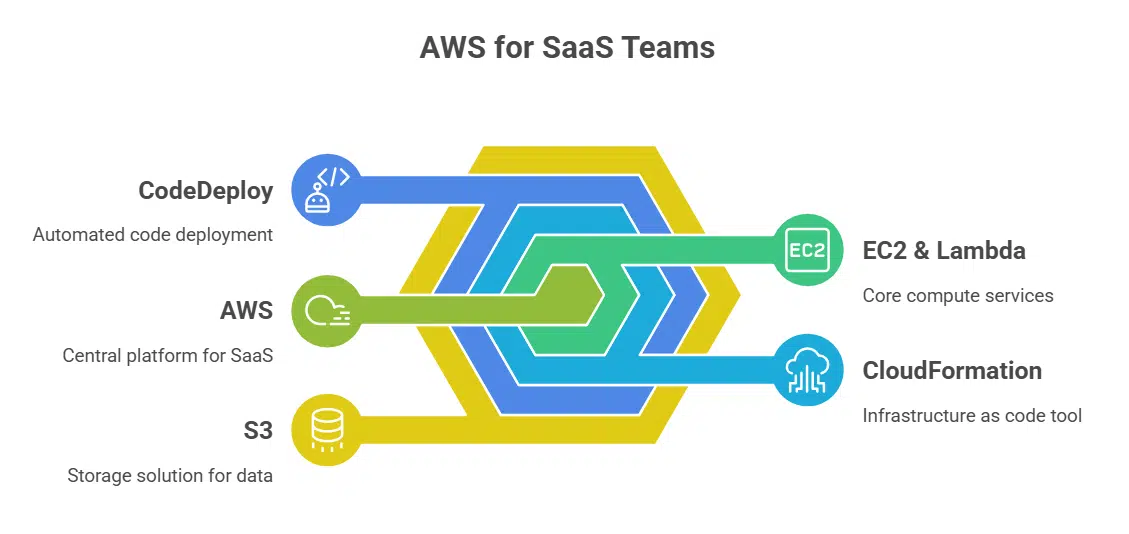
AWS serves SaaS teams like a Swiss Army knife, with EC2 servers and Lambda at your call. You define stacks with CloudFormation, swap code through CodeDeploy, and store bits in S3 vaults.
Features & Benefits of AWS for SaaS
Amazon Web Services ranks as the largest cloud provider, with over 200 services. It offers fast NVMe storage, low latency with load balancers, and serverless functions for on-demand load shifting.
Teams pay-as-they-go, so they only cover used computing power. AWS secures apps with DDoS protection, free SSL, and daily backups across global data centers.
Scalable infrastructure lets SaaS startups scale-up or down without costly hardware swaps. Cloudways taps AWS for its managed cloud hosting, so teams focus on code, not servers. A user-friendly control panel, 99.99% uptime guarantee, and 24/7 customer support guide you from staging environment to disaster recovery.
Pricing Considerations for AWS
AWS uses pay-as-you-go billing. Startups see big spikes after free tier ends. They move from low-rate virtual machines to standard vps hosting fees. They pay for EC2 instances, S3 buckets, and load balancers.
They tap autoscale groups to handle traffic surges. They get built-in ddos protection and nvme storage.
You can cap costs with reserved instances or on-demand pricing. Reserved instances lock rates for one-year terms. Spot instances slash compute costs by up to 70 percent. Billing tags track spend per service.
Budget alerts send emails on overspend. These tools curb surprise invoices and help plan for growth.
Google Cloud Platform (GCP)
GCP taps a global virtual network and container orchestrator to keep your SaaS humming, with a data warehouse and object storage ready for rush hour. You can fire servers with the Cloud SDK, set up load balancers, flip on DDoS protection, and spin up a staging environment in minutes.
Features & Benefits of GCP for SaaS
Google Cloud Platform stands out as a solid choice for SaaS startups. It runs on one of the largest fiber networks. This global web spans over 200 data centres in more than 20 regions.
Data moves fast, cutting latency for users. Load balancers steer traffic to healthy Virtual Machines. NVMe storage boosts database speed. You tap GPUs for AI tasks. Developers link up with Cloud SQL, App Engine, and Kubernetes Engine.
This setup drives innovation and raw performance.
Its pay as you go model keeps costs lean. You pay only for what you use. Startups lock in a 99.95 percent uptime guarantee. Daily backups run across regions for quick disaster recovery.
DDoS protection guards against bad traffic. Free SSL secures every session. Encryption at rest and in motion shields data. Google Cloud meets key compliance rules. Teams tap Google Workspace and Cloud Functions for smooth workflows.
This mix fits varied SaaS application needs.
Pricing Considerations for GCP
GCP offers per-second billing for VM Engine, which helps match costs to actual usage. It applies sustained use discounts automatically. Object Storage rates change by region and access class.
Application Engine charges by instance hours and data transfer. This pricing structure lets startups tailor budgets to their SaaS workloads.
Cloudways provides managed cloud hosting on GCP, by taking over server maintenance and security patches. It bills per server tier, so teams avoid surprise bills. Its developer-friendly hosting tools and user-friendly control panels make deployments smooth.
Small SaaS startups can pick entry-level plans with nvme storage and daily backups. This choice gives them low latency, free ssl, and ddos protection, without big budgets.
Microsoft Azure
Microsoft Azure runs on a public cloud network with data centers around the world. It packs cloud servers, a container orchestrator, serverless jobs, managed databases, and identity controls into one simple dashboard.
Features & Benefits of Azure for SaaS
Azure grows with your apps. You can add more cloud servers or serverless functions in minutes. It uses load balancers and auto-scaling to keep performance high. It tracks spending with cost management tools and alerts.
It drives updates through continuous integration and delivery pipelines in Azure DevOps.
Azure secures every layer with identity control and encryption. It offers ddos protection and daily backups for every instance. It taps global data centers with nvme storage for low latency and high uptime guarantees.
It links with Active Directory, GitHub, Docker, Kubernetes and third-party tools. It fits saas hosting, cloud-based software, and web hosting needs.
Pricing Considerations for Azure
Cloud hosting costs hinge on compute instance type, storage plan, and data transfer fees. Lsv2-series Virtual Machine uses local nvme storage and delivers scalable infrastructure. Regional rates differ by data centers, affecting vps hosting budgets.
Uptime guarantee and ddos protection add cost for high-availability setups.
Pricing for managed cloud hosting also covers daily backups and security features. Free ssl comes with some tiers, while dedicated resources cost more. Pricing Calculator in Azure Portal helps set budgets, tracking usage by tag.
Cost Management + Billing service sends alerts on spending spikes.
DigitalOcean
DigitalOcean makes launching a virtual server feel like flipping a light switch, with SSD drives and a simple interface at your fingertips. You tap its API to automate jobs, launch container clusters, or save files in object storage without breaking a sweat.
Features & Benefits of DigitalOcean for SaaS
Startups can spin up virtual servers in seconds with flexible vps hosting plans. It offers managed cloud hosting that fits tech-savvy teams. A user-friendly control panel and robust APIs create a developer-friendly hosting environment.
The platform handles WordPress hosting and PHP apps with one-click deployments. Automated backups run daily and simplify backup and recovery.
Scalable infrastructure adjusts CPU and memory as user counts grow. Load balancers and nvme storage cut latency and boost speed. Teams pick bare metal nodes or SSD block storage for extra power.
An uptime guarantee and built-in ddos protection keep apps online. Community guides and 24/7 technical support help fix issues fast.
Pricing Considerations for DigitalOcean
DigitalOcean provides a predictable pay-as-you-go model with droplets from $5 per month. This competitive pricing appeals to budget-minded SaaS startups. The plans include 1 vCPU, 1 GB memory, nvme storage and daily backups.
Users avoid unexpected fees common in major cloud providers.
Its developer-friendly cloud console, API, and Kubernetes help you launch or scale your SaaS application fast. Teams add load balancers or DDoS protection on demand. They gain full control over cloud infrastructure costs and usage.
Kamatera
Kamatera delivers on-demand VPS hosting with scalable infrastructure and fast disks, so you soar past traffic spikes. It packs firewall shields, DDoS guards and hourly snapshots to keep your SaaS safe and humming.
Features & Benefits of Kamatera for SaaS
It offers scalable infrastructure for SaaS startups, spinning up servers in seconds. Team members add or remove virtual private servers with a click. They fine tune CPU cores, NVMe storage, and load balancers to match peak traffic.
Developers spin up Docker containers on a user-friendly control panel.
Clients see a 99.95 percent uptime guarantee. They pay only for resources they use, cutting wasted budget. A tech team answers e-mails and calls around the clock for fast fixes. The service guards apps with firewalls, DDoS protection, free SSL, daily backups, and disaster recovery tools.
Pricing Considerations for Kamatera
Kamatera customers tap competitive pricing on cloud hosting plans. These schemes balance cost and quality. Startup teams scale VPS hosting or add load balancers and dedicated resources as they need.
This scalable infrastructure keeps cost spikes at bay.
Security features like ddos protection and free ssl land inside each price tier. The fee covers daily backups, an uptime guarantee, and low latency across global data centers. SaaS application teams see strong performance metrics, thanks to nvme storage and fast networking links.
That stability matches budgets for developer-friendly hosting.
Heroku
Heroku runs apps in containers, and it scales with one click, so you stay in control. It hooks into Git repos, CI pipelines, and managed databases, speeding up your SaaS launch.
Features & Benefits of Heroku for SaaS
A cloud hosting service powers saas hosting for startups. Platform as a Service offers instant deployment. Programmers push code to a Git repository and watch it go live. The platform supports Java, Python, Ruby and Node.js.
Scaling adjusts resources on demand. Developer-friendly hosting tools free teams from infrastructure chores.
Strong security shields user data with built-in SSL and ddos protection. Managed services handle routine backups and disaster recovery. A rich marketplace offers add-ons for databases, caching and email.
Third-party integrations link CRMs, analytics and payment gateways. Coders stay focused on building features. Daily backups and multi-regional data centers boost uptime guarantees.
Pricing Considerations for Heroku
Heroku runs apps on dynos, and each dyno carries an hourly fee. Promotional rates can drop that fee for the first contract term. Startups must track costs tied to scaling web servers, PostgreSQL, and add-ons.
This PaaS offers cloud services, developer-friendly hosting, and a user-friendly control panel. It handles scalability via load balancers and nvme storage, but every extra dyno and daily backup adds to the bill.
You should watch for hidden add-on fees to keep billing transparent. Factor in ddos protection, staging environment, and disaster recovery before you sign.
SiteGround
SiteGround runs on multi-tenancy and uses NVMe storage for speed. It adds Git-based workflows, daily backups, free SSL, and staging sites—see the next section for more details.
Pricing Considerations for SiteGround
Plans start at $2.99 per month for web hosting services. Each plan packs free SSL via Let’s Encrypt and daily backups. Shared hosting tiers let SaaS startups test applications on a budget.
A user-friendly control panel with cPanel integration simplifies website migration. The uptime guarantee stays near 99.99 percent.
Promotion ends after the first billing cycle. Renewal rates climb steeply, often over $14 monthly for managed hosting or cloud hosting. Growth plans add ddos protection, staging environment and dedicated resources.
Budgeting for dedicated servers and managed cloud hosting can help avoid cost surprises. Customer support and technical support stay strong beyond the initial deal.
Bluehost
Bluehost lights up your SaaS with strong cloud infrastructure, and it packs a helpful control panel to steer your app easily. It backs up your data daily, shields servers with DDoS protection, and keeps pricing simple, so you can grow with no shocks.
Features & Benefits of Bluehost for SaaS
The host offers shared hosting, vps hosting, and dedicated servers. It uses nvme storage for fast read and write speeds. It adds daily backups and free ssl certificates. The user-friendly control panel speeds up website migration and setup.
Developers like the staging environment and easy setup. WordPress tools and built-in analytics keep metrics close at hand.
It fits saas applications with scalable infrastructure and cloud hosting. It bundles ddos protection and security features. The platform gives a 99.9% uptime guarantee and disaster recovery options.
The provider runs data centers in multiple regions for low latency. Teams rely on dedicated resources, load balancers, and developer-friendly hosting. Support agents answer technical support queries around the clock.
Pricing Considerations for Bluehost
Shared hosting plans start at $1.99/month after an 83% off deal. Each package gives free SSL and daily backups. You can scale up to VPS hosting or dedicated servers. Bluehost uses NVMe storage in multiple data centers.
You pay month to month, with no long-term contract.
You can add ddos protection and load balancers to boost uptime. Site migration stays free, even for saas applications. You get a staging environment and whois privacy. Customer support runs 24/7 via chat and phone.
This cost structure keeps budgets lean and growth ready.
Hostinger
Hostinger packs a punch with NVMe drives, DDoS protection, and free SSL, so your SaaS runs on a lightning-fast cloud. Its hPanel feels like a friendly dashboard, and its 24/7 chat helps you tweak VPS hosting settings or view backups in moments.
Features & Benefits of Hostinger for SaaS
Free SSL and email join a global CDN to speed app delivery. A friendly control panel runs on mobile screens and desktop. It lets teams manage DNS, configure load balancers, and set up vps instances fast.
Subscriber apps rest on nvme storage, a tiered cloud infrastructure or dedicated servers. The plan covers daily backups, ddos protections, and an uptime guarantee.
Teams tap Hostinger’s SSH access, Git support, Docker containers, and Kubernetes pods for microservice apps. The provider rolls out managed cloud hosting, staging environments, and a clear disaster recovery path.
Domain registration and whois privacy protection sit in the dashboard. Low latency links to global data centers and 24/7 technical support round out the stack.
Pricing Considerations for Hostinger
Hostinger offers a plan that starts at only $2.69 per month. It applies a 78% discount and adds free months on select packages. This rate buys nvme storage, free ssl and a user-friendly control panel.
Developers enjoy cPanel access and Git support.
Plans include an uptime guarantee, ddos protection and daily backups. You can move your site with website migration at no extra fee. A staging environment and disaster recovery features help protect your saas application.
The plan lets you switch to vps hosting later. Customer support and phpMyAdmin access arrive 24/7.
CloudWays
CloudWays feels like a dev crew at your side, it taps managed cloud hosting from AWS and Google Compute Engine with free SSL and global data centers. You launch a staging environment in seconds, schedule daily backups, and tweak load balancers in a friendly control panel.
Features & Benefits of CloudWays for SaaS
Small teams need room to grow without stress. CloudWays hauls in scalable resources, isolates servers for peak load, and taps NVMe storage for quick data reads. It uses a fully managed environment with load balancers, daily backups and staging environments.
This platform also ties in Cloudflare Enterprise CDN to slash latency. Users get built-in DDoS protection and managed hosting perks on demand.
Developers love the user-friendly control panel, SSH access, and Git deploy tools. Smart billing charges a flat rate for compute power, making cost planning a breeze. A quick migration tool shifts apps from other providers in under five minutes.
Teams can spin up new test sites or databases via API calls, with no heavy lifting. Cloudflare Enterprise CDN boosts performance and shields apps with enterprise rules. Support staff answer chats any hour, to squash glitches fast.
Pricing Considerations for CloudWays
CloudWays charges start at $10 per month for cloud hosting. This plan gives you managed cloud hosting and scalable infrastructure. You can add hourly load balancers to handle traffic spikes.
CloudWays adds fees for email accounts. You cover costs per mailbox. You may pay more for daily backups or disaster recovery. Free SSL and ddos protection stay part of the base plan.
Final Thoughts and Recommendations
Picking the right host can fix scaling pains. AWS, GCP, Azure, and others bring solid cloud infrastructure, load balancers, NVMe storage. These platforms back uptime, daily backups, DDoS protection.
Platforms suit SaaS apps hungry for growth. Each plan adds control panels, a staging environment, free SSL, and dev-friendly tools. A sweet deal waits for founders on tight budgets.
Jump in, spin up servers, code away. Ready to launch your application? Act now.
FAQs on Best Hosting Providers for SaaS Startups
1. What makes a web hosting provider ideal for SaaS startups?
A good host acts like a pit crew for your SaaS app. It offers scalable infrastructure so you can grow, low latency so users don’t wait, and strong security features like ddos protection.
2. Do SaaS hosting providers offer daily backups and disaster recovery?
Yes, top SaaS hosting providers include daily backups, a staging environment for safe testing, and disaster recovery plans in data centers. This keeps your data safe even when things go sideways.
3. Can I move my SaaS application to a new host without hassle?
Most hosts offer smooth website migration. They shift your http files, databases, and on-premises apps fast. You skip the headache and get back to building your code.
4. Should I pick VPS hosting or managed cloud hosting?
VPS gives you dedicated resources and full control over your server. Managed cloud hosting handles server upkeep, adds load balancers, and taps into google cloud. You focus on features, not hardware.
Shared hosting shares server space to cut costs, but high traffic can slow you down. Dedicated hosting gives you a full server, often with nvme storage, a solid uptime guarantee, and custom http settings.
6. What extra features should I look for in SaaS hosting?
Look for developer-friendly hosting with a user-friendly control panel, free ssl, whois privacy protection, and 24/7 customer support. Also check for cloud infrastructure, scalable infrastructure, and low latency for a smooth user ride.