In a significant technological shift, Google is actively working to merge its two major operating systems—Android and ChromeOS—into a unified platform. This decision is expected to reshape the user experience across smartphones, tablets, and laptops using Google’s software, allowing for seamless integration and improved functionality, much like Apple’s highly interconnected ecosystem of iPhones, iPads, and MacBooks.
What Google Is Planning: Android and ChromeOS Come Together
The announcement about merging Android and ChromeOS into a single framework came from Android’s President, Sameer Samat. Google aims to rebuild ChromeOS on top of Android’s core technology, effectively combining the two systems at a foundational level. This move is intended to enhance overall system performance, accelerate software updates, and ensure that different devices powered by Google’s platforms communicate and cooperate effortlessly.
This strategic evolution has been underway since 2023, according to internal sources and public statements made by Samat on X (formerly Twitter). By unifying the systems, Google is attempting to eliminate long-standing limitations that have required users to navigate two separate, though partially integrated, environments.
Why It Matters for Users of Android and ChromeOS Devices
The merger is expected to deliver tangible improvements for users. Currently, those who use an Android smartphone alongside a Chromebook often experience inconsistencies in the user interface, app behavior, settings, and even file-sharing capabilities. By merging the two operating systems into one cohesive structure, Google is aiming to simplify everyday digital tasks, especially for users who switch between devices frequently.
For example, syncing files, sending messages across devices, continuing tasks from one platform to another, and managing shared app data will become far more streamlined. It reduces the learning curve for users and provides a consistent look and feel across devices, eliminating the need to relearn functions just because you’ve switched from a phone to a laptop or tablet.
This shift will be particularly beneficial in educational environments, where Chromebooks are widely used, as well as for professionals who depend on Google tools across multiple devices.
The Bigger Picture: Responding to Apple’s Ecosystem Success
Apple’s ecosystem is known for offering a unified experience across all its devices. Features like Handoff, iCloud syncing, Universal Clipboard, and iMessage continuity provide a level of integration that makes switching between an iPhone, iPad, and Mac almost effortless. Apple’s tight software-hardware coordination has been a key selling point for years.
Google’s decision to unify Android and ChromeOS is seen as a direct response to Apple’s success in ecosystem integration. While Android is the most widely used mobile operating system globally, and ChromeOS holds a dominant share in education and budget laptop markets, the two systems have historically functioned as distinct products with only limited cross-functionality. This fragmentation often led to duplicated development efforts and user frustrations.
The new unified platform will help Google not only compete more directly with Apple but also position itself as a stronger alternative for consumers seeking an integrated tech environment that supports a wide array of devices and services.
The Technical Side: How Android and ChromeOS Are Built
Both Android and ChromeOS are Linux-based operating systems developed by Google, but they were designed with different goals:
-
Android, launched in 2008, was built specifically for smartphones and touch-based interactions. It supports a massive global ecosystem of manufacturers including Samsung, OnePlus, Motorola, and Google’s own Pixel line.
-
ChromeOS, introduced in 2011, was designed for lightweight, cloud-centric computing with a focus on running web apps through the Chrome browser. It powers Chromebooks, which have become popular in classrooms, budget laptop markets, and among minimalistic users who rely mostly on browser-based work.
Over time, however, the distinction between mobile and laptop use has blurred. ChromeOS added support for Android apps through the Google Play Store, and Android devices began supporting desktop modes, like Samsung DeX, which mimics a laptop-style interface. These developments laid the groundwork for the full-fledged merger currently in progress.
What Developers and Tech Experts Are Saying
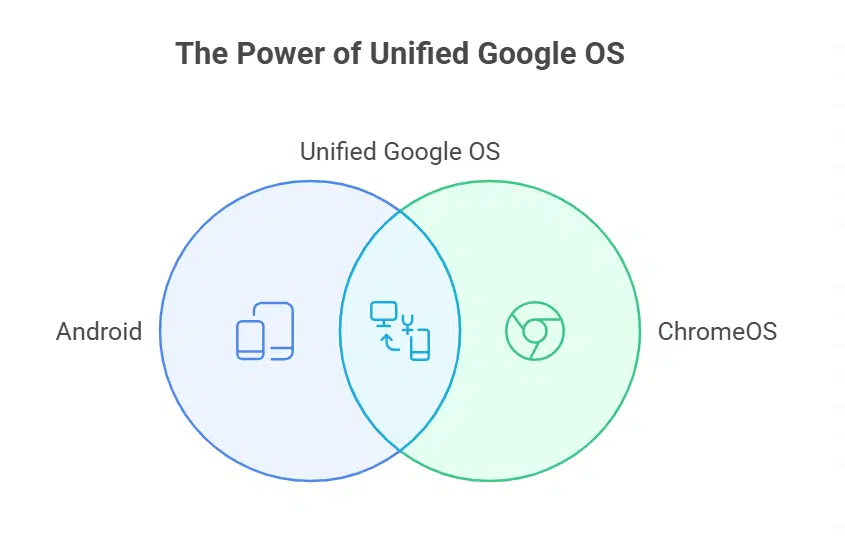
Industry observers note that the unification of Android and ChromeOS has been years in the making, with incremental steps like Nearby Share, Phone Hub, and shared Google account sync features pointing toward eventual convergence.
Tech podcast host Jason Howell noted that the merger is a logical next step. By creating one shared operating system, Google can focus its engineering resources, speed up updates, and reduce fragmentation across its ecosystem. The result will be a more consistent experience for users and a simpler development environment for app creators.
Developers will likely need to adapt their apps to work smoothly on both touch and keyboard/mouse interfaces, but the upside is that a single codebase could support smartphones, tablets, Chromebooks, foldables, and possibly even TVs and wearables in the future.
Android 16: A Glimpse Into Google’s Unified Vision
This announcement comes alongside the release of Android 16, the latest version of Google’s mobile operating system. Android 16 introduces the Material 3 Expressive Design language, which offers more visual flexibility, better large-screen optimization, and enhanced user customization options.
Android 16 is already being hailed as one of the most significant design updates to the platform in the past several years. These changes are not just cosmetic—they are part of a broader strategy to ensure that Android feels at home not just on phones but also on laptops, tablets, and beyond. With these developments, Android is being reshaped into a more versatile operating system capable of supporting a variety of form factors under a unified interface.
What Users Can Expect in the Future
Though Google has not provided a clear timeline for the complete rollout of the merged OS, several outcomes are likely in the near future:
-
A consistent UI and UX across devices, reducing friction for users switching between platforms.
-
Improved performance and battery life, thanks to shared optimization strategies.
-
Faster and more reliable software updates, as resources are focused on one platform.
-
Better app compatibility, with Android apps seamlessly working on Chromebooks and other large-screen devices.
-
Enhanced cross-device features, including task continuity, shared notifications, and universal clipboard.
This transition may also pave the way for more premium Chromebook models that support advanced Android functionalities, making them more competitive with Windows laptops and MacBooks in professional and creative sectors.
Google’s decision to unify Android and ChromeOS reflects a broader industry trend of device convergence, where users demand flexible, seamless experiences across platforms. As smartphones become more powerful and laptops become more cloud-based and app-driven, the line between mobile and desktop computing continues to blur.
For Google, this merger is not just a technical evolution—it’s a strategic repositioning to remain competitive in a world where consumers expect their devices to work together effortlessly.
This move could ultimately result in a more integrated and user-friendly Google ecosystem, giving users fewer reasons to jump ship to Apple or Microsoft alternatives.