

Finding the right workforce tracking software can feel like searching for a needle in a haystack. Most HR managers juggle multiple systems that don’t talk to each other, creating chaos instead of clarity.
This guide breaks down 12 powerful workforce management tools that top HR professionals use to streamline their daily operations, boost employee engagement, and cut administrative headaches in half.
Ready to transform your HR department?
Key Takeaways
- BambooHR costs $12 per user monthly and combines employee records, payroll, and performance management in one dashboard.
- Workday offers AI-driven workforce analytics at $8 per user monthly, targeting large organizations with advanced planning tools.
- Deputy reduces scheduling conflicts by 80% for retail and hospitality businesses with 31-day free trials available.
- Gusto automates payroll calculations and handles multi-state tax filings to reduce human error for small businesses.
- Planday costs $3.40 per user monthly and provides budget-friendly staff scheduling with real-time communication features.
How does BambooHR simplify HR workflows and employee management?
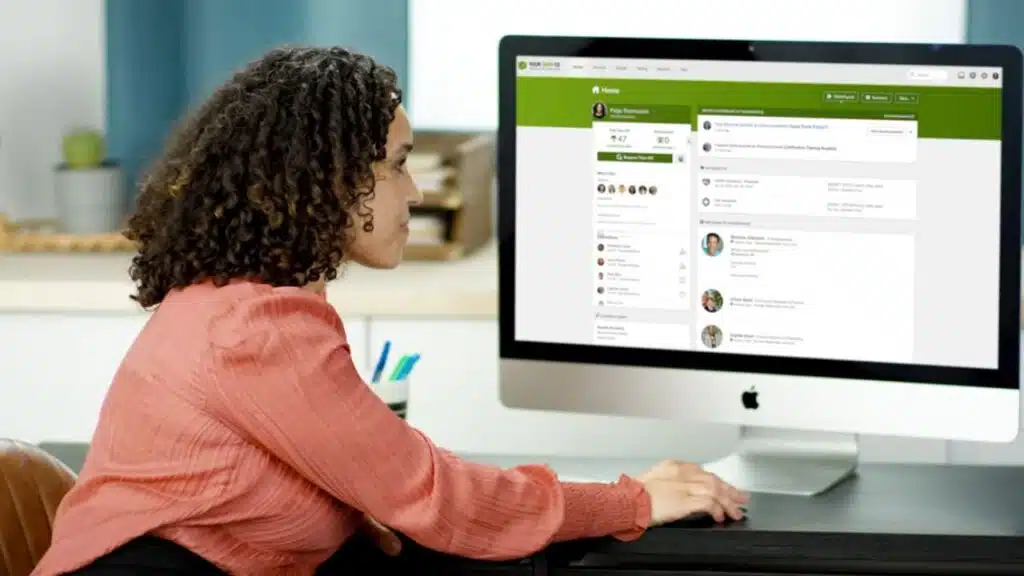
BambooHR transforms complex HR tasks into simple, streamlined processes for small and mid-sized businesses. This cloud-based workforce management platform automates time-consuming manual work that used to eat up hours of your day.
The software combines employee records, applicant tracking system features, payroll management, and performance management tools in one user-friendly dashboard. HR managers can track employee data, handle benefits enrollment, and manage time and attendance tracking without jumping between different systems.
At approximately $12 per user per month, the platform offers custom quotes and includes a free trial to test its capabilities.
The system excels at employee onboarding, making new hire paperwork a breeze instead of a headache. Document management becomes effortless as all employee files live in one secure location.
Performance management tools help track employee engagement and boost employee productivity through goal setting and regular check-ins. The platform’s hr automation features handle routine tasks like generating pay stubs and managing paid time off requests.
This leaves HR teams more time to focus on employee retention strategies and talent management initiatives that actually move the needle for their organization.
What workforce tracking and analytics features does Workday offer?
Workday packs a powerful punch for large organizations that need serious workforce analytics. This cloud-based workforce management platform costs around $8 per user per month, making it a smart investment for companies with big teams.
The software targets large organizations with comprehensive analytics that go way beyond basic time tracking. You get AI-driven planning tools that help predict staffing needs before problems hit.
Real-time dashboards show exactly what’s happening with your workforce right now. The system tracks employee productivity across departments and gives you the data to make smart decisions fast.
Advanced workforce management features include talent management tools that spot your top performers and identify skill gaps. The platform handles payroll management with global compliance built right in.
Labor law integration means you stay on the right side of regulations without breaking a sweat. Machine learning algorithms analyze patterns in employee engagement and help boost retention rates.
Free trials let you test drive the system before committing. The reporting and analytics tools dig deep into workforce planning data, showing trends that help you prepare for busy seasons or economic shifts.
Artificial intelligence powers the workforce optimization features, giving HR teams insights they never had before.
How can Deputy help with scheduling and time tracking?
Deputy tackles the chaos of employee scheduling with laser focus on retail and hospitality businesses. This workforce management software transforms the headache of shift planning into a smooth operation.
Managers create schedules in minutes, not hours. Staff members receive instant notifications about their shifts through mobile apps. The platform handles complex scheduling scenarios like split shifts, break coverage, and last-minute changes.
Deputy’s time tracking features capture clock-in and clock-out data automatically. Employees can’t manipulate their hours because the system tracks their exact location during shifts.
The software integrates seamlessly with payroll systems, cutting down on manual data entry errors.
Deputy offers a generous 31-day trial period for businesses to test all features. The platform connects with SC Training, formerly known as EdApp, creating a complete training management system.
This integration tracks training requirements alongside work schedules. Managers see which employees need certification updates or safety training. The system sends automatic reminders about expiring credentials.
Deputy’s reporting tools show labor costs in real-time, helping businesses stay within budget. Restaurant owners and retail managers praise the software for reducing scheduling conflicts by 80%.
The mobile-first design means employees access their schedules anywhere, reducing the constant phone calls about shift times.
Advanced workforce management features of UKG (Ultimate Kronos Group)
UKG delivers global workforce management solutions that tackle compliance challenges head-on. This platform combines time tracking, labor forecasting, and integrated team communication into one powerful system.
Large international teams find UKG particularly valuable because it reduces compliance risks with local labor laws across different countries. The software handles complex scheduling automation while keeping detailed records for internal audits.
UKG’s workforce analytics provide real-time visibility into employee productivity and attendance management patterns. The system supports distributed teams with cloud-based workforce management tools that work seamlessly across time zones.
HR departments can monitor employee engagement while tracking performance management metrics through comprehensive reporting features. The platform’s human capital management capabilities include everything from employee onboarding to exit interviews, making it a complete solution for enterprise-level operations.
How does Tanda streamline time and attendance tracking?
Tanda transforms time and attendance tracking into a simple process that works for teams of all sizes. This workforce management software offers mobile-based attendance features that let employees clock in from anywhere.
GPS geofenced clock-in options make sure workers log hours from the right location. The system supports businesses ranging from small teams of 1-5 people to large companies with over 5000 employees.
Shift scheduling becomes effortless with tools that handle employee schedules and shift swaps automatically. Time-off management tools integrate smoothly with the main system for seamless absence management.
The platform delivers powerful reporting and analytics that help managers assess workforce performance and attendance patterns. Real-time visibility into employee data helps HR teams make smart decisions quickly.
Tanda promotes compliance with labor laws by building local regulations directly into its scheduling logic. The system includes employee self-service portals where workers can view their schedules and request time off.
Cloud-based workforce management means teams can access their data from any device, anywhere. Attendance management becomes stress-free with automated features that reduce manual work and human error.
What makes When I Work effective for easy shift scheduling?
Shift scheduling becomes a breeze with this workforce management software. The platform streamlines shift scheduling for hourly teams across restaurants, retail stores, and healthcare facilities.
Real-time visibility lets managers see their entire workforce at a glance, making quick adjustments simple. Mobile punch clock functionalities allow employees to clock in and out from their smartphones, eliminating the need for traditional time clocks.
This cloud-based workforce management solution works perfectly for distributed teams who need flexibility.
Employee scheduling gets smarter with built-in shift swapping features that boost employee satisfaction. Workers can trade shifts directly through the app, reducing the back-and-forth emails that eat up managers’ time.
Leave management tools track absences and handle time-off requests automatically. The system integrates seamlessly with payroll systems, cutting down on manual data entry errors. Time and attendance tracking flows directly into payroll processing, saving hours each week.
Scheduling automation takes the guesswork out of workforce planning, while the user-friendly interface makes training new staff members quick and painless.
What end-to-end workforce management does ADP provide?
ADP delivers a complete workforce management solution that covers every aspect of your employee lifecycle. This platform handles everything from hiring new staff to managing their final day at work.
ADP’s system includes payroll automation that reduces costs and saves time for human resources teams. The software tracks time and attendance with precision, making sure your business stays compliant with labor laws across different states.
ADP’s workforce analytics give you real-time data analysis to make smarter staffing decisions. The platform supports businesses of all sizes, from small companies to organizations with over 5000 employees.
You can manage employee scheduling, track performance, and handle benefits enrollment all in one place. The system works well for various industries including retail, construction, and facility management, giving you the flexibility to adapt the tools to your specific business needs.
How does Replicon ensure accurate time tracking and project management?

Replicon’s Time Intelligence platform takes the guesswork out of tracking work hours and managing projects. This workforce management software uses artificial intelligence and machine learning to create smart timesheets that catch errors before they become problems.
The system costs $6 per user each month and comes with a free trial so teams can test it first. AI-driven timesheets learn from employee patterns and suggest accurate time entries automatically.
Custom reporting features give managers real-time visibility into how teams spend their time on different tasks. The platform integrates smoothly with ERP systems, human resources information systems, and accounting systems like QuickBooks.
This connection means no more double data entry or missing information between different business tools.
Project management becomes much simpler with Replicon’s automated time allocation features. The software tracks time spent on specific projects and tasks without requiring constant manual input from workers.
Compliance management tools help companies follow labor laws and avoid costly mistakes with employee time records. Managers get detailed workforce analytics that show which projects take the most time and resources.
The system also handles complex payroll management by connecting time data directly to pay calculations. Mobile teams can clock in and out using any device, making it perfect for distributed teams and remote workers.
Document management features store all time-related records in one secure location for easy access during audits or reviews.
What integrated HR and payroll management does Ceridian Dayforce offer?
Ceridian Dayforce brings all your HR and payroll management into one powerful platform. This workforce management software combines timekeeping, scheduling, and workforce forecasting to make your human resources department run like a well-oiled machine.
The system handles everything from employee onboarding to benefits enrollment without making you jump between different tools. AI-powered analytics help you make smarter decisions about workforce planning and compliance management tools keep you on the right side of labor laws.
Your team gets real-time visibility into payroll management, time and attendance tracking, and employee productivity metrics all in one place.
Global teams love how Dayforce supports multi-country and multi-location operations without breaking a sweat. The platform automates demand forecasting and employee scheduling, which cuts down on manual work and reduces those pesky compliance errors.
Payroll automation slashes operational costs while talent management features boost employee retention rates. Your staff can access employee self-service portals to check paystubs, request time off, and update their information anytime.
The system’s reporting and analytics give you the big data insights you need to improve employee satisfaction and streamline your entire HR workflow from start to finish.
How does Connecteam support workforce management for mobile teams?
Connecteam serves as a game-changer for companies managing mobile and deskless teams. This cloud-based workforce management platform tackles the biggest headaches that come with managing workers who are always on the move.
GPS tracking keeps tabs on employee locations during work hours, while shift scheduling tools make it simple to assign tasks and track attendance. The platform costs $29 per month for 30 users, making it budget-friendly for growing businesses.
Real-time communication features let managers and workers stay connected through in-app messaging, eliminating the need for endless phone calls and text chains.
Mobile teams love how Connecteam puts everything they need right in their pocket. Customizable workflows adapt to different job types, whether you’re managing delivery drivers, field service technicians, or construction crews.
Task management becomes effortless as workers can update job status, upload photos, and complete forms directly from their smartphones. The employee self-service portals give workers control over their schedules and time tracking without bothering HR staff.
Companies can try the platform risk-free with the available free trial, making it easy to see if Connecteam fits their workforce monitoring needs.
How does Gusto simplify payroll, benefits, and compliance tracking?
Gusto transforms payroll management from a headache into a breeze. This workforce management software automates payroll calculations and tax filings to reduce human error. HR managers love how it handles multi-state payroll management for employees across different states.
The platform takes care of tax forms, taxes, and all the nitty-gritty details that usually keep HR teams up at night. Small business owners find the intuitive user interface makes navigation simple.
No more wrestling with complicated systems or spending hours on manual calculations. Gusto’s automation features handle the heavy lifting while you focus on growing your team.
Benefits enrollment becomes a walk in the park with Gusto’s comprehensive tools. The system offers seamless management of various employee benefits, from health insurance to retirement plans.
Compliance tracking tools keep you updated with labor law changes so you never miss a beat. The platform provides robust reporting and analytics for payroll expenses and benefits usage.
HR teams get real-time visibility into costs and trends. Dedicated customer support and implementation services make transitions smoother than silk. The ease of use means even non-tech-savvy team members can master the system quickly.
Gusto’s employee self-service portals let workers manage their own information, reducing administrative burden on HR staff.
What project and task tracking features does Teamwork offer for HR?
Teamwork brings project management tools straight to HR teams who need better task management and workforce planning. This collaboration-focused platform helps HR professionals track deadlines, monitor task status, and allocate resources across multiple projects.
HR teams can create onboarding checklist templates for new hires, making employee onboarding smoother and more organized. The software includes Gantt charts and Kanban boards that give real-time visibility into project progress.
Time tracking features help measure employee productivity while resource management tools support better workforce analytics.
HR departments can use Teamwork’s free and paid versions to manage everything from talent management projects to compliance monitoring tasks. The platform’s reporting and analytics features provide insights into team performance and project completion rates.
Task assignments become clearer with deadline tracking and status updates that keep everyone on the same page. HR automation gets a boost through templates and recurring task setups that save time on routine processes.
Teams can collaborate on performance management reviews, benefits enrollment projects, and employee engagement initiatives all within one system.
How does NICE use AI-driven insights for workforce optimization?
NICE transforms real-time workforce data into actionable insights that help HR teams make smarter decisions. AI-powered analytics support quicker decision-making for staffing needs and resource allocation.
This workforce management software takes the guesswork out of scheduling by using smart data analysis. HR managers can see patterns in employee productivity and attendance that they might miss otherwise.
NICE’s solutions automate payroll processes, which cuts costs and prevents compliance errors. The software streamlines time tracking and shift planning, making HR teams more productive.
Local labor laws get built right into the scheduling logic, so companies stay compliant without extra work. Features include time tracking, shift scheduling, and compliance support, all boosted by AI capabilities that turn numbers into real business value.
How does Planday improve staff scheduling and workforce communication?
Planday transforms staff scheduling for hourly teams through its specialized approach to workforce management software. This platform costs approximately $3.40 per user per month, making it budget-friendly for small and medium businesses.
The system includes shift scheduling tools that let managers create schedules in minutes rather than hours. Employees can clock in and out using the punch-clock feature, which tracks time and attendance tracking automatically.
Leave management becomes simple as team members can request time off directly through the app. Managers approve or deny requests with just a few clicks. Payroll integrations connect seamlessly with existing systems, reducing manual data entry errors.
The free trial lets companies test all features before committing to the service.
Team communication flows smoothly through Planday’s built-in messaging system. Staff members receive instant notifications about schedule changes, shift swaps, and important announcements.
The platform works on both desktop and mobile devices, giving distributed teams real-time visibility into their work schedules. Dynamic workplaces benefit from automated scheduling features that adapt to changing business needs.
Employee self-service portals allow workers to view schedules, request shifts, and communicate with colleagues without calling managers. This reduces administrative burden while boosting employee engagement.
The system’s reporting and analytics help track labor costs, attendance patterns, and productivity metrics. HR automation features streamline routine tasks, freeing up time for strategic workforce planning activities.
What comprehensive HR solutions does greytHR offer for SMBs?
GreytHR delivers a complete workforce management software package built specifically for small and medium-sized businesses. This cloud-based platform tackles everything from employee onboarding to payroll management, making it a one-stop shop for busy HR teams.
The software shines with its time and attendance tracking features that support face recognition, mobile-based check-ins, and GPS geofenced monitoring. Small business owners love how the system handles shift planning and time off requests without breaking a sweat.
Payroll automation stands out as one of greytHR’s strongest features, cutting down compliance errors while streamlining monthly processing. The platform’s reporting and analytics tools give HR managers the data they need to make smart decisions about their workforce.
Distributed teams can access the system from anywhere, and the software plays nice with other hr tools your company might already use. From benefits management to performance tracking, greytHR covers all the bases that growing companies need to keep their human resource management running smoothly.
How does OnPay simplify payroll and HR for smaller teams?
OnPay transforms payroll headaches into simple tasks for small business owners. This cloud-based workforce management platform automates HR functions that usually eat up precious hours.
Small teams love its flat monthly rate pricing model with zero hidden fees. The software handles multi-state payroll processing while keeping businesses compliant with local labor laws.
Time tracking and attendance management connect directly to payroll calculations. This means fewer mistakes and less stress for busy managers.
Small companies get powerful reporting and analytics tools that bigger competitors use. The user-friendly interface makes hr automation feel natural, not complicated. Owners can focus on growing their business instead of wrestling with payroll spreadsheets.
OnPay’s comprehensive features include benefits management and employee self-service portals. Teams can clock in from their phones using the Android app. The system tracks everything from vacation days to overtime hours.
This workforce monitoring tool gives real-time visibility into labor costs and employee productivity across distributed teams.
Takeaways
Choosing the right workforce tracking software can make or break your HR operations. These 12 tools offer everything from time tracking to employee engagement features that boost productivity.
Smart HR managers know that investing in quality workforce management software pays off through better compliance monitoring and streamlined processes. Your team deserves tools that work as hard as they do, so pick the solution that fits your company’s needs best.
FAQs
1. What makes workforce tracking software essential for HR managers today?
Workforce management software helps HR managers handle employee scheduling, time and attendance tracking, and payroll management all in one place. These hr tools save time and reduce errors that come with manual processes. Most HR managers say these systems are game changers for employee productivity and compliance management.
2. How do these systems improve employee onboarding and retention?
Employee onboarding becomes smoother with document management features and employee self-service portals. New hires can complete benefits enrollment and access important information without constant HR support. Better onboarding leads to higher employee satisfaction and improved employee retention rates.
3. Can workforce tracking software handle compliance monitoring effectively?
Yes, these systems excel at compliance management tools and help companies follow labor laws automatically. They track time clocked by employees and generate reports for audits. Non-compliance risks drop significantly when you have real-time visibility into workforce analytics.
4. What advanced features do modern workforce monitoring tools offer?
Many platforms now include facial recognition systems and biometric time tracking for accurate attendance management. Cloud-based workforce management allows distributed teams to access scheduling automation from anywhere. Some even integrate with CRM systems and marketing tools like HubSpot for better employer branding.
5. How do these platforms support employee engagement and mental health?
Employee engagement tools within these systems help track satisfaction levels and identify stress management needs. HR automation frees up time for managers to focus on talent management and performance management. Features like flexible shift planning and self-service options give workers more control over their schedules.
6. What should HR managers look for in terms of usability and integration?
User-friendliness is key when choosing workforce planning software. Look for systems that offer resume parsing for recruitment, easy shift management, and simple reporting and analytics. The best platforms integrate with existing hr metrics tools and provide labor forecasting to help with strategic planning.






























