

A Microsoft 365 alert, a package redelivery text, an urgent message from your boss—phishing scams rely on speed and panic to make you act before thinking. So, what is phishing and how to spot it before damage occurs?
Phishing is a social engineering cyberattack where attackers impersonate trusted individuals, brands, or institutions via email, SMS, or phone calls. Their goal is to trick you into revealing sensitive data—like passwords, banking credentials, or personal information—or installing malicious software.
Spotting phishing comes down to recognizing key red flags: artificial urgency, unexpected links, requests for private credentials, and domain name subtle mismatches. Checking the actual intent of the request beats judging a message’s visual appearance every time.
What Is Phishing and How to Spot It in Real Messages
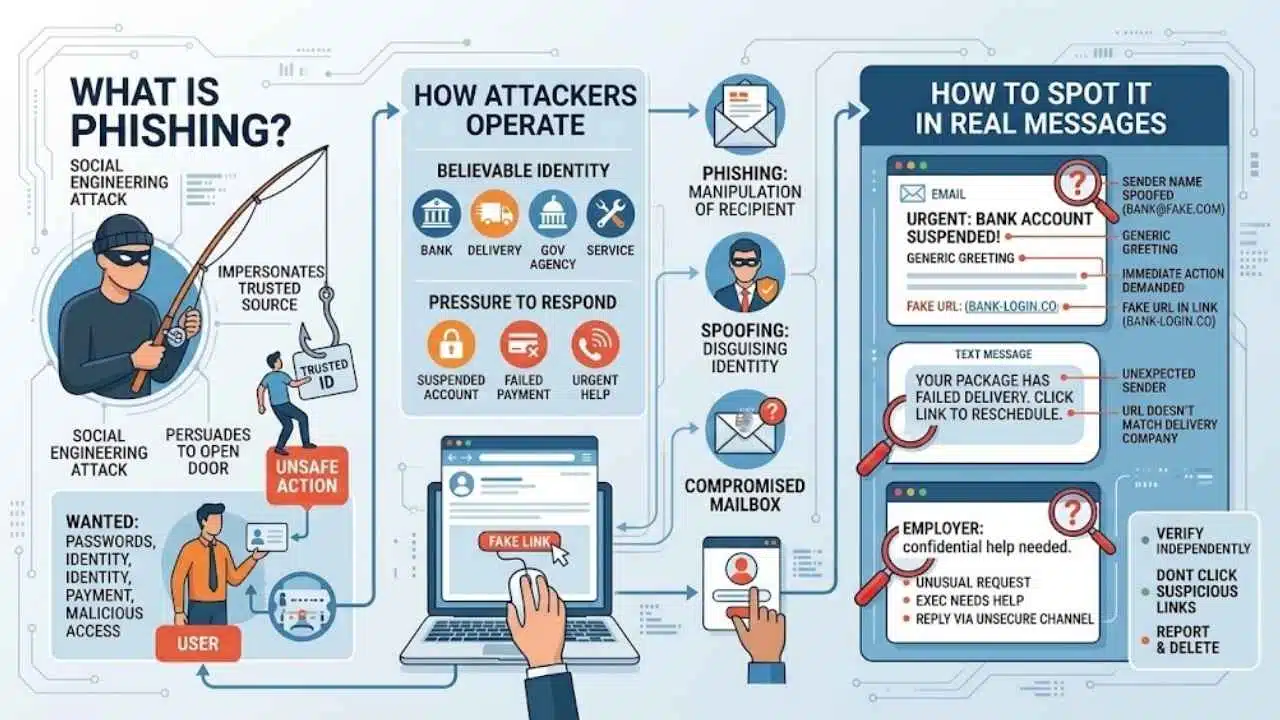
Phishing is a social engineering attack in which someone impersonates a trusted person or organization to persuade the recipient to take an unsafe action. Instead of breaking through a technical defense first, the attacker tries to make the user open the door.
The attacker may want a password, payment or identity information, approval for an unexpected sign-in, or access gained through a malicious attachment or remote-access program.
Most attempts combine a believable identity with pressure to respond. The sender claims to represent a bank, delivery company, government agency, employer, customer, or service you use. An account will supposedly be suspended, a payment has failed, or an executive needs confidential help.
Spoofing is related but distinct: it means disguising a sender name, address, caller ID, or URL. Phishing is the attempt to manipulate the recipient. It may use a spoofed identity, a lookalike account, or a real mailbox that has been compromised.
Phishing Can Reach You Almost Anywhere
Email remains a common route, but phishing follows people into whatever channel they use:
- Smishing arrives by SMS or a messaging app. Fake delivery notices, toll charges, and account alerts fit this pattern.
- Vishing uses a phone or voice call, often impersonating a bank, technical-support worker, police officer, or government representative.
- Spear phishing targets a particular person or organization using relevant names, roles, projects, or events.
- QR phishing, sometimes called quishing, hides the destination behind a QR code, making the address harder to inspect.
- Social media phishing appears in direct messages, advertisements, impersonated profiles, or compromised accounts.
- Business email compromise uses apparently legitimate correspondence to redirect payments or collect sensitive information, sometimes by altering an existing email conversation.
The label matters less than the behavior: establish trust, create pressure, and push you toward an action you would normally question.
Read the Request, Not Just the Design
A polished logo, a familiar sender photo, and perfect grammar do not establish that a message is genuine. Those details are easy to copy. Examine what the sender wants and whether it makes sense in context.
Urgency is being used to shorten your thinking time
Be cautious when a message imposes an immediate deadline or threatens a severe consequence: an account will close today, a parcel will be returned, or a payment must be completed within an hour.
Real deadlines exist, but a legitimate organization will usually provide another way to review the issue through its app, your account dashboard, a statement, or a published phone number.
The request is unexpected or breaks the normal process
A password-reset email is suspicious if you requested no reset. An invoice needs checking if you do not recognize the supplier. A senior colleague’s request should not bypass normal purchasing controls merely because it is marked urgent.
Ask three questions: Was I expecting this? Is this how the sender normally handles the request? Why am I being asked to complete it through this message?
Context often exposes a scam more reliably than spelling.
The displayed identity proves very little
A display name such as “Microsoft Support” can be entered by almost anyone. Expand the sender information and inspect the complete address. Look for misspellings, substituted characters, an unexpected reply-to address, or a free email account used for company business.
Even a correct address is not conclusive because real accounts can be compromised. If a familiar contact suddenly asks for money, credentials, or secrecy, verify the request another way.
Check where the link actually goes
On a computer, hovering over a link will often reveal its destination without opening it. Focus on the domain rather than the linked words.
For example, https://accounts.example.com/security sits under example.com. By contrast, https://example.com.secure-login.invalid/security uses secure-login.invalid, not example.com.
Shortened links, QR codes, and small mobile screens make this harder. Do not turn URL inspection into a technical exam. If the address is uncertain, open the official app, use an existing bookmark, or type the known address yourself.
The padlock is widely misunderstood. HTTPS means the connection is encrypted; it does not prove that the site operator is honest. A fraudulent website can use HTTPS too.
Some requests deserve an immediate stop
Do not provide a password, PIN, recovery code, or one-time login code in response to an unsolicited message. Reject login prompts you did not initiate. Treat urgent requests for gift cards, cryptocurrency, remote-access software, or replacement bank details as high risk.
Unexpected attachments deserve the same caution. Do not enable macros, bypass a security warning, or install a special viewer because a document says it is required. Confirm the file with the sender through a separate, trusted channel first.
Use a Separate Route to Verify the Request
The safest check happens outside the message. Open the organization’s official app, use a trusted bookmark, or type the known web address. Look for the supposed payment problem, delivery notice, or security warning there.
For unusual requests, use a second channel. Call the person on a number you already have, not one supplied in the message. Check a parcel on the carrier’s official site and a bank alert inside the banking app. Confirm new supplier details with an established contact before money moves.
Report the message through your email provider, messaging platform, or workplace process before deleting it. Do not use its unsubscribe link; it may lead to another fraudulent page.
You do not need to prove that a message is malicious. You only need a safer way to check whether its claim is real.
Small Businesses Need Controls Around Employees
Telling employees to “be careful” is not a security system. Even experienced users can be fooled by a message built around a real project or email thread.
Changes to payroll instructions, supplier bank details, large purchases, and requests for sensitive files should require confirmation through a second channel. A senior employee’s email should not override the normal approval process.
Small businesses also need multifactor authentication, limited administrator access, email filtering, domain authentication such as SPF, DKIM, and DMARC, and a simple reporting route. Employees must be able to report a mistake without expecting punishment. Fear causes delays, giving an attacker more time to use stolen access.
Training helps people recognize familiar patterns. It cannot catch every convincing message, so payment controls and technical defenses still matter.
What to Do If You Already Clicked
A click does not automatically mean an account or device has been compromised. What happened next determines the response.
You opened a page but entered nothing
Close the page and report the original message. On a work device, tell IT or the security team even if the page appeared blank. Updated browsers reduce risk, but a malicious page may still attempt to deliver harmful content.
You entered a password
Open the real service through its official app or a separately entered address and change the affected password. If you reused that password, replace it on the other accounts as well.
Review recent logins and connected devices, end unfamiliar sessions, and check recovery phone numbers and email addresses. Remove unknown apps with account access. For email, inspect forwarding rules, filters, and automatic replies you did not create. Then turn on multifactor authentication or review its settings.
If you opened a file or installed software, change sensitive passwords from another trusted device or follow your workplace IT team’s instructions.
Reject further prompts, change the associated password, and review active sessions. Contact the service provider or workplace security team if sensitive information is involved.
Multifactor authentication reduces the risk of account takeover, but manually entered codes and push approvals can still be phished.
Contact the bank or card issuer immediately using the number on the card, statement, or official website. Ask about blocking the card, recalling a transfer, or disputing unauthorized activity. Do not postpone the call while documenting the scam; the opportunity to stop a transfer may be limited.
You opened a file or installed software
Stop following the sender’s instructions. On a work device, contact IT. On a personal device, update the installed security software and run a full scan. Seek qualified help if you installed remote-access software, granted unusual permissions, or notice unexpected behavior.
Keep the original message for reporting, but do not forward a suspicious attachment to coworkers as a warning.
Reduce the Damage a Future Attempt Can Cause
No security measure catches every phishing message, but a few controls limit what a stolen password or mistaken click can do:
- Use a unique password for every important account. A reputable password manager makes this manageable.
- Enable the strongest authentication method the service supports. Passkeys and FIDO security keys resist fake login sites better than passwords combined with manually entered codes.
- Treat every unexpected authentication prompt as suspicious.
- Install operating-system, browser, email, and app updates promptly.
- Use official apps or saved bookmarks for banking, payroll, shopping, and administrative accounts.
- Review how much workplace, travel, contact, and family information is publicly visible.
- Back up important files in case a phishing attack leads to malware or ransomware.
Some password managers match credentials to the legitimate domain and will not autofill them on a lookalike page. Behavior varies, so treat failed autofill as a reason to check, not proof of fraud.
Where to Report Phishing
Reporting routes can change, so check the relevant official service for current instructions. In the United States, report fraud to the Federal Trade Commission. The FTC also directs consumers to forward phishing emails to the Anti-Phishing Working Group and suspicious texts to 7726.
In the United Kingdom, forward suspicious emails to the National Cyber Security Centre and texts to 7726. If money was lost, contact the bank immediately and use the appropriate fraud-reporting service.
In Canada, report through the Canadian Anti-Fraud Centre; suspicious texts can also go to 7726. In Australia, report scams to Scamwatch and cybercrime through ReportCyber.
Elsewhere, look for the official national cybersecurity agency, consumer-protection authority, telecommunications provider, or police cybercrime service. Work-related messages should also go through the employer’s approved reporting process.
Final Thoughts
If you remember one answer to “What is phishing and how to spot it?”, make it this: a suspicious message wants you to trust the route it provides. Safer verification takes you somewhere else.
Pause, leave the message, and use an official app, known website, established phone number, or workplace process. That brief interruption is often enough to keep a convincing request from becoming a stolen account, infected device, or fraudulent payment.























