
A website is built, the content is crafted with care, and the goal is clear: rank higher on Google. Then comes the big decision—should the blog live on a subdomain like “blog.example.com,” or inside a folder such as “example.com/blog”? Many site owners feel stuck at this crossroads because this single technical choice can influence how search engines evaluate the entire site.
The debate around Subdomains Vs Subdirectories has been ongoing for years. Google often treats subdomains as separate entities, while subdirectories remain closely tied to the main domain. As of 2026, the data leans strongly in one direction—but the best option still depends on specific goals, site structure, and long-term SEO strategy.
This guide breaks down what Subdomains Vs Subdirectories mean for traffic, rankings, authority, and user experience. No jargon—just clear, practical insights to help a website perform at its best.
What Are Subdomains and Subdirectories?
Many people spot these terms while glancing at a browser address bar, but what do they really mean for your business? Stick around, because understanding the power in those little slashes and dots can save you a lot of marketing budget later.
Definition of Subdomains
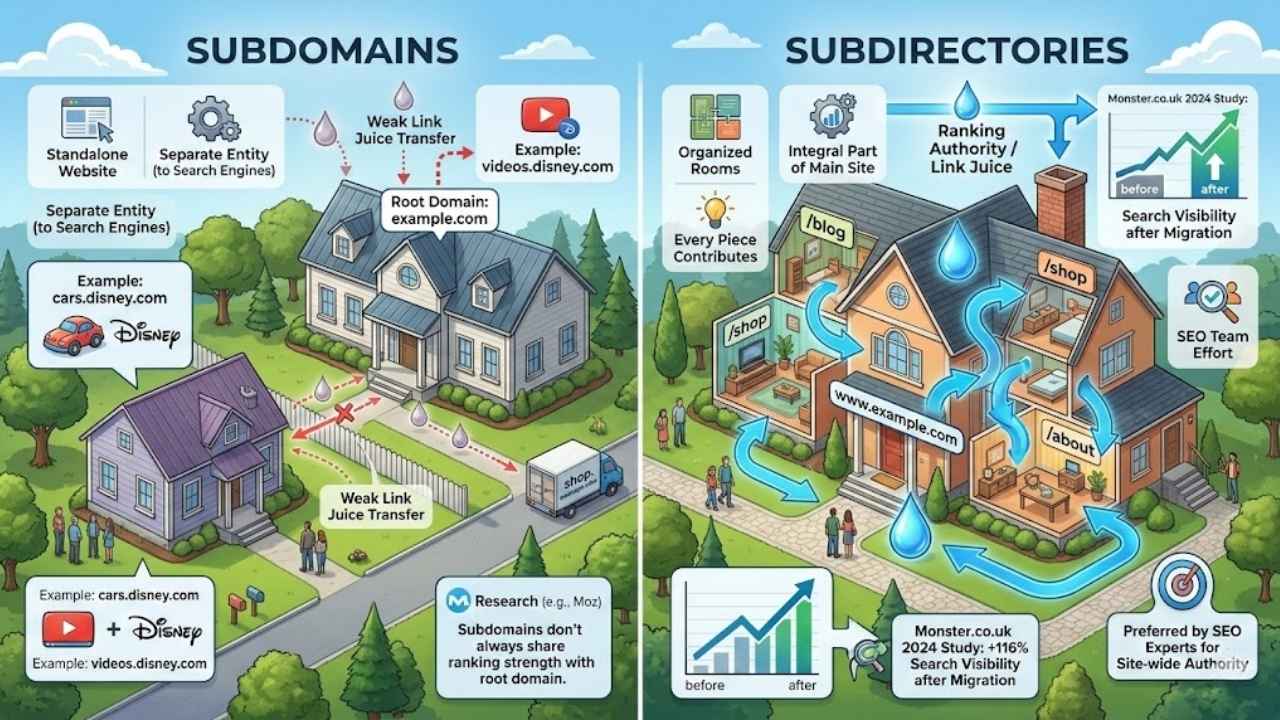
A subdomain is a section of your main domain that acts like a standalone website. Think of it like owning a large property and building a guest house in the backyard. The guest house has your address, but it has its own front door, its own keys, and its own rules.
For example, in “shop.example.com,” the word “shop” acts as the subdomain. Search engines like Google often view this setup as two distinct entities. This is common for giant platforms. Disney, for instance, uses subdomains like cars.disney.com and videos.disney.com because each section is massive and markets to a completely different audience.
However, this separation comes with a cost. Research from industry leaders like Moz suggests that subdomains do not always share ranking strength with their root domains. If you earn a great backlink to your blog subdomain, that “juice” might not flow back to help your main product pages rank higher.
Definition of Subdirectories
Subdirectories act like organized rooms inside your main house. They live under the primary domain, separated only by a forward slash. A classic example is www.example.com/blog or www.example.com/shop.
In this setup, Google treats the subdirectory as an integral part of the main site. Every piece of content you publish here contributes to the overall authority of your primary domain. It’s a team effort where every player scores points for the same team.
Most SEO experts prefer this setup because it keeps your architecture tidy. A 2024 study involving the job site Monster.co.uk found a 116% increase in search visibility after they migrated content from a subdomain to a subdirectory. That is the kind of data that makes decision-making easy.
The SEO Impact of Subdomains
Search engines often treat subdomains like separate websites, which can split your site’s strength in two. Many business owners scratch their heads over whether this separation is a smart strategic move or an SEO trap.
How Search Engines Treat Subdomains
Google has historically treated each subdomain as a unique entity. While Google’s John Mueller has stated in recent years that their systems are good at understanding connections between subdomains, many SEOs find that the “link equity” (the ranking power passed from links) does not flow as efficiently as it does with subdirectories.
This means your blog.sample.com and shop.sample.com might have to fight for their own rankings separately. You essentially have to build authority for two websites instead of one.
- The Keyword Split: Keywords ranking on a subdomain may not boost your main domain’s relevance for those terms.
- The “Guest House” Effect: Just because your guest house is nice doesn’t mean the main house gets credit for the renovation.
- Management Overhead: You often need to verify each subdomain separately in tools like Google Search Console.
Common Use Cases for Subdomains
Despite the SEO challenges, subdomains are sometimes the perfect tool for the job. They shine when you need a “clean slate” or distinct technical environment.
Customer Support Portals: Companies like Zendesk often host support tickets on support.company.com. This content is technical and doesn’t need to rank for marketing keywords, so keeping it separate is fine.
International Markets: Large brands often use subdomains for regional sites, such as de.example.com for Germany or fr.example.com for France. This allows them to host the site on local servers and keep the language signals clear for Google.
Different Platforms: Sometimes you have no choice. If your main site is on WordPress but you want a store on Shopify, Shopify might force you to use shop.yourbrand.com unless you use advanced technical setups.
The SEO Impact of Subdirectories
Search engines generally see subdirectories as part of the main site, passing more strength from the root domain to every page. This structure is usually the gold standard for content marketing.
How Search Engines Treat Subdirectories
When you use a subdirectory, Google sees your content as a direct extension of your root domain. A blog post at example.com/blog/tips is seen as a new room in your existing mansion. This helps with “crawl budget”—Google’s bots can easily follow the internal links from your homepage to your new posts.
Moz famously tested this by moving their “Beginner’s Guide to SEO” from a subdomain to a subfolder. The result? They saw a dramatic improvement in rankings for competitive keywords. By keeping everything under one roof, they consolidated their authority.
Advantages of Using Subdirectories
Subdirectories help gather all your website’s SEO strength in one place. Every backlink you earn to a blog post helps your product pages, and every product link helps your blog.
“If you want your blog to power your main site’s SEO, put it in a subfolder. It is the single most effective way to share authority.” — Common advice from SEO veterans.
Benefits at a Glance:
- Unified Authority: All backlinks count toward one domain authority score.
- Shared Cookies: Tracking users is easier. You don’t need complex “wildcard” cookie setups to keep a user logged in as they move between sections.
- Simpler Analytics: All your data shows up in one Google Analytics view without needing cross-domain tracking configurations.
Subdomains vs Subdirectories: Key Differences
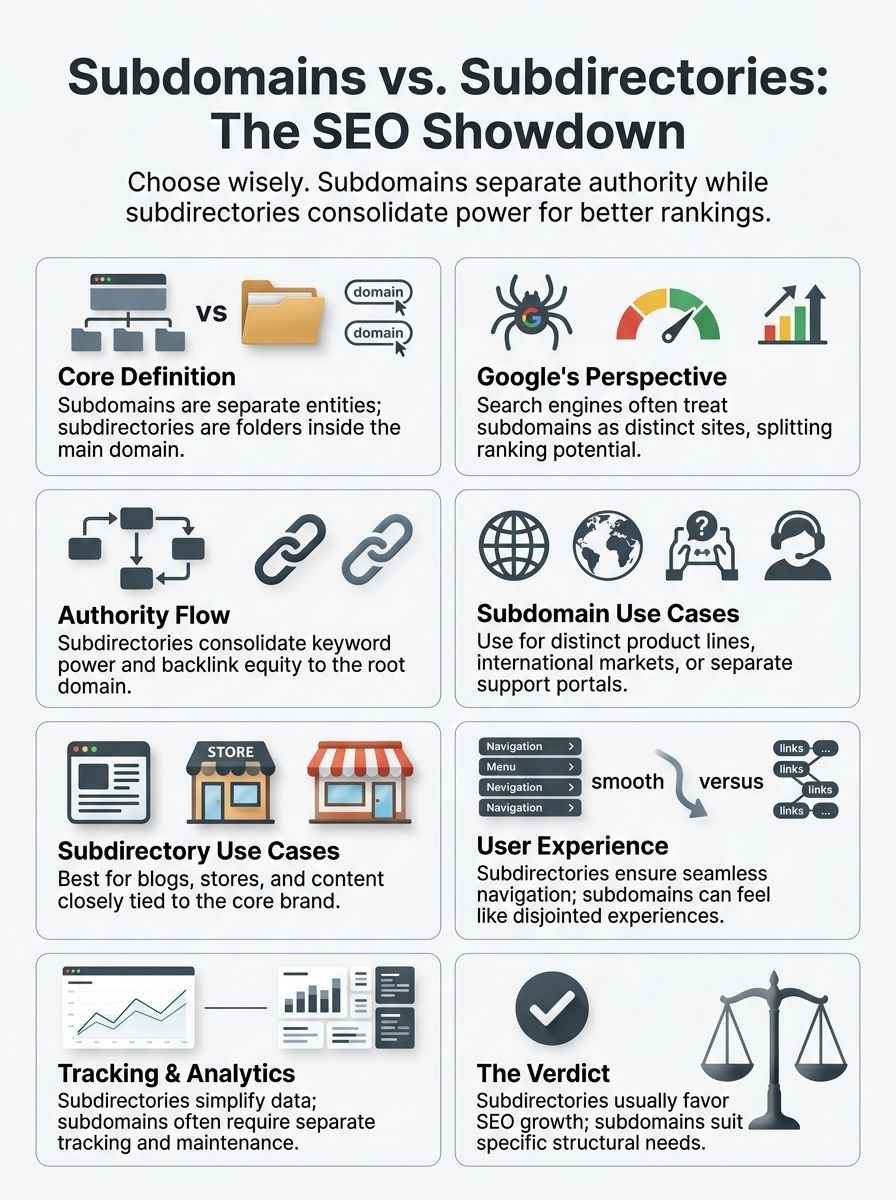
Thinking about SEO? The way you set up your site can change everything for your visitors and search engines alike. Let’s look at the hard data to help you decide.
Comparison: The Tale of the Tape
To make this decision easier, we have compared the two options across the factors that matter most to your business growth.
| Feature | Subdirectory (example.com/blog) | Subdomain (blog.example.com) |
|---|---|---|
| SEO Authority | Consolidated (High Impact) | Split (Lower Impact) |
| Setup Difficulty | Easy (Same Server) | Moderate (DNS Configuration) |
| Tracking (Analytics) | Simple (One Property) | Complex (Cross-Domain) |
| Best For | Blogs, Shops, Services | Support, Apps, International |
User Experience Implications
Site visitors notice subtle differences between a subdomain and a subdirectory, even if they aren’t tech-savvy. A site with all content in clear subdirectories feels like one seamless experience. It helps users stay grounded, making it simpler to find key sections like /blog or /store.
Setting up content as a subdomain can make things feel fragmented. If a user clicks a link and the URL changes from example.com to blog.example.com, the browser may reload the entire page environment. This can sometimes log them out or break the navigation style they were used to.
Pro Tip: Most users prefer simple structures. Fewer surprises and less mental gymnastics mean happier clicks and longer visits. Subdirectories support easy internal linking, so moving from page to page feels smoother than hopping across different branches of a tree.
When to Use a Subdomain
Sometimes, you need a clean slate for new ideas or projects. This is where subdomains shine. Think of them as separate workshops where you can make a mess without affecting the main showroom.
Scenarios Where Subdomains Are Ideal
Complex Web Apps: If you run a software company, your marketing site might be on WordPress, but your actual tool might be a complex React app. Hosting the app on app.product.com keeps the heavy code separate from your marketing content.
Distinct Branding: Large organizations often use subdomains for events or distinct divisions. For example, a university might use athletics.university.edu because the sports team has a totally different design, audience, and goal than the physics department.
Testing Environments: Developers almost always use subdomains like staging.example.com to test new features. This lets them break things safely without Google indexing the broken pages or users seeing the errors.
When to Use a Subdirectory
If you want your site to feel like one big family, putting new sections in a subdirectory is usually the right call. For 90% of businesses, this is the path to growth.
Situations That Favor Subdirectories
Content Marketing: If you are writing articles to attract customers to your main product, you must use a subdirectory. You want the traffic from those articles to boost your product pages.
E-commerce Categories: Never put your product categories on a subdomain. Nike doesn’t put “Running Shoes” on a separate website; they use nike.com/running. This concentrates all the shopping power on the main domain.
Strict Budgets: Managing one website is cheaper and easier than managing two. With a subdirectory, you only pay for one SSL certificate, one hosting plan, and one set of maintenance tools.
Optimizing Subdomains and Subdirectories for SEO
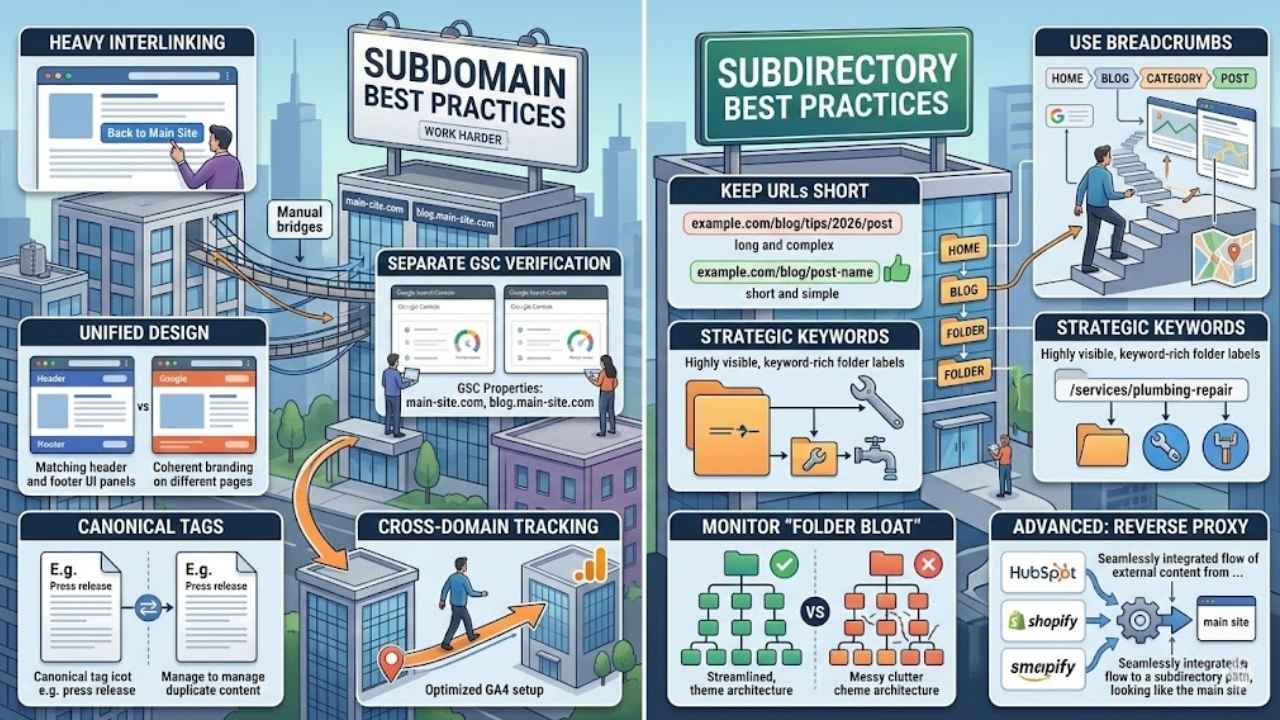
Strong site structure sets you up for better visibility in search results. Whether you choose the path of the subdirectory or the subdomain, you need to follow these rules to win.
Best Practices for Subdomains
Subdomains act like separate websites in the eyes of search engines. If you must use them, you need to work twice as hard to ensure they rank.
- Interlink Heavily: Add a clear “Back to Main Site” link in the header. You need to manually forge the connection that subdirectories get for free.
- Verify Separately: Go into Google Search Console and add each subdomain as a separate property. You need to track their health individually.
- Unified Design: Don’t let your design drift. Keep the header and footer identical to the main site so users don’t feel lost.
- Canonical Tags: Be careful with duplicate content. If you post a press release on both the main site and the subdomain, use a canonical tag to tell Google which one is the “original.”
- Cross-Domain Tracking: Configure your Google Analytics 4 (GA4) specifically for cross-domain tracking. If you don’t, a user moving from your main site to the subdomain will count as two different visitors.
Best Practices for Subdirectories
Using subdirectories is easier, but you can still mess it up. Keep your structure clean to maximize the SEO benefits.
- Keep URLs Short: Avoid deep nesting. example.com/blog/seo/tips/2026/post is too long. Stick to example.com/blog/post-name whenever possible.
- Use Breadcrumbs: Implement breadcrumb navigation (e.g., Home > Blog > Category > Post). This helps Google understand the structure of your folders.
- Strategic Keywords: Use the folder name itself as a keyword. If you are a plumber, /services/plumbing-repair is better than just /services/repair.
- Monitor “Folder Bloat”: Don’t create a new folder for every tiny topic. Group content into broad themes to keep your architecture flat and accessible.
- Advanced Tip – Reverse Proxies: If you use a third-party tool like HubSpot or Shopify but want the SEO benefits of a subdirectory, ask your developer about a “Reverse Proxy.” This tech trick allows you to show external content on a URL like example.com/blog seamlessly.
Final Thoughts
Both subdomains and subdirectories have their place in website structure, but they serve very different masters. Subdirectories are the reliable workhorses of SEO; they pull all your content under one roof and help your main site rank faster.
Subdomains are the specialists. They are handy when you need a fresh technical environment, a separate regional site, or a dedicated customer portal. Pick the one that aligns with your business goals, and you have already won half the battle.
If you want even more clarity, check out the specific documentation for your hosting provider, as switching later can be a headache. Every great online journey starts with smart choices, so go ahead and organize with confidence!