Hey there, have you ever worried about your website getting hacked? It’s a real pain, right, when cybercriminals sneak in and mess with your hard work, maybe even causing a data breach.
You’re not alone, and I get how scary it can be to think about losing everything to malware or SQL injections.
Here’s a quick fact to chew on, websites without an SSL certificate are like houses with no locks, super easy for hackers to break into. But don’t sweat it, I’ve got your back.
In this post, I’ll walk you through five simple ways to protect your website from hacks, like using strong passwords and two-factor authentication (2FA). Stick with me, okay? Let’s keep those bad guys out!
Key Takeaways
- Use strong passwords with letters, numbers, and symbols to stop hackers from brute force attacks.
- Turn on two-factor authentication (2FA) to add an extra lock, making it harder for cyber crooks to get in.
- Keep your CMS, themes, and plugins updated to block threats like SQL injections and XSS attacks.
- Install an SSL certificate and use HTTPS to encrypt data, protecting against 64% of web attacks faced by businesses.
- Backup your website daily or weekly and store copies off-site to save your data from crashes or hacks.
Implement Strong Authentication Measures
Hey, wanna keep those pesky hackers at bay? Start by beefing up how you log into your website, and trust me, it’s a game-changer!
Use strong, unique passwords
Let’s talk about keeping your website safe with solid passwords. I’m not kidding when I say a strong password is like a sturdy lock on your front door. Make yours with a mix of letters, numbers, and symbols to stop hackers cold.
Trust me, a weak password is an open invite for trouble like brute force attacks.
Now, think about using a password manager to help out. It creates and stores tough passwords for you, so you don’t have to recall them all. With 64% of businesses facing web attacks, as stats show, you can’t take chances.
Limit login tries too, to block those pesky brute force attempts from sneaking in.
Enable two-factor authentication (2FA)
Hey there, want to keep hackers away from your website? Start by turning on two-factor authentication, or 2FA, a super simple trick to boost your security. It’s like adding a second lock to your front door.
Even if someone guesses your password, they can’t get in without that extra key, often a code sent to your phone using TOTP or HOTP protocols.
I get it, adding steps can feel like a hassle, but think of it as a tiny shield against big threats. Did you know 64% of businesses face web attacks? With 2FA, you’re making it way harder for those sneaky folks to steal sensitive data.
So, flip that switch in your settings, whether it’s on your content management systems or web hosting panel, and sleep a bit easier tonight.
Keep Software and Plugins Updated
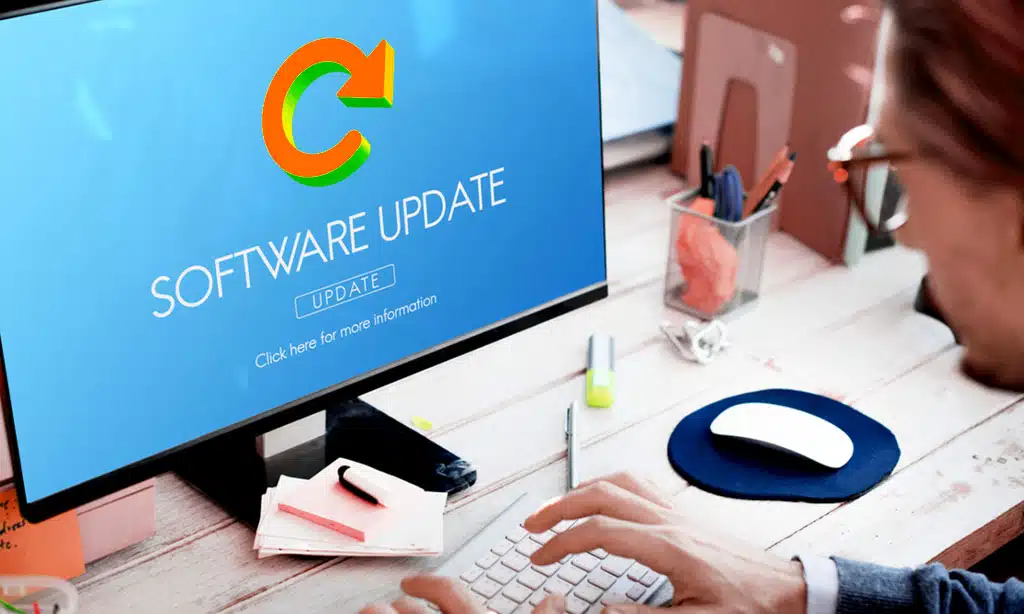
Hey, wanna keep those pesky hackers at bay? Make sure to patch up your CMS and extensions with the latest security fixes, pronto!
Regularly update your CMS, themes, and plugins
Keeping your website safe starts with fresh software. Always update your content management systems (CMS) like WordPress, along with themes and plugins. Old versions often have holes that hackers exploit for attacks like SQL injections or cross-site scripting (XSS).
So, patch them up fast with the latest security fixes.
Think of updates as a shield for your site. Outdated tools are like open doors for malware or malicious code to sneak in. Grab those security patches as soon as they drop, especially for popular platforms.
It’s a simple step, but it blocks many cyber threats from harming your online space.
Remove unused or outdated plugins
Hey there, let’s talk about a quick way to boost your website security. Getting rid of unused or outdated plugins is a must, folks. These old bits of code can be like open doors for hackers, just waiting to let malware slip in.
If you don’t need a plugin anymore, delete it right away. Same goes for anything that hasn’t been updated in ages. Stick to well-maintained tools with lots of active users and fresh updates.
Now, here’s the kicker, don’t even think about using nulled plugins or themes. They might seem like a bargain, but they often hide nasty surprises like viruses. Keep your content management systems (CMS) clean by cutting out the junk.
Focus on essential plugins only, and you’ll dodge a big risk of website hacking. Let’s keep that online space safe, shall we?
Secure Your Website with HTTPS and SSL
Hey, want to keep your website safe from sneaky intruders? Locking it down with HTTPS and a solid SSL certificate is like putting a deadbolt on your front door!
Install an SSL certificate
Grab a seat, folks, ‘cause securing your website is like locking your front door, and an SSL certificate is the deadbolt you need. SSL, or Secure Sockets Layer, encrypts data between your site and visitors, keeping sneaky hackers at bay.
Without it, sensitive info like passwords or credit card details could get snatched over the internet. So, install that SSL certificate to build a safe bridge for data.
Think of HTTPS as your website’s bodyguard, and it only works with an SSL certificate in place. This duo ensures encrypted communication, making it tough for cyber crooks to mess with your stuff.
Did you know that 64% of businesses face web attacks? Don’t be a statistic, get that SSL shield up pronto to protect your website and keep your visitors’ trust intact.
Use the HTTPS protocol for secure communication
Hey there, folks, let’s chat about keeping your website safe with HTTPS. This nifty protocol, teamed up with an SSL certificate, scrambles your data during transfer, making it tough for hackers to sneak a peek.
It’s like sending a secret message in a locked box, and only the right person has the key.
Now, think about this, switching to HTTPS isn’t just a cool trick, it’s a must. With 64% of businesses facing web attacks, using HTTPS and secure sockets layer (SSL) shields your site from nasty stuff like data breaches.
So, get that SSL certificate installed, and lock down your online store or blog with top-notch website security.
Backup Your Website Regularly
Hey, don’t let a crash wipe out your hard work, okay? Saving a copy of your site with tools like UpdraftPlus can be a real lifesaver!
Automate daily or weekly backups
Let’s chat about setting up automatic backups for your website. I’m telling you, this is like having a safety net for your online space. Automate daily or weekly backups, and you won’t lose sleep over data loss.
It’s a simple step to protect your website from crashes or hacks. Trust me, doing this regularly, as in every day or at least once a week, keeps your info safe.
Now, make sure those backups are stored securely offsite. Think of it as locking your valuables in a vault far from home. This way, if something goes wrong with your site, your data stays out of harm’s way.
Use tools like website backup plugins or services to handle this task. It’s a breeze to set up, and it saves you from big headaches later.
Store backups in secure, off-site locations
Storing backups off-site is a smart move to keep your website safe. Think of it as hiding a spare key far from your house. If something goes wrong, like a data leak or malware attack, you won’t lose everything.
Use secure spots, like cloud services or external drives in a separate place, to protect your website backup. Make sure these locations have strong password security to block any sneaky hackers.
Daily backups, as a habit, work best for quick recovery. Automate them, either every day or weekly, to save time and stress. Keep these copies in locked-down, off-site spots away from your main server.
This way, even if disaster strikes, your data stays safe from threats like SQL injections or DDoS attacks. Stick with this plan, and you’ve got a solid safety net!
Use Website Security Tools and Firewalls
Hey, wanna keep those pesky hackers at bay? Grab some top-notch security tools and set up a solid Web Application Firewall to guard your site like a fortress!
Implement a Web Application Firewall (WAF)
Setting up a Web Application Firewall, or WAF, is like putting a sturdy shield in front of your website. It blocks nasty threats, such as malware and sneaky bots, before they can harm your site.
Tools like Wordfence, MalCare, and Sucuri are top picks for this job. They stand guard, keeping attacks at bay with solid bot protection.
Did you know that 64% of businesses face web attacks? That’s a big number, and it shows why a WAF is a must for website security. This firewall stops dangers like SQL injections and cross-site scripting attacks dead in their tracks.
So, grab a security plugin with WAF power, set it up, and sleep easy knowing your site’s got a tough defender!
Monitor for malware with security plugins
Hey there, let’s chat about keeping your site safe with security plugins. These handy tools act like a guard dog, sniffing out malware before it bites. Scan for malware daily using something like MalCare, which digs into your files and databases to spot trouble fast.
I get it, nobody wants their website to be a hacker’s playground. So, use these plugins to stay ahead of threats. They work non-stop, catching nasty stuff like malware or weird activity.
Did you know 64% of businesses face web attacks? Don’t be part of that stat, grab a tool, and protect your website today with solid malware detection.
Limit User Access and Permissions
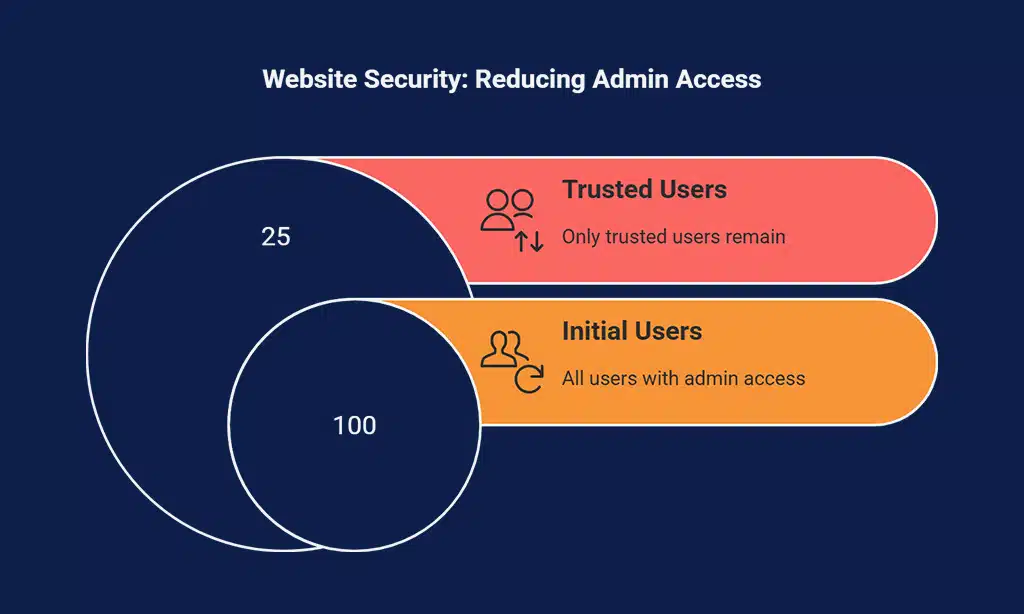
Hey, wanna keep those pesky hackers out of your website? Start by locking down who gets the keys, and only hand them to folks you truly trust with admin power!
Restrict admin access to trusted users
Limiting who can get into your website’s admin panel is a big deal. Think of it as locking your front door and only giving keys to folks you trust with your life. If too many people have access, it’s like leaving that door wide open for trouble.
So, cut down the number of users with admin rights to just a tiny, reliable crew.
Stick to static IPs for admin access if you can, folks. This means only specific, unchanging internet addresses can log in, making it super hard for random hackers to sneak in. With 64% of businesses facing web attacks, tightening up on admin permissions and using tools for secure website control is a must to dodge those nasty data breaches.
Keep those weak passwords out and protect your website from sneaky threats like phishing emails or privilege escalation.
Set strong file and directory permissions
Hey there, let’s chat about locking down your website with strong file permissions. Think of your site as a house, and file permissions are the keys to different rooms. You wouldn’t hand out keys to just anyone, right? So, set tight rules, especially for upload folders, to stop hackers from sneaking in harmful stuff.
Now, get this, a whopping 64% of businesses face web attacks, often due to weak file settings. Don’t let that be you. Use tools like FileZilla to adjust who can view or edit files on your content management systems (CMS).
Keep those upload directories extra secure by blocking risky actions like PHP execution. Stick with this, and you’ve got a solid shield against nasty threats like malware or SQL injections.
Monitor and Test Your Website Security
Hey there, wanna keep those pesky hackers at bay? Checking your website with tools like vulnerability scanners can spot weak spots before trouble hits!
Conduct regular security audits
Dig into your website’s safety with regular security audits, folks. These checks are like a health checkup for your site, spotting weak spots before hackers do. Did you know that 64% of businesses face web attacks? That’s a big number, and you don’t want to be part of it.
So, scan for sneaky issues like malware or odd user activity logs.
Make it a habit to test deeper with tricks like penetration testing. Think of it as playing the bad guy to catch flaws in your armor. Use tools to monitor logs and keep tabs on everything.
Stay ahead of risks like SQL injections or XSS attacks by fixing holes fast. Your website security depends on these steady audits, trust me on this!
Use vulnerability scanning tools
Hey there, folks, let’s chat about a smart way to keep your website safe with vulnerability scanning tools. These handy helpers, like Nessus or OWASP ZAP, sniff out weak spots in your site before hackers can pounce.
Trust me, catching issues early is like fixing a leaky roof before the storm hits.
Now, get this, around 64% of businesses face web attacks, so scanning for flaws isn’t just nice, it’s a must. Run these scans often to spot risks tied to malware or outdated software.
Tools for website security can save you from nasty surprises like data breaches or SQL injections. Keep your guard up, and stay one step ahead of trouble!
Secure File Uploads
Hey, wanna keep those pesky hackers from sneaking in through file uploads? Stick with me, and let’s lock down your site tighter than a drum!
Restrict file types allowed for upload
Let’s chat about keeping your website safe by controlling file uploads. Hackers often sneak in through files, so you gotta be picky about what you allow. Stick to safe file extensions like JPG or PDF, and block risky ones like PHP that can run harmful code.
This simple step can stop a lot of trouble before it starts.
Did I mention that 64% of businesses face web attacks? Yup, that’s a big number, and many come from sneaky uploads. Limiting file types in your content management systems (CMS) acts like a bouncer at a club, only letting the good stuff through.
Pair this with malware scanning to catch anything shady, and store those files separately from your main site. It’s like keeping a suspicious package far from your house, just in case!
Block PHP execution in upload directories
Hey there, folks, let’s chat about a sneaky little trick to keep your website safe. Blocking PHP execution in upload directories is like putting a lock on a treasure chest, keeping bad guys from running harmful code.
See, hackers often try to sneak malicious scripts into folders where files get uploaded, and if PHP runs there, it’s game over.
Now, take action by tweaking your website settings to stop PHP from working in those spots. This simple step can block nasty attacks before they even start. With 64% of businesses facing web attacks, as stats show, securing upload folders with this fix is a must for solid website security.
Stick with me, and let’s keep those cyber creeps at bay!
Takeaways
Wrapping up, let’s keep your website safe from sneaky hackers. Think of your site as a fortress, and these five tips as your trusty guards. Got a question or a funny hacking story? Drop it below, I’d love to chat.
Stick with these steps, and sleep easy knowing your online space is secure.
FAQs
1. How can I shield my website from nasty attacks like SQL injections?
Hey, let’s keep those digital bandits at bay with strong defenses against SQL injection and other tricks like remote code execution. Start by using parameterized queries to block sneaky code from slipping into your data network. It’s like locking the back door before a thief even thinks to try it!
2. Why should I bother with tough passwords for website security?
Listen up, a flimsy password is like leaving your front door wide open on the World Wide Web. Go for strong passwords and mix in dual-factor authentication or two-factor authentication (2FA) to double down on safety against social engineering and phishing emails.
3. What’s the deal with regular backups for protecting my site?
Think of a website backup as your safety net if a series of cyberattacks or a Yahoo data breach style mess hits. Regular backups through your content management systems (CMS) can save your bacon by restoring stolen data or fixing software vulnerabilities fast.
4. How do security plugins help dodge malware and other threats?
Security plugins are like your personal bodyguards on the web, always scanning for malware and patching up holes like stored XSS or reflected XSS. They work with antivirus software and content security policy to stop clickjacking and DNS spoofing before they mess up your site. Plus, many are easy to grab from places like the Google Play Store for apps or directly for your CMS.
5. Can an SSL certificate really keep my website safe from hacks?
Absolutely, an SSL certificate is like a secret handshake between your site and the browser, keeping data breaches at arm’s length. It scrambles info so hackers can’t snoop on your networks, making secure websites a must for trust.
6. What’s the simplest way to stop issues like local file inclusion or anonymous FTP risks?
Hey, don’t sweat it, just tighten up file permissions in your file manager to block local file inclusion and anonymous FTP access. It’s a quick fix to stop bad guys from exploiting injection flaws or pulling off chargeback scams through sneaky backdoors.